
【全】CSS动画大全之按钮【c】
效果预览
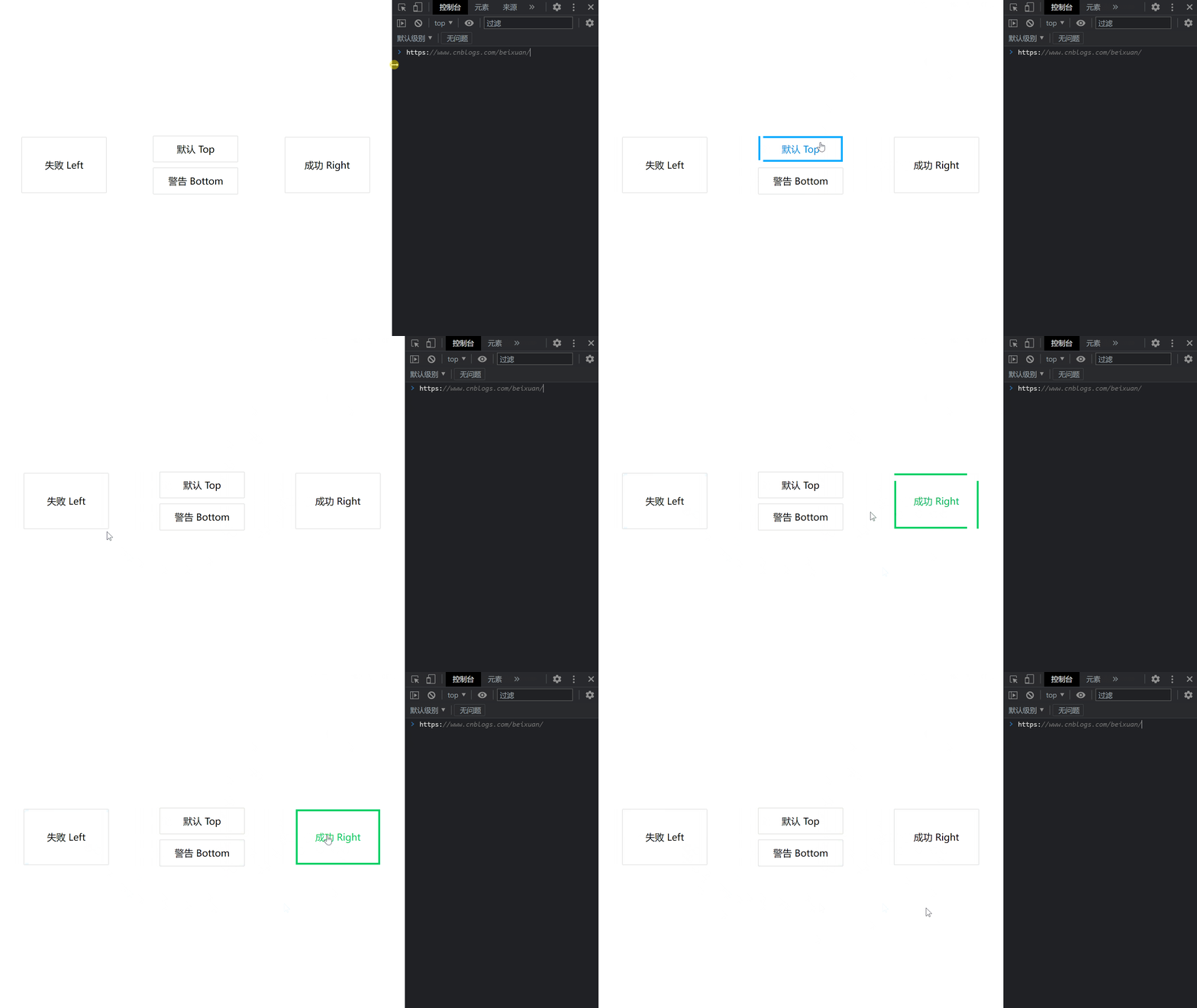
代码
<!DOCTYPE html>

<html>

    <head>

        <meta charset="utf-8" />

        <meta name="author" content="https://www.cnblogs.com/beixuan">

        <meta name="version" content="1.0.0">

        <meta name="date" content="2021/12/01 18:00:26">

        <meta name="viewport" content="width=device-width, initial-scale=1">

        <title>CSS动画大全之按钮组[b]</title>

    </head>

    <style type="text/css">

      /* 设置 body 内、外边距为 0 */

      body {

        margin: 0;

        padding: 0;

        display: grid;

        grid-template-columns: 100%;

        grid-template-rows: 100%;

        justify-items: center;

        align-items: center;

        width: 100vw;

        height: 100vh;

        background-color: #FFF;

      }

      .page-wrapper {

        display: grid;

        grid-template-columns: 33% 34% 33%;

        grid-template-rows: 100%;

        justify-items: center;

        align-items: center;

        width: 100vw;

        height: 100vh;

      }

      .page-wrapper > div {

        display: inline-block;

      }

      .btn {

        width: 12.5rem;

        height: 3.125rem;

        line-height: 3.125rem;

        font-size: 1.5rem;

        padding: 0.5rem;

        text-align: center;

        box-shadow: 0 0 1px #000;

        position: relative;

        transition: all 0.5s;

        margin-bottom: 1rem;

        cursor: pointer;

        overflow: hidden;

      }

      .btn:hover {

        box-shadow: 0 0 0px #000;

      }

      .btn-danger, .btn-success {

        height: 7.85rem;

        line-height: 7.85rem;

      }

      /* 默认 */

      .btn-default:hover {

        color: #00aaff;

      }

      .btn-default::before {

        content: '';

        width: calc(100% - 10px);

        height: 100%;

        position: absolute;

        border-left: 5px solid #00aaff;

        border-right: 5px solid #00aaff;

        top: -100%;

        left: 0;

        transition: all 0.4s;

        z-index: -1;

      }

      .btn-default:hover::before {

        content: '';

        width: calc(100% - 10px);

        height: 100%;

        position: absolute;

        border-left: 5px solid #00aaff;

        border-right: 5px solid #00aaff;

        top: 0%;

        left: 0;

        transition: all 0.4s;

        z-index: -1;

      }

      .btn-default::after {

        content: '';

        width: 100%;

        height: calc(100% - 10px);

        position: absolute;

        border-top: 5px solid #00aaff;

        border-bottom: 5px solid #00aaff;

        top: 0;

        left: 100%;

        transition: all 0.4s;

        z-index: -1;

      }

      .btn-default:hover::after {

        content: '';

        width: 100%;

        height: calc(100% - 10px);

        position: absolute;

        border-top: 5px solid #00aaff;

        border-bottom: 5px solid #00aaff;

        top: 0;

        left: 0;

        transition: all 0.4s;

        z-index: -1;

      }

      /* 警告 */

      .btn-warning:hover {

        color: #ffaa00;

      }

      .btn-warning::before {

        content: '';

        width: calc(100% - 10px);

        height: 100%;

        position: absolute;

        border-left: 5px solid #ffaa00;

        border-right: 5px solid #ffaa00;

        top: 100%;

        left: 0;

        transition: all 0.4s;

        z-index: -1;

      }

      .btn-warning:hover::before {

        content: '';

        width: calc(100% - 10px);

        height: 100%;

        position: absolute;

        border-left: 5px solid #ffaa00;

        border-right: 5px solid #ffaa00;

        top: 0%;

        left: 0;

        transition: all 0.4s;

        z-index: -1;

      }

      .btn-warning::after {

        content: '';

        width: 100%;

        height: calc(100% - 10px);

        position: absolute;

        border-top: 5px solid #ffaa00;

        border-bottom: 5px solid #ffaa00;

        top: 0;

        left: 100%;

        transition: all 0.4s;

        z-index: -1;

      }

      .btn-warning:hover::after {

        content: '';

        width: 100%;

        height: calc(100% - 10px);

        position: absolute;

        border-top: 5px solid #ffaa00;

        border-bottom: 5px solid #ffaa00;

        top: 0;

        left: 0;

        transition: all 0.4s;

        z-index: -1;

      }

      /* 失败 */

      .btn-danger:hover {

        color: #e30000;

      }

      .btn-danger::before {

        content: '';

        width: calc(100% - 10px);

        height: 100%;

        position: absolute;

        border-left: 5px solid #e30000;

        border-right: 5px solid #e30000;

        top: -100%;

        left: 0;

        transition: all 0.4s;

        z-index: -1;

      }

      .btn-danger:hover::before {

        content: '';

        width: calc(100% - 10px);

        height: 100%;

        position: absolute;

        border-left: 5px solid #e30000;

        border-right: 5px solid #e30000;

        top: 0%;

        left: 0;

        transition: all 0.4s;

        z-index: -1;

      }

      .btn-danger::after {

        content: '';

        width: 100%;

        height: calc(100% - 10px);

        position: absolute;

        border-top: 5px solid #e30000;

        border-bottom: 5px solid #e30000;

        top: 0;

        left: -100%;

        transition: all 0.4s;

        z-index: -1;

      }

      .btn-danger:hover::after {

        content: '';

        width: 100%;

        height: calc(100% - 10px);

        position: absolute;

        border-top: 5px solid #e30000;

        border-bottom: 5px solid #e30000;

        top: 0;

        left: 0;

        transition: all 0.4s;

        z-index: -1;

      }

      /* 成功 */

      .btn-success:hover {

        color: #00d064;

      }

      .btn-success::before {

        content: '';

        width: calc(100% - 10px);

        height: 100%;

        position: absolute;

        border-left: 5px solid #00d064;

        border-right: 5px solid #00d064;

        top: 100%;

        left: 0;

        transition: all 0.4s;

        z-index: -1;

      }

      .btn-success:hover::before {

        content: '';

        width: calc(100% - 10px);

        height: 100%;

        position: absolute;

        border-left: 5px solid #00d064;

        border-right: 5px solid #00d064;

        top: 0%;

        left: 0;

        transition: all 0.4s;

        z-index: -1;

      }

      .btn-success::after {

        content: '';

        width: 100%;

        height: calc(100% - 10px);

        position: absolute;

        border-top: 5px solid #00d064;

        border-bottom: 5px solid #00d064;

        top: 0;

        left: -100%;

        transition: all 0.4s;

        z-index: -1;

      }

      .btn-success:hover::after {

        content: '';

        width: 100%;

        height: calc(100% - 10px);

        position: absolute;

        border-top: 5px solid #00d064;

        border-bottom: 5px solid #00d064;

        top: 0;

        left: 0;

        transition: all 0.4s;

        z-index: -1;

      }

    </style>

    <body>

      <!-- 页面容器 -->

      <div class="page-wrapper">

        <div class="btn btn-danger">失败 Left</div>

        <div>

          <div class="btn btn-default">默认 Top</div>

          <div class="btn btn-warning">警告 Bottom</div>

        </div>

        <div class="btn btn-success">成功 Right</div>

      </div>

    </body>

</html>
往期回顾
【全】CSS动画大全之按钮【c】的更多相关文章
- 【2016年特别福利】史上最全CSS学习资料大全
css学习篇 [2016年特别福利]史上最全CSS学习资料大全
- 原生html,css+js写下载按钮有提示动画效果的落地页
<!DOCTYPE html> <html lang="en"> <head> <meta charset="UTF-8&q ...
- 这样使用 GPU 渲染 CSS 动画(转)
大多数人知道现代网络浏览器使用GPU来渲染部分网页,特别是具有动画的部分. 例如,使用transform属性的CSS动画看起来比使用left和top属性的动画更平滑. 但是如果你问,“我如何从GPU获 ...
- Web高性能动画及渲染原理(1)CSS动画和JS动画
目录 一. CSS动画 和 JS动画 1.1 CSS动画 1.2 JS动画 1.3 小结 二. 使用Velocity.js实现动画 示例代码托管在:http://www.github.com/dash ...
- 高性能Web动画和渲染原理系列(1)——CSS动画和JS动画
[摘要] 介绍CSS动画和JS动画的基本特点,以及轻量级动画库velocity.js的基本用法. 示例代码托管在:http://www.github.com/dashnowords/blogs 博客园 ...
- JS框架_(JQuery.js)文章全屏动画切换
百度云盘 传送门 密码:anap 文章全屏动画切换效果 <!doctype html> <html lang="zh"> <head> < ...
- Css 动画的回调
在做项目中经常会遇到使用动画的情况.以前的情况是用js写动画,利用setTimeout函数或者window.requestAnimationFrame()实现目标元素的动画效果.虽然后者解决了刷新频率 ...
- [转]CSS hack大全&详解
转自:CSS hack大全&详解 1.什么是CSS hack? CSS hack是通过在CSS样式中加入一些特殊的符号,让不同的浏览器识别不同的符号(什么样的浏览器识别什么样的符号是有标准的, ...
- CSS动画与GPU
写在前面 满世界的动画性能优化技巧,例如: 只允许改变transform.opacity,其它属性不要动,避免重新计算布局(reflow) 对动画元素应用transform: translate3d( ...
- 15个来自 CodePen 的酷炫 CSS 动画效果【下篇】
CodePen 是一个在线的前端代码编辑和展示网站,能够编写代码并即时预览效果.你在上面可以在线分享自己的 Web 作品,也可以欣赏到世界各地的优秀开发者在网页中实现的各种令人惊奇的效果. 今天这篇文 ...
随机推荐
- vue项目中一些常用的插件
@riophae/vue-treeselect:带选择的树组件 https://vue-treeselect.js.org/ ele-calendar:日历组件 https://www.npmjs.c ...
- echarts 各种特效图
饼图标签展示数值 配置项: option = { title: { text: '项目时间分布', left: 'center' }, tooltip: { trigger: 'item', form ...
- python 二次封装logging,打印日志文件名正确,且正确写入/结合pytest执行,日志不输出的问题
基于之前日志问题,二次封装日志后,导致日志输出的文件名不对,取到的文件一直都是当前二次封装的log的文件名,基于这个问题,做了优化,详细看 https://www.cnblogs.com/cuitan ...
- python重拾基础第四天
本节内容 迭代器&生成器 装饰器 Json & pickle 数据序列化 软件目录结构规范 作业:ATM项目开发 1. 列表生成式,迭代器&生成器 列表生成式 我现在有个需求, ...
- C# Linq俩个list<Datarow> 取差集,并自定义字段
可以自定义类 ,也可以从参考官网文档:Enumerable.Except 方法 (System.Linq) | Microsoft Learn List<DataRow> list1 = ...
- Android案例分享,基于瑞芯微RK3568国产平台!
开发环境说明 Windows开发环境:Windows7 64bit.Windows10 64bit 虚拟机:VMware15.5.5 AndroidSDK编译环境:Ubuntu18.04.4 64bi ...
- 化腐朽为神奇!揭开ISP图像处理的神秘面纱,基于瑞芯微RK3568J工业平台!
ISP图像处理前后图像对比 化腐朽为神奇!经过ISP图像处理的图片前后对比是如此惊人!从下图中可以观察到,未经处理的原始图像偏绿且暗淡,而经ISP图像处理的图像能够清晰地还原现场真实的颜色细节! 图1 ...
- QEMU + Vscode + Arm Arch's Linux调试小记
QEMU + Vscode + Arm Arch's Linux调试小记 前几天看到了一篇讲授如何调试ARM Linux内核的文章,这里现在记录一下调试ARM Linux内核的办法 下载QEMU ...
- Java 表达式执行引擎 jexl
介绍 JEXL的全称是Java表达式语言(Java Expression Language),简单的说,它可以配合我们的Java程序运算一些简单的表达式. 具体可以识别哪些表达式? 包含最基本的加减乘 ...
- 拆解LangChain的大模型记忆方案
之前我们聊过如何使用LangChain给LLM(大模型)装上记忆,里面提到对话链ConversationChain和MessagesPlaceholder,可以简化安装记忆的流程.下文来拆解基于Lan ...