
Linux Shell命令提示样式修改
对linux shell命令样式进行美化。
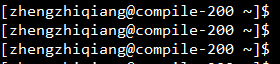
修改前的效果:
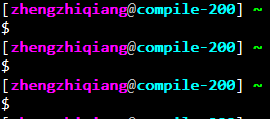
修改后的效果:
直接给出.bashrc脚本代码:


  1 # ~/.bashrc: executed by bash(1) for non-login shells.

  2 # see /usr/share/doc/bash/examples/startup-files (in the package bash-doc)

  3 # for examples

  4

  5 # If not running interactively, don't do anything

  6 case $- in

  7     *i*) ;;

  8       *) return;;

  9 esac

 10

 11 # don't put duplicate lines or lines starting with space in the history.

 12 # See bash(1) for more options

 13 HISTCONTROL=ignoreboth

 14

 15 # append to the history file, don't overwrite it

 16 shopt -s histappend

 17

 18 # for setting history length see HISTSIZE and HISTFILESIZE in bash(1)

 19 HISTSIZE=1000

 20 HISTFILESIZE=2000

 21

 22 # check the window size after each command and, if necessary,

 23 # update the values of LINES and COLUMNS.

 24 shopt -s checkwinsize

 25

 26 # If set, the pattern "**" used in a pathname expansion context will

 27 # match all files and zero or more directories and subdirectories.

 28 #shopt -s globstar

 29

 30 # make less more friendly for non-text input files, see lesspipe(1)

 31 [ -x /usr/bin/lesspipe ] && eval "$(SHELL=/bin/sh lesspipe)"

 32

 33 # set variable identifying the chroot you work in (used in the prompt below)

 34 if [ -z "${debian_chroot:-}" ] && [ -r /etc/debian_chroot ]; then

 35     debian_chroot=$(cat /etc/debian_chroot)

 36 fi

 37

 38 # set a fancy prompt (non-color, unless we know we "want" color)

 39 case "$TERM" in

 40     xterm-color) color_prompt=yes;;

 41 esac

 42

 43 # uncomment for a colored prompt, if the terminal has the capability; turned

 44 # off by default to not distract the user: the focus in a terminal window

 45 # should be on the output of commands, not on the prompt

 46 #force_color_prompt=yes

 47

 48 if [ -n "$force_color_prompt" ]; then

 49     if [ -x /usr/bin/tput ] && tput setaf 1 >&/dev/null; then

 50         # We have color support; assume it's compliant with Ecma-48

 51         # (ISO/IEC-6429). (Lack of such support is extremely rare, and such

 52         # a case would tend to support setf rather than setaf.)

 53         color_prompt=yes

 54     else

 55         color_prompt=

 56     fi

 57 fi

 58

 59 if [ "$color_prompt" = yes ]; then

 60     PS1='${debian_chroot:+($debian_chroot)}\[\033[01;32m\]\u@\h\[\033[00m\]:\[\033[01;34m\]\w\[\033[00m\]\$ '

 61 else

 62     PS1='${debian_chroot:+($debian_chroot)}\u@\h:\w\$ '

 63 fi

 64 unset color_prompt force_color_prompt

 65

 66 # If this is an xterm set the title to user@host:dir

 67 case "$TERM" in

 68 xterm*|rxvt*)

 69     PS1="\[\e]0;${debian_chroot:+($debian_chroot)}\u@\h: \w\a\]$PS1"

 70     ;;

 71 *)

 72     ;;

 73 esac

 74

 75 # enable color support of ls and also add handy aliases

 76 if [ -x /usr/bin/dircolors ]; then

 77     test -r ~/.dircolors && eval "$(dircolors -b ~/.dircolors)" || eval "$(dircolors -b)"

 78     alias ls='ls --color=auto -F'

 79     #alias dir='dir --color=auto'

 80     #alias vdir='vdir --color=auto'

 81

 82     alias grep='grep --color=auto'

 83     alias fgrep='fgrep --color=auto'

 84     alias egrep='egrep --color=auto'

 85 fi

 86

 87 # some more ls aliases

 88 alias ll='ls -alF'

 89 alias la='ls -A'

 90 alias l='ls -CF'

 91

 92 # Add an "alert" alias for long running commands.  Use like so:

 93 #   sleep 10; alert

 94 alias alert='notify-send --urgency=low -i "$([ $? = 0 ] && echo terminal || echo error)" "$(history|tail -n1|sed -e '\''s/^\s*[0-9]\+\s*//;s/[;&|]\s*alert$//'\'')"'

 95

 96 # Alias definitions.

 97 # You may want to put all your additions into a separate file like

 98 # ~/.bash_aliases, instead of adding them here directly.

 99 # See /usr/share/doc/bash-doc/examples in the bash-doc package.

100

101 if [ -f ~/.bash_aliases ]; then

102     . ~/.bash_aliases

103 fi

104

105 # enable programmable completion features (you don't need to enable

106 # this, if it's already enabled in /etc/bash.bashrc and /etc/profile

107 # sources /etc/bash.bashrc).

108 if ! shopt -oq posix; then

109   if [ -f /x/usr/local/share/bash-completion/bash_completion ]; then

110     . /usr/local/share/bash-completion/bash_completion

111   elif [ -f /etc/bash_completion ]; then

112     . /etc/bash_completion

113   fi

114 fi

115

116 PS1='[\[\e[1;35m\]\u\e[0m\[\e[0;37m\]@\e[0m\[\e[1;36m\]\h\e[0m] \[\e[1;32m\w\e[0m\]\[\e[1;33m\]\e[0m\n$ '

117 export EDITOR="vim"

118 alias emacs='emacs -nw'

119 export LANGUAGE=en_US.UTF-8
直接替换用户目录下的.bashrc即可。
另外给出vim样式修改脚本,直接替换用户目录下的.vimrc即可。
.vimrc脚本:
 1 set mouse=a

 2 set number

 3 set ic

 4 set autoindent

 5 set tabstop=4

 6 set softtabstop=4

 7 set shiftwidth=4

 8 set cindent

 9 set hlsearch

10 set ruler

11 syntax on

12 if has('mouse')

13     set mouse-=a

14 endif

15 map <F4> ms:call AddAuthor()<cr>'s

16 function AddTitle()

17     call append(0,"/*****************************************************")

18     call append(1," * Last modified : ".strftime("%Y-%m-%d %H:%M"))

19     call append(2," * Filename       : ".expand("%:t"))

20     call append(3," * Author         : Huruke")

21     call append(4," * Email         : huruke@163.com")

22     call append(5," * Description    :")

23     call append(6," ****************************************************/")

24     echohl WarningMsg | echo "Successful in adding the copright!" | echohl    None

25 endfunction

26

27 function UpdateTitle()

28     normal m'

29     execute '/* Last modified\s*:/s@:.*$@\=strftime(": %Y-%m-%d %H:%M")@'

30     normal ''

31     normal mk

32     execute '/* Filename\s*:/s@:.*$@\=": ".expand("%:t")@'

33     execute "noh"

34     normal 'k

35     echohl WarningMsg | echo "Successful in updating the copy right." | echohl None

36 endfunction

37

38 function AddAuthor()

39     let n=1

40     while n < 7

41         let line = getline(n)

42         if line =~'^\s*\*\s*\S*Last\s*modified\s*:\s*\S*.*$'

43             call UpdateTitle()

44             return

45         endif

46         let n = n + 1

47     endwhile

48     call AddTitle()

49 endfunction
Linux Shell命令提示样式修改的更多相关文章
- 73条日常Linux shell命令汇总,总有一条你需要!
转载: 73条日常Linux shell命令汇总,总有一条你需要! 1.检查远程端口是否对bash开放: echo >/dev/tcp/8.8.8.8/53 && echo &q ...
- 常用Linux Shell命令,了解一下!
目录 1 前言 2 正文 2.1 关机/重启 2.2 echo 2.3 vim文本编辑器 2.3.1 最基本用法 2.3.2 常用快捷键 2.3.3 查找/替换 2.4 拷贝/删除/移动/重命名 2. ...
- Java文件操作API功能与Windows DOS命令和Linux Shell 命令类比
Java文件操作API功能与Windows DOS命令和Linux Shell 命令类比: Unix/Linux (Bash) Windows(MS-DOS) Java 进入目录 cd cd - 创建 ...
- Linux shell命令中expr
在Linux shell命令中expr虽然不是很起眼,但是它的作用是非常大的!到目前为止,我个人看来最大的作用就是两个——四则运算和字符串的操作. 先说四则运算,在Shell中四则运算不能简简单单的加 ...
- Linux/shell命令的实际应用——查看Port占用 netstat
启动1024端口一下,是需要root权限的 该Linux/shell命令主要用于解决: 1.查看某端口是否被占用: 2.查看某端口被哪个进程占用: 3.查看某个进程占用了哪些端口: 比如我tomcat ...
- [Python2.x] 利用commands模块执行Linux shell命令
用Python写运维脚本时,经常需要执行linux shell的命令,Python中的commands模块专门用于调用Linux shell命令,并返回状态和结果,下面是commands模块的3个主要 ...
- java使用Runtime.exec()运行windwos dos或linux shell命令
使用Runtime.exec()运行windwos dos或linux shell命令,按实际情况具体测试 实例代码: package com.bookoo.test.command; imp ...
- 15个有趣好玩的linux shell 命令
今天介绍一些有趣的linux shell命令,所有的命令都可以使用man + 命令名称 来查看完整的使用方法. 1,figlet 字符画 figlet 可以将英文字符串以字符画的形式输出: >& ...
- [SHELL实例] (转)最牛B的 Linux Shell 命令 (一)
本文编译自commandlinefu.com ( 应该是 Catonmat ) 的系列文章 Top Ten One-Liners from CommandLineFu Explained .作为一个由 ...
- linux + shell 命令等
Linux命令[注意:建议用UltraEdit打开] 一.文件处理命令 1.命令格式与目录处理命令 ls –a[查看隐藏文件] ls –l[查看文件信息长格式显示] ls –d[查看指定目录的详细信息 ...
随机推荐
- Django框架——模版层之标签、自定义过滤器 标签及inclusion_tag(了解)、模版的继承与导入、模型层之前期准备、ORM常用关键字
模版层之标签 {% if 条件1(可以自己写也可以用传递过来的数据) %} <p>今天又是周三了</p> {% elif 条件2(可以自己写也可以用传递过来的数据) %} &l ...
- iLogtail社区版使用入门 - 采集MySQL Binlog
简介: MySQL Binlog记录了MySQL的变更日志,业界也有一些方案来同步Binlog的数据,如Canal.MaxWell.DTS等.不同的工具可以实现不同的目标,iLogtail也提供了便捷 ...
- 客户端单元测试实践——C++篇
简介: 我们团队在手淘中主要负责BehaviX模块,代码主要是一些逻辑功能,很少涉及到UI,为了减少双端不一致问题.提高性能,我们采用了将核心代码C++化的策略.由于团队项目偏底层,测试同学难以完全覆 ...
- 为 Serverless Devs 插上 Terraform 的翅膀,解耦代码和基础设施,实现企业级多环境部署(下)
简介: 在上篇<为 Serverless Devs 插上 Terraform 的翅膀,实现企业级多环境部署(上)>中,主要介绍了 Serverless Devs 多环境功能的使用,用户读完 ...
- Apache RocketMQ + Hudi 快速构建 Lakehouse
简介:基于RocketMQ和Hudi零代码构建Lakehouse架构,以及RocketMQ Connector & RocketMQ Stream助力ETL数据分析,为大家提供快速构建Lak ...
- 记因为 NVIDIA 显驱错误而让 WPF 应用启动闪退问题
本文记录一个因为 NVIDIA 显卡驱动错误而让 WPF 应用启动闪退问题 表现是 WPF 应用程序,在启动时,立刻闪退.在事件管理器看到的异常代码是 0xC0000005(Access Violat ...
- UWP 写入图片 Exif 信息
本文告诉大家如何在 UWP 中,保存图片的时候,写入 Exif 信息,也就是如照片的 相机型号 制造商 光圈值等信息的写入 在 UWP 中,保存图片或照片需要用到图片编码器,在使用编码器写入前可以设置 ...
- GitHub Action 新上线 WPF .NET Core 自动构建模板
在很土豪的微软免费给大家提供 GitHub 的构建服务器受到了小伙伴们的一堆好评之后,微软最近推出了 WPF 的 .NET Core 版本的模板,可以快速上手 WPF 项目的自动构建,支持自动进行单元 ...
- LLM应用实战:当KBQA集成LLM(二)
1. 背景 又两周过去了,本qiang~依然奋斗在上周提到的项目KBQA集成LLM,感兴趣的可通过传送门查阅先前的文章<LLM应用实战:当KBQA集成LLM>. 本次又有什么更新呢?主要是 ...
- Springboot+Prometheus+grafana 制作自己的业务监控
目录 知识储备 系统架构 开始实现 生成业务指标 经典实现方法 自己的实现方案 引入依赖 配置文件 注册自己的指标[我这里用的是guaua格式数据] 写入指标 效果展示 配置prometheus 抓取 ...