
Springboot+Prometheus+grafana 制作自己的业务监控
//@desc:Springboot+Prometheus+grafana 制作自己的业务监控
//@desc:码字不宜,转载请注明出处
//@author:张慧源 <turing_zhy@163.com>
//@date:2022/09/09
知识储备
Prometheus 中文文档 : https://prometheus.fuckcloudnative.io/
系统架构
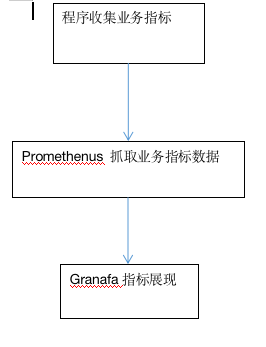
开始实现
生成业务指标
经典实现方法
经典的实现方法网上有很多案例,即利用切面在接口发生调用的时候写入指标数据
详见:https://www.jb51.net/article/202726.htm
自己的实现方案
由于自己的业务是为服务架构,第一期打算先实现从无到有,于是采用了定时任务跑指标的方案
引入依赖
<!--prometheus-->

        <dependency>

            <groupId>io.micrometer</groupId>

            <artifactId>micrometer-registry-prometheus</artifactId>

            <version>1.8.4</version>

        </dependency>

        <!--定时任务-->

        <dependency>

            <groupId>org.springframework.boot</groupId>

            <artifactId>spring-boot-starter-quartz</artifactId>

            <version>2.6.6</version>

        </dependency>

        <!--actuator 监控-->

        <dependency>

            <groupId>org.springframework.boot</groupId>

            <artifactId>spring-boot-starter-actuator</artifactId>

            <version>2.7.2</version>

        </dependency>
配置文件
#监控路径

management:

  endpoints:

    web:

      exposure:

        include: "*"
注册自己的指标[我这里用的是guaua格式数据]
package cn.hexcloud.m82.monitoring.service.monitor;

import io.micrometer.prometheus.PrometheusMeterRegistry;

import io.prometheus.client.Gauge;

import org.springframework.stereotype.Service;

import javax.annotation.PostConstruct;

import javax.annotation.Resource;

/**

 * 优惠相关监控

 *

 * @author abner<huiyuan.zhang @ hex-tech.net>

 * @date 2022-09-08 17:09:14

 */

@Service

public class PromotionMonitor {

    /**

     * 核券数量

     */

    public static Gauge VERIFY_COUPON_COUNT;

    /**

     * 核券金额

     */

    public static Gauge VERIFY_COUPON_AMOUNT_SUM;

    /**

     * 核活动数量

     */

    public static Gauge VERIFY_ACTIVITY_COUNT;

    /**

     * 核活动金额

     */

    public static Gauge VERIFY_ACTIVITY_AMOUNT_SUM;

    /**

     * 构造函数

     *

     * @author abner<huiyuan.zhang @ hex-tech.net>

     * @date 2022-09-08 11:33:56

     */

    @PostConstruct

    private void init() {

        VERIFY_COUPON_COUNT = initVerifyCouponCount();

        VERIFY_COUPON_AMOUNT_SUM = initVerifyCouponAmountSum();

        VERIFY_ACTIVITY_COUNT = initVerifyActivityCount();

        VERIFY_ACTIVITY_AMOUNT_SUM = initVerifyActivityAmountSum();

    }

    @Resource

    private PrometheusMeterRegistry prometheusMeterRegistry;

    /**

     * 获取 verify coupon count 句柄

     *

     * @author abner<huiyuan.zhang @ hex-tech.net>

     * @date 2022-09-08 11:47:45

     */

    public Gauge getVerifyCouponCount() {

        return VERIFY_COUPON_COUNT;

    }

    /**

     * 获取 verify coupon amount sum 句柄

     *

     * @author abner<huiyuan.zhang @ hex-tech.net>

     * @date 2022-09-08 11:47:45

     */

    public Gauge getVerifyCouponAmountSum() {

        return VERIFY_COUPON_AMOUNT_SUM;

    }

    /**

     * 获取 experience count 句柄

     *

     * @author abner<huiyuan.zhang @ hex-tech.net>

     * @date 2022-09-08 11:47:45

     */

    public Gauge getVerifyActivityCount() {

        return VERIFY_ACTIVITY_COUNT;

    }

    /**

     * 获取 verify activity amount sum 句柄

     *

     * @author abner<huiyuan.zhang @ hex-tech.net>

     * @date 2022-09-08 11:47:45

     */

    public Gauge getVerifyActivityAmountSum() {

        return VERIFY_ACTIVITY_AMOUNT_SUM;

    }

    /**

     * 核券数量

     */

    public Gauge initVerifyCouponCount() {

        Gauge verifyCouponCount = Gauge.build().name("verify_coupon_count").labelNames("partner_id").help("verify coupon count").register();

        prometheusMeterRegistry.getPrometheusRegistry().register(verifyCouponCount);

        return verifyCouponCount;

    }

    /**

     * 核券金额

     */

    public Gauge initVerifyCouponAmountSum() {

        Gauge verifyCouponAmountSum = Gauge.build().name("verify_coupon_amount_sum").labelNames("partner_id").help("verify coupon amount sum").register();

        prometheusMeterRegistry.getPrometheusRegistry().register(verifyCouponAmountSum);

        return verifyCouponAmountSum;

    }

    /**

     * 核销活动数量

     */

    public Gauge initVerifyActivityCount() {

        Gauge verifyActivityCount = Gauge.build().name("verify_activity_count").labelNames("partner_id").help("verify activity count").register();

        prometheusMeterRegistry.getPrometheusRegistry().register(verifyActivityCount);

        return verifyActivityCount;

    }

    /**

     * 核活动金额

     */

    public Gauge initVerifyActivityAmountSum() {

        Gauge verifyActivityAmountSum = Gauge.build().name("verify_activity_amount_sum").labelNames("partner_id").help("verify activity amount sum").register();

        prometheusMeterRegistry.getPrometheusRegistry().register(verifyActivityAmountSum);

        return verifyActivityAmountSum;

    }

}
写入指标
log.info("VerifyActivityCount-partnerId:{}-count:{}",partnerCountAmountActivityDto.getPartnerId(),partnerCountAmountActivityDto.getCount());

                promotionMonitor.getVerifyActivityCount().labels(partnerCountAmountActivityDto.getPartnerId()).set(partnerCountAmountActivityDto.getCount());

                float verifyCouponAmount = partnerCountAmountActivityDto.getAmount()

                        .divide(BigDecimal.TEN.multiply(BigDecimal.TEN), 2, RoundingMode.HALF_UP)

                        .floatValue();

                log.info("VerifyActivityAmountSum-partnerId:{}-amount:{}",partnerCountAmountActivityDto.getPartnerId(),verifyCouponAmount);

                promotionMonitor.getVerifyActivityAmountSum().labels(partnerCountAmountActivityDto.getPartnerId()).set(verifyCouponAmount);
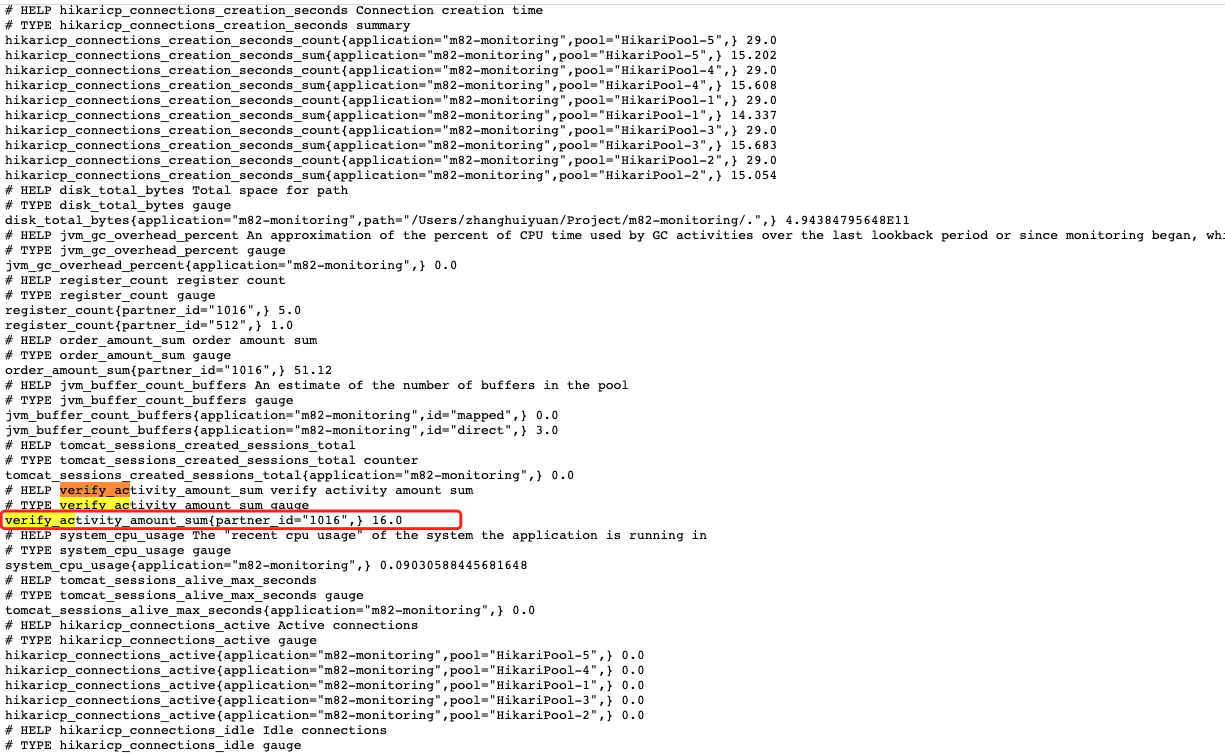
效果展示
路径:http://localhost:8080//actuator/prometheus
配置prometheus 抓取上面的指标
** 可以搭建自己的prometheus服务也可以使用阿里云的prometheus**
我是使用阿里云的prometheus
抓取配置
# my global config

global:

  scrape_interval:     15s # Set the scrape interval to every 15 seconds. Default is every 1 minute.

  evaluation_interval: 15s # Evaluate rules every 15 seconds. The default is every 1 minute.

  # scrape_timeout is set to the global default (10s).

# Alertmanager configuration

alerting:

  alertmanagers:

  - static_configs:

    - targets:

      # - alertmanager:9093

# Load rules once and periodically evaluate them according to the global 'evaluation_interval'.

rule_files:

  # - "first_rules.yml"

  # - "second_rules.yml"

# A scrape configuration containing exactly one endpoint to scrape:

# Here it's Prometheus itself.

scrape_configs:

  # The job name is added as a label `job=` to any timeseries scraped from this config.

  - job_name: 'prometheus'

    # metrics_path defaults to '/metrics'

    # scheme defaults to 'http'.

    static_configs:

    - targets: ['localhost:9090']
配置自己的图表
我的业务需要分租户展示,kennel跟大家的不太一样,稍微展示下吧
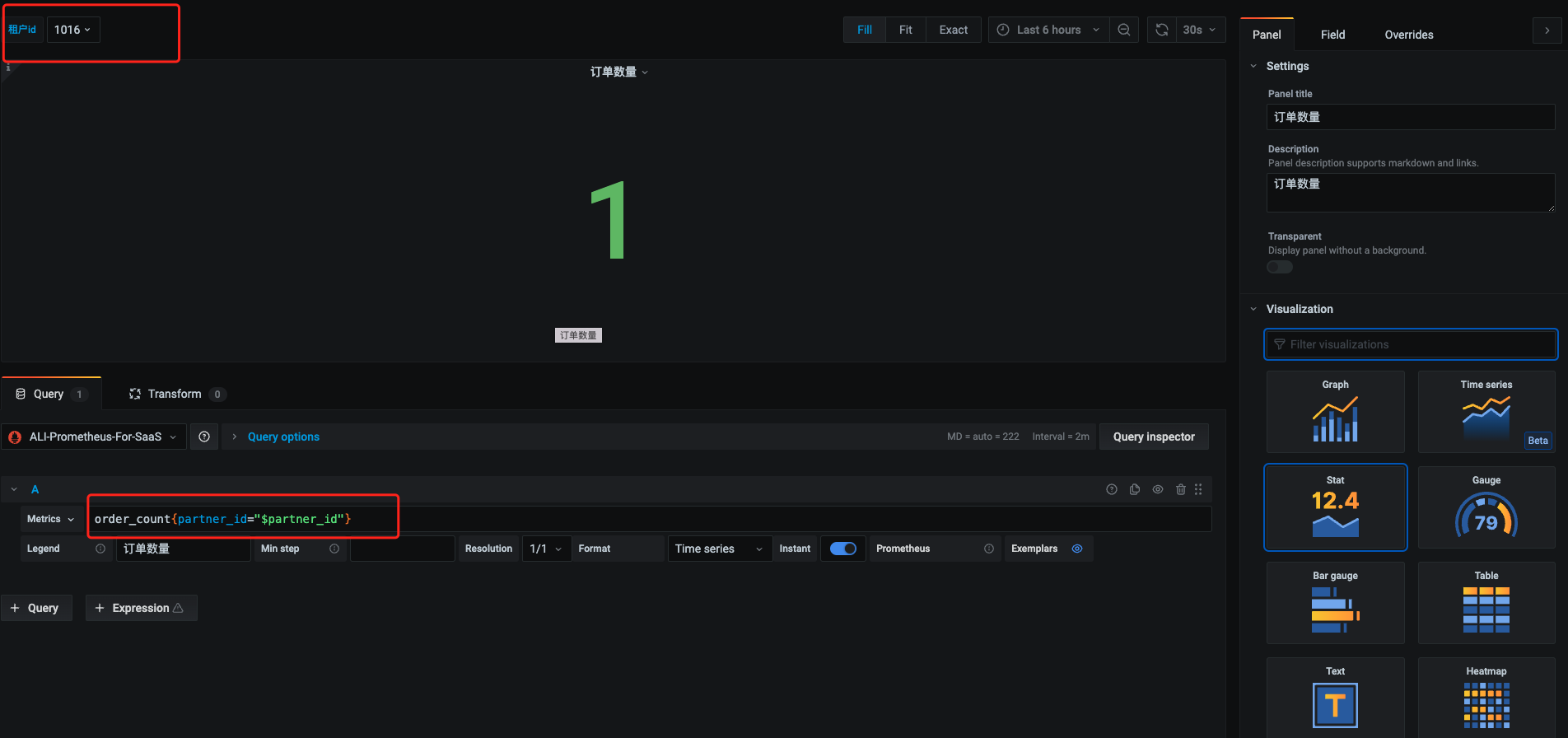
最终效果展示

Springboot+Prometheus+grafana 制作自己的业务监控的更多相关文章
- SpringBoot+Prometheus+Grafana实现应用监控和报警
一.背景 SpringBoot的应用监控方案比较多,SpringBoot+Prometheus+Grafana是目前比较常用的方案之一.它们三者之间的关系大概如下图: 关系图 二.开发SpringBo ...
- Prometheus+Grafana+Alertmanager搭建全方位的监控告警系统
prometheus安装和配置 prometheus组件介绍 1.Prometheus Server: 用于收集和存储时间序列数据. 2.Client Library: 客户端库,检测应用程序代码,当 ...
- 使用 Prometheus + Grafana 对 Kubernetes 进行性能监控的实践
1 什么是 Kubernetes? Kubernetes 是 Google 开源的容器集群管理系统,其管理操作包括部署,调度和节点集群间扩展等. 如下图所示为目前 Kubernetes 的架构图,由 ...
- Kubernetes使用prometheus+grafana做一个简单的监控方案
前言 本文介绍在k8s集群中使用node-exporter.prometheus.grafana对集群进行监控.其实现原理有点类似ELK.EFK组合.node-exporter组件负责收集节点上的me ...
- 微服务监控之三:Prometheus + Grafana Spring Boot 应用可视化监控
一.Springboot增加Prometheus 1.Spring Boot 应用暴露监控指标,添加如下依赖 <dependency> <groupId>org.springf ...
- 基于Prometheus和Grafana打造业务监控看板
前言 业务监控对许许多多的场景都是十分有意义,业务监控看板可以让我们比较直观的看到当前业务的实时情况,然后运营人员可以根据这些情况及时对业务进行调整操作,避免业务出现大问题. 老黄曾经遇到过一次比较尴 ...
- prometheus+grafana监控mysql最佳实践
导航 前言 环境准备 安装Docker 安装prometheus 安装mysqld_exporter prometheus采集数据 安装grafana grafana配置数据源 感谢您的阅读,预计阅读 ...
- Prometheus(一):Prometheus+Grafana 安装配置
一.基础环境 系统 IP 监控主机 CentOS 7 192.168.56.200 被监控主机 CentOS 7 192.168.56.201 二.Prometheus服务端安装 以下操作皆在监控主机 ...
- Prometheus+Grafana监控SpringBoot
Prometheus+Grafana监控SpringBoot 一.Prometheus监控SpringBoot 1.1 pom.xml添加依赖 1.2 修改application.yml配置文件 1. ...
- 基于Docker+Prometheus+Grafana监控SpringBoot健康信息
在微服务体系当中,监控是必不可少的.当系统环境超过指定的阀值以后,需要提醒指定的运维人员或开发人员进行有效的防范,从而降低系统宕机的风险.在CNCF云计算平台中,Prometheus+Grafana是 ...
随机推荐
- Swift Structured Concurrency
异步函数 异步函数概念 异步和并发是两个不同的概念,并发(Concurrency)是指多个任务同时执行,这里的同时不是严格意义上的同一时刻,而是在稍大时间粒度上,多个任务可以同时推进,并发的实现可以是 ...
- Apache Hudi从零到一:存储格式初探
在花了大约 4 年时间致力于 Apache Hudi(其中包括 3 年Committer身份)之后,我决定开始这个博客系列,旨在以有组织且适合初学者的方式展示 Hudi 的设计和用法. 我的目标是确保 ...
- Kingbase Create Type 语句使用
Kingbase create type类型创建语句 说明: KingbaseES 数据库中,可以通过CREATE TYPE语句定义一种新的数据类型. 有八种形式的CREATE TYPE.它们分别创建 ...
- SPEL表达式注入分析
环境依赖 <dependencies> <dependency> <groupId>org.springframework</groupId> < ...
- 北京思特奇2023年校招笔试(Java)
北京思特奇2023年校招笔试(Java) 1.表达式 (short)10/10.2*2 运算后结果是什么类型? 答案:double,浮点数默认是double,自动类型向上转换为浮点数类型 2. ser ...
- Python爬虫爬取1905电影网视频电影并存储到mysql数据库
数据获取方式:微信搜索关注[靠谱杨阅读人生]回复[电影].整理不易,资源付费,谢谢支持! 代码: 1 import time 2 import traceback 3 import requests ...
- mybatis踩坑之integer类型是0的时候会被认为0!=''是假
当你的参数类型是integer类型,并且传的是0的时候,在SQL里面做if判断的时候 <if test="auditStatus != null and auditStatus != ...
- #贪心,构造#AT2266 [AGC008D] K-th K
题目 给你一个长度为 \(N\) 的整数序列 \(X\),请判断是否存在一个满足下列条件的整数序列 \(a\),如果存在,请构造一种方案 条件如下: \(a\) 的长度为 \(N^2\),并且满足数字 ...
- 【版本发布公告】HMS Core6.5.0来啦
新 能 力 3D Engine 3D Engine提供高性能.高画质.高扩展性的实时3D引擎,并提供便捷高效的可视化开发工具.开发者可基于华为的3D Studio开发工具,通过图形和渲染.动画.UI等 ...
- Stable diffusion 初学者指南
1. Stable diffusion 初学者指南 想掌握Stable Diffusion AI技术吗? 这份初学者指南专为完全没接触过Stable Diffusion或任何AI图像生成器的新手设计. ...