
【Spring-Security】Re11 Oauth2协议 P2 Redis存储 密码模式令牌
一、Redis配置
需要的依赖
<dependency>

    <groupId>org.springframework.boot</groupId>

    <artifactId>spring-boot-starter-data-redis</artifactId>

</dependency>

<dependency>

    <groupId>org.apache.commons</groupId>

    <artifactId>commons-pool2</artifactId>

</dependency>
yml配置信息:
spring:

  redis:

    host: localhost
Redis的配置类:
package cn.zeal4j.configuration;

import org.springframework.beans.factory.annotation.Autowired;

import org.springframework.context.annotation.Bean;

import org.springframework.context.annotation.Configuration;

import org.springframework.data.redis.connection.RedisConnectionFactory;

import org.springframework.security.oauth2.provider.token.TokenStore;

import org.springframework.security.oauth2.provider.token.store.redis.RedisTokenStore;

/**

 * @author Administrator

 * @file Spring-Security + Oauth2

 * @create 2020 09 29 17:16

 */

@Configuration

public class RedisConfiguration {

    @Autowired

    private RedisConnectionFactory redisConnectionFactory;

    @Bean

    public TokenStore getRedisTokenStore() {

        return new RedisTokenStore(redisConnectionFactory);

    }

}
注入到授权的密码模式方法中:
package cn.zeal4j.configuration;

import org.springframework.beans.factory.annotation.Autowired;

import org.springframework.beans.factory.annotation.Qualifier;

import org.springframework.context.annotation.Configuration;

import org.springframework.security.authentication.AuthenticationManager;

import org.springframework.security.core.userdetails.UserDetails;

import org.springframework.security.core.userdetails.UserDetailsService;

import org.springframework.security.crypto.password.PasswordEncoder;

import org.springframework.security.oauth2.config.annotation.configurers.ClientDetailsServiceConfigurer;

import org.springframework.security.oauth2.config.annotation.web.configuration.AuthorizationServerConfigurerAdapter;

import org.springframework.security.oauth2.config.annotation.web.configuration.EnableAuthorizationServer;

import org.springframework.security.oauth2.config.annotation.web.configurers.AuthorizationServerEndpointsConfigurer;

import org.springframework.security.oauth2.provider.token.TokenStore;

/**

 * @author Administrator

 * @file Spring-Security + Oauth2

 * @create 2020 09 29 11:48

 * @description 授权服务器配置

 */

@Configuration

@EnableAuthorizationServer

public class AuthorizationServerConfiguration extends AuthorizationServerConfigurerAdapter {

    @Autowired

    private PasswordEncoder passwordEncoder;

    @Autowired

    private AuthenticationManager authenticationManager;

    @Qualifier("customUserDetailsServiceImpl")

    @Autowired

    private UserDetailsService userDetailsService;

    @Qualifier("getRedisTokenStore")

    @Autowired

    private TokenStore tokenStore;

    /**

     * 使用密码模式需要的配置方法

     * @param endpoints

     * @throws Exception

     */

    @Override

    public void configure(AuthorizationServerEndpointsConfigurer endpoints) throws Exception {

        endpoints.

                authenticationManager(authenticationManager).

                userDetailsService(userDetailsService).

                tokenStore(tokenStore);

    }

    @Override

    public void configure(ClientDetailsServiceConfigurer clients) throws Exception {

        clients.

                inMemory().

                withClient("admin").

                secret(passwordEncoder.encode("112233")).

                // accessTokenValiditySeconds(3600). // 令牌有效时间 一小时

                redirectUris("http://www.baidu.com"). // 授权成功的跳转

                scopes("all").  // 所有范围

                // authorizedGrantTypes("authorization_code");     // 授权类型:授权码模式

                authorizedGrantTypes("password");     // 授权类型:密码模式

    }

}
二、使用
还是使用密码模式授权
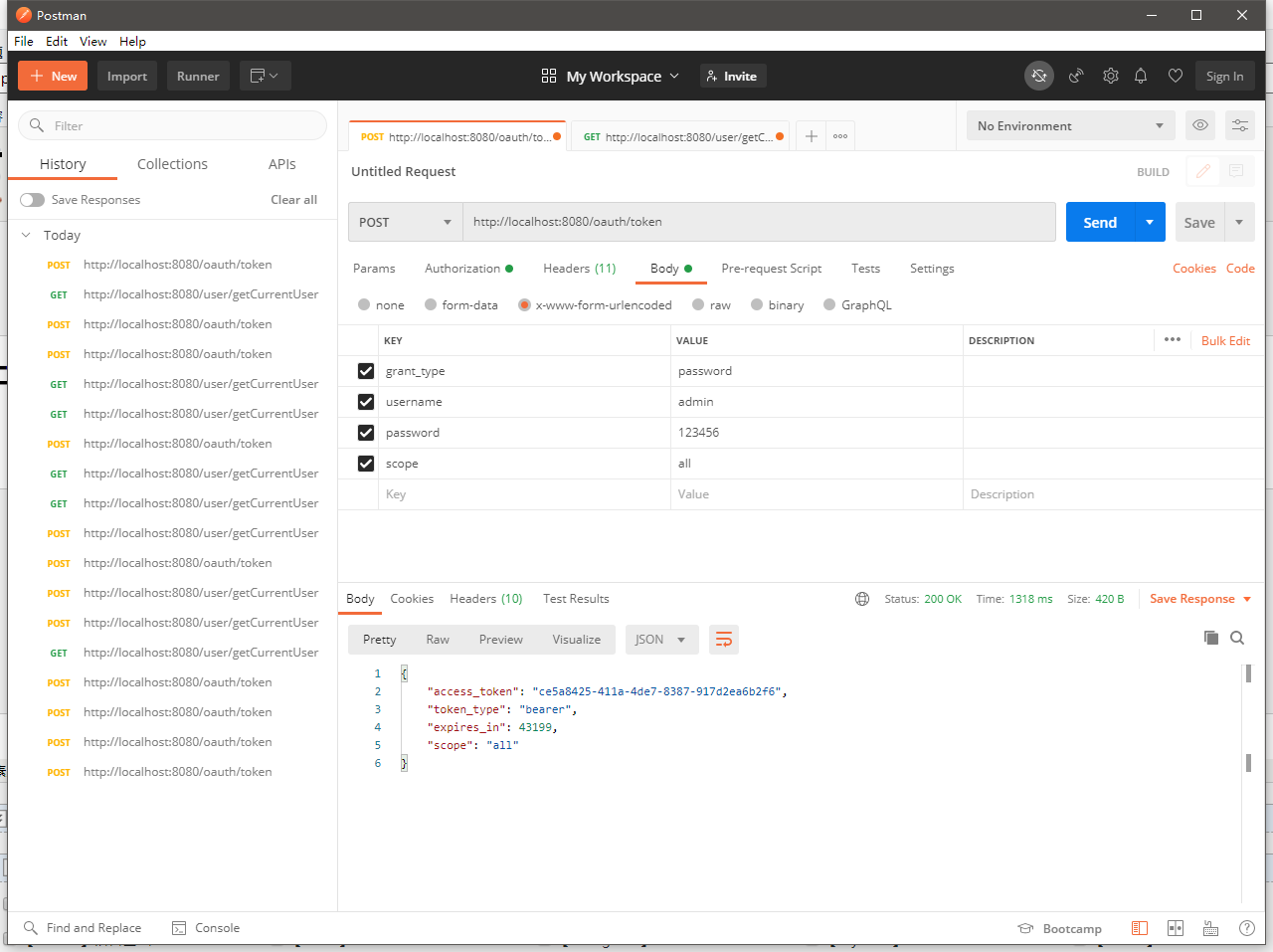
{

    "access_token": "ce5a8425-411a-4de7-8387-917d2ea6b2f6",

    "token_type": "bearer",

    "expires_in": 43199,

    "scope": "all"

}
这个时候可以打开Redis客户端查看:
Administrator@DESKTOP-D3S5169 MINGW64 ~/Desktop

$ redis-cli

127.0.0.1:6379> keys *

1) "uname_to_access:admin:admin"

2) "access:ce5a8425-411a-4de7-8387-917d2ea6b2f6"

3) "client_id_to_access:admin"

4) "auth_to_access:413f0c776eb9223fe9f8c47e020774ed"

5) "auth:ce5a8425-411a-4de7-8387-917d2ea6b2f6"

127.0.0.1:6379>
这个Token已经存到了Redis中了
【Spring-Security】Re11 Oauth2协议 P2 Redis存储 密码模式令牌的更多相关文章
- Spring Security 与 OAuth2 介绍
个人 OAuth2 全部文章 Spring Security 与 OAuth2(介绍):https://www.jianshu.com/p/68f22f9a00ee Spring Security 与 ...
- Spring Security 与 OAuth2(介绍)
https://www.jianshu.com/p/68f22f9a00ee Spring Security 与 OAuth2(介绍) 林塬 2018.01.23 11:14* 字数 3097 阅读 ...
- Spring Security实现OAuth2.0授权服务 - 基础版
一.OAuth2.0协议 1.OAuth2.0概述 OAuth2.0是一个关于授权的开放网络协议. 该协议在第三方应用与服务提供平台之间设置了一个授权层.第三方应用需要服务资源时,并不是直接使用用户帐 ...
- Spring Security实现OAuth2.0授权服务 - 进阶版
<Spring Security实现OAuth2.0授权服务 - 基础版>介绍了如何使用Spring Security实现OAuth2.0授权和资源保护,但是使用的都是Spring Sec ...
- Spring Security基于Oauth2的SSO单点登录怎样做?一个注解搞定
一.说明 单点登录顾名思义就是在多个应用系统中,只需要登录一次,就可以访问其他相互信任的应用系统,免除多次登录的烦恼.本文主要介绍 同域 和 跨域 两种不同场景单点登录的实现原理,并使用 Spring ...
- spring boot:spring security实现oauth2授权认证(spring boot 2.3.3)
一,oauth2的用途? 1,什么是oauth2? OAuth2 是一个开放标准, 它允许用户让第三方应用访问该用户在某一网站上存储的私密资源(如头像.照片.视频等), 在这个过程中无须将用户名和密码 ...
- spring oauth2 ,spring security整合oauth2.0 JdbcTokenStore实现 解决url-pattern .do .action
参考以下两个文章: http://www.cnblogs.com/0201zcr/p/5328847.html http://wwwcomy.iteye.com/blog/2230265 web.xm ...
- spring boot:spring security实现oauth2+jwt管理认证授权及oauth2返回结果格式化(spring boot 2.3.3)
一,为什么oauth2要整合jwt? 1,OAuth2的token技术有一个最大的问题是不携带用户信息,所以资源服务器不能进行本地验证, 以致每次对于资源的访问,资源服务器都需要向认证服务器的toke ...
- 使用Spring Security和OAuth2实现RESTful服务安全认证
这篇教程是展示如何设置一个OAuth2服务来保护REST资源. 源代码下载github. (https://github.com/iainporter/oauth2-provider)你能下载这个源码 ...
- Spring Boot,Spring Security实现OAuth2 + JWT认证
阅读此文,希望是对JWT以及OAuth2有一定了解的童鞋. JWT认证,提供了对称加密以及非对称的实现. 内容源码点我 涉及到源码中两个服务 spring-boot-oauth-jwt-server ...
随机推荐
- 强!推荐一款开源接口自动化测试平台:AutoMeter-API !
在当今软件开发的快速迭代中,接口自动化测试已成为确保代码质量和服务稳定性的关键步骤. 随着微服务架构和分布式系统的广泛应用,对接口自动化测试平台的需求也日益增长. 今天,我将为大家推荐一款强大的开源接 ...
- react props进阶 children属性
children属性,表示组件标签的子节点,当组件标签有子节点时,props就会有该属性,与与普通的props一样,其值可以使任意类型. # 父组件 class App extends React.C ...
- set数据类型
SET 数据类型 是一个类似于 数组 的数据类型 特点 : 不接受重复的相同的数据 同样的 ...
- Java中创建对象的5种方式总结
引言 作为Java开发人员,我们每天都会代码中创建对象,但我们通常使用依赖管理系统,比如Spring框架,然后,这里有很多种创建对象的方式,本文就对Java创建对象的几种方式进行总结 五种创建方式 创 ...
- 字符数组转换及数字求和 java8 lambda表达式 demo
public static void main(String[] args) throws IllegalAccessException { //字符串转换为数字且每个加上100,输出. String ...
- mysql5.7msi安装
本文介绍的是只安装MySQL数据库的过程,并不包含各种其他附加工具.安装完成之后通常使用Navicat或SQLyog进行可视化操作. 清华的镜像网站只保存最新的几个MySQL版本,所以直链可能已经失效 ...
- git clone 时拉取子模块
git clone 时拉取子模块 对还未下载的项目: git clone --recursive 对已下载的项目: git submodule sync git submodule update -- ...
- ClickHouse介绍(二)MergeTree引擎
MergeTree引擎 ClickHouse中有多种表引擎,包括MergeTree.外部存储.内存.文件.接口等,6大类,20多种表引擎.其中最强大的当属MergeTree(及其同一家族中)引擎.我们 ...
- Linux 内核:设备驱动模型(3)class与device
Linux 内核:设备驱动模型(3)class与device 背景 前面我们知道了设备如何通过总线与驱动匹配,也了解了设备插拔时与用户空间是如何通过uevent基于环境变量进行交互的. 前面看过了设备 ...
- 设备树DTS 学习:3-驱动开发中常用的 DTS api
背景 本章的内容是为了实现在驱动中的开发,通过调用有关的api来寻找设备树节点熟悉,从而达到使用设备树进行驱动开发的目的. 参考:Linux内核 设备树操作常用API Linux设备树语法详解一文中介 ...