
部署堡垒机2——安装MySQL8.0.32或8.0.28+
MySQL的三大版本
a)MySQL Enterprise Edition:企业版本(付费)
b)MySQL Cluster CGE:高级集群版(收费)
c)MySQL Community Server:社区版(开源)
登录MySQL官网
https://www.mysql.com/downloads/
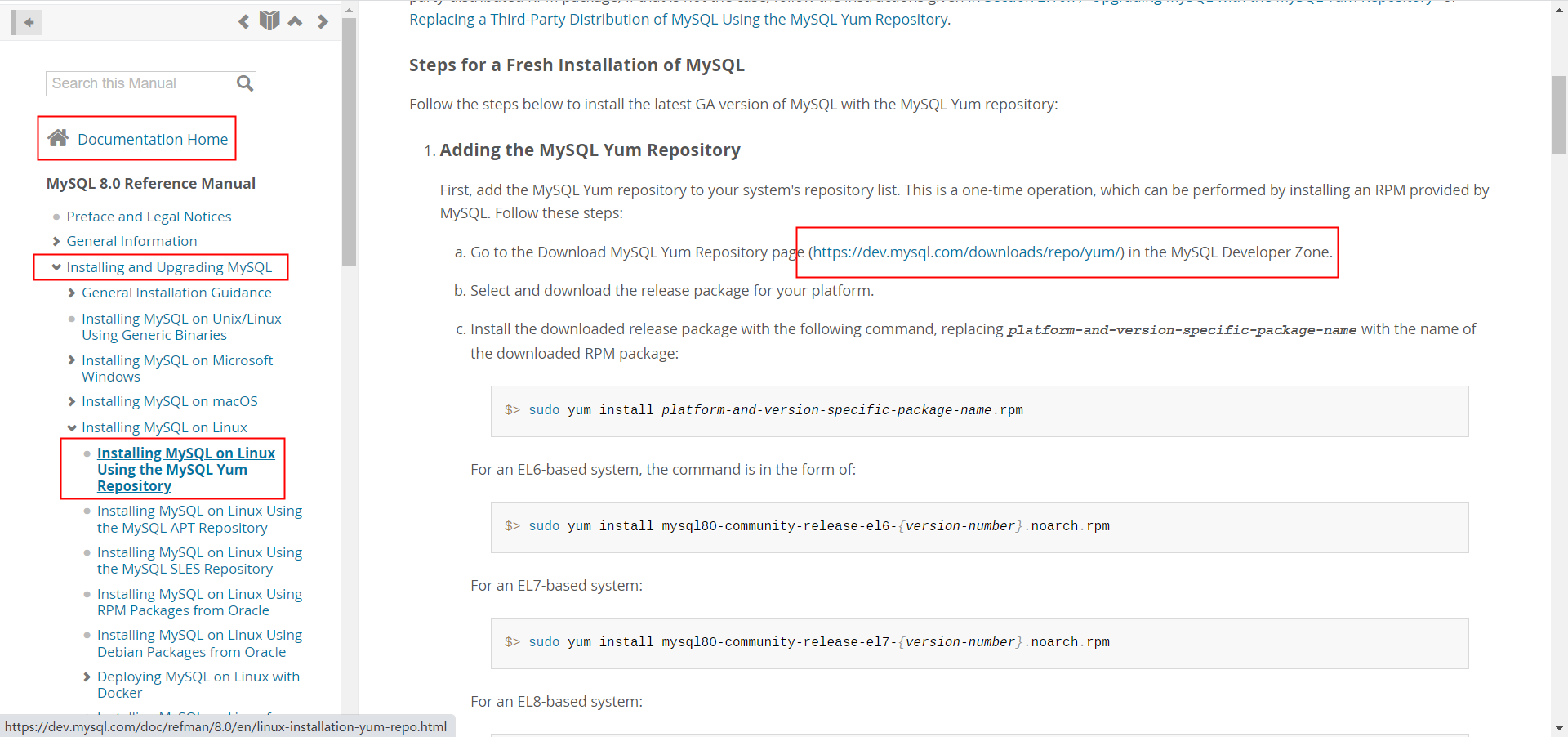
点击“DOCUMENTATION”——“MySQL Server”——“Installing and Upgrading MySQL”——“Installing MySQL on Linux”
点击:Installing MySQL on Linux Using the MySQL Yum Repository
点击:https://dev.mysql.com/downloads/repo/yum/
点击linux 7——download

右键复制链接地址
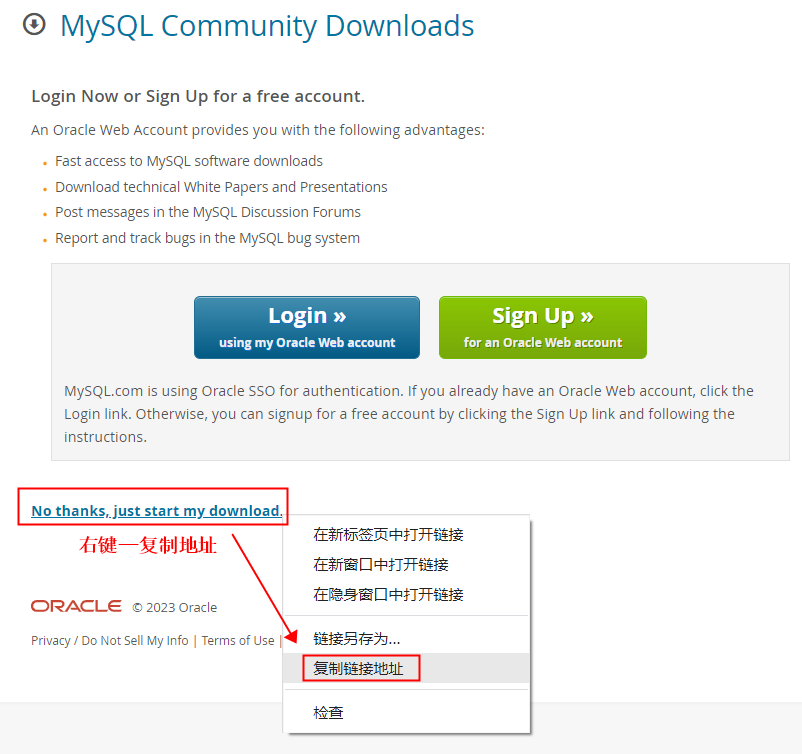
wget https://dev.mysql.com/get/mysql80-community-release-el7-7.noarch.rpm操作步骤如下:
cd /opt/

wget https://dev.mysql.com/get/mysql80-community-release-el7-7.noarch.rpm

yum install mysql80-community-release-el7-7.noarch.rpm

gcc -v

yum update -y

yum list | grep mysql

yum install -y mysql-community-server

root@jumpserver-app-t01:/opt#mysql -V

mysql  Ver 8.0.32 for Linux on x86_64 (MySQL Community Server - GPL)
启动mysqld服务
root@jumpserver-app-t01:/opt/mysql#systemctl start mysqld

root@jumpserver-app-t01:/opt/mysql#systemctl status mysqld

root@jumpserver-app-t01:/opt/mysql#systemctl enable mysqld

root@jumpserver-app-t01:/opt/mysql#
找到mysql的默认密码在这里:root@localhost: si<%<s%x7.On
root@jumpserver-app-t01:/var/log#cat /var/log/mysqld.log

2023-02-21T11:06:14.287837Z 0 [System] [MY-013169] [Server] /usr/sbin/mysqld (mysqld 8.0.32) initializing of server in progress as process 90720

2023-02-21T11:06:14.296083Z 1 [System] [MY-013576] [InnoDB] InnoDB initialization has started.

2023-02-21T11:06:14.658319Z 1 [System] [MY-013577] [InnoDB] InnoDB initialization has ended.

2023-02-21T11:06:15.848026Z 6 [Note] [MY-010454] [Server] A temporary password is generated for root@localhost: si<%<s%x7.On

2023-02-21T11:06:18.815307Z 0 [System] [MY-010116] [Server] /usr/sbin/mysqld (mysqld 8.0.32) starting as process 90787

2023-02-21T11:06:18.821989Z 1 [System] [MY-013576] [InnoDB] InnoDB initialization has started.

2023-02-21T11:06:18.911013Z 1 [System] [MY-013577] [InnoDB] InnoDB initialization has ended.

2023-02-21T11:06:19.119711Z 0 [Warning] [MY-010068] [Server] CA certificate ca.pem is self signed.

2023-02-21T11:06:19.119756Z 0 [System] [MY-013602] [Server] Channel mysql_main configured to support TLS. Encrypted connections are now supported for this channel.

2023-02-21T11:06:19.136298Z 0 [System] [MY-011323] [Server] X Plugin ready for connections. Bind-address: '::' port: 33060, socket: /var/run/mysqld/mysqlx.sock

2023-02-21T11:06:19.136335Z 0 [System] [MY-010931] [Server] /usr/sbin/mysqld: ready for connections. Version: '8.0.32'  socket: '/var/lib/mysql/mysql.sock'  port: 3306  MySQL Community Server - GPL.

root@jumpserver-app-t01:/var/log#
此时需要到mysql中使用临时密码登录,并修改临时密码,因为临时密码是不可用的
mysql -uroot -p

si<%<s%x7.On

mysql> alter user root@'localhost' identified by'*******@666';

Query OK, 0 rows affected (0.00 sec)

mysql> flush privileges;    #刷新数据表信息后exit退出

Query OK, 0 rows affected (0.00 sec)

mysql>exit

Bye
分割线
PS:简单的MySQL安装方法,去阿里源中找到mysql-community-server-8.0.28-1.el7.x86_64.rpm,下载到本地后,然后yum localinstall ./*
这样既能安装该组件,还能安装所需依赖
cd /opt

mkdir mysql

cd mysql

wget https://mirrors.aliyun.com/mysql/MySQL-8.0/mysql-community-server-8.0.28-1.el7.x86_64.rpm?spm=a2c6h.25603864.0.0.5e8670b2c1XZn4

yum localinstall ./*

后面一路选Y安装即可

systemctl start mysqld

systemctl status mysqld

systemctl enable mysqld
分割线
1、创建JumpServer数据库,并存储为中文支持格式
root@jumpserver-app-t01.novalocal:/jumpserver/mysql_rpm#mysql -uroot -p

Enter password:

mysql> create database jumpserver default charset 'utf8' collate 'utf8_bin';

Query OK, 1 row affected, 2 warnings (0.00 sec)

mysql>
2、创建用户 @是占位符、%是允许该账号在任何位置都可以登录
mysql> create user 'jumpserver'@'%' IDENTIFIED BY '******66666';

Query OK, 0 rows affected (0.00 sec)

mysql> flush privileges;

Query OK, 0 rows affected (0.00 sec)

###mysql登录报错时用这个命令

alter user jumpserver@'%' identified with mysql_native_password by '******66666';

###登录报错内容如下:

root@jumpserver-app-p01:/root#mysql -h 10.15.32.10 -P 3306 -u jumpserver -p

Enter password:

ERROR 2059 (HY000): Authentication plugin 'caching_sha2_password' cannot be loaded: /usr/lib64/mysql/plugin/caching_sha2_password.so: cannot open shared object file: No such file or directory
3、给JumpServer用户授予访问JumpServer数据库的权限。
#grant授权'jumpserver'@'%'用户在使用identified by 'chaoge888'密码时,允许访问jumpserver.*所有的表,的all privileges所有权限“添删改查”

mysql> grant all privileges on jumpserver.* to 'jumpserver'@'%' ;

Query OK, 0 rows affected (0.01 sec)

mysql> flush privileges;

Query OK, 0 rows affected (0.00 sec)

mysql>exit

Bye
MySQL数据库基础常用命令8.0版本适用
#查询数据库账户

select user, host from mysql.user;

#删除账户 'zabbix'

drop user 'zabbix'@'%';

#查询数据库

show databases;

#删除数据库zabbix;

drop database zabbix;

#修改账户密码

alter user 'zabbix'@'%' identified  by 'Qqqq1234.com';
ubuntu安装的mysql,默认配置文件保存在/etc/mysql/mysql.conf.d/mysqld.cnf
root@JumpServer-DB-P01:/opt# cat /etc/mysql/mysql.conf.d/mysqld.cnf

#

# The MySQL database server configuration file.

#

# One can use all long options that the program supports.

# Run program with --help to get a list of available options and with

# --print-defaults to see which it would actually understand and use.

#

# For explanations see

# http://dev.mysql.com/doc/mysql/en/server-system-variables.html

# Here is entries for some specific programs

# The following values assume you have at least 32M ram

[mysqld]

#

# * Basic Settings

#

user		= mysql

# pid-file	= /var/run/mysqld/mysqld.pid

# socket	= /var/run/mysqld/mysqld.sock

# port		= 3306

# datadir	= /var/lib/mysql

# If MySQL is running as a replication slave, this should be

# changed. Ref https://dev.mysql.com/doc/refman/8.0/en/server-system-variables.html#sysvar_tmpdir

# tmpdir		= /tmp

#

# Instead of skip-networking the default is now to listen only on

# localhost which is more compatible and is not less secure.

bind-address		= 0.0.0.0

mysqlx-bind-address	= 0.0.0.0

#

# * Fine Tuning
部署堡垒机2——安装MySQL8.0.32或8.0.28+的更多相关文章
- jumpserver跳板机(堡垒机)安装
jumpserver跳板机(堡垒机) Jumpserver 是一款由Python编写开源的跳板机(堡垒机)系统,实现了跳板机应有的功能,基于ssh协议来管理,客户端无需安装agent,助力互联网企业 ...
- 开源堡垒机Gateone 安装过程记录及报错处理
1.下载git源码或者zip包都可以,下载到我们制定部署目录. git地址:https://github.com/liftoff/GateOne.git 2.检查tornado 版本,安装tornad ...
- Jumpserver(堡垒机)的安装与应用
官网:http://docs.jumpserver.org/zh/docs/introduce.html 作者:邓聪聪 环境 系统: CentOS 7.6 IP: 172.16.16.2 关闭 sel ...
- day11 堡垒机
项目实战:运维堡垒机开发 前景介绍 到目前为止,很多公司对堡垒机依然不太感冒,其实是没有充分认识到堡垒机在IT管理中的重要作用的,很多人觉得,堡垒机就是跳板机,其实这个认识是不全面的,跳板功能只是堡垒 ...
- python【第十三篇】可以写一个堡垒机了
前景介绍 到目前为止,很多公司对堡垒机依然不太感冒,其实是没有充分认识到堡垒机在IT管理中的重要作用的,很多人觉得,堡垒机就是跳板机,其实这个认识是不全面的,跳板功能只是堡垒机所具备的功能属性中的其中 ...
- Python之路,Day12 - 那就做个堡垒机吧
Python之路,Day12 - 那就做个堡垒机吧 本节内容 项目实战:运维堡垒机开发 前景介绍 到目前为止,很多公司对堡垒机依然不太感冒,其实是没有充分认识到堡垒机在IT管理中的重要作用的,很多 ...
- Day12 - 堡垒机开发
Python之路,Day12 - 那就做个堡垒机吧 本节内容 项目实战:运维堡垒机开发 前景介绍 到目前为止,很多公司对堡垒机依然不太感冒,其实是没有充分认识到堡垒机在IT管理中的重要作用的,很多 ...
- Django项目:堡垒机(Linux服务器主机管理系统)--03--03堡垒机在Linux系统里记录会话日志02/02
#main.py #本文件写所有的连接交互动作程序 # ————————————————03堡垒机在Linux系统里记录会话日志 开始———————————————— from Fortress im ...
- Django项目:堡垒机(Linux服务器主机管理系统)--02--02堡垒机设计后台交互程序
#main.py #本文件写所有的连接交互动作程序 #————————————————02堡垒机设计后台交互程序 开始———————————————— from django.contrib.auth ...
- Python之堡垒机
本节内容 项目实战:运维堡垒机开发 前景介绍 到目前为止,很多公司对堡垒机依然不太感冒,其实是没有充分认识到堡垒机在IT管理中的重要作用的,很多人觉得,堡垒机就是跳板机,其实这个认识是不全面的,跳板功 ...
随机推荐
- 20230919 .NET面经
SQL IQuerable 和 IEnumerable 的主要区别? https://stackoverflow.com/questions/252785/what-is-the-difference ...
- 【RocketMQ】事务实现原理总结
RocketMQ事务的使用场景 单体架构下的事务 在单体系统的开发过程中,假如某个场景下需要对数据库的多张表进行操作,为了保证数据的一致性,一般会使用事务,将所有的操作全部提交或者在出错的时候全部回滚 ...
- HTTPS相比HTTP为什么安全
HTTPS(超文本传输协议[安全]) 1.HTTPS为什么叫安全的超文本传输协议 在HTTPS中,S是Security的意思,是安全的意思,而HTTP是超文本传输协议,这就不得不谈起HTTP在安全方面 ...
- Python并发编程——threading、开启线程 、线程进程对比、线程方法、守护线程、GIL、同步锁、死锁和递归锁、信号量、Event、condition、定时器、queue、concurrent
文章目录 内容回顾 一 threading模块介绍 二 开启线程的两种方式 三 在一个进程下开启多个线程与在一个进程下开启多个子进程的区别 四 练习 五 线程相关的其他方法 六 守护线程 七 Pyth ...
- 教学法学期末考试MOOC01
期末考试 返回 期末考试试卷为客观题,总分为100分,占课程成绩的40%.其中包含16道单选题,2道多选题.共18道题.单选题每道5分,多选题每道10分,限时90分钟完成. 倒计时: 01:13:4 ...
- CF1336A
题目简化和分析: 明确一点这是一棵树. 为了保证每个工业城市的设置效益最大,应该设在最深的节点. 从深到浅,可以使用优先队列去实现. 设置一个的价值为 \(dep_u-siz_u-1\). 关于作者一 ...
- Nacos注册中心有几种调用方式?
Spring Cloud Alibaba Nacos 作为近几年最热门的注册中心和配置中心,也被国内无数公司所使用,今天我们就来看下 Nacos 作为注册中心时,调用它的接口有几种方式? 1.什么是注 ...
- NGINX相关介绍其一
HTTP协议和NGINX 跨网络的主机间通讯 远程的两台主机联系在一起 套接字Socket是进程间通信IPC的一种实现,允许位于不同主机(或同一主机)上不同进程之间进行通信和数据交换,SocketAP ...
- or等价改写union SQL案例
同事找我优化一些SQL,其中有个SQL比较经典,拿出来分享给大家,从原来执行2分钟,到1.4S出结果. -- 原SQL SELECT count (*) FROM ( SELECT DISTINCT ...
- [数据校验/数据质量] 数据校验框架:hibernate-validation
0 前言 其一,项目中普遍遇到了此问题,故近两天深入地研究了一下. 其二,能够自信地说,仔细看完本篇,就无需再看其他的Java数据校验框架的文章了. 1 数据校验框架概述 1.0 数据校验框架的产生背 ...