
SpringBoot事件机制
1、是什么?
SpringBoot事件机制是指SpringBoot中的开发人员可以通过编写自定义事件来对应用程序进行事件处理。我们可以创建自己的事件类,并在应用程序中注册这些事件,当事件被触发时,可以对其进行处理。在SpringBoot中,事件可以是任意类型的,可以是基于Spring的事件,也可以是自定义的事件。事件处理可以是在应用程序中特定的方法中进行,也可以是通过Spring提供的事件处理API进行处理。
主要有三大对象:
- 1、事件源 :具体的事件内容
- 2、事件发布者 :发布事件
- 3、事件监听者 :监听事件
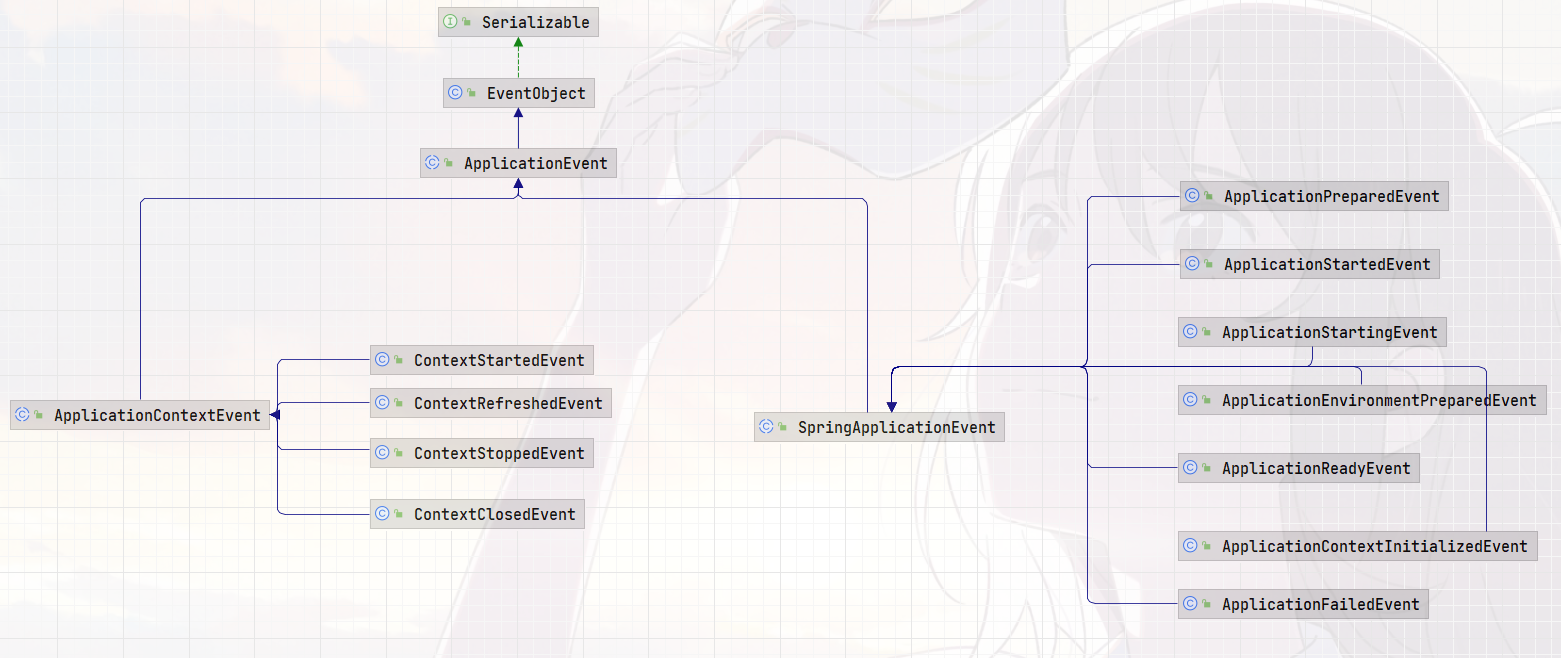
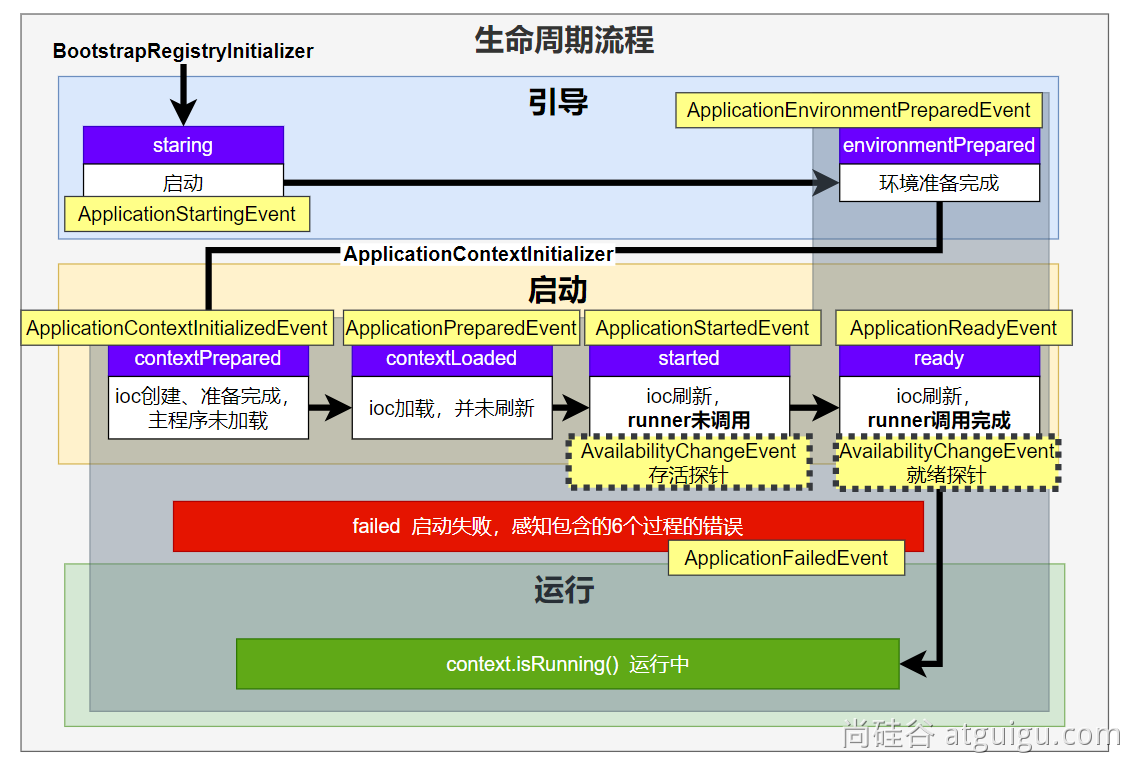
9大事件触发顺序&时机
1、ApplicationStartingEvent:应用启动但未做任何事情, 除过注册listeners and initializers.
2、ApplicationEnvironmentPreparedEvent: Environment 准备好,但context 未创建.
3、ApplicationContextInitializedEvent: ApplicationContext 准备好,ApplicationContextInitializers 调用,但是任何bean未加载
4、ApplicationPreparedEvent: 容器刷新之前,bean定义信息加载
5、ApplicationStartedEvent: 容器刷新完成, runner未调用
=以下就开始插入了探针机制====
6、AvailabilityChangeEvent: LivenessState.CORRECT应用存活; 存活探针
7、ApplicationReadyEvent: 任何runner被调用
8、AvailabilityChangeEvent:ReadinessState.ACCEPTING_TRAFFIC就绪探针,可以接请求
9、ApplicationFailedEvent :启动出错
2、怎么玩?
这样把,我们先模拟一个场景:现在有一个用户打卡的需求,用户登录进行签到打卡,打卡会奖励一些积分;当连续打卡次数到了7次我们就送一张优惠券。当然除了前面的操作我们还需要记录一下用户的登录日志
明确一下:
- 1、加积分
- 2、送优惠券
- 3、记录登录日志
常规写法如下:
@Autowired

private AccountService accountService;

@Autowired

private CouponService couponService;

@Autowired

private SystemService systemService;

@GetMapping("/login")

public String login(@RequestParam String username,

					@RequestParam String password) {

	// 伪代码

	// login......

	// 加积分

	accountService.addAccountScore(username);

	// 送优惠券

	couponService.addCoupon(username);

	// 记录登录日志

	systemService.addLoginLog(username);

	// 等等....

	return "success";

}
问题:上面的代码实现功能是没问题的,但是如果我还需要做其他的操作岂不是每次都得修改代码加功能了...,这不是我们想要的,也不符合【开闭原则】;下面我们就用时间解耦上面的代码
(1) 定义一个事件发布器
package com.ly.event;

import org.springframework.context.ApplicationEvent;

import org.springframework.context.ApplicationEventPublisher;

import org.springframework.context.ApplicationEventPublisherAware;

import org.springframework.stereotype.Service;

/**

 * 事件发布器

 *

 * @author ly (个人博客:https://www.cnblogs.com/ybbit)

 * @date 2023-06-26  20:06

 * @tags 喜欢就去努力的争取

 */

@Service

public class EventPublisher implements ApplicationEventPublisherAware {

    ApplicationEventPublisher applicationEventPublisher;

    /**

     * 发送所有事件

     *

     * @param event

     */

    public void sendEvent(ApplicationEvent event) {

        // 真正的发送事件

        this.applicationEventPublisher.publishEvent(event);

    }

    /**

     * 会被自动调用,把真正发事件的底层组件给我们注入进来

     *

     * @param applicationEventPublisher

     */

    @Override

    public void setApplicationEventPublisher(ApplicationEventPublisher applicationEventPublisher) {

        this.applicationEventPublisher = applicationEventPublisher;

    }

}
(2) 定义一个事件
package com.ly.event;

import com.ly.entity.UserEventEntity;

import org.springframework.context.ApplicationEvent;

/**

 * 事件

 *

 * @author ly (个人博客:https://www.cnblogs.com/ybbit)

 * @date 2023-06-26  20:06

 * @tags 喜欢就去努力的争取

 */

public class LoginSuccessEvent extends ApplicationEvent {

    public LoginSuccessEvent(UserEventEntity source) {

        super(source);

    }

}
(3) 定义一个事件对象
package com.ly.entity;

import lombok.AllArgsConstructor;

import lombok.Builder;

import lombok.Data;

import lombok.NoArgsConstructor;

/**

 * @author ly (个人博客:https://www.cnblogs.com/ybbit)

 * @date 2023-06-26  20:05

 * @tags 喜欢就去努力的争取

 */

@Data

@NoArgsConstructor

@AllArgsConstructor

@Builder

public class UserEventEntity {

    private String username;

    private String password;

}
(4) 编写相关逻辑(伪代码)
AccountService
package com.ly.service;

import com.ly.entity.UserEventEntity;

import com.ly.event.LoginSuccessEvent;

import org.springframework.context.ApplicationListener;

import org.springframework.stereotype.Service;

/**

 * 记录积分

 *

 * @author ly (个人博客:https://www.cnblogs.com/ybbit)

 * @date 2023-06-26  20:23

 * @tags 喜欢就去努力的争取

 */

@Service

public class AccountService implements ApplicationListener<LoginSuccessEvent> {

    public void addAccountScore(String username) {

        System.out.println(username + "增加积分");

    }

    @Override

    public void onApplicationEvent(LoginSuccessEvent event) {

        UserEventEntity userEventEntity = (UserEventEntity) event.getSource();

        System.out.println("============AccountService=============onApplicationEvent");

        addAccountScore(userEventEntity.getUsername());

    }

}
CouponService
package com.ly.service;

import com.ly.entity.UserEventEntity;

import com.ly.event.LoginSuccessEvent;

import org.springframework.context.event.EventListener;

import org.springframework.stereotype.Service;

/**

 * 优惠券

 *

 * @author ly (个人博客:https://www.cnblogs.com/ybbit)

 * @date 2023-06-26  20:23

 * @tags 喜欢就去努力的争取

 */

@Service

public class CouponService {

    @EventListener

    public void onEnvet(LoginSuccessEvent event) {

        // TODO 判断逻辑......

        UserEventEntity userEventEntity = (UserEventEntity) event.getSource();

        System.out.println("=========CouponService========= onEnvet");

        addCoupon(userEventEntity.getUsername());

    }

    public void addCoupon(String username) {

        System.out.println(username + "发送优惠券");

    }

}
SystemService
package com.ly.service;

import com.ly.entity.UserEventEntity;

import com.ly.event.LoginSuccessEvent;

import org.springframework.context.event.EventListener;

import org.springframework.core.annotation.Order;

import org.springframework.stereotype.Service;

/**

 * 登录日志

 *

 * @author ly (个人博客:https://www.cnblogs.com/ybbit)

 * @date 2023-06-26  20:23

 * @tags 喜欢就去努力的争取

 */

@Service

public class SystemService {

    @Order(1)

    @EventListener

    public void onEvent(LoginSuccessEvent event) {

        System.out.println("==========SystemService========= onEvent");

        UserEventEntity userEventEntity = (UserEventEntity) event.getSource();

        addLoginLog(userEventEntity.getUsername());

    }

    public void addLoginLog(String username) {

        System.out.println(username + "记录登录日志");

    }

}
(5) 修改旧的登录处理逻辑
@Autowired

private EventPublisher eventPublisher;

@Autowired

private AccountService accountService;

@Autowired

private CouponService couponService;

@Autowired

private SystemService systemService;

@GetMapping("/login")

public String login(@RequestParam String username,

					@RequestParam String password) {

	/*  // 伪代码

        // login......

        // 加积分

        accountService.addAccountScore(username);

        // 送优惠券

        couponService.addCoupon(username);

        // 记录登录日志

        systemService.addLoginLog(username);

        // 等等....*/

	// 我们发送登录事件就好了

	eventPublisher.sendEvent(new LoginSuccessEvent(new UserEventEntity(username, password)));

	return "success";

}

3、事件监听的几种方式
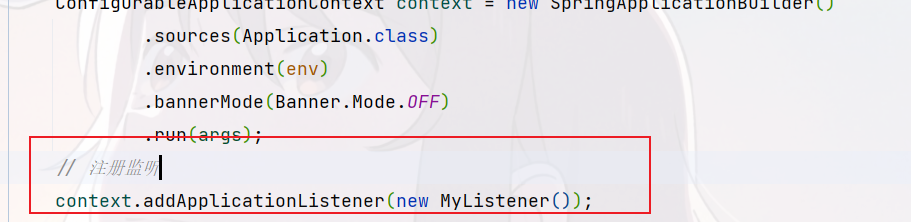
1、在应用上下文直接添加
2、使用spring.factories文件

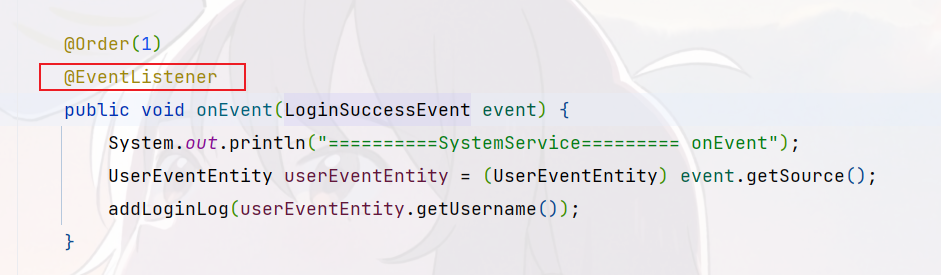
3、使用@EventListener注解
4、自定义监听器实现ApplicationListener接口并交给Spring管理

事件发布:ApplicationEventPublisherAware 或注入:ApplicationEventMulticaster
事件监听:组件 + @EventListener
SpringBoot事件机制的更多相关文章
- [译]谈谈SpringBoot 事件机制
要"监听"事件,我们总是可以将"监听器"作为事件源中的另一个方法写入事件,但这将使事件源与监听器的逻辑紧密耦合. 对于实际事件,我们比直接方法调用更灵活.我们可 ...
- springBoot的事件机制---GenericApplicationListener用法
springBoot的事件机制---GenericApplicationListener用法 什么是ApplicationContext? 它是Spring的核心,Context我们通常解释为上下文环 ...
- SpringBoot事件监听机制及观察者模式/发布订阅模式
目录 本篇要点 什么是观察者模式? 发布订阅模式是什么? Spring事件监听机制概述 SpringBoot事件监听 定义注册事件 注解方式 @EventListener定义监听器 实现Applica ...
- ApplicationEvent事件机制源码分析
<spring扩展点之三:Spring 的监听事件 ApplicationListener 和 ApplicationEvent 用法,在spring启动后做些事情> <服务网关zu ...
- SpringBoot学习(二)探究Springboot启动机制
引言: SpringBoot为我们做的自动配置,确实方便快捷,但是对于新手来说,如果不大懂SpringBoot内部启动原理,以后难免会吃亏.所以这次博主就跟你们一起探究一下SpringBoot的启动原 ...
- 搞清楚Spring事件机制后:Spring的源码看起来简单多了
本文主讲Spring的事件机制,意图说清楚: 什么是观察者模式? 自己实现事件驱动编程,对标Spring的事件机制 彻底搞懂Spring中的事件机制,从而让大家 本文内容较长,代码干货较多,建议收藏后 ...
- 观察者模式之spring事件机制
ddsspring中的事件机制使用到设计模式中的观察者模式 ,观察者模式有两个概念,1.观察者.被观察者.2.被观察者做出相应得动作,观察者能接收到.不分析设计模式,学习下spring中的事件机制实际 ...
- 【移动端兼容问题研究】javascript事件机制详解(涉及移动兼容)
前言 这篇博客有点长,如果你是高手请您读一读,能对其中的一些误点提出来,以免我误人子弟,并且帮助我提高 如果你是javascript菜鸟,建议您好好读一读,真的理解下来会有不一样的收获 在下才疏学浅, ...
- tkinter事件机制
一.tkinter.Event tkinter的事件机制跟js是一样的,也是只有一个Event类,这个类包罗万象,集成了键盘事件,鼠标事件,包含各种参数. 不像java swing那种强类型事件,sw ...
- [解惑]JavaScript事件机制
群里童鞋问到关于事件传播的一个问题:“事件捕获的时候,阻止冒泡,事件到达目标之后,还会冒泡吗?”. 初学 JS 的童鞋经常会有诸多疑问,我在很多 QQ 群也混了好几年了,耳濡目染也也收获了不少,以后会 ...
随机推荐
- 使用API接口获取淘宝商品数据的详细指南
在电商行业中,淘宝作为中国最大的在线购物平台,每天有数以百万计的商品被发布和交易.作为程序员,如果需要获取淘宝商品的详细数据,可以通过调用API接口来实现.本文将详细介绍如何使用淘宝API接口获取 ...
- 如何通过关键词搜索API接口获取1688的商品详情
如果你是一位电商运营者或者是想要进行1688平台产品调研的人员,你可能需要借助API接口来获取你所需要的信息.在这篇文章中,我们将会讨论如何通过关键词搜索API接口获取1688的商品详情. 第一步:获 ...
- Web服务器部署上线的踩坑流程回顾与知新
5月份时曾部署上线了C++的Web服务器,温故而知新,本篇文章梳理总结一下部署流程知识: 最初的解决方案:https://blog.csdn.net/BinBinCome/article/detail ...
- Go开始:Go基本元素介绍
本文深入探讨了Go编程语言中的核心概念,包括标识符.关键字.具名函数.具名值.定义类型.类型别名.包和模块管理,以及代码块和断行.这些元素是构成Go程序的基础,也是编写高质量代码的关键. 关注Tech ...
- Deep Transfer Learning综述阅读笔记
这是一篇linkedin发表的深度迁移学习综述, 里面讲了一些对于search/recommend system中的迁移学习应用. 有不少指导性的方法, 看完后摘录出来 对于ranking方向的TL, ...
- Solution -「BalticOI 2004」Sequence
Description Link. Given is a sequencen \(A\) of \(n\) intergers. Construct a stricly increasing sequ ...
- 如何查询4GL程序中创建的临时表中的数据
前提:将dba_segments这个表的select权限授权给各个营运中心(即数据库用户) ①.用sys账号以dba的权限登录数据库 <topprod:/u1/topprod/tiptop> ...
- Factors 分解质因数
package com.yourself.yours; import java.util.Scanner; /** ****************************************** ...
- Java 中 extends 与implements 的区别 ?
一.介绍extends 与 implements 的概念 1.类与类之间的继承使用extends : 子类extends父类的属性和方法,并且进行扩展或者重写. // 父类 class Animal ...
- C#软件架构设计原则
软件架构设计原则 学习设计原则是学习设计模式的基础.在实际的开发过程中,并不是一定要求所有的代码都遵循设计原则,而是要综合考虑人力.成本.时间.质量,不刻意追求完美,要在适当的场景遵循设计原则.这体现 ...