
popup介绍
一、作用
用于使浏览器自动生成弹窗
二、示例
1、新建Django项目,新建APP:app01, 项目根目录下新建文件夹static
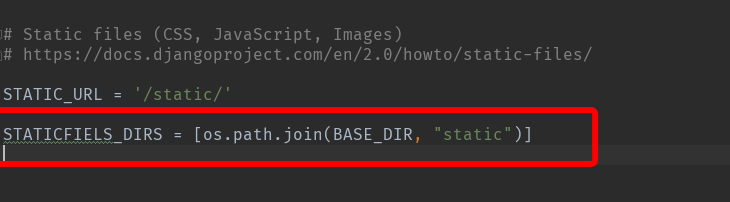
2、静态文件配置,在settings.py中配置static:
3、路由配置, urls.py:
from django.contrib import admin

from django.urls import path

from app01 import views

urlpatterns = [

    path('admin/', admin.site.urls),

    path('index/', views.index),

    path('add/city/', views.add_city),

]
4、编写view函数,views.py:
from django.shortcuts import render, HttpResponse

def index(request):

    """首页"""

    return render(request, "index.html", locals())

def add_city(request):

    """添加城市"""

    if request.method == "POST":

        # 获取数据  存入数据库

        # ........

        city_info = {"id": 5, "city": "成都"}

        return render(request, "pop-response.html", locals())  # 新建完成后自动关闭窗口

    return render(request, "add_city.html")
5、templates模板编写:
index.html
<!DOCTYPE html>

<html lang="en">

<head>

    <meta charset="UTF-8">

    <title>Title</title>

</head>

<body>

<form>

    <p><input type="text"></p>

    <p>

        <select id="city">

            <option value=1>北京</option>

            <option value=2>天津</option>

            <option value=3>上海</option>

            <option value=4>深圳</option>

        </select>

        <input type="button" value="+" onclick="popUp();">

    </p>

</form>

<script>

    function func(cityId, cityTitle){

        //构造一个option标签

        var tag = document.createElement("option");

        tag.value = cityId;

        tag.innerText = cityTitle;

        //找到select框  将option添加进去

        var city = document.getElementById("city");

        city.appendChild(tag);

    }

    function popUp() {

        //打开新弹窗  (弹窗地址,弹窗名, 弹窗格式设置)

        window.open("/add/city/", "x1", "status=1, height=500, width=500, toolbar=0, resizeable=0");

    }

</script>

</body>

</html>
add_city.html
<!DOCTYPE html>

<html lang="en">

<head>

    <meta charset="UTF-8">

    <title>Title</title>

    <style>

        .box {

            width: 200px;

            height: 200px;

            border: 1px solid dodgerblue;

        }

    </style>

</head>

<body>

<h3>新建城市</h3>

<div class="box">

    <form method="post">

        {% csrf_token %}

        <input type="text" name="city">

        <input type="submit" value="提交">

    </form>

</div>

</body>

</html>
pop-response.html
<!DOCTYPE html>

<html lang="en">

<head>

    <meta charset="UTF-8">

    <title>正在关闭</title>

</head>

<body>

<script src="/static/commons.js"></script>

{#引入文件,里面的'{{ id }}'不会被识别,就只是把它当做普通的字符串打印出来#}

<script>

    //function close(){

        //window.close();

    //}

    //close();

    // 自执行函数   在写完函数后, 后面直接加括号便可以执行,括号内可以传递参数, 执行效果同上

    (function(){

        // 获取到是谁把这个页面打开的

        opener.func({{ id }}, "{{ city }}"); //传递参数 {"id": 5, "city": "成都"}

        window.close();

    })();

    // 可以传参:

    //(function(arg){

    //})("x1")  // arg=x1

</script>

</body>

</html>
6、static文件夹下新建文件commons.js:
alert('{{id}}'); //在pop-response.html中引入它
7、启动项目,在浏览器输入:http://127.0.0.1:8088/index/进入首页,点击按钮弹出新窗口,新增城市,提交后窗口自动关闭
popup介绍的更多相关文章
- 重新想象 Windows 8 Store Apps 系列文章索引
[源码下载][重新想象 Windows 8.1 Store Apps 系列文章] 重新想象 Windows 8 Store Apps 系列文章索引 作者:webabcd 1.重新想象 Windows ...
- 重新想象 Windows 8.1 Store Apps 系列文章索引
[源码下载] [重新想象 Windows 8 Store Apps 系列文章] 重新想象 Windows 8.1 Store Apps 系列文章索引 作者:webabcd 1.重新想象 Windows ...
- Windows 8 Store Apps
重新想象 Windows 8 Store Apps 系列文章索引 Posted on 2013-11-18 08:33 webabcd 阅读(672) 评论(3) 编辑 收藏 [源码下载] 重新想象 ...
- 34.qt quick-Popup弹出窗口自定义
1.Popup介绍 Popup是一个弹出窗口的控件它的常用属性如下所示: anchors.centerIn : Object,用来设置居中在谁窗口中. closePolicy : enumeratio ...
- popup定位引擎popper.js介绍
https://medium.com/@FezVrasta/popper-js-v1-5e8b3acd888c https://survivejs.com/blog/popper-interview/ ...
- 背水一战 Windows 10 (36) - 控件(弹出类): ToolTip, Popup, PopupMenu
[源码下载] 背水一战 Windows 10 (36) - 控件(弹出类): ToolTip, Popup, PopupMenu 作者:webabcd 介绍背水一战 Windows 10 之 控件(弹 ...
- 网页引导:jQuery插件实现的页面功能介绍引导页效果
现在很多网站不仅是介绍,更多的是有一些功能,怎么样让客户快速的知道网站有哪些功能呢?这里pagewalkthrough.js插件能帮我们实现,它是一个轻量级的jQuery插件,它可以帮助我们创建一个遮 ...
- 重新想象 Windows 8.1 Store Apps (78) - 控件增强: ScrollViewer, FlipView, Popup
[源码下载] 重新想象 Windows 8.1 Store Apps (78) - 控件增强: ScrollViewer, FlipView, Popup 作者:webabcd 介绍重新想象 Wind ...
- jQuery Mobile 1.1八大新特性介绍
随着HTML 5时代的来临,移动开发开始进入了一个新的时代,现在只需要懂得HTML5,配合一定的开发框架,就可以开发出十分漂亮的HTML5的移动应用.在众多的 移动HTML5开发框架中,比较著名的是j ...
随机推荐
- python_os.path模块用法
python中os.path模块用法: dirname() 用于去掉文件名,返回目录所在的路径 >>> import os >>> os.path.dirname ...
- 进击的Python【第十一章】:消息队列介绍、RabbitMQ&Redis的重点介绍与简单应用
消息队列介绍.RabbitMQ.Redis 一.什么是消息队列 这个概念我们百度Google能查到一大堆文章,所以我就通俗的讲下消息队列的基本思路. 还记得原来写过Queue的文章,不管是线程queu ...
- [PKUWC2018]猎人杀
题解 感觉是一道神题,想不出来 问最后\(1\)号猎人存活的概率 发现根本没法记录状态 每次转移的分母也都不一样 可以考虑这样一件事情: 如果一个人被打中了 那么不急于从所有人中将ta删除,而是给ta ...
- bzoj1415 [Noi2005]聪聪和可可【概率dp 数学期望】
传送门:http://www.lydsy.com/JudgeOnline/problem.php?id=1415 noip2016 D1T3,多么痛的领悟...看来要恶补一下与期望相关的东西了. 这是 ...
- Bryce1010的linux课程设计
1.设计目的 2.软件环境 3.要求 4.需求分析 5.总体设计 6.详细设计 7.调试与测试 8.总结 思路整理: 1.如果要开始编译着手的准备 SQLite数据库的安装 gtk+的安装 (.... ...
- synchronized(4)修饰语句块之:synchronized(this)
synchronized(this) 此时,线程获得的是对象锁.例如: public class Thread8 extends Thread { public void sync_fun() { s ...
- 设置UITableViewCell 选中时的背景颜色
自定义Cell如图 一个View上面放了四个Label 分别连线到.m文件中 @property (weak, nonatomic) IBOutlet UILabel *nameLabel; @pro ...
- CCF|公共钥匙盒|Java
import java.util.Scanner; public class Main { public static void main(String[] args) { Scanner in = ...
- SQL 触发器-如何查看当前数据库中有哪些触发器
在查询分析器中运行: use 数据库名goselect * from sysobjects where xtype='TR' sysobjects 保存着数据库的对象,其中 xtype 为 TR 的记 ...
- [安卓开发板]迅为IMX6 四核Android开发板
工业级核心板-Android开发板 10层高速PCB设计,充分保证电磁兼容 处理器:开发板默认是四核商业扩展级芯片,可根据用户需求更换单核.双核.工业级.汽车级处理器,批量更省成本. 扩展引脚:320 ...