
一步一步教你用IntelliJ IDEA 搭建SSM框架(2)——配置mybatis-geneator
我们要搭建整个SSM框架,所以要继续上篇文章没有完成的工作,下面配置mybatis-geneator,自动生成mybatis代码。
在上篇文章中的pom.xml的配置文件中已经加了mybatis-geneator的依赖包,如下图:
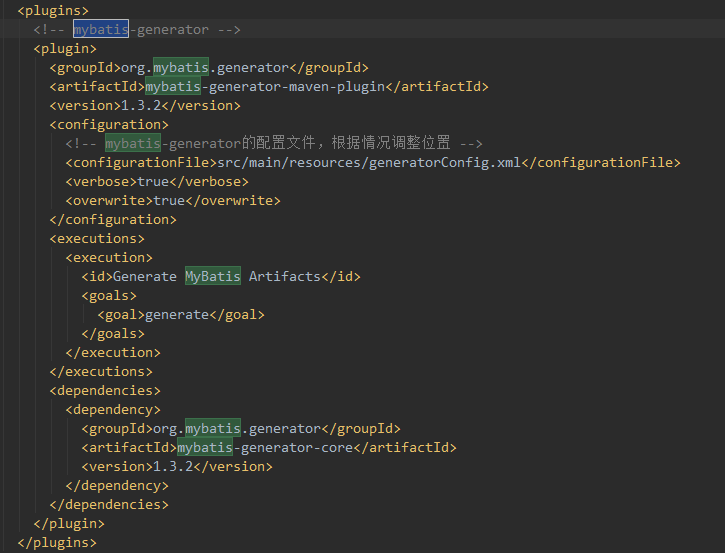
请注意:上图的plugins是和pluginManagement是同级的,如果把mybatis.geneator的plugin放在pluginManagement就引用不到mybatis-geneator
然后在 applicationContext.xml文件中添加下面代码:
<!-- 配置会话工厂SqlSessionFactory -->

    <bean id="sqlSessionFactory" class="org.mybatis.spring.SqlSessionFactoryBean">

        <!-- 数据源 -->

        <property name="dataSource" ref="dataSource"/>

        <property name="mapperLocations" value="classpath:sqlmap/*Mapper.xml"/>

        <property name="typeAliasesPackage" value="cn.only.entity" />

    </bean>

    <!-- 在spring容器中配置mapper的扫描器产生的动态代理对象在spring的容器中自动注册,bean的id就是mapper类名(首字母小写)-->

    <bean class="org.mybatis.spring.mapper.MapperScannerConfigurer">

        <!-- 指定扫描包的路径,就是mapper接口的路径,多个包中间以 半角逗号隔开   -->

        <property name="basePackage" value="cn.only.dao"/>

        <!-- 配置sqlSessionFactoryBeanName -->

        <property name="sqlSessionFactoryBeanName" value="sqlSessionFactory"/>

    </bean>
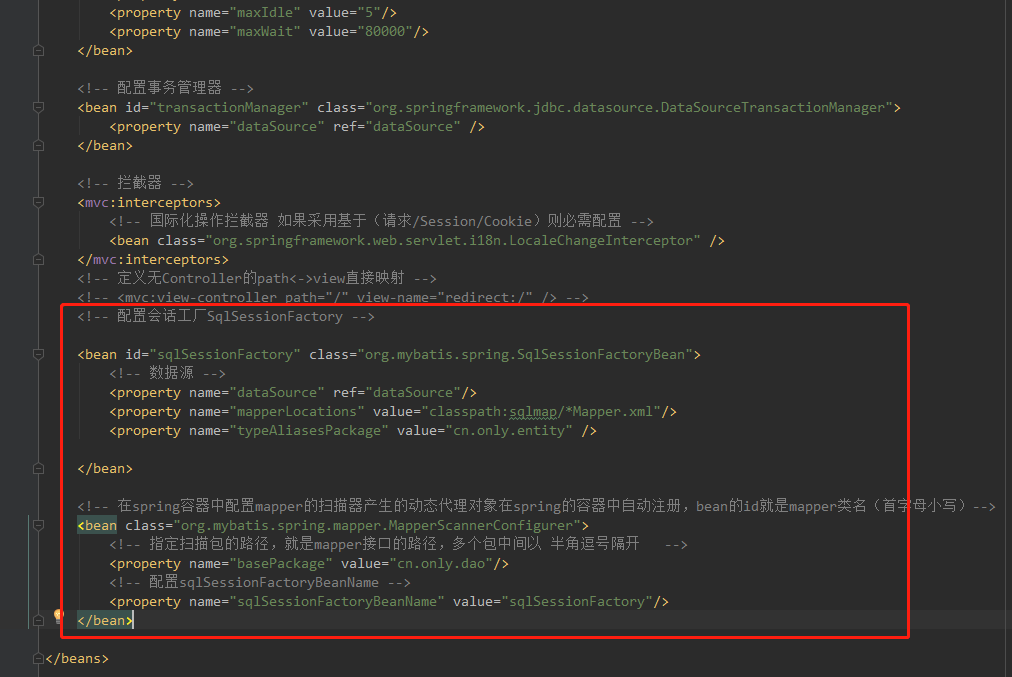
generatorConfig.xml的配置如下:
<?xml version="1.0" encoding="UTF-8" ?>

<!DOCTYPE generatorConfiguration PUBLIC "-//mybatis.org//DTD MyBatis Generator Configuration 1.0//EN"

        "http://mybatis.org/dtd/mybatis-generator-config_1_0.dtd">

<generatorConfiguration>

    <!--导入属性配置 -->

    <properties resource="generator.properties"/>

    <classPathEntry

            location="C:\Users\Administrator\.m2\repository\mysql\mysql-connector-java\5.0.8\mysql-connector-java-5.0.8.jar" />

    <context id="context1">

        <!-- 注释 -->

        <commentGenerator>

            <property name="suppressAllComments" value="true" /><!-- 是否取消注释 -->

            <property name="suppressDate" value="true" /> <!-- 是否生成注释代时间戳 -->

        </commentGenerator>

        <jdbcConnection driverClass="${driver}"

                        connectionURL="${url}"

                        userId="${username}"

                        password="${password}" />

        <!-- 类型转换 -->

        <javaTypeResolver>

            <!-- 是否使用bigDecimal, false可自动转化以下类型(Long, Integer, Short, etc.) -->

            <property name="forceBigDecimals" value="false" />

        </javaTypeResolver>

        <javaModelGenerator targetPackage="${modelPackage}"

                            targetProject="${modelProject}" />

        <sqlMapGenerator targetPackage="${sqlPackage}" targetProject="${sqlProject}" />

        <javaClientGenerator targetPackage="${mapperPackage}"

                             targetProject="${mapperProject}" type="XMLMAPPER" />

        <!-- 如果需要通配所有表 直接用sql的通配符    %即可 -->

        <table schema="" tableName="${table}" enableCountByExample="false"

               enableUpdateByExample="false" enableDeleteByExample="false"

               enableSelectByExample="false" selectByExampleQueryId="false"/>

    </context>

</generatorConfiguration>
代码中的classPathEntry的location换成您本地的。如下图,
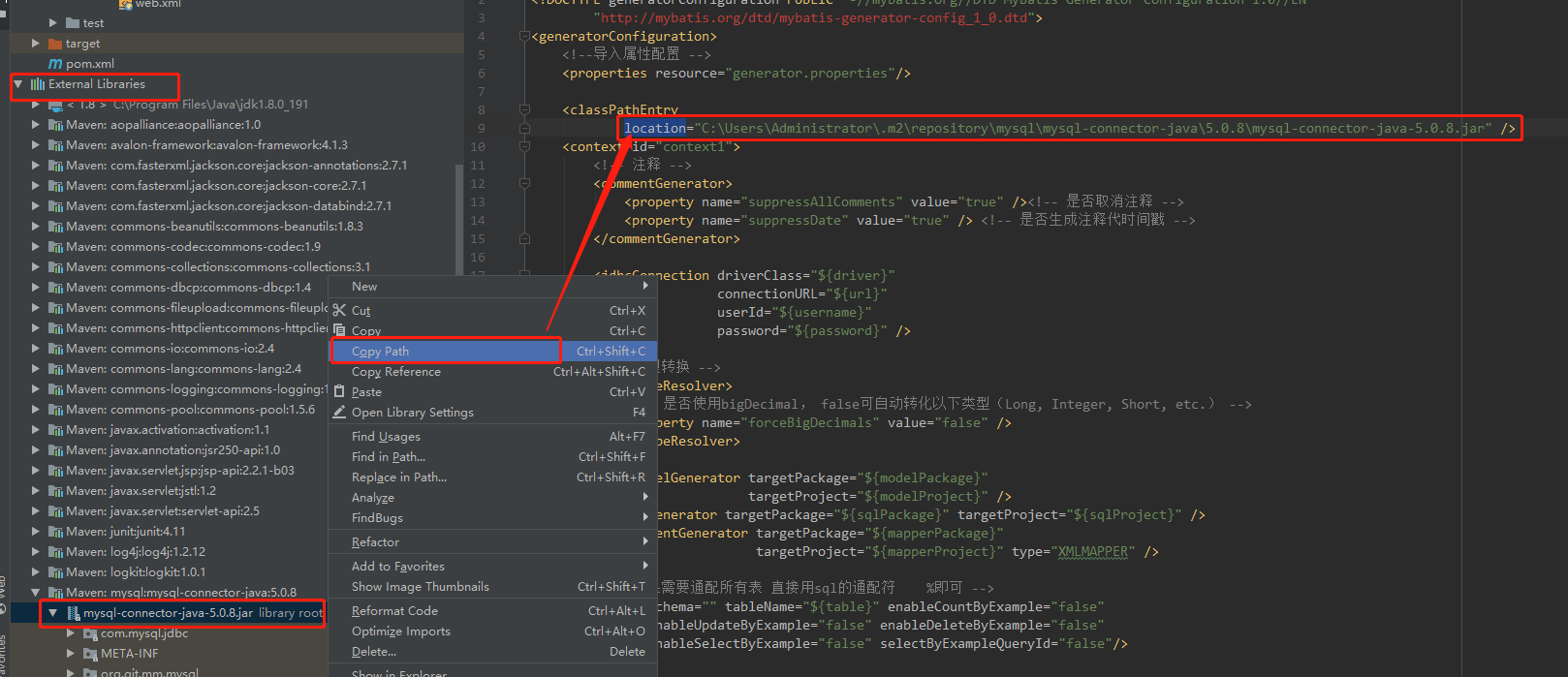
注意:如果mysql-connector-java的版本与本地的MySQL版本不配套,数据库操作会报错。
generator.properties配置
driver=com.mysql.jdbc.Driver

url=jdbc:mysql://localhost:3306/test?useUnicode=true&characterEncoding=utf-8&serverTimezone=UTC

username=root

password=******

#entity 包名和 java目录

modelPackage=cn.only.entity

modelProject=src/main/java

#sqlmap包名 和resources目录

sqlPackage=sqlmap

sqlProject=src/main/resources

#mapper包名和 java目录

mapperPackage=cn.only.dao

mapperProject=src/main/java

table=message
注意:上面的代码中如果没有serverTimezone=UTC,代码运行会报错
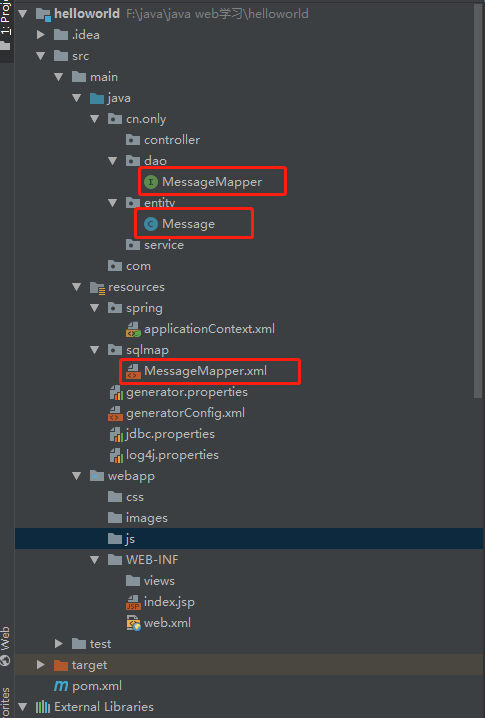
modelPackage:连接数据库自动生成的实体类保存的位置
sqlPackage:生成xml映射文件保存的位置
mapperPackage:生成数据库接口保存的位置
table:数据库里面表的名字
现在mybatis-geneator已经配置好了。
MySQL数据库中已经建立了数据库test和表message。
点击IntelliJ IDEA右侧边栏的Maven Projects,如下图。
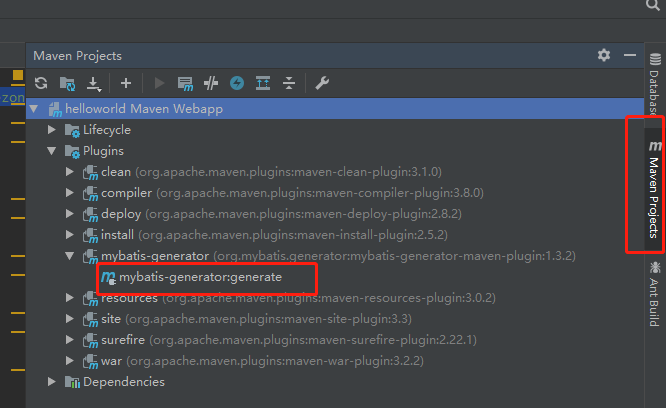
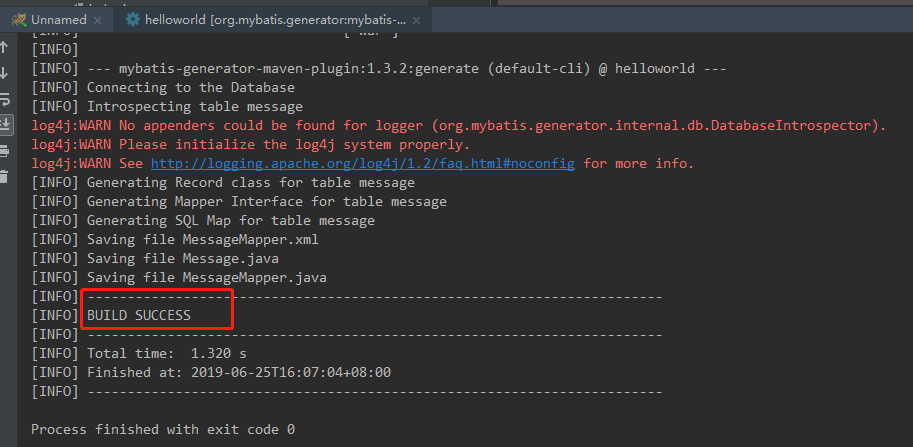
双击上图中的 mybatis-generator:generate,运行结果如下图
mybatis-generator运行成功以后会自动生成以下文件:
现在Spring MVC + Spring + MyBatis 的框架已经搭建好,下面就用junit测试工具,测一下数据能不能正常写入数据库。
打开MessageMapper文件,添加@Repository标签,表明这是数据访问组件,如下图
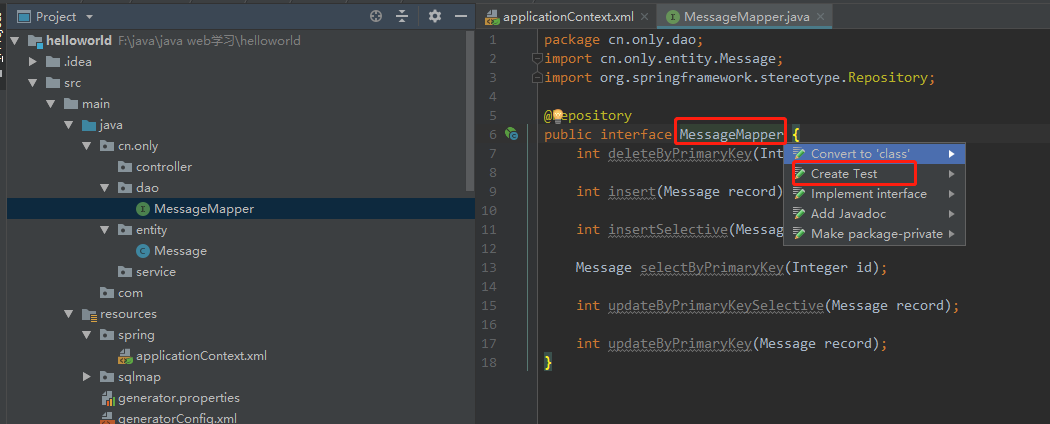
上图中鼠标放在紧跟在MessageMapper后面,按alt+enter,选择Create Test,弹窗如下图:
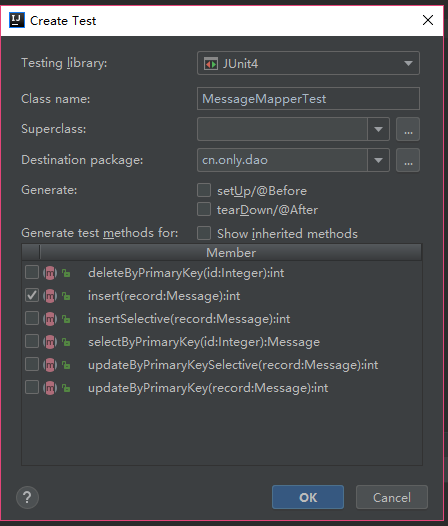
上图中选中insert,点击OK,会在test目录下生成MessageMapperTest测试文件,测试代码就写在此文件中如下:
package cn.only.dao;

import cn.only.entity.Message;

import org.junit.After;

import org.junit.Before;

import org.junit.Test;

import org.springframework.beans.factory.annotation.Autowired;

import org.springframework.context.ApplicationContext;

import org.springframework.context.support.ClassPathXmlApplicationContext;

import static org.junit.Assert.*;

public class MessageMapperTest {

    private ApplicationContext applicationContext;

    @Autowired

    private MessageMapper mapper;

    @Before

    public void setUp() throws Exception {

        // 加载spring配置文件

        applicationContext = new ClassPathXmlApplicationContext("classpath:spring/applicationContext.xml");

        // 导入需要测试的

        mapper = applicationContext.getBean(MessageMapper.class);

    }

    @After

    public void tearDown() throws Exception {

    }

    @Test

    public void insert() throws Exception{

        Message message = new Message();

        message.setCommand("做仙女");

        message.setContent("吃美食");

        message.setDescription("云游四方");

        int result = mapper.insert(message);

        System.out.println(result);

        assert (result == 1);

    }

}

如上图点击绿色圆圈和三角形组合,点击Run ‘insert()’,运行结果如下,表示运行成功。

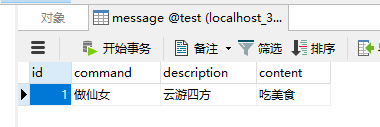
打开数据库查看结果如下:
好了,SSM框架已经搭建成功。
本文参照这篇文章写的:https://www.cnblogs.com/toutou/p/9015126.html#_nav_0,
一步一步教你用IntelliJ IDEA 搭建SSM框架(2)——配置mybatis-geneator的更多相关文章
- 详解intellij idea搭建SSM框架(spring+maven+mybatis+mysql+junit)(下)
在上一篇(详解intellij idea 搭建SSM框架(spring+maven+mybatis+mysql+junit)(上))博文中已经介绍了关于SSM框架的各种基础配置,(对于SSM配置不熟悉 ...
- 一步一步教你用IntelliJ IDEA 搭建SSM框架(3)——实现用户登录功能
上面两篇博客已经详细的介绍了在IntelliJ IDEA 搭建SSM框架的整个过程,下面我们就要在搭建好的环境里实现我们想要的功能了.本文完成用户的登录功能,主要包括:用户注册,登录,编辑,退出,注销 ...
- 详解intellij idea搭建SSM框架(spring+maven+mybatis+mysql+junit)(上)
SSM(Spring+SpringMVC+MyBatis)框架集由Spring.SpringMVC.MyBatis三个开源框架整合而成,常作为数据源较简单的web项目的框架. 其中spring是一个轻 ...
- 一步一步教你用IntelliJ IDEA 搭建SSM框架(1)
1.基本概念 SSM框架指:Spring MVC + Spring + MyBatis Spring MVC是一种web层mvc框架,用于替代servlet,处理|响应请求,获取表单参数,表单校验等 ...
- 手把手教你 基础 整合最优雅SSM框架:SpringMVC + Spring
我们看招聘信息的时候,经常会看到这一点,需要具备SSH框架的技能:而且在大部分教学课堂中,也会把SSH作为最核心的教学内容. 但是,我们在实际应用中发现,SpringMVC可以完全替代Struts,配 ...
- 基于IntelliJ IDEA开发工具搭建SSM框架并实现页面登录功能详细讲解二
接: 接下来配置类 UserController package com.chatRotbot.controller; import com.chatRotbot.model.User; import ...
- maven(二)基于intellij idea搭建ssm的maven项目结构
项目配置文件整合步骤 1.这里使用maven来引入项目所需要的jar包,所以也就不需要手动来管理jar包了. pom.xml 配置模板如下: <project xmlns="http: ...
- 手把手教你整合最优雅SSM框架:SpringMVC + Spring + MyBatis
在写代码之前我们先了解一下这三个框架分别是干什么的? 相信大以前也看过不少这些概念,我这就用大白话来讲,如果之前有了解过可以跳过这一大段,直接看代码! SpringMVC:它用于web层,相当于con ...
- 手把手教你整合最优雅SSM框架
我们看招聘信息的时候,经常会看到这一点,需要具备 SSM 框架的技能, SpringMVC 可以完全替代 Struts,配合注解的方式,编程非常快捷,而且通过 restful 风格定义 url,让地址 ...
随机推荐
- [Vue @Component] Pass Props Between Components with Vue Slot Scope & renderless component
Components with slots can expose their data by passing it into the slot and exposing the data using ...
- 喜欢玩warcraft的ltl
喜欢玩warcraft的ltl 时间限制:2000 ms | 内存限制:65535 KB 难度:3 描写叙述 ltl 很喜欢玩warcraft.由于warcraft十分讲究团队总体实力,而他自己如 ...
- Android从源码看ListView的重用机制
不管是android还是iOS,列表视图应该是最复杂的控件了.android中的listview从命名能够看出是个一维数组,而iOS中的tableview则是二维数组.但事实上须要注意的地方是差点儿相 ...
- 推断给定的IP地址是否是内网IP
/** * 推断给定的IP地址是否是内网IP * * @author GaoHuanJie */ public class Test{ public boolean isInnerIP(String ...
- JWPlayer Uncaught Error: Invalid SRT file
错误场景: JWPlayer 播放视频,加入了字幕和缩略图: 字幕为Srt格式: 1 00:00:00,000 --> 00:00:02,000 战略管理过程 2 00:00:03,000 -- ...
- CAS—改动默认登录页
1. 部署CAS-Server 本文以cas-server-3.4.11-release.zip为例.解压提取cas-server-3.4.11/modules/cas-server-webapp- ...
- Oracle 简单的列转行
需求是,统计每一个部门不同工种的薪水总和. SQL> select deptno,ename,job,sal from emp; DEPTNO ENAME JOB ...
- 李洪强经典面试题30-iOS应用性能调优的25个建议和技巧
iOS应用性能调优的25个建议和技巧 本文来自iOS Tutorial Team 的 Marcelo Fabri,他是Movile的一名 iOS 程序员.这是他的个人网站:http://www.mar ...
- leaning website
-->SoapUI http://soapui-tutorial.com/home/login/SOAPUI Module 13 - 1, 2, 3, 4, 5, 6 Module 1 ...
- bzoj 2465 小球
题目大意: 给定n个不同颜色的球,每个球都有一个分数,同时有m个瓶子,每个瓶子都有固定的容量 必须把球放到瓶子里面 计算最多能放多少个球到这些瓶子里 思路: 开始想的是费用流 超级源向每个球连一条 容 ...