
PowerShell和Bash的介绍
PowerShell是运行在windows平台的脚本,而Bash是运行在linux平台的脚本
现在bash能做的事情,PowerShell也能做,PowerShell的强大之处是它可以管理windows服务器(特别是域domain),现在的开源PowerShell 也可以管理Linux和Mac(通过PSRP)。
下载最新的PS程序
https://msdn.microsoft.com/en-us/Mt173057.aspx
安装后它会有powershell和它的开发IDE工具,ISE,非常不错!
一、进行powershell的程序
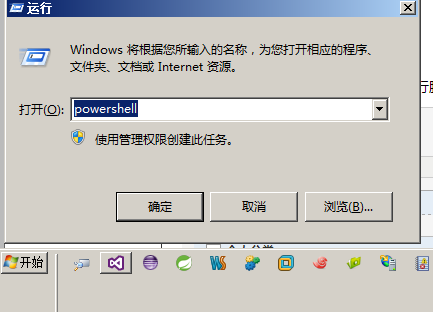
二、创建脚本,简单的Helloworld.ps1
任务的自动化是以程序文件或者可执行脚本文件为基础的,PowerShell也支持将命令列表做成脚本文件来执行。以下是Helloworld.ps1脚本文件的内容:
$a = "Hello World!"

$a

echo $a > a.txt

dir a.txt
Helloworld.ps1脚本文件的执行情况结果如下:
PS E:\>.\Helloworld.ps1 --注意在执行它时要加.\,表示当前上当下的文章,类似于centos里的文件执行方法
Hello world!Directory: E:\Mode LastWriteTime Length Name ---- ------------- ------ ---- -a--- 5/30/2017 4:56 PM 16 a.txt
下面是在eShopOnContainers上的一个例子,分别用ps和bash实现了程序的部署
#!/bin/bash

declare -a projectList=(

    '../src/Services/Catalog/Catalog.API'

    '../src/Services/Basket/Basket.API'

    '../src/Services/Ordering/Ordering.API'

    '../src/Services/Identity/Identity.API'

    '../src/Web/WebMVC'

    '../src/Web/WebSPA'

    '../src/Web/WebStatus'

)

# Build SPA app

# pushd $(pwd)../src/Web/WebSPA

# npm run build:prod

for project in "${projectList[@]}"

do

    echo -e "\e[33mWorking on $(pwd)/$project"

    echo -e "\e[33m\tRemoving old publish output"

    pushd $(pwd)/$project

    rm -rf obj/Docker/publish

    echo -e "\e[33m\tRestoring project"

    dotnet restore

    echo -e "\e[33m\tBuilding and publishing projects"

    dotnet publish -o obj/Docker/publish

    popd

done

# remove old docker images:

images=$(docker images --filter=reference="eshop/*" -q)

if [ -n "$images" ]; then

    docker rm $(docker ps -a -q) -f

    echo "Deleting eShop images in local Docker repo"

    echo $images

    docker rmi $(docker images --filter=reference="eshop/*" -q) -f

fi

# No need to build the images, docker build or docker compose will

# do that using the images and containers defined in the docker-compose.yml file.
powershell代码如下
Param([string] $rootPath)

$scriptPath = Split-Path $script:MyInvocation.MyCommand.Path

Write-Host "Current script directory is $scriptPath" -ForegroundColor Yellow

if ([string]::IsNullOrEmpty($rootPath)) {

    $rootPath = "$scriptPath\.."

}

Write-Host "Root path used is $rootPath" -ForegroundColor Yellow

$projectPaths =

    @{Path="$rootPath\src\Web\WebMVC";Prj="WebMVC.csproj"},

    @{Path="$rootPath\src\Web\WebSPA";Prj="WebSPA.csproj"},

    @{Path="$rootPath\src\Services\Identity\Identity.API";Prj="Identity.API.csproj"},

    @{Path="$rootPath\src\Services\Catalog\Catalog.API";Prj="Catalog.API.csproj"},

    @{Path="$rootPath\src\Services\Ordering\Ordering.API";Prj="Ordering.API.csproj"},

    @{Path="$rootPath\src\Services\Basket\Basket.API";Prj="Basket.API.csproj"}

    @{Path="$rootPath\src\Web\WebStatus";Prj="WebStatus.csproj"}

$projectPaths | foreach {

    $projectPath = $_.Path

    $projectFile = $_.Prj

    $outPath = $_.Path + "\obj\Docker\publish"

    $projectPathAndFile = "$projectPath\$projectFile"

    Write-Host "Deleting old publish files in $outPath" -ForegroundColor Yellow

    remove-item -path $outPath -Force -Recurse -ErrorAction SilentlyContinue

    Write-Host "Publishing $projectPathAndFile to $outPath" -ForegroundColor Yellow

    dotnet restore $projectPathAndFile

    dotnet build $projectPathAndFile

    dotnet publish $projectPathAndFile -o $outPath

}

########################################################################################

# Delete old eShop Docker images

########################################################################################

$imagesToDelete = docker images --filter=reference="eshop/*" -q

If (-Not $imagesToDelete) {Write-Host "Not deleting eShop images as there are no eShop images in the current local Docker repo."}

Else

{

    # Delete all containers

    Write-Host "Deleting all containers in local Docker Host"

    docker rm $(docker ps -a -q) -f

    # Delete all eshop images

    Write-Host "Deleting eShop images in local Docker repo"

    Write-Host $imagesToDelete

    docker rmi $(docker images --filter=reference="eshop/*" -q) -f

}

# WE DON'T NEED DOCKER BUILD AS WE CAN RUN "DOCKER-COMPOSE BUILD" OR "DOCKER-COMPOSE UP" AND IT WILL BUILD ALL THE IMAGES IN THE .YML FOR US
自己感觉,这两个东西在以后的程序部署上都会发挥各自强大的力量!
PowerShell和Bash的介绍的更多相关文章
- linux下一键安装 powershell,的bash脚本
说明 目前,linux下的powershell约等于pash.希望大家专注mono,关注pash. 一键安装脚本包括for centos6,centos7,ubuntu 14.04 ubuntu 1 ...
- 干货~powershell与bash和docker在项目中怎么用
回到目录 这个标题够直接了吧,够坦诚了吧,也许你在项目里这三个东西都没有用到,但这三个东西在未来的两年里将成为最HOT的技术,它们不是什么框架,也不是什么设计模式,而是做为程序和环境快速部署而设计出来 ...
- Linux基础之bash shell介绍及基本特性
今天继续讲Linux基础知识,内容是关于bash shell的.分享以下bash shell的相关知识,例如基本特性等. 1.8)bash shell的介绍 1.8.1)什么是bash shell ...
- 1.bash总体介绍
1.总体介绍1.1 什么是Bash?Bash(Borune-Again SHell)是一个用于Linux操作系统的shell,即命令解释器Bash与sh兼容,并从ksh和csh引进了一些有用的功能,在 ...
- Bash简单介绍
Bash不不过一个命令解析程序. 它本身拥有一种程序设计语言,使用这样的语言,能够编写shell脚本来完毕各种各样的工作.而这些工作是使用现成的命令所无法完毕的.Bash脚本能够使用if-then-e ...
- PowerShell~执行策略的介绍
首先看一下无法加载ps1脚本的解决方法 事实上也是由于策略导致的 解决方法主是开启对应的策略 set-ExecutionPolicy RemoteSigned 执行策略更改 执行策略可以防止您执行不 ...
- Typora + Powershell/bash + Git搭建自己的笔记
网上都说什么onenote,evernote,ant等笔记.个人感觉这些都不算太好,还是自己用简易东西搭建一个笔记. 个人推荐使用typora写笔记. 上面既有文件目录,还能通过模糊搜索. 然后需要p ...
- GITHUB中GIT BASH基础命令行
PS:转自https://www.cnblogs.com/WangXinPeng/p/8016293.html 1.常用命令行工具: ①cmd ②powershell ③git ba ...
- Cmder介绍和配置
一.命令行神器cmder介绍 windows上做开发,不管是cmd还是powershell,似乎都不够美观,不够强大.今天就来介绍一款可以替代cmd的神器"Cmder",话不多说, ...
随机推荐
- Writing a Simple YARN Application 从hadoop生态抽出yarn ,单独使用yarn
Apache Hadoop 2.9.1 – Hadoop: Writing YARN Applications https://hadoop.apache.org/docs/current/hadoo ...
- CSS3 的10种Loading
昨晚用CSS3实现了几种常见的Loading效果,虽然很简单,但还是分享一下,顺便也当是做做笔记…… 第1种效果: 代码如下: <div class="loading"> ...
- IE67下float左右对齐
例子: <style> .h1{text-align: left;} .leftA{color: #000} .rightA{color: #ccc; float: right;} < ...
- Spark基本原理
仅作<Spark快速大数据分析>学习笔记 定义:Spark是一个用来实现 快速 而 通用 的集群计算平台:(通用的大数据处理引擎:) 改进了原Hadoop MapReduce处理模型,体现 ...
- 2013级新生程序设计基础竞赛-正式赛 F 异或最大值 解题报告
F - 异或最大值 Time Limit: 2000/1000MS (Java/Others) Memory Limit: 128000/64000KB (Java/Others) Subm ...
- MD5Util1
package com.cc.hkjc.util; import java.math.BigInteger;import java.security.MessageDigest;import java ...
- java中匹配中文的正则表达式
java中要匹配中文的正则表达式可以有两种写法:一是使用unicode中文码:二是直接使用汉字字符: 例: (1)String str = "晴"; String regexStr ...
- 如何快糙好猛的使用Shiqi.Yu老师的公开人脸检测库(附源码)
前言 本次编写所用的库为于仕祺老师免费提供的人脸检测库.真心好用,识别率和识别速度完全不是Opencv自带的程序能够比拟的.将其配合Opencv的EigenFace算法,基本上可以形成一个小型的毕业设 ...
- UVaLive 6585 && Gym 100299F Draughts (暴力+回溯)
题意:给定一个 10*10的矩阵,每一个W可以跳过一个B向对角走到#并把B吃掉,并且可以一直跳直到不能动为止,现在是W走的时候,问你最多吃几个B. 析:直接暴力+回溯,深搜就好. 代码如下: #pra ...
- android:ellipsize省略文字用法(转载)
转自:http://zhangkun716717-126-com.iteye.com/blog/864989 TextView及其子类,当字符内容太长显示不下时可以省略号代替未显示的字符:省略号可以在 ...