
【集群监控】JMX exporter+Prometheus+Grafana监控Hadoop集群
下载jmx_exporter的jar包
创建配置文件namenode.yaml(datanode.yaml)放在任意位置,内容为你想要的metrics
参考配置:
---

startDelaySeconds:

hostPort: master:1234 #master为本机IP(一般可设置为localhost);1234为想设置的jmx端口(可设置为未被占用的端口)

#jmxUrl: service:jmx:rmi:///jndi/rmi://127.0.0.1:1234/jmxrmi

ssl: false

lowercaseOutputName: false

lowercaseOutputLabelNames: false
其他参数参考:
| Name | Description |
|---|---|
| startDelaySeconds | start delay before serving requests. Any requests within the delay period will result in an empty metrics set. |
| hostPort | The host and port to connect to via remote JMX. If neither this nor jmxUrl is specified, will talk to the local JVM. |
| username | The username to be used in remote JMX password authentication. |
| password | The password to be used in remote JMX password authentication. |
| jmxUrl | A full JMX URL to connect to. Should not be specified if hostPort is. |
| ssl | Whether JMX connection should be done over SSL. To configure certificates you have to set following system properties:-Djavax.net.ssl.keyStore=/home/user/.keystore-Djavax.net.ssl.keyStorePassword=changeit-Djavax.net.ssl.trustStore=/home/user/.truststore-Djavax.net.ssl.trustStorePassword=changeit |
| lowercaseOutputName | Lowercase the output metric name. Applies to default format and name. Defaults to false. |
| lowercaseOutputLabelNames | Lowercase the output metric label names. Applies to default format and labels. Defaults to false. |
| whitelistObjectNames | A list of ObjectNames to query. Defaults to all mBeans. |
| blacklistObjectNames | A list of ObjectNames to not query. Takes precedence over whitelistObjectNames. Defaults to none. |
| rules | A list of rules to apply in order, processing stops at the first matching rule. Attributes that aren't matched aren't collected. If not specified, defaults to collecting everything in the default format. |
| pattern | Regex pattern to match against each bean attribute. The pattern is not anchored. Capture groups can be used in other options. Defaults to matching everything. |
| attrNameSnakeCase | Converts the attribute name to snake case. This is seen in the names matched by the pattern and the default format. For example, anAttrName to an_attr_name. Defaults to false. |
| name | The metric name to set. Capture groups from the pattern can be used. If not specified, the default format will be used. If it evaluates to empty, processing of this attribute stops with no output. |
| value | Value for the metric. Static values and capture groups from the pattern can be used. If not specified the scraped mBean value will be used. |
| valueFactor | Optional number that value (or the scraped mBean value if value is not specified) is multiplied by, mainly used to convert mBean values from milliseconds to seconds. |
| labels | A map of label name to label value pairs. Capture groups from pattern can be used in each. name must be set to use this. Empty names and values are ignored. If not specified and the default format is not being used, no labels are set. |
| help | Help text for the metric. Capture groups from pattern can be used. name must be set to use this. Defaults to the mBean attribute decription and the full name of the attribute. |
| type | The type of the metric, can be GAUGE, COUNTER or UNTYPED. name must be set to use this. Defaults to UNTYPED. |
修改$HADOOP_HOME/etc/hadoop/hadoop-env.sh
NameNode节点添加:
export HADOOP_NAMENODE_OPTS="-Dcom.sun.management.jmxremote.authenticate=false -Dcom.sun.management.jmxremote.ssl=false -Dcom.sun.management.jmxremote.local.only=false -Dcom.sun.management.jmxremote.port=1234 $HADOOP_NAMENODE_OPTS "
DataNode节点添加:
export HADOOP_DATANODE_OPTS="-Dcom.sun.management.jmxremote.authenticate=false -Dcom.sun.management.jmxremote.ssl=false -Dcom.sun.management.jmxremote.local.only=false -Dcom.sun.management.jmxremote.port=1235 $HADOOP_DATANODE_OPTS "
提示:
端口1234(1235)要与之前设置的jmx端口保持一致
修改
$HADOOP_HOME/bin/hdfs
export HADOOP_NAMENODE_OPTS="$HADOOP_NAMENODE_OPTS -javaagent:/home/hadoop/jmx_prometheus_javaagent-0.3.1.jar=9200:/home/hadoop/namenode.yaml"
export HADOOP_DATANODE_OPTS="$HADOOP_DATANODE_OPTS -javaagent:/home/hadoop/jmx_prometheus_javaagent-0.3.1.jar=9300:/home/hadoop/datanode.yaml"
提示:9200(9300)为jmx_exporter提供metrics数据端口,后续Prometheus从此端口获取数据
访问http://master:9200/metrics就能获得需要的metrics数据:
# HELP jvm_buffer_pool_used_bytes Used bytes of a given JVM buffer pool.

# TYPE jvm_buffer_pool_used_bytes gauge

jvm_buffer_pool_used_bytes{pool="direct",} 1181032.0

jvm_buffer_pool_used_bytes{pool="mapped",} 0.0

# HELP jvm_buffer_pool_capacity_bytes Bytes capacity of a given JVM buffer pool.

# TYPE jvm_buffer_pool_capacity_bytes gauge

jvm_buffer_pool_capacity_bytes{pool="direct",} 1181032.0

jvm_buffer_pool_capacity_bytes{pool="mapped",} 0.0

# HELP jvm_buffer_pool_used_buffers Used buffers of a given JVM buffer pool.
...
下载Prometheus
https://prometheus.io/download/
解压
修改配置文件 prometheus.yml
添加
  - job_name: hadoop-master

    static_configs:

      - targets: ['localhost:9200']

  - job_name: hadoop-slave1

    static_configs:

      - targets: ['slave1:9300']
运行
./prometheus
http://master:9090/targets查看是否添加成功
成功则增加master,slave1
如下图
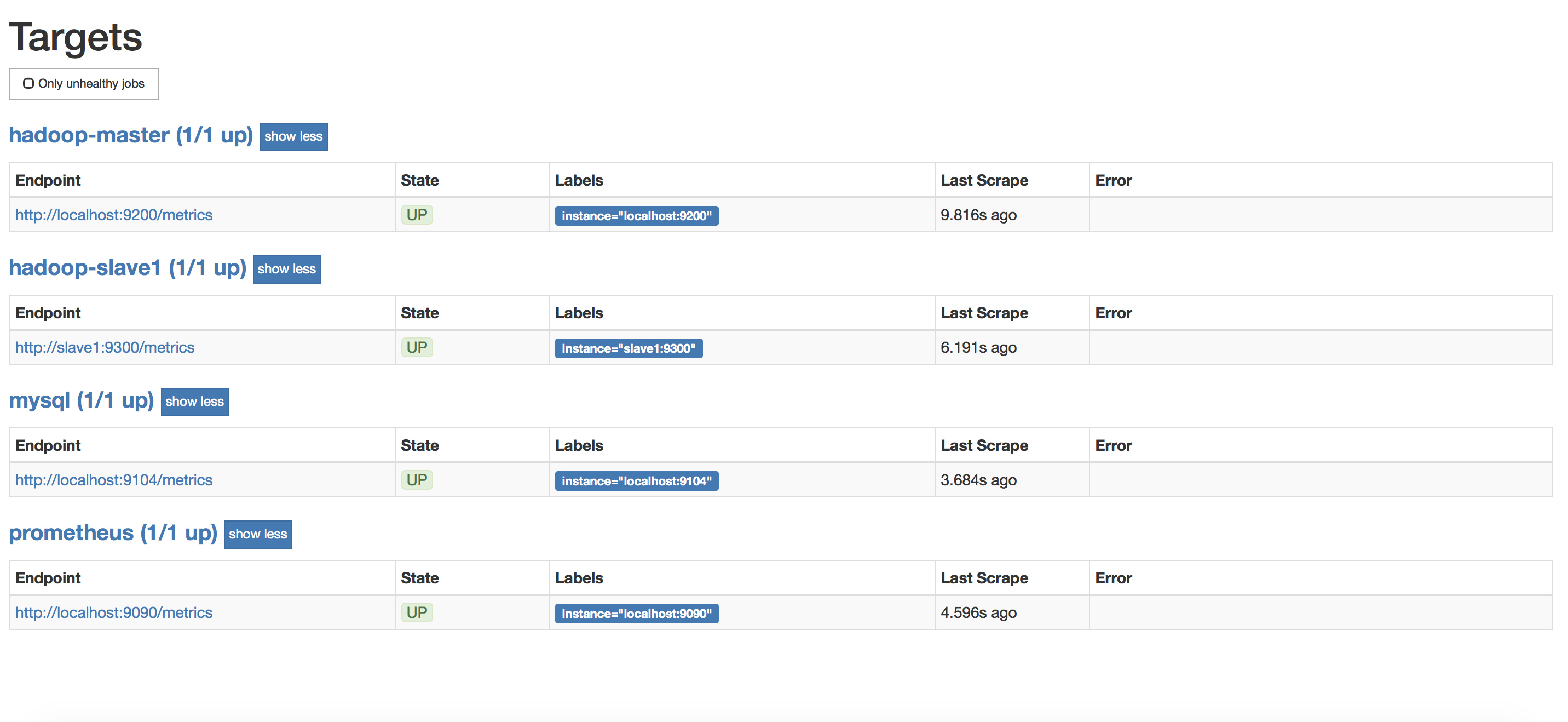
通过点击http://localhost:9200/metrics可以看到metrics数据
下载Grafana
https://grafana.com/grafana/download?platform=linux
安装相应版本grafana
启动grafana
systemctl start grafana-server
启动后,即可通过http://master:3000/来访问了(默认账号密码是admin/admin)
如下图

关联Grafana和Prometheus
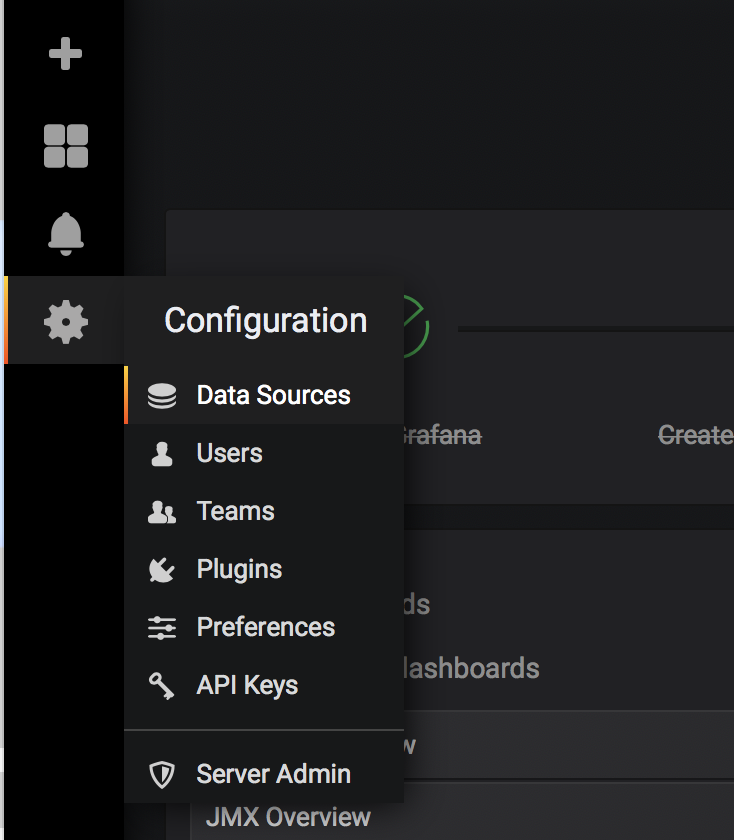
点击Data Sources
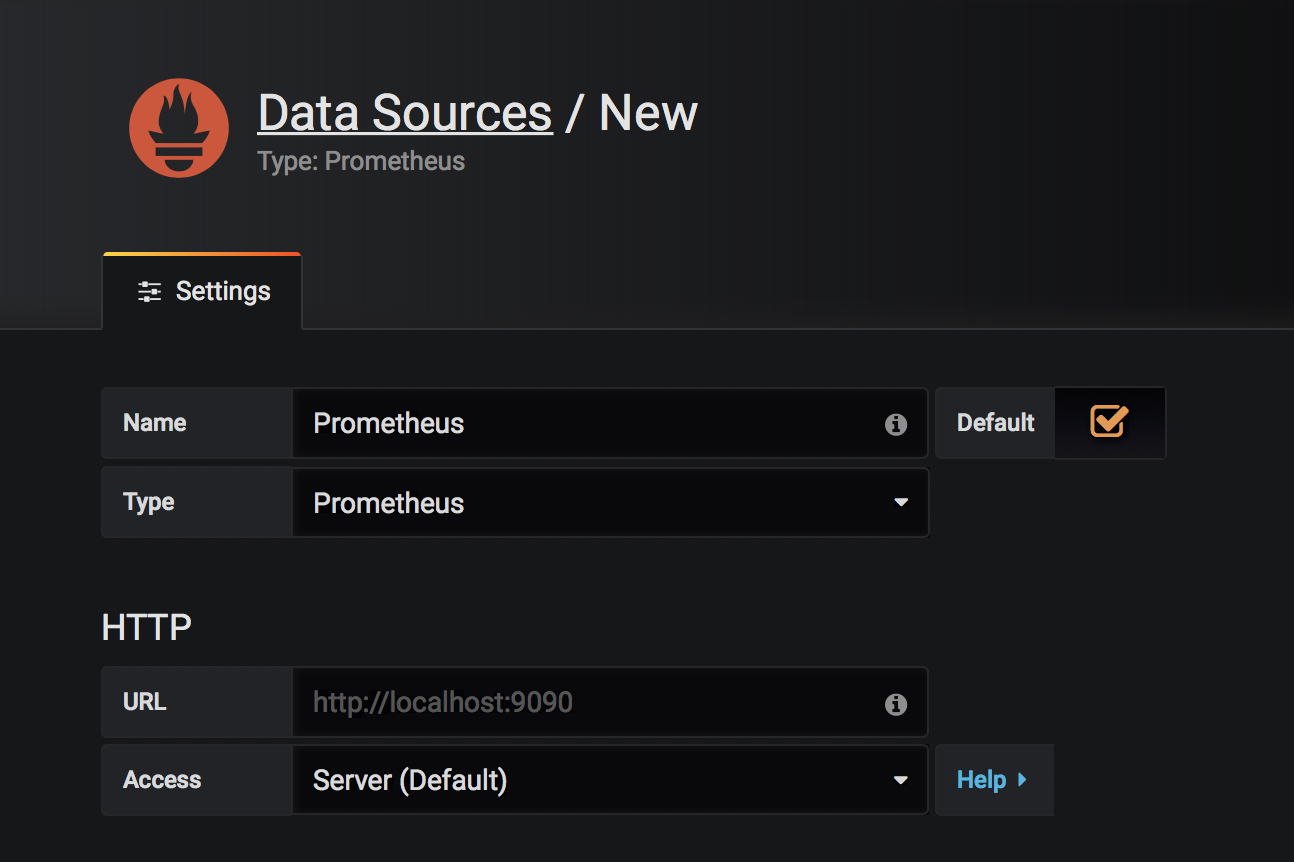
点击Add data source,填写数据保存
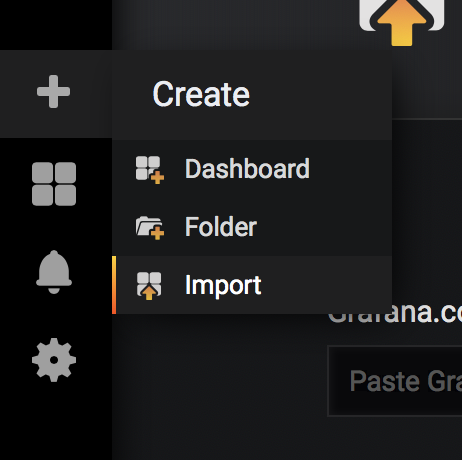
添加一个dashboard,如下图进入dashboard导入页面
点击Upload .json File,导入模版(可从https://grafana.com/dashboards下载)

导入成功后可以看到类似如下效果,完成!

【集群监控】JMX exporter+Prometheus+Grafana监控Hadoop集群的更多相关文章
- k8s集群监控 cadvisor/exporter+prometheus+grafana
### k8s监控处理 ### 1.cadvisor/exporter+prometheus+grafana 安装#### 1.1 配置nfs安装```shellubuntu: nfs 服务器 apt ...
- cAdvisor+Prometheus+Grafana监控docker
cAdvisor+Prometheus+Grafana监控docker 一.cAdvisor(需要监控的主机都要安装) 官方地址:https://github.com/google/cadvisor ...
- [转帖]Prometheus+Grafana监控Kubernetes
原博客的位置: https://blog.csdn.net/shenhonglei1234/article/details/80503353 感谢原作者 这里记录一下自己试验过程中遇到的问题: . 自 ...
- Prometheus + Grafana 监控系统搭
本文主要介绍基于Prometheus + Grafana 监控Linux服务器. 一.Prometheus 概述(略) 与其他监控系统对比 1 Prometheus vs. Zabbix Zabbix ...
- Prometheus+Grafana监控SpringBoot
Prometheus+Grafana监控SpringBoot 一.Prometheus监控SpringBoot 1.1 pom.xml添加依赖 1.2 修改application.yml配置文件 1. ...
- Prometheus+Grafana监控Kubernetes
涉及文件下载地址:链接:https://pan.baidu.com/s/18XHK7ex_J0rzTtfW-QA2eA 密码:0qn6 文件中需要下载的镜像需要自己提前下载好,eg:prom/node ...
- prometheus+grafana监控mysql
prometheus+grafana监控mysql 1.安装配置MySQL官方的 Yum Repository(有mysql只需设置监控账号即可) [root@localhost ~]# wget - ...
- [转帖]安装prometheus+grafana监控mysql redis kubernetes等
安装prometheus+grafana监控mysql redis kubernetes等 https://www.cnblogs.com/sfnz/p/6566951.html plug 的模式进行 ...
- prometheus+grafana监控redis
prometheus+grafana监控redis redis安装配置 https://www.cnblogs.com/autohome7390/p/6433956.html redis_export ...
随机推荐
- A-The power of Fibonacci_2019牛客暑期多校训练营(第九场)
题意 求\(\sum_0^n{Fb}_i^m \mod (1e9)\) 题解 模1e9时的斐波那契数列循环节太大,考虑把模数质因数分解成\(2^9\cdot5^9\),此时循环节变成768和78125 ...
- CodeForces - 697D - Puzzles DFS
传送门:D - Puzzles 题意:在一个图中,从1开始dfs,求每一个点到达的期望: 思路:(下面是队长写的) 首先求的是到每一个点的步数的期望. 记fa( u ) = v, son( v )表示 ...
- 2019 HZNU Winter Training Day 13 Comprehensive Training
A.Jongmah CodeForces-1110D 题意:你在玩一个数字游戏,有一堆写在瓦片上的数字,希望你能组成最多的三元组(三个数字相同,或顺子). 这题用到的方法是动态规划.f[i][j] ...
- Spring.Net是怎么在MVC中实现注入的(原理)
本文将介绍Spring.Net(不仅仅是Spring.Net,其实所有的IoC容器要向控制器中进行注入,原理都是差不多的)在MVC控制器中依赖注入的实现原理,本文并没有关于在MVC使用Spring怎么 ...
- 【2】KNN:约会对象分类器
前言 这是一个KNN算法的应用实例,参考<机器学习实战>中的datingTestSet2.txt的数据集. 可以通过对不同约会对象的特征进行分析然后自动得出以下三种结论: 不喜欢的 有点魅 ...
- Nuget打包类库及引用
什么是nuget 适用于任何现代开发平台的基本工具可充当一种机制,通过这种机制,开发人员可以创建.共享和使用有用的代码. 通常,此类代码捆绑到"包"中,其中包含编译的代码(如 DL ...
- Unity3D_05_理解Unity的新GUI系统(UGUI)
理解Unity的新GUI系统(UGUI) Unity GUI 链接:UnityEngine.UI系统基础类架构图 Unity GUI 链接:UnityEngine Event & Event ...
- Peer reports incompatible or unsupported protocol version.
问题描述 ==> CentOS 操作系统 git clone 项目时出现类似如下错误: fatal: unable to access 'https://github.com/rancher/r ...
- Redis的复制(Master/Slave)、主从复制、读写分离 (下)
哨兵模式(就是反客为主的自动版) 能够自动监控主机是否故障,如果故障了根据投票数自动将从机变成主机 1创建哨兵文件 touch sentinel.conf [root@localhost myredi ...
- 深入理解Three.js中透视投影照相机PerspectiveCamera
前言 在开始正式讲解透视摄像机前,我们先来理理three.js建模的流程.我们在开始创建一个模型的时候,首先需要创建我们模型需要的物体,这个物体可以是three.js中已经为我们封装好的,比如正方体, ...