
Spring高级注解
目录:
1、使用限定注解;
2、自定义限定注解;
3、自定义bean的生命周期;
开发环境:IntelliJ IDEA 2019.2.2
Spring Boot版本:2.1.8
新建一个名称为demo的Spring Boot项目。
一、限定注解
当存在多个同类型的bean时,可以使用Primary注解指定优先注入的bean。如果对bean的注入选择做进一步的控制,则可以使用限定注解。
限定注解可以与特定的参数关联起来,缩小类型匹配的范围,最后选择一个符合条件的bean来注入。
1、新建类 MyBean.java
package com.example.demo;

public class MyBean {

    public MyBean(String id){

       this.id = id;

    }

    private String id;

    public String getId() {

        return id;

    }

    public void setId(String id) {

        this.id = id;

    }

}
2、新建类 MyConfig.java
package com.example.demo;

import org.springframework.context.annotation.Bean;

import org.springframework.context.annotation.Configuration;

@Configuration

public class MyConfig {

    @Bean

    public MyBean bean1(){

        return new MyBean("1");

    }

    @Bean

    public MyBean bean2(){

        return new MyBean("2");

    }

}
3、新建一个控制器 DemoController.java
package com.example.demo;

import org.springframework.beans.factory.annotation.Autowired;

import org.springframework.beans.factory.annotation.Qualifier;

import org.springframework.web.bind.annotation.RequestMapping;

import org.springframework.web.bind.annotation.RestController;

@RestController

public class DemoController {

    @Autowired

    @Qualifier("bean1")

    MyBean bean;

    @RequestMapping(value = "/")

    public String index(){

        return bean.getId();

    }

}
运行项目后,浏览器访问:http://localhost:8080/,页面显示:
1
二、自定义限定注解
如果需要根据特定的属性来指定注入的bean,则可以自定义限定注解。
1、继续使用上面例子的类 MyBean.java
2、新建一个接口 MyBeanQualifier.java
package com.example.demo;

import org.springframework.beans.factory.annotation.Qualifier;

import java.lang.annotation.ElementType;

import java.lang.annotation.Retention;

import java.lang.annotation.RetentionPolicy;

import java.lang.annotation.Target;

@Target({ElementType.FIELD, ElementType.METHOD})

@Retention(RetentionPolicy.RUNTIME)

@Qualifier

public @interface MyBeanQualifier {

    String type();

}
3、修改上面例子代码 MyConfig.java
在配置bean时,需要为相应的bean设置不同的类型。
package com.example.demo;

import org.springframework.context.annotation.Bean;

import org.springframework.context.annotation.Configuration;

@Configuration

public class MyConfig {

    @Bean

    @MyBeanQualifier(type = "bean1")

    public MyBean bean1(){

        return new MyBean("1");

    }

    @Bean

    @MyBeanQualifier(type = "bean2")

    public MyBean bean2(){

        return new MyBean("2");

    }

}
4、修改上面例子控制器代码 DemoController.java
package com.example.demo;

import org.springframework.beans.factory.annotation.Autowired;

import org.springframework.web.bind.annotation.RequestMapping;

import org.springframework.web.bind.annotation.RestController;

@RestController

public class DemoController {

    @Autowired

    @MyBeanQualifier(type = "bean2")

    MyBean bean;

    @RequestMapping(value = "/")

    public String index(){

        return bean.getId();

    }

}
运行项目后,浏览器访问:http://localhost:8080/,页面显示:
2
三、自定义bean的生命周期
Scope注解主要用于配置bean在容器中的生命周期,除了可以配置为singleton和prototype,在Web环境还可以配置为request、session等
值,表示容器会为一次请求或一个会话分配一个bean的实例。
如果对bean的生命周期有特殊需求,可以使用自定义的Scope。
例子:一个bean被使用3次后,就获取新的bean实例。
1、继续使用上面例子的类 MyBean.java
2、新建一个自定义的Scope类 MyScope.java
package com.example.demo;

import org.springframework.beans.factory.ObjectFactory;

import org.springframework.beans.factory.config.Scope;

import java.util.HashMap;

import java.util.Map;

public class MyScope implements Scope {

    //记录bean的使用次数

    private Map<String,Integer> beanCounts = new HashMap<String,Integer>();

    //保存实例

    private Map<String,Object> beans = new HashMap<String,Object>();

    @Override

    public Object get(String s, ObjectFactory<?> objectFactory) {

        if(beanCounts.get(s) == null){

            beanCounts.put(s, 0);

        }

        //第一次使用,放到实例的Map中

        Integer beanCount = beanCounts.get(s);

        if(beanCount == 0){

            Object newObject = objectFactory.getObject();

            beans.put(s, newObject);

        }

        Object bean = beans.get(s);

        //计数器加1

        Integer newBeanCount = beanCount + 1;

        if(newBeanCount >= 3){

            newBeanCount = 0;

        }

        //设置新的次数

        beanCounts.put(s, newBeanCount);

        return bean;

    }

    @Override

    public Object remove(String s) {

        return null;

    }

    @Override

    public void registerDestructionCallback(String s, Runnable runnable) {

    }

    @Override

    public Object resolveContextualObject(String s) {

        return null;

    }

    @Override

    public String getConversationId() {

        return null;

    }

}
3、修改上面例子代码 MyConfig.java
将自定义Scope注册到容器中。
package com.example.demo;

import org.springframework.beans.factory.BeanFactory;

import org.springframework.beans.factory.annotation.Autowired;

import org.springframework.beans.factory.config.ConfigurableListableBeanFactory;

import org.springframework.beans.factory.config.CustomScopeConfigurer;

import org.springframework.context.annotation.Bean;

import org.springframework.context.annotation.Configuration;

import org.springframework.context.annotation.Scope;

import javax.annotation.PostConstruct;

@Configuration

public class MyConfig {

    @Autowired

    BeanFactory factory;

    @PostConstruct

    public void customScopeConfigurer(){

        CustomScopeConfigurer config = new CustomScopeConfigurer();

        config.addScope("three", new MyScope());

        config.postProcessBeanFactory((ConfigurableListableBeanFactory)factory);

    }

    @Bean

    @Scope(scopeName = "three")

    public MyBean bean1(){

        return new MyBean("1");

    }

}
4、修改上面例子控制器代码 DemoController.java
package com.example.demo;

import org.springframework.beans.factory.annotation.Autowired;

import org.springframework.context.ApplicationContext;

import org.springframework.web.bind.annotation.RequestMapping;

import org.springframework.web.bind.annotation.RestController;

@RestController

public class DemoController {

    @Autowired

    ApplicationContext ctx;

    @RequestMapping(value = "/")

    public String index(){

        for(int i=0;i<5;i++){

            System.out.println(ctx.getBean("bean1"));

        }

        return "";

    }

}
运行项目后,浏览器访问:http://localhost:8080/,IDEA控制台输出:
com.example.demo.MyBean@61f13a02
com.example.demo.MyBean@61f13a02
com.example.demo.MyBean@61f13a02
com.example.demo.MyBean@54094334
com.example.demo.MyBean@54094334
可见前3次得到同一个bean实例。
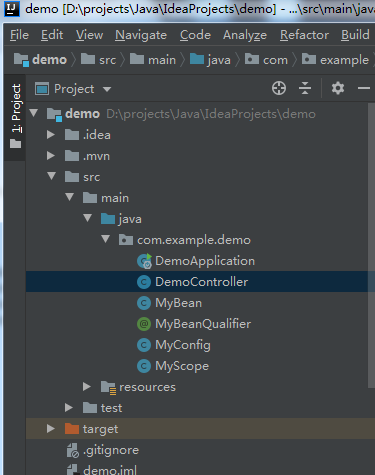
附,项目结构图
Spring高级注解的更多相关文章
- Spring高级话题-@Enable***注解的工作原理
出自:http://blog.csdn.net/qq_26525215 @EnableAspectJAutoProxy @EnableAspectJAutoProxy注解 激活Aspect自动代理 & ...
- Spring Boot实战笔记(九)-- Spring高级话题(组合注解与元注解)
一.组合注解与元注解 从Spring 2开始,为了响应JDK 1.5推出的注解功能,Spring开始大量加入注解来替代xml配置.Spring的注解主要用来配置注入Bean,切面相关配置(@Trans ...
- Spring高级装配
Spring高级装配 目录 一.Profile(根据开发环境创建对应的bean) 二.条件化的创建bean(根据条件创建bean) 三.处理自动装配歧义性(指定首选bean.限定符限制bean) 四. ...
- Spring高级装配(一) profile
Spring高级装配要学习的内容包括: Spring profile 条件化的bean声明 自动装配与歧义性 bean的作用域 Spring表达式语言 以上属于高级一点的bean装配技术,如果你没有啥 ...
- spring mvc 注解详解
1.@Controller 在SpringMVC 中,控制器Controller 负责处理由DispatcherServlet 分发的请求,它把用户请求的数据经过业务处理层处理之后封装成一个Model ...
- Spring常用注解用法总结
转自http://www.cnblogs.com/leskang/p/5445698.html 1.@Controller 在SpringMVC 中,控制器Controller 负责处理由Dispat ...
- Spring MVC注解的一些案列
1. spring MVC-annotation(注解)的配置文件ApplicationContext.xml <?xml version="1.0" encoding=& ...
- Spring系列之Spring常用注解总结
传统的Spring做法是使用.xml文件来对bean进行注入或者是配置aop.事物,这么做有两个缺点:1.如果所有的内容都配置在.xml文件中,那么.xml文件将会十分庞大:如果按需求分开.xml文件 ...
- spring @condition 注解
spring @condition注解是用来在不同条件下注入不同实现的 demo如下: package com.foreveross.service.weixin.test.condition; im ...
随机推荐
- Android 插件化开发(四):插件化实现方案
在经过上面铺垫后,我们可以尝试整体实现一下插件化了.这里我们先介绍一下最简单的实现插件化的方案. 一.最简单的插件化实现方案 最简单的插件化实现方案,对四大组件都是适用的,技术面涉及如下: 1). 合 ...
- github克隆项目缓慢
github浏览或者克隆项目的时候,总是十分缓慢,下面是亲自自测的一种方式,克隆速度可以稍快一些 第一步 访问域名解析网站:https://www.ipaddress.com/ 在网页下方可以看见一个 ...
- Spring Boot 设置项目名后静态文件相对路径问题
出现问题的原因 server.servlet.context-path=testDemospring.mvc.static-path-pattern=/static/**定义项目名和静态资源路径后发现 ...
- 工具类Arrays.asList()方法把数组转换成集合
工具类Arrays.asList()方法把数组转换成集合 不能使用其修改集合相关的方法,它的add/remove/clear方法会抛出UnsupportedOperationException() 问 ...
- sqlalchemy 执行原生sql语句
from contextlib import contextmanager from sqlalchemy import create_engine, ForeignKey from sqlalche ...
- 东芝MCU实现位带操作
位带操作简介 位带操作的概念其实30年前就有了,那还是 8051单片机开创的先河,如今ARM CM3 将此能力进化,可以说,这里的位带操作是8051 位寻址区的威力大幅加强版.即如果要改写某个寄存器的 ...
- Nacos Cluster Building
原文链接:https://www.javaspring.net/nacos/nacos-cluster-building Continue to talk about the Nacos build ...
- 自己总结numpy用法
最近用numpy比较多,边用边自己总结用法. 1. 数组 1.1 生成 m行 * n列 的随机数组 import numpy as np # 生成 m行*n列 的随机数组 # np.random.ra ...
- springboot~mybatis枚举映射
在mybatis和mybatis plus里,如果你的实体字段是一个枚举类型,而在数据表里是整型,这时在存储时需要进行处理,默认情况下,会把枚举的元素名称拼接到SQL语句里,而由于数据表是int类型, ...
- 一文彻底搞清楚 Material Design
一文彻底搞清楚 Material Design 首先声明以下介绍的关于 Material Design 的介绍,都是基于在 Android 环境下,其实 Material Design 是一种为了让 ...