
动手造轮子:实现简单的 EventQueue
动手造轮子:实现简单的 EventQueue
Intro
最近项目里有遇到一些并发的问题,想实现一个队列来将并发的请求一个一个串行处理,可以理解为使用消息队列处理并发问题,之前实现过一个简单的 EventBus,于是想在 EventBus 的基础上改造一下,加一个队列,改造成类似消息队列的处理模式。消息的处理(Consumer)直接使用 .netcore 里的 IHostedService 来实现了一个简单的后台任务处理。
初步设计
- Event 抽象的事件
- EventHandler 处理 Event 的方法
- EventStore 保存订阅 Event 的 EventHandler
- EventQueue 保存 Event 的队列
- EventPublisher 发布 Event
- EventConsumer 处理 Event 队列里的 Event
- EventSubscriptionManager 管理订阅 Event 的 EventHandler
实现代码
EventBase 定义了基本事件信息,事件发生时间以及事件的id:
public abstract class EventBase

{

    [JsonProperty]

    public DateTimeOffset EventAt { get; private set; }

    [JsonProperty]

    public string EventId { get; private set; }

    protected EventBase()

    {

      this.EventId = GuidIdGenerator.Instance.NewId();

      this.EventAt = DateTimeOffset.UtcNow;

    }

    [JsonConstructor]

    public EventBase(string eventId, DateTimeOffset eventAt)

    {

      this.EventId = eventId;

      this.EventAt = eventAt;

    }

}
EventHandler 定义:
public interface IEventHandler

{

    Task Handle(IEventBase @event);

}

public interface IEventHandler<in TEvent> : IEventHandler where TEvent : IEventBase

{

    Task Handle(TEvent @event);

}

public class EventHandlerBase<TEvent> : IEventHandler<TEvent> where TEvent : EventBase

{

    public virtual Task Handle(TEvent @event)

    {

        return Task.CompletedTask;

    }

    public Task Handle(IEventBase @event)

    {

        return Handle(@event as TEvent);

    }

}
EventStore:
public class EventStore

{

    private readonly Dictionary<Type, Type> _eventHandlers = new Dictionary<Type, Type>();

    public void Add<TEvent, TEventHandler>() where TEventHandler : IEventHandler<TEvent> where TEvent : EventBase

    {

        _eventHandlers.Add(typeof(TEvent), typeof(TEventHandler));

    }

    public object GetEventHandler(Type eventType, IServiceProvider serviceProvider)

    {

        if (eventType == null || !_eventHandlers.TryGetValue(eventType, out var handlerType) || handlerType == null)

        {

            return null;

        }

        return serviceProvider.GetService(handlerType);

    }

    public object GetEventHandler(EventBase eventBase, IServiceProvider serviceProvider) =>

        GetEventHandler(eventBase.GetType(), serviceProvider);

    public object GetEventHandler<TEvent>(IServiceProvider serviceProvider) where TEvent : EventBase =>

        GetEventHandler(typeof(TEvent), serviceProvider);

}
EventQueue 定义:
public class EventQueue

{

    private readonly ConcurrentDictionary<string, ConcurrentQueue<EventBase>> _eventQueues =

        new ConcurrentDictionary<string, ConcurrentQueue<EventBase>>();

    public ICollection<string> Queues => _eventQueues.Keys;

    public void Enqueue<TEvent>(string queueName, TEvent @event) where TEvent : EventBase

    {

        var queue = _eventQueues.GetOrAdd(queueName, q => new ConcurrentQueue<EventBase>());

        queue.Enqueue(@event);

    }

    public bool TryDequeue(string queueName, out EventBase @event)

    {

        var queue = _eventQueues.GetOrAdd(queueName, q => new ConcurrentQueue<EventBase>());

        return queue.TryDequeue(out @event);

    }

    public bool TryRemoveQueue(string queueName)

    {

        return _eventQueues.TryRemove(queueName, out _);

    }

    public bool ContainsQueue(string queueName) => _eventQueues.ContainsKey(queueName);

    public ConcurrentQueue<EventBase> this[string queueName] => _eventQueues[queueName];

}
EventPublisher:
public interface IEventPublisher

{

    Task Publish<TEvent>(string queueName, TEvent @event)

        where TEvent : EventBase;

}

public class EventPublisher : IEventPublisher

{

    private readonly EventQueue _eventQueue;

    public EventPublisher(EventQueue eventQueue)

    {

        _eventQueue = eventQueue;

    }

    public Task Publish<TEvent>(string queueName, TEvent @event)

        where TEvent : EventBase

    {

        _eventQueue.Enqueue(queueName, @event);

        return Task.CompletedTask;

    }

}
EventSubscriptionManager:
public interface IEventSubscriptionManager

{

    void Subscribe<TEvent, TEventHandler>()

        where TEvent : EventBase

        where TEventHandler : IEventHandler<TEvent>;

}

public class EventSubscriptionManager : IEventSubscriptionManager

{

    private readonly EventStore _eventStore;

    public EventSubscriptionManager(EventStore eventStore)

    {

        _eventStore = eventStore;

    }

    public void Subscribe<TEvent, TEventHandler>()

        where TEvent : EventBase

        where TEventHandler : IEventHandler<TEvent>

    {

        _eventStore.Add<TEvent, TEventHandler>();

    }

}
EventConsumer:
public class EventConsumer : BackgroundService

{

    private readonly EventQueue _eventQueue;

    private readonly EventStore _eventStore;

    private readonly int maxSemaphoreCount = 256;

    private readonly IServiceProvider _serviceProvider;

    private readonly ILogger _logger;

    public EventConsumer(EventQueue eventQueue, EventStore eventStore, IConfiguration configuration, ILogger<EventConsumer> logger, IServiceProvider serviceProvider)

    {

        _eventQueue = eventQueue;

        _eventStore = eventStore;

        _logger = logger;

        _serviceProvider = serviceProvider;

    }

    protected override async Task ExecuteAsync(CancellationToken stoppingToken)

    {

        using (var semaphore = new SemaphoreSlim(Environment.ProcessorCount, maxSemaphoreCount))

        {

            while (!stoppingToken.IsCancellationRequested)

            {

                var queues = _eventQueue.Queues;

                if (queues.Count > 0)

                {

                    await Task.WhenAll(

                    queues

                        .Select(async queueName =>

                        {

                            if (!_eventQueue.ContainsQueue(queueName))

                            {

                                return;

                            }

                            try

                            {

                                await semaphore.WaitAsync(stoppingToken);

                                //

                                if (_eventQueue.TryDequeue(queueName, out var @event))

                                {

                                    var eventHandler = _eventStore.GetEventHandler(@event, _serviceProvider);

                                    if (eventHandler is IEventHandler handler)

                                    {

                                        _logger.LogInformation(

                                            "handler {handlerType} begin to handle event {eventType}, eventId: {eventId}, eventInfo: {eventInfo}",

                                            eventHandler.GetType().FullName, @event.GetType().FullName,

                                            @event.EventId, JsonConvert.SerializeObject(@event));

                                        try

                                        {

                                            await handler.Handle(@event);

                                        }

                                        catch (Exception e)

                                        {

                                            _logger.LogError(e, "event  {eventId}  handled exception", @event.EventId);

                                        }

                                        finally

                                        {

                                            _logger.LogInformation("event {eventId} handled", @event.EventId);

                                        }

                                    }

                                    else

                                    {

                                        _logger.LogWarning(

                                            "no event handler registered for event {eventType}, eventId: {eventId}, eventInfo: {eventInfo}",

                                            @event.GetType().FullName, @event.EventId,

                                            JsonConvert.SerializeObject(@event));

                                    }

                                }

                            }

                            catch (Exception ex)

                            {

                                _logger.LogError(ex, "error running EventConsumer");

                            }

                            finally

                            {

                                semaphore.Release();

                            }

                        })

                );

                }

                await Task.Delay(50, stoppingToken);

            }

        }

    }

}
为了方便使用定义了一个 Event 扩展方法:
public static IServiceCollection AddEvent(this IServiceCollection services)

{

    services.TryAddSingleton<EventStore>();

    services.TryAddSingleton<EventQueue>();

    services.TryAddSingleton<IEventPublisher, EventPublisher>();

    services.TryAddSingleton<IEventSubscriptionManager, EventSubscriptionManager>();

    services.AddSingleton<IHostedService, EventConsumer>();

    return services;

}
使用示例
定义 PageViewEvent 记录请求信息:
public class PageViewEvent : EventBase

{

    public string Path { get; set; }

}
这里作为示例只记录了请求的Path信息,实际使用可以增加更多需要记录的信息
定义 PageViewEventHandler,处理 PageViewEvent
public class PageViewEventHandler : EventHandlerBase<PageViewEvent>

{

    private readonly ILogger _logger;

    public PageViewEventHandler(ILogger<PageViewEventHandler> logger)

    {

        _logger = logger;

    }

    public override Task Handle(PageViewEvent @event)

    {

        _logger.LogInformation($"handle pageViewEvent: {JsonConvert.SerializeObject(@event)}");

        return Task.CompletedTask;

    }

}
这个 handler 里什么都没做只是输出一个日志
这个示例项目定义了一个记录请求路径的事件以及一个发布请求记录事件的中间件
// 发布 Event 的中间件

app.Use(async (context, next) =>

{

    var eventPublisher = context.RequestServices.GetRequiredService<IEventPublisher>();

    await eventPublisher.Publish("pageView", new PageViewEvent() { Path = context.Request.Path.Value });

    await next();

});
Startup 配置:
public void ConfigureServices(IServiceCollection services)

{

    // ...

    services.AddEvent();

    services.AddSingleton<PageViewEventHandler>();// 注册 Handler

}

// This method gets called by the runtime. Use this method to configure the HTTP request pipeline.

public void Configure(IApplicationBuilder app, IHostingEnvironment env, IEventSubscriptionManager eventSubscriptionManager)

{

    eventSubscriptionManager.Subscribe<PageViewEvent, PageViewEventHandler>();

    app.Use(async (context, next) =>

    {

        var eventPublisher = context.RequestServices.GetRequiredService<IEventPublisher>();

        await eventPublisher.Publish("pageView", new PageViewEvent() { Path = context.Request.Path.Value });

        await next();

    });

    // ...

}
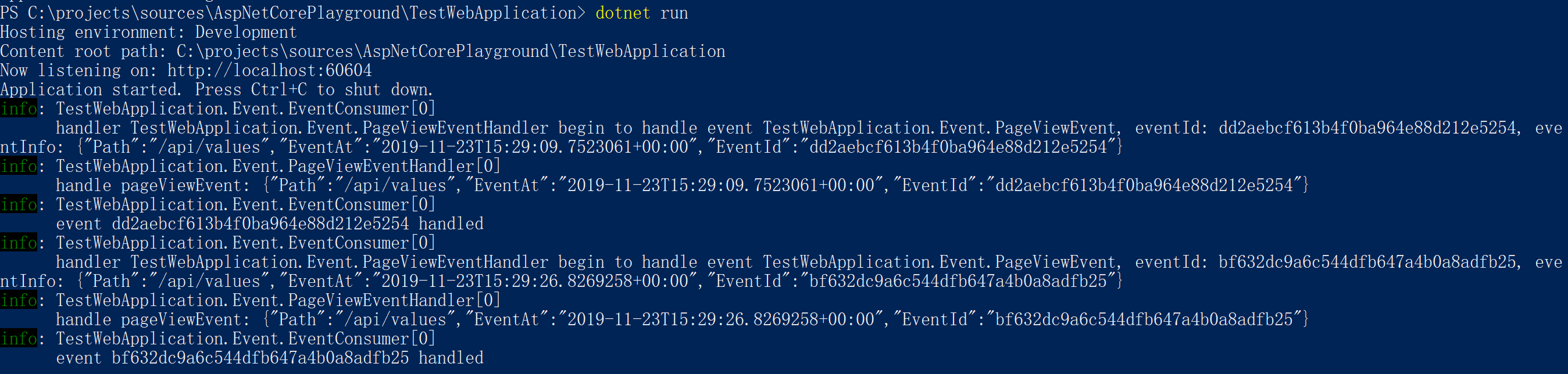
使用效果:
More
注:只是一个初步设计,基本可以实现功能,还是有些不足,实际应用的话还有一些要考虑的事情
Consumer消息逻辑,现在的实现有些问题,我们的应用场景目前比较简单还可以满足,如果事件比较多就会而且每个事件可能处理需要的时间长短不一样,会导致在一个批次中执行的Event中已经完成的事件要等待其他还没完成的事件完成之后才能继续取下一个事件,理想的消费模式应该是各个队列相互独立,在同一个队列中保持顺序消费即可- 上面示例的
EventStore的实现只是简单的实现了一个事件一个Handler的处理情况,实际业务场景中很可能会有一个事件需要多个Handler的情况 - 这个实现是基于内存的,如果要在分布式场景下使用就不适用了,需要自己实现一下基于redis或者数据库的以满足分布式的需求
- and more...
上面所有的代码可以在 Github 上获取,示例项目 Github 地址:https://github.com/WeihanLi/AspNetCorePlayground/tree/master/TestWebApplication
Reference
动手造轮子:实现简单的 EventQueue的更多相关文章
- 动手造轮子:实现一个简单的 EventBus
动手造轮子:实现一个简单的 EventBus Intro EventBus 是一种事件发布订阅模式,通过 EventBus 我们可以很方便的实现解耦,将事件的发起和事件的处理的很好的分隔开来,很好的实 ...
- 动手造轮子:实现一个简单的 AOP 框架
动手造轮子:实现一个简单的 AOP 框架 Intro 最近实现了一个 AOP 框架 -- FluentAspects,API 基本稳定了,写篇文章分享一下这个 AOP 框架的设计. 整体设计 概览 I ...
- 动手造轮子:基于 Redis 实现 EventBus
动手造轮子:基于 Redis 实现 EventBus Intro 上次我们造了一个简单的基于内存的 EventBus,但是如果要跨系统的话就不合适了,所以有了这篇基于 Redis 的 EventBus ...
- h5engine造轮子
基于学习的造轮子,这是一个最简单,最基础的一个canvas渲染引擎,通过这个引擎架构,可以很快的学习canvas渲染模式! 地址:https://github.com/RichLiu1023/h5en ...
- 重新造轮子之静态链接1(Static linking)
最近学习计算机病毒学的过程中,又讲到了静态链接的问题,联想到了之前保健哥在信息安全的课堂上向我们展示了一个没有main()函数的C程序到底应该如何编写.个人觉得这个小实验对于加深静态链接的过程的理解也 ...
- React造轮子:拖拽排序组件「Dragact」
先来一张图看看: 项目地址:Github地址 (无耻求星!) 在线观看(第一次加载需要等几秒):预览地址 说起来不容易,人在国外没有过年一说,但是毕竟也是中国年,虽然不放假,但是家里总会主内一顿丰盛的 ...
- 造轮子系列之RPC 1:如何从零开始开发RPC框架
前言 RPC 框架是后端攻城狮永远都绕不开的知识点,目前业界比较知名有 Dubbo.Spring Cloud 等.很多人都停留在了只会用的阶段,作为程序猿,拥有好奇心深入学习,才能有效提高自己的竞争力 ...
- 【疯狂造轮子-iOS】JSON转Model系列之二
[疯狂造轮子-iOS]JSON转Model系列之二 本文转载请注明出处 —— polobymulberry-博客园 1. 前言 上一篇<[疯狂造轮子-iOS]JSON转Model系列之一> ...
- 【疯狂造轮子-iOS】JSON转Model系列之一
[疯狂造轮子-iOS]JSON转Model系列之一 本文转载请注明出处 —— polobymulberry-博客园 1. 前言 之前一直看别人的源码,虽然对自己提升比较大,但毕竟不是自己写的,很容易遗 ...
随机推荐
- 近万字案例:Rancher + VMware PKS实现全球数百站点K8S集群管理
Sovereign Systems是一家成立于2007年的技术咨询公司,帮助客户将传统数据中心技术和应用程序转换为更高效的.基于云的技术平台,以更好地应对业务挑战.曾连续3年提名CRN,并且在2012 ...
- 基于mysql-8.0.16-winx64的主从搭建
1.主服务器的my.ini文件内容:[mysqld]# 主库和从库需要不一致server-id=1log-bin=mysql-bin# 同步的数据库binlog-do-db=master-slave# ...
- Leetcode(4)寻找两个有序数组的中位数
Leetcode(4)寻找两个有序数组的中位数 [题目表述]: 给定两个大小为 m 和 n 的有序数组 nums1 和* nums2. 请你找出这两个有序数组的中位数,并且要求算法的时间复杂度为 O( ...
- Linux生产下安装db2V10.1
Db210.1版本安装手册 装新的suse系统后需要做以下几步才能完整安装10.1版本的db2 1.要挂载2个iso文件 首先在跟目录下建目录test1和test2 2.把iso文件挂载到目录下 ...
- hystrix原理
一.hystrix 产生背景 微服务是解决复杂服务的一个方案,在功能不变的情况下,对一个复杂的单体服务分解为多个可管理的分支.每个服务作为轻量的子服务,通过RPC实现服务间的关联,将服务简单化.每个服 ...
- 使用linq实现回调函数
通过输入的Id找到parentId是该Id的列表,然后找到parentId是上面那个Id的列表,以此类推,找到第一目录下所有子目录的的列表. 通过传入第一目录的Id,得到该目录下的所有子目录. 通过回 ...
- 微服务架构案例(05):SpringCloud 基础组件应用设计
本文源码:GitHub·点这里 || GitEE·点这里 更新进度(共6节): 01:项目技术选型简介,架构图解说明 02:业务架构设计,系统分层管理 03:数据库选型,业务数据设计规划 04:中间件 ...
- 为什么磁盘慢会导致Linux负载飙升?
一.CPU利用率和负载率的区别 这里要区别CPU负载和CPU利用率,它们是不同的两个概念,但它们的信息可以在同一个top命令中进行显示.CPU利用率显示的是程序在运行期间实时占用的CPU百分比,这是对 ...
- 全栈项目|小书架|服务器开发-Koa2 全局异常处理
什么是异常 做开发的基本都知道异常,像Android开发中常见的ANR异常.空指针异常,服务器开发中经常遇到的异常404,500异常,还有一些其他常见的异常,具体可见HTTP状态码. 基本上这些异常可 ...
- 创建 numpy.array
# 导包 import numpy as np numpy.array nparr = np.array([i for i in range(10)]) nparr # array([0, 1, 2, ...