
React: React组件的生命周期
一、简介
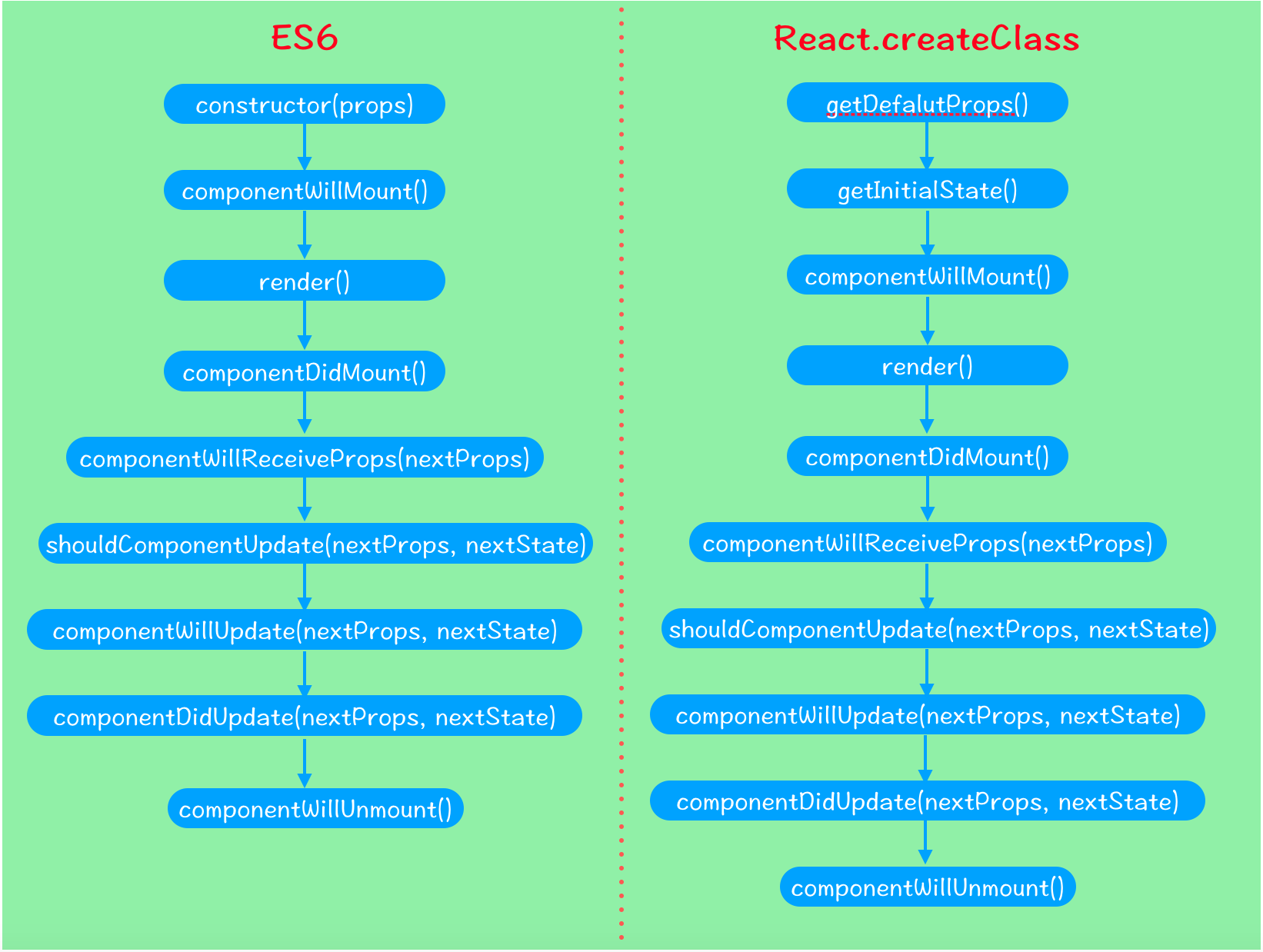
在前面的第二篇博文中对组件的生命周期虽然做了一个大略介绍,但总感觉说的过于简单,毕竟生命周期是React组件的核心部分。在我们熟练使用React挂载和合成组件来创建应用表现层的过程中,针对数据异步或延时问题,只有充分利用组件的生命周期来把握框架载入和数据处理的时机,才能将组件性能发挥到合理水平,并提高应用程序的健壮性。基本来说,组件的生命周期可分为挂载生命周期和更新生命周期两大部分,它们都包括一系列方法,这些方法在组件渲染前后会被触发,事实上,render方法本身也是组件生命周期的一部分。当然,根据用户使用的是ES6类创建组件还是React.createClass创建组件,它们体现的生命周期有一点点的区别。使用React.createClass创建组件时,开发者可以默认在getDefalutProps和getInitialState函数中分别初始化属性和state,而使用ES6类创建组件时,这两个函数被取而代之是constructor构造函数,在构造函数内部可以获取默认属性并且设置state。完整的生命周期对比如图所示:
二、详解
1、挂载生命周期
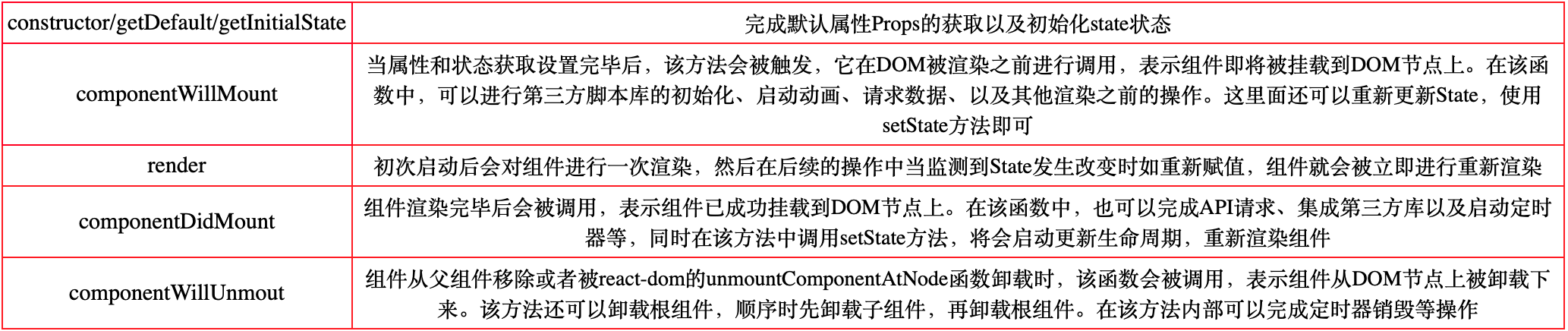
包括方法有:constructor/getDefault/getInitialState、componentWillMount、render、componentDidMount、componentWillUnmout。
2、更新生命周期
包括方法有:componentWillReceiveProps、shouldComponentUpdate、componentWillUpdate、componentDidUpdate。

三、示例
1、React.createClass
<!DOCTYPE html>

<html>

<head lang="en">

    <meta charset="UTF-8">

    <title>Hello React</title>

    <script src="react/react.js"></script>

    <script src="react/react-dom.js"></script>

    <script src="react/browser.min.js"></script>

</head>

<body>

    <div id="container"></div>

    <script type="text/babel">

        const targetNode = document.getElementById("container");

        const Component = React.createClass({

            getDefaultProps(){

                console.log("---getDefaultProps---");

                return {}

            },

            getInitialState(){

                console.log("---getInitialState---");

                return ({

                    count: 0

                })

            },

            componentWillMount(){

                console.log("---componentWillMount---")

            },

            render(){

                console.log("---render---");

                return (

                    <div>

                        <h1>{`${this.props.title} ${this.state.count}`}</h1>

                    </div>

                )

            },

            componentDidMount(){

                console.log("---componentDidMount---");

                this.setProps({

                    title:"I AM XYQ! Welcome me, current count is"

                })

            },

            /*

            * 现象:父组件更新子组件的props,在子组件接收到新的props时,更新子组件的state,但是却没有重新渲染。

            * 原因:官方说在该函数中调用 this.setState() 将不会引起第二次渲染。每次子组件接收到新的props,都会重新渲染一次,

            * 除非你做了处理来阻止(比如使用:shouldComponentUpdate)。 但是你可以在这次渲染前,根据新的props更新state,

            * 更新state也会触发一次重新渲染,但react基于性能考虑,只会渲染一次。

            * */

            componentWillReceiveProps(nextProps){

                console.log("---componentWillReceiveProps---");

                this.setState({

                    count: this.state.count + 1

                })

            },

            shouldComponentUpdate(nextProps, nextState){

                console.log("---shouldComponentUpdate---"+`count is ${nextState.count}`);

                return true

            },

            componentWillUpdate(nextProps, nextState){

                console.log("---componentWillUpdate---")

            },

            componentDidUpdate(nextProps, nextState){

                console.log("---componentDidUpdate---");

                ReactDOM.unmountComponentAtNode(targetNode); //卸载根组件

            },

            componentWillUnmount(){

                console.log("---componentWillUnmout---");

            }

        });

        ReactDOM.render(

            <Component/>,

            targetNode

        )

    </script>

</body>

</html>
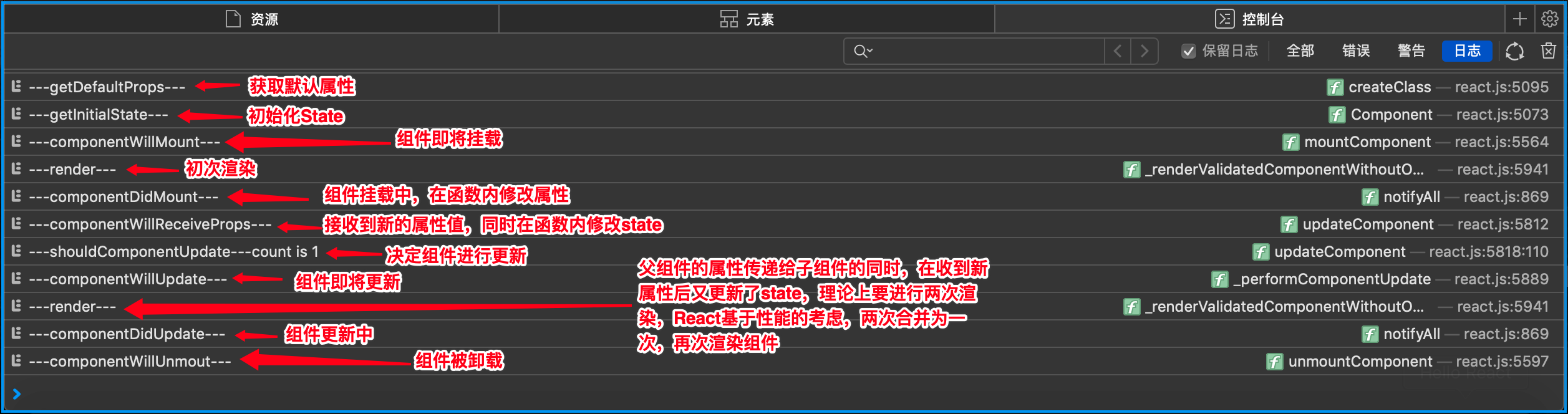
结果与分析 【需要把ReactDOM.unmountComponentAtNode()方法注释掉,才会显示结果,不然组件就从DOM上卸载了】

2、ES6
<!DOCTYPE html>

<html>

<head lang="en">

    <meta charset="UTF-8">

    <title>Hello React</title>

    <script src="react/react.js"></script>

    <script src="react/react-dom.js"></script>

    <script src="react/browser.min.js"></script>

</head>

<body>

    <div id="container"></div>

    <script type="text/babel">

        const targetNode = document.getElementById("container");

        //父组件

        class Parent extends React.Component {

            constructor(props){

                super(props)

                this.state = {title:""}

                this.deleteComponent = this.deleteComponent.bind(this)

            };

            deleteComponent(){

                ReactDOM.unmountComponentAtNode(targetNode); //卸载根组件

            }

            render(){

                return (

                    <div onClick={this.deleteComponent}>

                        <Children name={this.state.title}/>

                    </div>)

            };

            //父组件修改传递给子组件的属性值,子组件会触发componentWillReceiveProps函数

            componentDidMount(){

                this.setState({

                    title: "I AM XYQ! Welcome me, current count is"

                })

            };

        }

        //子组件

        class Children extends React.Component{

            constructor(props){

                super(props);

                this.state = {count:0};

                console.log("---constructor---")

            };

            componentWillMount(){

                console.log("---componentWillMount---")

            };

            render(){

                console.log("---render---");

                return (

                    <h1>{`${this.props.name} ${this.state.count}`}</h1>

                )

            };

            componentDidMount(){

                console.log("---componentDidMount---");

            };

            //此处获取的nextProps就是父组件的state中的title属性

            componentWillReceiveProps(nextProps){

                console.log("---componentWillReceiveProps---");

                this.setState({

                    count: this.state.count + 1

                })

            };

            shouldComponentUpdate(nextProps, nextState){

                console.log("---shouldComponentUpdate---"+`count is ${nextState.count}`);

                return true

            };

            componentWillUpdate(nextProps, nextState){

                console.log("---componentWillUpdate---")

            };

            componentDidUpdate(nextProps, nextState){

                console.log("---componentDidUpdate---");

            };

            componentWillUnmount(){

                console.log("---componentWillUnmout---");

            }

        }

        ReactDOM.render(

            <Parent/>,

            targetNode

        )

    </script>

</body>

</html>
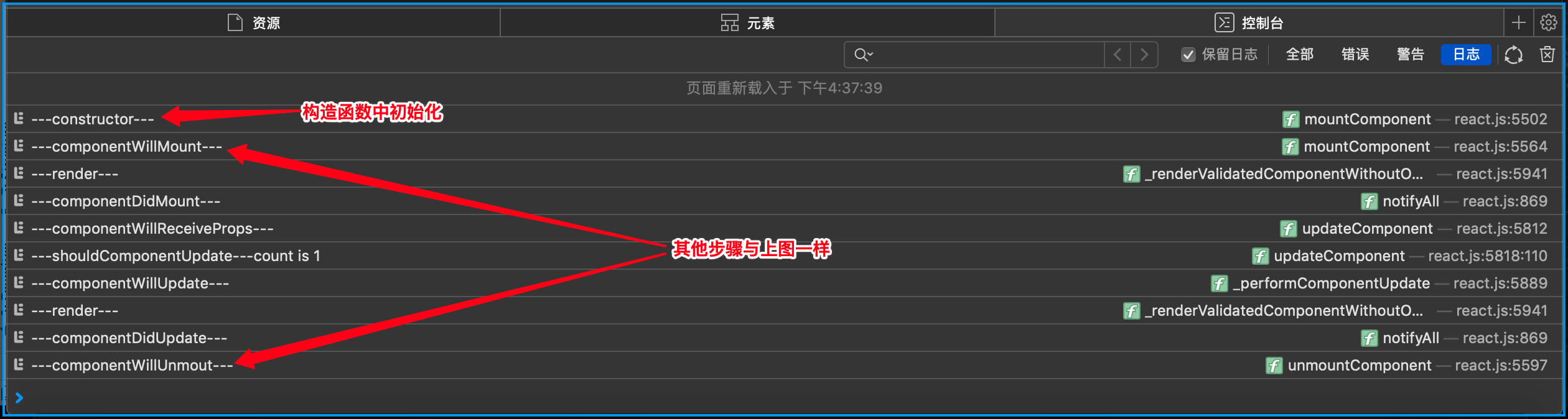
结果与分析 【点击deleteComponent()事件,组件就从DOM上卸载了】

React: React组件的生命周期的更多相关文章
- reactjs入门到实战(七)---- React的组件的生命周期
React的组件的生命周期有三个状态分别是:挂载(生产组件示例化.准备挂载到页面.挂载到页面).更新(更新值.更新DOM).和卸载(卸载后). >>>其他 getInitia ...
- react native组件的生命周期
react native组件的生命周期 一.当页面第一次加载时,会依次调用: constructor() componentWillMount(): 这个函数调用时机是在组件创建,并初始化了状态之后, ...
- Android React Native组件的生命周期及回调函数
熟悉android的童鞋应该都清楚,android是有生命周期的,其很多组件也是有生命周期.今天小编和大家分享的React Native组件的生命周期,还不了解的童鞋,赶紧来围观吧 在android开 ...
- 【RN - 基础】之React Native组件的生命周期
下图描述了React Native中组件的生命周期: 从上图中可以看到,React Native组件的生命周期可以分为初始化阶段.存在阶段和销毁阶段. 实例化阶段 实例化阶段是React Native ...
- React Native组件、生命周期及属性传值props详解
创建组件的三种方式 第一种:通过ES6的方式创建 /** * 方式一 :ES6 */ export default class HelloComponent extends Component { r ...
- React:组件的生命周期
在组件的整个生命周期中,随着该组件的props或者state发生改变,其DOM表现也会有相应的变化.一个组件就是一个状态机,对于特定地输入,它总返回一致的输出. 一个React组件的生命周期分为三个部 ...
- react教程 — 组件的生命周期 和 执行顺序
一.组件执行的生命周期: 参考 https://www.cnblogs.com/soyxiaobi/p/9559117.html 或 https://www.c ...
- React(三)组件的生命周期
Component Specs and LifeCycle <div id="app"></div> <script src="bower_ ...
- React Native——组件的生命周期
组件生命周期 上流程图描述了组件从创建.运行到销毁的整个过程,可以看到如果一个组件在被创建,从开始一直到运行会依次调用getDefaultProps到render这五个函数:在运行过程中,如果有属性和 ...
- React入门--------组件的生命周期
Mounting/组件挂载相关: componentWillMount componentDidMount Updating/组件更新相关: componentWillReceiveProps sho ...
随机推荐
- 21.跨域和CORS
一 跨域 同源策略(Same origin policy)是一种约定,它是浏览器最核心也最基本的安全功能,如果缺少了同源策略,则浏览器的正常功能可能都会受到影响.可以说Web是构建在同源策略基础之上的 ...
- firefox浏览器写xpath
最近在学xpath发现Firefox浏览器不支持xpath定位页面元素 百度为例: F12 页面前端代码 输入最简单的xpath发现并不能定位元素 解决方案:添加 Try Xpath 这个插件,因为 ...
- Visual Studio2019及.NET CORE3.0的安装教程
看到很多开发.net core的初学者在安装的时候就陷入问题了,不知道安装那些东西,好吧,既然要分享知识那么就尽量做得精细一点吧,我决定从零开始为大家讲解.net core,同时有.net core工 ...
- WebGPU学习(六):学习“rotatingCube”示例
大家好,本文学习Chrome->webgpu-samplers->rotatingCube示例. 上一篇博文: WebGPU学习(五): 现代图形API技术要点和WebGPU支持情况调研 ...
- d3.js 教程 模仿echarts折线图
今天我们来仿echarts折线图,这个图在echarts是折线图堆叠,但是我用d3改造成了普通的折线图,只为了大家学习(其实在简单的写一个布局就可以).废话不多说商行代码. 1 制作 Line 类 c ...
- [ASP.NET Core 3框架揭秘] 依赖注入[9]:实现概述
<服务注册>.<服务消费>和<生命周期>主要从实现原理的角度对.NET Core的依赖注入框架进行了介绍,接下来更进一步,看看该框架的总体设计和实现.在过去的多个版 ...
- crontab 定时任务没有响应 检测步骤
设置规则 # 每分钟执行一次 */1 * * * * /scripts/script.sh # 每小时执行一次 0 */1 * * * /scripts/script.sh # 每天 02:00 执行 ...
- MySQL基础-存储过程
存储过程 定义:将一批为了完成特定功能的SQL语句集,根据传入的参数(也可没有),调用,完成单个sql语句更复杂的功能 存储过程思想很简单,就是SQL语句层面上的代码封装和重用 优点:1) 可封装,并 ...
- SpringMVC 自定义参数解析器.
一.简述 有没有想过像 @RequestParam.@RequestBody 这些注解的工作原理呢?为什么 form 表单.application/json 的参数能够直接封装进 Bean 对象中呢? ...
- 编译Netty源码遇到的一些问题-缺少io.netty.util.collection包
缺少包和java类 下载好Netty的源码后,导入到IDE,运行自带的example时编译不通过. 如下图,是因为io.netty.util.collection的包没有 点进去看,确实没有这个包 发 ...