
(六)c#Winform自定义控件-单选框
官网
前提
入行已经7,8年了,一直想做一套漂亮点的自定义控件,于是就有了本系列文章。
GitHub:https://github.com/kwwwvagaa/NetWinformControl
码云:https://gitee.com/kwwwvagaa/net_winform_custom_control.git
如果觉得写的还行,请点个 star 支持一下吧
欢迎前来交流探讨: 企鹅群568015492 
目录
https://www.cnblogs.com/bfyx/p/11364884.html
准备工作
准备4个图片,分别对应选中,没选中,选中禁用,没选中禁用
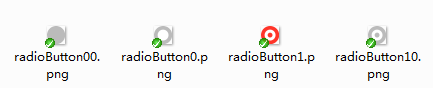
复选框需要支持分组,当同一面板上具有多种选择的时候,分组就显得更为重要了
开始
添加一个用户控件,命名为:UCRadioButton
看一下有哪些属性
 [Description("选中改变事件"), Category("自定义")]

         public event EventHandler CheckedChangeEvent;

         private Font _Font = new Font("微软雅黑", );

         [Description("字体"), Category("自定义")]

         public new Font Font

         {

             get { return _Font; }

             set

             {

                 _Font = value;

                 label1.Font = value;

             }

         }

         private Color _ForeColor = Color.FromArgb(, , );

         [Description("字体颜色"), Category("自定义")]

         public new Color ForeColor

         {

             get { return _ForeColor; }

             set

             {

                 label1.ForeColor = value;

                 _ForeColor = value;

             }

         }

         private string _Text = "单选按钮";

         [Description("文本"), Category("自定义")]

         public string TextValue

         {

             get { return _Text; }

             set

             {

                 label1.Text = value;

                 _Text = value;

             }

         }

         private bool _checked = false;

         [Description("是否选中"), Category("自定义")]

         public bool Checked

         {

             get

             {

                 return _checked;

             }

             set

             {

                 if (_checked != value)

                 {

                     _checked = value;

                     if (base.Enabled)

                     {

                         if (_checked)

                         {

                             panel1.BackgroundImage = Properties.Resources.radioButton1;

                         }

                         else

                         {

                             panel1.BackgroundImage = Properties.Resources.radioButton0;

                         }

                     }

                     else

                     {

                         if (_checked)

                         {

                             panel1.BackgroundImage = Properties.Resources.radioButton10;

                         }

                         else

                         {

                             panel1.BackgroundImage = Properties.Resources.radioButton00;

                         }

                     }

                     SetCheck(value);

                     if (CheckedChangeEvent != null)

                     {

                         CheckedChangeEvent(this, null);

                     }

                 }

             }

         }

         private string _groupName;

         [Description("分组名称"), Category("自定义")]

         public string GroupName

         {

             get { return _groupName; }

             set { _groupName = value; }

         }

         public new bool Enabled

         {

             get

             {

                 return base.Enabled;

             }

             set

             {

                 base.Enabled = value;

                 if (value)

                 {

                     if (_checked)

                     {

                         panel1.BackgroundImage = Properties.Resources.radioButton1;

                     }

                     else

                     {

                         panel1.BackgroundImage = Properties.Resources.radioButton0;

                     }

                 }

                 else

                 {

                     if (_checked)

                     {

                         panel1.BackgroundImage = Properties.Resources.radioButton10;

                     }

                     else

                     {

                         panel1.BackgroundImage = Properties.Resources.radioButton00;

                     }

                 }

             }

         }
当选中状态改变时需要根据分组名称来做相应的处理
   private void SetCheck(bool bln)

         {

             if (!bln)

                 return;

             if (this.Parent != null)

             {

                 foreach (Control c in this.Parent.Controls)

                 {

                     if (c is UCRadioButton && c != this)

                     {

                         UCRadioButton uc = (UCRadioButton)c;

                         if (_groupName == uc.GroupName && uc.Checked)

                         {

                             uc.Checked = false;

                             return;

                         }

                     }

                 }

             }

         }
当点击时改变选中状态
         private void Radio_MouseDown(object sender, MouseEventArgs e)

         {

             this.Checked = true;

         }
加载时做一下处理,防止多选了
 private void UCRadioButton_Load(object sender, EventArgs e)

         {

             if (this.Parent != null && this._checked)

             {

                 foreach (Control c in this.Parent.Controls)

                 {

                     if (c is UCRadioButton && c != this)

                     {

                         UCRadioButton uc = (UCRadioButton)c;

                         if (_groupName == uc.GroupName && uc.Checked)

                         {

                             Checked = false;

                             return;

                         }

                     }

                 }

             }

         }
来看下完整的代码吧
 // 版权所有  黄正辉  交流群:568015492   QQ:623128629

 // 文件名称:UCRadioButton.cs

 // 创建日期:2019-08-15 16:03:13

 // 功能描述:RadioButton

 // 项目地址:https://gitee.com/kwwwvagaa/net_winform_custom_control

 using System;

 using System.Collections.Generic;

 using System.ComponentModel;

 using System.Drawing;

 using System.Data;

 using System.Linq;

 using System.Text;

 using System.Windows.Forms;

 namespace HZH_Controls.Controls

 {

     [DefaultEvent("CheckedChangeEvent")]

     public partial class UCRadioButton : UserControl

     {

         [Description("选中改变事件"), Category("自定义")]

         public event EventHandler CheckedChangeEvent;

         private Font _Font = new Font("微软雅黑", );

         [Description("字体"), Category("自定义")]

         public new Font Font

         {

             get { return _Font; }

             set

             {

                 _Font = value;

                 label1.Font = value;

             }

         }

         private Color _ForeColor = Color.FromArgb(, , );

         [Description("字体颜色"), Category("自定义")]

         public new Color ForeColor

         {

             get { return _ForeColor; }

             set

             {

                 label1.ForeColor = value;

                 _ForeColor = value;

             }

         }

         private string _Text = "单选按钮";

         [Description("文本"), Category("自定义")]

         public string TextValue

         {

             get { return _Text; }

             set

             {

                 label1.Text = value;

                 _Text = value;

             }

         }

         private bool _checked = false;

         [Description("是否选中"), Category("自定义")]

         public bool Checked

         {

             get

             {

                 return _checked;

             }

             set

             {

                 if (_checked != value)

                 {

                     _checked = value;

                     if (base.Enabled)

                     {

                         if (_checked)

                         {

                             panel1.BackgroundImage = Properties.Resources.radioButton1;

                         }

                         else

                         {

                             panel1.BackgroundImage = Properties.Resources.radioButton0;

                         }

                     }

                     else

                     {

                         if (_checked)

                         {

                             panel1.BackgroundImage = Properties.Resources.radioButton10;

                         }

                         else

                         {

                             panel1.BackgroundImage = Properties.Resources.radioButton00;

                         }

                     }

                     SetCheck(value);

                     if (CheckedChangeEvent != null)

                     {

                         CheckedChangeEvent(this, null);

                     }

                 }

             }

         }

         private string _groupName;

         [Description("分组名称"), Category("自定义")]

         public string GroupName

         {

             get { return _groupName; }

             set { _groupName = value; }

         }

         public new bool Enabled

         {

             get

             {

                 return base.Enabled;

             }

             set

             {

                 base.Enabled = value;

                 if (value)

                 {

                     if (_checked)

                     {

                         panel1.BackgroundImage = Properties.Resources.radioButton1;

                     }

                     else

                     {

                         panel1.BackgroundImage = Properties.Resources.radioButton0;

                     }

                 }

                 else

                 {

                     if (_checked)

                     {

                         panel1.BackgroundImage = Properties.Resources.radioButton10;

                     }

                     else

                     {

                         panel1.BackgroundImage = Properties.Resources.radioButton00;

                     }

                 }

             }

         }

         public UCRadioButton()

         {

             InitializeComponent();

         }

         private void SetCheck(bool bln)

         {

             if (!bln)

                 return;

             if (this.Parent != null)

             {

                 foreach (Control c in this.Parent.Controls)

                 {

                     if (c is UCRadioButton && c != this)

                     {

                         UCRadioButton uc = (UCRadioButton)c;

                         if (_groupName == uc.GroupName && uc.Checked)

                         {

                             uc.Checked = false;

                             return;

                         }

                     }

                 }

             }

         }

         private void Radio_MouseDown(object sender, MouseEventArgs e)

         {

             this.Checked = true;

         }

         private void UCRadioButton_Load(object sender, EventArgs e)

         {

             if (this.Parent != null && this._checked)

             {

                 foreach (Control c in this.Parent.Controls)

                 {

                     if (c is UCRadioButton && c != this)

                     {

                         UCRadioButton uc = (UCRadioButton)c;

                         if (_groupName == uc.GroupName && uc.Checked)

                         {

                             Checked = false;

                             return;

                         }

                     }

                 }

             }

         }

     }

 }
 namespace HZH_Controls.Controls

 {

     partial class UCRadioButton

     {

         /// <summary>

         /// 必需的设计器变量。

         /// </summary>

         private System.ComponentModel.IContainer components = null;

         /// <summary>

         /// 清理所有正在使用的资源。

         /// </summary>

         /// <param name="disposing">如果应释放托管资源,为 true;否则为 false。</param>

         protected override void Dispose(bool disposing)

         {

             if (disposing && (components != null))

             {

                 components.Dispose();

             }

             base.Dispose(disposing);

         }

         #region 组件设计器生成的代码

         /// <summary>

         /// 设计器支持所需的方法 - 不要

         /// 使用代码编辑器修改此方法的内容。

         /// </summary>

         private void InitializeComponent()

         {

             this.label1 = new System.Windows.Forms.Label();

             this.panel1 = new System.Windows.Forms.Panel();

             this.SuspendLayout();

             //

             // label1

             //

             this.label1.Dock = System.Windows.Forms.DockStyle.Fill;

             this.label1.Font = new System.Drawing.Font("微软雅黑", 12F);

             this.label1.ForeColor = System.Drawing.Color.FromArgb(((int)(((byte)()))), ((int)(((byte)()))), ((int)(((byte)()))));

             this.label1.Location = new System.Drawing.Point(, );

             this.label1.Name = "label1";

             this.label1.Padding = new System.Windows.Forms.Padding(, , , );

             this.label1.Size = new System.Drawing.Size(, );

             this.label1.TabIndex = ;

             this.label1.Text = "单选按钮";

             this.label1.TextAlign = System.Drawing.ContentAlignment.MiddleLeft;

             this.label1.MouseDown += new System.Windows.Forms.MouseEventHandler(this.Radio_MouseDown);

             //

             // panel1

             //

             this.panel1.BackgroundImage = global::HZH_Controls.Properties.Resources.radioButton0;

             this.panel1.BackgroundImageLayout = System.Windows.Forms.ImageLayout.Zoom;

             this.panel1.Dock = System.Windows.Forms.DockStyle.Left;

             this.panel1.Location = new System.Drawing.Point(, );

             this.panel1.Name = "panel1";

             this.panel1.Size = new System.Drawing.Size(, );

             this.panel1.TabIndex = ;

             this.panel1.MouseDown += new System.Windows.Forms.MouseEventHandler(this.Radio_MouseDown);

             //

             // UCRadioButton

             //

             this.AutoScaleMode = System.Windows.Forms.AutoScaleMode.None;

             this.Controls.Add(this.label1);

             this.Controls.Add(this.panel1);

             this.Name = "UCRadioButton";

             this.Size = new System.Drawing.Size(, );

             this.Load += new System.EventHandler(this.UCRadioButton_Load);

             this.MouseDown += new System.Windows.Forms.MouseEventHandler(this.Radio_MouseDown);

             this.ResumeLayout(false);

         }

         #endregion

         private System.Windows.Forms.Label label1;

         private System.Windows.Forms.Panel panel1;

     }

 }
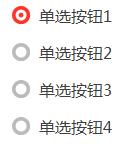
用处及效果
用处:就是单选框
效果:
最后的话
如果你喜欢的话,请到 https://gitee.com/kwwwvagaa/net_winform_custom_control 点个星星吧
(六)c#Winform自定义控件-单选框的更多相关文章
- (十六)c#Winform自定义控件-文本框哪里去了?-HZHControls
官网 http://www.hzhcontrols.com 前提 入行已经7,8年了,一直想做一套漂亮点的自定义控件,于是就有了本系列文章. GitHub:https://github.com/kww ...
- (三十)c#Winform自定义控件-文本框(三)
前提 入行已经7,8年了,一直想做一套漂亮点的自定义控件,于是就有了本系列文章. 开源地址:https://gitee.com/kwwwvagaa/net_winform_custom_control ...
- (三十一)c#Winform自定义控件-文本框(四)
前提 入行已经7,8年了,一直想做一套漂亮点的自定义控件,于是就有了本系列文章. 开源地址:https://gitee.com/kwwwvagaa/net_winform_custom_control ...
- (十八)c#Winform自定义控件-提示框
前提 入行已经7,8年了,一直想做一套漂亮点的自定义控件,于是就有了本系列文章. 开源地址:https://gitee.com/kwwwvagaa/net_winform_custom_control ...
- (八十二)c#Winform自定义控件-穿梭框
前提 入行已经7,8年了,一直想做一套漂亮点的自定义控件,于是就有了本系列文章. GitHub:https://github.com/kwwwvagaa/NetWinformControl 码云:ht ...
- (二十八)c#Winform自定义控件-文本框(一)
前提 入行已经7,8年了,一直想做一套漂亮点的自定义控件,于是就有了本系列文章. 开源地址:https://gitee.com/kwwwvagaa/net_winform_custom_control ...
- (二十九)c#Winform自定义控件-文本框(二)
前提 入行已经7,8年了,一直想做一套漂亮点的自定义控件,于是就有了本系列文章. 开源地址:https://gitee.com/kwwwvagaa/net_winform_custom_control ...
- c#Winform自定义控件-目录
前提 入行已经7,8年了,一直想做一套漂亮点的自定义控件,于是就有了本系列文章. 开源地址:https://gitee.com/kwwwvagaa/net_winform_custom_control ...
- winform 自定义控件(高手)
高手推荐:https://www.cnblogs.com/bfyx/p/11364884.html c#Winform自定义控件-目录 前提 入行已经7,8年了,一直想做一套漂亮点的自定义控件 ...
随机推荐
- python数据库-MongoDB的安装(53)
一.NoSQL介绍 1.什么是NoSQL NoSQL(NoSQL = Not Only SQL ),意即"不仅仅是SQL". NoSQL,指的是非关系型的数据库.NoSQL有时也称 ...
- centos 上安装redis 3.0.5
官网下载安装包,直接使用make编译,报如下错误 : [root@localhost redis-3.0.5]# make cd src && make all make[1]: 进入 ...
- springcloud高可用方案
1. 场景描述 公司在规划后续可能会做中台服务,考虑用微服务的方案,让用springcloud部署个简单的高可用Demo. 2. 解决方案 2.1 方案说明 demo用了5台虚拟机: (1)1台gat ...
- ~~Py2&Py3~~
进击のpython python2 整型 int -- long(长整型) /获取的是整数 python3 整型 int /获取的是浮点数(小数) python2 print(range(1,10)) ...
- 20131228-sql命令
开始 --cmd net start mssqlservernetnet stop mssqlserver
- 牛客小白月赛16 E 小雨的矩阵 ( 暴搜)
链接:https://ac.nowcoder.com/acm/contest/949/E来源:牛客网 时间限制:C/C++ 1秒,其他语言2秒 空间限制:C/C++ 262144K,其他语言52428 ...
- Java编程思想:Preferences
import java.util.prefs.BackingStoreException; import java.util.prefs.Preferences; public class Test ...
- 安卓开发之详解getChildFragmentManager和getsupportFragmentManager和getFragmentManager详解
安卓开发之详解getChildFragmentManager和getsupportFragmentManager和getFragmentManager详解 getFragmentManager()所得 ...
- http面试笔试常考知识点(二)
接上一篇随笔 1. https协议为什么比http安全? 内容加密:建立一个信息安全通道,确保信息传输安全: 身份认证:确保网站的真实性: 数据完整性校验:防止内容被第三方冒充或者篡改 2.常见状态码 ...
- Java EE.JSP.概述
JSP最终会被转换成标准Servlet,该转换过程一般出现在第一次请求页面时. JSP页面的主要组成部分如下: HTML 脚本:嵌入Java代码 指令:从整体上控制Servlet的结构 动作:引入现有 ...