定义:描述 Foundation 框架类在标准的网络传输协议下,用 URLs 连接因特网并与服务器交互的一整套体系。
支持的传输协议:
- File Transfer Protocol (
ftp://)
- Hypertext Transfer Protocol (
http://)
- Hypertext Transfer Protocol with encryption (
https://)
- Local file URLs (
file:///)
- Data URLs (
data://)
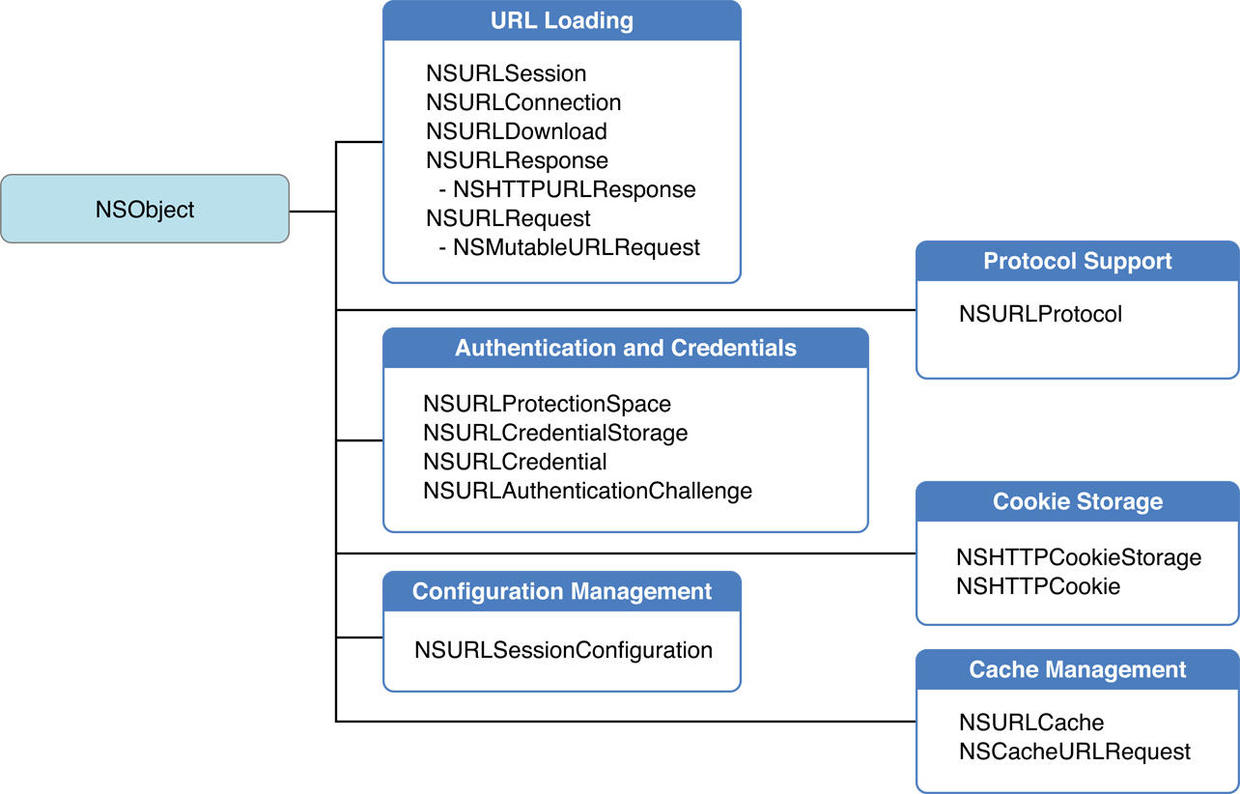
结构图
网络系统模块
5个模块:代理支持、身份验证和凭据、cookie 存储、配置管理和缓存管理。
Cookie,有时也用其复数形式 Cookies,指某些网站为了辨别用户身份、进行 session 跟踪而储存在用户本地终端上的数据(通常经过加密)。
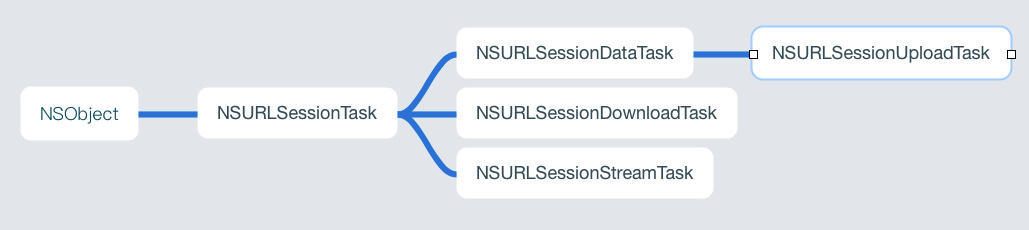
NSURLSessionTask
NSURLSessionDelegate 委托协议

Session 会话的概念
Session中任务的行为取决于三个方面:
- Session 的类型(取决于创建的配置对象类型);
- task 任务的类型;
- task 任务被创建时,app 是否处于前台状态?
Session 的类型
- 默认会话(Default session):与其他用于下载URL的 Foundation 方法类似。 使用永久性的基于磁盘的缓存并将凭据存储在用户的钥匙串中。
- 短暂会话(Ephemeral session):不会将任何数据存储到磁盘; 所有缓存,凭证等都保存在 RAM 中并与会话相关联。 因此,当应用程序使会话无效时,会自动清除该会话。
- 后台会话(Background session):类似于默认会话,但是会使用单独的进程处理所有数据传输。 后台会话有一些额外的限制。
⚠️ NSURLSession 使用完需要释放,否则会引起内存泄漏问题。
task 任务类型
NSURLSession 支持三种类型的任务:data tasks, download tasks 和 upload tasks。
- data tasks:使用 NSData 对象发送和接收数据。 处理应用程序与服务器之间的简短的,经常交互的请求。 数据任务可以在每次接收到数据后就返回,或者通过 completion handler 一次性返回所有数据到您的应用程序。
- download tasks:下载任务以文件的形式检索数据,并在应用程序未运行时支持后台下载。
- upload tasks:上传任务以文件的形式发送数据,并在应用程序未运行时支持后台上传。
后台传输注意事项
NSURLSession 类在您的应用程序被暂停时支持后台传输。 后台传输仅由使用后台会话配置对象(调用 backgroundSessionConfiguration :返回的会话)提供。
- 必须提供委托对象来进行事件传递。 (对于上传和下载任务,代理的行为与在进程内传输相同。)
- 只支持HTTP和HTTPS协议(没有自定义协议)。
- 始终遵循重定向。
- 只支持 file 文件上传(应用程序退出后,data 或 stream 类型的传输将会失败)。
- 如果在应用程序处于后台时启动后台传输,配置对象的 discretionary 属性将被视为true。
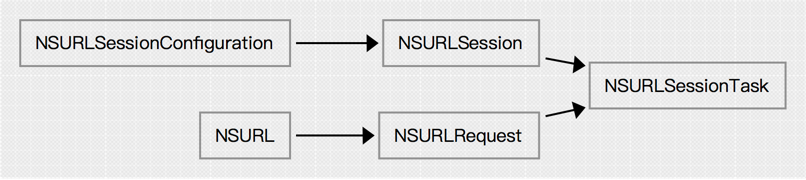
网络请求创建流程
1
2
3
4
5
|
graph LR
NSURL-->NSURLRequest
NSURLRequest-->NSURLSessionTask
NSURLSessionConfiguration-->NSURLSession
NSURLSession-->NSURLSessionTask
|
创建和配置 Session
一、NSURLSessionDataTask 示例
1
2
3
4
5
6
7
8
9
10
11
12
13
14
15
16
17
18
19
20
21
22
23
24
25
26
27
28
29
30
31
32
33
|
// 1.创建 NSURLSessionConfiguration
NSURLSessionConfiguration *defaultConfiguration = [NSURLSessionConfiguration defaultSessionConfiguration];
NSURLSessionConfiguration *ephemeralConfiguration = [NSURLSessionConfiguration ephemeralSessionConfiguration];
NSURLSessionConfiguration *backgroundConfiguration = [NSURLSessionConfiguration backgroundSessionConfigurationWithIdentifier: @"com.myapp.networking.background"];

// 配置默认会话的缓存行为
NSString *cachesDirectory = NSSearchPathForDirectoriesInDomains(NSCachesDirectory, NSUserDomainMask, YES).firstObject;
NSString *cachePath = [cachesDirectory stringByAppendingPathComponent:@"MyCache"];

/* Note:
 iOS需要设置相对路径:〜/Library/Caches
 OS X 要设置绝对路径。
 */
NSURLCache *cache = [[NSURLCache alloc] initWithMemoryCapacity:16384
                                                  diskCapacity:268435456
                                                      diskPath:cachePath];
defaultConfiguration.URLCache = cache;
defaultConfiguration.requestCachePolicy = NSURLRequestUseProtocolCachePolicy;

// 2.创建 NSURLSession
NSOperationQueue *operationQueue = [NSOperationQueue mainQueue];

NSURLSession *defaultSession = [NSURLSession sessionWithConfiguration:defaultConfiguration delegate:self delegateQueue:operationQueue];
NSURLSession *ephemeralSession = [NSURLSession sessionWithConfiguration:ephemeralConfiguration delegate:self delegateQueue:operationQueue];
NSURLSession *backgroundSession = [NSURLSession sessionWithConfiguration:backgroundConfiguration delegate:self delegateQueue:operationQueue];

// 3.创建 NSURLSessionDataTask
NSURL *url = [NSURL URLWithString:@"https://www.example.com/"];

[[defaultSession dataTaskWithURL:url completionHandler:^(NSData *data, NSURLResponse *response, NSError *error) {
    NSLog(@"Got response %@ with error %@.n", response, error);
    NSLog(@"DATA:n%@nEND DATAn", [[NSString alloc] initWithData:data encoding:NSUTF8StringEncoding]);
          }] resume];
|
二、NSURLSessionDownloadTask 示例
1
2
3
4
5
6
7
8
9
10
11
12
13
14
15
16
17
18
19
20
21
22
23
24
25
26
27
28
29
30
31
32
33
34
35
36
37
38
39
40
41
42
43
44
45
46
47
48
49
50
51
52
53
54
|
NSURL *url = [NSURL URLWithString:@"https://developer.apple.com/library/ios/documentation/Cocoa/Reference/Foundation/ObjC_classic/FoundationObjC.pdf"];

// 1.创建 NSURLSessionConfiguration
NSURLSessionConfiguration *backgroundConfiguration = [NSURLSessionConfiguration backgroundSessionConfigurationWithIdentifier: @"com.myapp.networking.background"];

// 2.创建 NSURLSession
NSOperationQueue *operationQueue = [NSOperationQueue mainQueue];

NSURLSession *backgroundSession = [NSURLSession sessionWithConfiguration:backgroundConfiguration delegate:self delegateQueue:operationQueue];

// 3.创建 NSURLSessionDownloadTask
NSURLSessionDownloadTask *downloadTask = [backgroundSession downloadTaskWithURL:url];
[downloadTask resume];

# prama mark - Delegate
- (void)URLSession:(NSURLSession *)session
      downloadTask:(NSURLSessionDownloadTask *)downloadTask
      didWriteData:(int64_t)bytesWritten
 totalBytesWritten:(int64_t)totalBytesWritten
totalBytesExpectedToWrite:(int64_t)totalBytesExpectedToWrite
{
    NSLog(@"Session %@ download task %@ wrote an additional %lld bytes (total %lld bytes) out of an expected %lld bytes.n", session, downloadTask, bytesWritten, totalBytesWritten, totalBytesExpectedToWrite);
}

- (void)URLSession:(NSURLSession *)session
      downloadTask:(NSURLSessionDownloadTask *)downloadTask
 didResumeAtOffset:(int64_t)fileOffset
expectedTotalBytes:(int64_t)expectedTotalBytes
{
    NSLog(@"Session %@ download task %@ resumed at offset %lld bytes out of an expected %lld bytes.n", session, downloadTask, fileOffset, expectedTotalBytes);
}

- (void)URLSession:(NSURLSession *)session
      downloadTask:(NSURLSessionDownloadTask *)downloadTask
didFinishDownloadingToURL:(NSURL *)location
{
    NSLog(@"Session %@ download task %@ finished downloading to URL %@n", session, downloadTask, location);

    // Perform the completion handler for the current session
    self.completionHandlers[session.configuration.identifier]();

   // Open the downloaded file for reading
    NSError *readError = nil;
    NSFileHandle *fileHandle = [NSFileHandle fileHandleForReadingFromURL:location error:readError];
    // ...

   // Move the file to a new URL
    NSFileManager *fileManager = [NSFileManager defaultManager];
    NSURL *cacheDirectory = [[fileManager URLsForDirectory:NSCachesDirectory inDomains:NSUserDomainMask] firstObject];
    NSError *moveError = nil;
    if ([fileManager moveItemAtURL:location toURL:cacheDirectory error:moveError]) {
        // ...
    }
}
|
三、Uploading Body Content
1
2
3
4
5
6
7
8
9
10
11
12
13
14
15
16
17
18
19
20
21
22
23
24
25
26
27
28
29
30
31
32
33
34
35
36
37
38
39
40
41
42
43
44
45
46
47
48
49
50
51
52
53
54
55
56
57
58
59
60
|
// 1.创建 NSURLSessionConfiguration
NSURLSessionConfiguration *defaultConfiguration = [NSURLSessionConfiguration defaultSessionConfiguration];

// 配置默认会话的缓存行为
NSString *cachesDirectory = NSSearchPathForDirectoriesInDomains(NSCachesDirectory, NSUserDomainMask, YES).firstObject;
NSString *cachePath = [cachesDirectory stringByAppendingPathComponent:@"MyCache"];

/* Note:
 iOS需要设置相对路径:〜/Library/Caches
 OS X 要设置绝对路径。
 */
NSURLCache *cache = [[NSURLCache alloc] initWithMemoryCapacity:16384
                                                  diskCapacity:268435456
                                                      diskPath:cachePath];
defaultConfiguration.URLCache = cache;
defaultConfiguration.requestCachePolicy = NSURLRequestUseProtocolCachePolicy;

// 2.创建 NSURLSession
NSOperationQueue *operationQueue = [NSOperationQueue mainQueue];

NSURLSession *defaultSession = [NSURLSession sessionWithConfiguration:defaultConfiguration delegate:self delegateQueue:operationQueue];

// ***************************************************************
// 3.1.上传 Data
NSURL *textFileURL = [NSURL fileURLWithPath:@"/path/to/file.txt"];
NSData *data = [NSData dataWithContentsOfURL:textFileURL];

NSURL *url = [NSURL URLWithString:@"https://www.example.com/"];
NSMutableURLRequest *mutableRequest = [NSMutableURLRequest requestWithURL:url];
mutableRequest.HTTPMethod = @"POST";
[mutableRequest setValue:[NSString stringWithFormat:@"%lld", data.length] forHTTPHeaderField:@"Content-Length"];
[mutableRequest setValue:@"text/plain" forHTTPHeaderField:@"Content-Type"];

NSURLSessionUploadTask *uploadTask = [defaultSession uploadTaskWithRequest:mutableRequest fromData:data];
[uploadTask resume];

// ***************************************************************
// 3.2.上传 File
NSURL *textFileURL = [NSURL fileURLWithPath:@"/path/to/file.txt"];

NSURL *url = [NSURL URLWithString:@"https://www.example.com/"];
NSMutableURLRequest *mutabl 大专栏  iOS 编程:NSURLSessioneRequest = [NSMutableURLRequest requestWithURL:url];
mutableRequest.HTTPMethod = @"POST";

NSURLSessionUploadTask *uploadTask = [defaultSession uploadTaskWithRequest:mutableRequest fromFile:textFileURL];
[uploadTask resume];

// ***************************************************************
// 3.3.上传 Stream
NSURL *textFileURL = [NSURL fileURLWithPath:@"/path/to/file.txt"];

NSURL *url = [NSURL URLWithString:@"https://www.example.com/"];
NSMutableURLRequest *mutableRequest = [NSMutableURLRequest requestWithURL:url];
mutableRequest.HTTPMethod = @"POST";
mutableRequest.HTTPBodyStream = [NSInputStream inputStreamWithFileAtPath:textFileURL.path];
[mutableRequest setValue:@"text/plain" forHTTPHeaderField:@"Content-Type"];
[mutableRequest setValue:[NSString stringWithFormat:@"%lld", data.length] forHTTPHeaderField:@"Content-Length"];

NSURLSessionUploadTask *uploadTask = [defaultSession uploadTaskWithStreamedRequest:mutableRequest];
[uploadTask resume];
|
四、NSURLSessionDataTask 发送 GET 请求
1
2
3
4
5
6
7
8
9
10
11
12
13
14
15
16
17
18
|
- (void)p_NSURLSessionDataTask_GET {
    // 请求路径
    NSURL *url = [NSURL URLWithString:@"https://op.juhe.cn/shanghai/hospital?dtype=&key=123"];

    // 1.创建 NSURLSession,使用共享 Session
    NSURLSession *session = [NSURLSession sharedSession];

    // 2.创建 NSURLSessionDataTask, 默认 GET 请求
    NSURLSessionDataTask *dataTask = [session dataTaskWithURL:url completionHandler:^(NSData * _Nullable data, NSURLResponse * _Nullable response, NSError * _Nullable error) {
        if (error) {
            NSLog(@"%@",error.localizedDescription);
        }else {
            NSLog(@"%@",data);
        }
    }];
    // 3.执行 Task
    [dataTask resume];
}
|
五、NSURLSessionDataTask 发送 POST 请求
1
2
3
4
5
6
7
8
9
10
11
12
13
14
15
16
17
18
19
20
21
22
23
24
25
|
- (void)p_NSURLSessionDataTask_POST {
    // 请求路径
    NSURL *url = [NSURL URLWithString:@"https://op.juhe.cn/shanghai/hospital"];

    // 创建请求对象
    NSMutableURLRequest *request = [NSMutableURLRequest requestWithURL:url];
    // 设置请求方法
    request.HTTPMethod = @"POST";
    // 设置请求体
    NSString *stringBody = @"dtype=&key=123";
    request.HTTPBody = [stringBody dataUsingEncoding:NSUTF8StringEncoding];

    // 1.创建 NSURLSession,使用共享 Session
    NSURLSession *session = [NSURLSession sharedSession];
    // 2.创建 NSURLSessionDataTask
    NSURLSessionDataTask *dataTask = [session dataTaskWithRequest:request completionHandler:^(NSData * _Nullable data, NSURLResponse * _Nullable response, NSError * _Nullable error) {
        if (error) {
            // error
        }else {
            // data
        }
    }];
    // 3.执行 Task
    [dataTask resume];
}
|
六、NSURLSessionDataTask 设置代理发送请求
1
2
3
4
5
6
7
8
9
10
11
12
13
14
15
16
17
18
19
20
21
22
23
24
25
26
27
28
29
30
31
32
33
34
35
36
37
38
39
40
41
42
43
44
45
46
47
48
49
50
51
52
53
54
55
56
57
58
59
60
61
62
63
64
|
- (void)p_NSURLSessionDataTask_Delegate {
    // 请求路径
    NSURL *url = [NSURL URLWithString:@"https://op.juhe.cn/shanghai/hospital"];

    // 创建请求对象
    NSMutableURLRequest *request = [NSMutableURLRequest requestWithURL:url];
    // 设置请求方法
    request.HTTPMethod = @"POST";
    // 设置请求体
    NSString *stringBody = @"dtype=&key=5718abc3837ecb471c5d5b1ef1e35130";
    request.HTTPBody = [stringBody dataUsingEncoding:NSUTF8StringEncoding];

    // 1.创建 NSURLSessionConfiguration
    NSURLSessionConfiguration *configuration =
        [NSURLSessionConfiguration defaultSessionConfiguration];
    // 2.创建 NSURLSession
    NSURLSession *session =
        [NSURLSession sessionWithConfiguration:configuration
                                      delegate:self
                                 delegateQueue:nil];
    // 3.创建 NSURLSessionDataTask
    NSURLSessionDataTask *dataTask =
        [session dataTaskWithRequest:request];
    // 4.执行 Task
    [dataTask resume];
}

#pragma mark - NSURLSessionDelegate

- (void)URLSession:(NSURLSession *)session didBecomeInvalidWithError:(nullable NSError *)error {
    // 请求失败调用。
}

- (void)URLSession:(NSURLSession *)session didReceiveChallenge:(NSURLAuthenticationChallenge *)challenge
 completionHandler:(void (^)(NSURLSessionAuthChallengeDisposition disposition, NSURLCredential * _Nullable credential))completionHandler {
    // 处理身份验证和凭据。
}

- (void)URLSessionDidFinishEventsForBackgroundURLSession:(NSURLSession *)session {
    // 后台任务下载完成后调用
}

#pragma mark - NSURLSessionDataDelegate

- (void)URLSession:(NSURLSession *)session
          dataTask:(NSURLSessionDataTask *)dataTask
didReceiveResponse:(NSURLResponse *)response
 completionHandler:(void (^)(NSURLSessionResponseDisposition disposition))completionHandler {
    // 接收到服务器响应的时候调用
    // 默认情况下不接收数据,必须告诉系统是否接收服务器返回的数据
    completionHandler(NSURLSessionResponseAllow);
}

- (void)URLSession:(NSURLSession *)session
              task:(NSURLSessionTask *)task
didCompleteWithError:(nullable NSError *)error {
    // 请求失败调用
}

- (void)URLSession:(NSURLSession *)session
          dataTask:(NSURLSessionDataTask *)dataTask
    didReceiveData:(NSData *)data {
    // 接受到服务器返回数据的时候调用,可能被调用多次
}
|
获取新闻示例代码:
1
2
3
4
5
6
7
8
9
10
11
12
13
14
15
16
17
18
19
20
21
22
23
24
25
26
27
28
29
30
31
32
33
34
35
36
37
38
39
40
41
42
43
44
45
46
47
48
49
50
51
52
53
54
55
56
57
58
59
60
61
62
|
-(void)viewdidload {

    //创建NSURLSession对象
    NSURLSessionConfiguration *config = [NSURLSessionConfiguration defaultSessionConfiguration];
    _session = [NSURLSession sessionWithConfiguration:config
                                             delegate:nil
                                        delegateQueue:nil];
    //发起网络请求获取新闻
    [self fetchHrssnews];
}

#pragma 获取新闻方法
- (void)fetchHrssnews {

    //创建NSURLRequest对象
    NSString *requestString = hrssnewsString;
    NSURL *url = [NSURL URLWithString:requestString];
    //方法参数:统一资源定位符、缓存策略:忽略本地缓存、等待web服务器响应最长时间
    NSMutableURLRequest *req = [NSMutableURLRequest requestWithURL:url
                                                       cachePolicy:NSURLRequestReloadIgnoringLocalCacheData
                                                   timeoutInterval:60.0f];
    //设置请求方式为POST
    [req setHTTPMethod:	@"POST"];

    //设置请求体
    NSString *dataString = @"ksym=0&jsym=15";
    NSData *postData = [dataString dataUsingEncoding:NSUTF8StringEncoding];
    [req setHTTPBody:postData];

    //创建NSURLSessionDataTask对象
    NSURLSessionDataTask *dataTask = [self.session dataTaskWithRequest:req completionHandler:^(NSData * _Nullable data, NSURLResponse * _Nullable response, NSError * _Nullable error) {

        //解析JSON数据
        NSDictionary *jsonObject = [NSJSONSerialization
                                    JSONObjectWithData:data
                                options:kNilOptions
                                error:nil];

        self.msgflag = jsonObject[@"msgflag"];
        HQLog(@"msgflag:%@",self.msgflag);
        self.msg = jsonObject[@"msg"];
        HQLog(@"msg:%@",self.msg);

        //判断是否成功获取服务器端数据
        if ([self.msgflag isEqualToString:@"0"]) {
            HQLog(@"msgflag:%@",self.msgflag);
        }else{
            HQLog(@"msgflag:-1,msg:For input string: ");
        }

        //使用dispatch_asynch函数让reloadData方法在主线程中运行
        dispatch_async(dispatch_get_main_queue(), ^{
            //重新加载UITableView对象的数据
            [self.tableView reloadData];});
            //停止刷新
            [self.tableView.mj_header endRefreshing];
    }];

    //NSURLSessionDataTask在刚创建的时候默认处于挂起状态,需要手动调用恢复。
    [dataTask resume];

}
|
参考
- [译] 二、开始iOS编程之前,你还需要做什么?
声明:本文翻译自AppCoda网站的文章:What You Need to Begin iOS Programming?,作者是创建者Simon Ng.如有异议,请联系博主. 更新:帖子已经重新被 ...
- IOS编程User Interface基础
IOS编程之User Interface基础 目录 概述 相关概念 常见问题 状态栏的隐藏 应用图标的设置 概述 IOS用户界面是APP呈现给用户最直观.最常用的方式,因此学会用户界面的编程是学习IO ...
- IOS编程之多线程
IOS编程之多线程 目录 概述——对多线程的理解 IOS中实现多线程的三种方式 NSThread 线程创建 线程的同步与锁 线程间的交互 线程的操作方法 NSOperation and NSOpera ...
- iOS编程——经过UUID和KeyChain来代替Mac地址实现iOS设备的唯一标示(OC版)
iOS编程——通过UUID和KeyChain来代替Mac地址实现iOS设备的唯一标示(OC版) 很多的应用都需要用到手机的唯一标示,而且要求这个唯一标示不能因为应用app的卸载或者改变而变化. 在iO ...
- IOS编程教程(八):在你的应用程序添加启动画面
IOS编程教程(八):在你的应用程序添加启动画面 虽然你可能认为你需要编写闪屏的代码,苹果已经可以非常轻松地把它做在Xcode中.不需要任何编码.你只需要做的是设置一些配置. 什么是闪屏 对于那些 ...
- iOS编程之前
iOS编程之前 更新:帖子已经重新被更新过,以便能更好的兼容Xcode 5和iOS 7. 至今为止,已经超过6000位读者加入了这个iOS免费教程.首先,我要感谢这些加入我们社区的朋友.在 ...
- iOS编程中比较两个日期的大小
转自:http://www.myext.cn/other/a_30922.html 比较日期大小是任何编程语言都会经常遇到的问题,再iOS编程中,通常用NSDate对象来存储一个时间(包括日期和时间. ...
- 新书《iOS编程(第6版)》抢鲜试读
我最近翻译了Big Nerd Ranch的<iOS编程(第6版)>.我用了大半年时间,尽可能做到通顺易懂.不足之处请大家多多指正.感谢辛苦审校的丁道骏同学. 这本书得过Jolt大奖,原书在 ...
- iOS - 网络 - NSURLSession
1.NSURLSession基础 NSURLConnection在开发中会使用的越来越少,iOS9已经将NSURLConnection废弃,现在最低版本一般适配iOS,所以也可以使用.NSURLCon ...
随机推荐
- Java远程调用Linux脚本
参考:http://blog.csdn.net/xiao_jun_0820/article/details/26254813 http://blog.csdn.net/a19881029/artic ...
- Django专题之ORM
ORM介绍 ORM概念 对象关系映射(Object Relational Mapping,简称ORM)模式是一种为了解决面向对象与关系数据库存在的互不匹配的现象的技术. 简单的说,ORM是通过使用描述 ...
- eclipse创建文件携带作者时间
windows–>preference Java–>Code Style–>Code Templates code–>new Java files 编辑它 ${filecomm ...
- Python之小作业
文档如下: # name, age, score tom, 12, 86 Lee, 15, 99 Lucy, 11, 58 Joseph, 19, 56 第一栏为姓名(name),第二栏为年纪(age ...
- 查看opencv-python编译信息
python -c "import cv2; print(cv2.getBuildInformation())" General configuration for OpenCV ...
- C#Web网站的创建
一.CS与BS的区别 CS软件:需要在客户端安装软件. BS软件:只需要浏览器就能运行,Web网站就是BS软件. 创建过程: 1.文件新建---新建网站----空白网站 2.右击网站项目---添加网页 ...
- hdu2222 (AC自动机模板)
题:http://acm.hdu.edu.cn/showproblem.php?pid=2222 学习出:https://bestsort.cn/2019/04/28/402/ 主要是fail的建立. ...
- day50-线程-定时器
#1.定时器: from threading import Timer def func(): print('定时器') t = Timer(1,func) #定时一秒,开启func线程. t.sta ...
- 897B. Chtholly's request#长度为偶数的回文数(模拟)
题目出处:http://codeforces.com/problemset/problem/897/B 题目大意:构造一个题意要求的zcy数之后取模 #include<iostream> ...
- set_include_path详细解释(转)
首先我们来看这个全局变量:__FILE__它表示文件的完整路径(当然包括文件名在内)也就是说它根据你文件所在的目录不同,有着不同的值:当然,当它用在包行文件中的时候,它的值是包含的路径: 然后:我们看 ...
