
Ubuntu操作系统部署zabbix agent服务
Ubuntu操作系统部署zabbix agent服务
作者:尹正杰
版权声明:原创作品,谢绝转载!否则将追究法律责任。
一.下载zabbix软件包
  博主推荐阅读:

    https://www.cnblogs.com/yinzhengjie2020/p/12305427.html
二.编译安装agent
1>.将下载的软件包上传到服务器上
[root@mysql202.yinzhengjie.org.cn ~]# cd /usr/local/src/

[root@mysql202.yinzhengjie.org.cn /usr/local/src]#

[root@mysql202.yinzhengjie.org.cn /usr/local/src]# ll

total

drwxr-xr-x   root root  Aug     ./

drwxr-xr-x  root root  Aug     ../

[root@mysql202.yinzhengjie.org.cn /usr/local/src]#

[root@mysql202.yinzhengjie.org.cn /usr/local/src]# rz

[root@mysql202.yinzhengjie.org.cn /usr/local/src]#

[root@mysql202.yinzhengjie.org.cn /usr/local/src]# ll

total

drwxr-xr-x   root root      Feb  : ./

drwxr-xr-x  root root      Aug     ../

-rw-r--r--   root root  Feb  : zabbix-4.0..tar.gz

[root@mysql202.yinzhengjie.org.cn /usr/local/src]#
2>.解压软件包
[root@mysql202.yinzhengjie.org.cn /usr/local/src]# ll

total

drwxr-xr-x   root root      Feb  : ./

drwxr-xr-x  root root      Aug     ../

-rw-r--r--   root root  Feb  : zabbix-4.0..tar.gz

[root@mysql202.yinzhengjie.org.cn /usr/local/src]#

[root@mysql202.yinzhengjie.org.cn /usr/local/src]# tar zxf zabbix-4.0..tar.gz

[root@mysql202.yinzhengjie.org.cn /usr/local/src]#

[root@mysql202.yinzhengjie.org.cn /usr/local/src]# ll

total

drwxr-xr-x   root root      Feb  : ./

drwxr-xr-x  root root      Aug     ../

drwxr-xr-x         Jan  : zabbix-4.0./

-rw-r--r--   root root  Feb  : zabbix-4.0..tar.gz

[root@mysql202.yinzhengjie.org.cn /usr/local/src]#

[root@mysql202.yinzhengjie.org.cn /usr/local/src]#
[root@mysql202.yinzhengjie.org.cn /usr/local/src]# tar zxf zabbix-4.0.17.tar.gz
3>.安装依赖环境
[root@mysql202.yinzhengjie.org.cn ~]# apt-get -y install libpcre3 libpcre3-dev gcc make
4>.配置zabbix agent的安装参数
[root@mysql202.yinzhengjie.org.cn /usr/local/src]# ll

total

drwxr-xr-x   root root      Feb  : ./

drwxr-xr-x  root root      Aug     ../

drwxr-xr-x         Jan  : zabbix-4.0./

-rw-r--r--   root root  Feb  : zabbix-4.0..tar.gz

[root@mysql202.yinzhengjie.org.cn /usr/local/src]#

[root@mysql202.yinzhengjie.org.cn /usr/local/src]# cd zabbix-4.0./

[root@mysql202.yinzhengjie.org.cn /usr/local/src/zabbix-4.0.]#

[root@mysql202.yinzhengjie.org.cn /usr/local/src/zabbix-4.0.]# ll

total

drwxr-xr-x       Jan  : ./

drwxr-xr-x   root root    Feb  : ../

-rw-r--r--       Jan  : aclocal.m4

-rw-r--r--          Jan  : AUTHORS

drwxr-xr-x        Jan  : bin/

drwxr-xr-x        Jan  : build/

-rw-r--r--      Jan  : ChangeLog

-rwxr-xr-x        Jan    compile*

drwxr-xr-x        Jan  : conf/

-rwxr-xr-x       Nov    config.guess*

-rwxr-xr-x       Nov    config.sub*

-rwxr-xr-x      Jan  : configure*

-rw-r--r--       Jan  : configure.ac

-rw-r--r--       Jan  : COPYING

drwxr-xr-x        Jan  : database/

-rwxr-xr-x       Jan    depcomp*

drwxr-xr-x        Jan  : frontends/

drwxr-xr-x        Jan  : include/

-rw-r--r--          Jan  : INSTALL

-rwxr-xr-x       Jan    install-sh*

drwxr-xr-x        Jan  : m4/

-rw-r--r--        Jan  : Makefile.am

-rw-r--r--       Jan  : Makefile.in

drwxr-xr-x        Jan  : man/

drwxr-xr-x        Jan  : misc/

-rwxr-xr-x        Jan    missing*

-rw-r--r--          Jan  : NEWS

-rw-r--r--        Jan  : README

drwxr-xr-x        Jan  : sass/

drwxr-xr-x       Jan  : src/

[root@mysql202.yinzhengjie.org.cn /usr/local/src/zabbix-4.0.]#
[root@mysql202.yinzhengjie.org.cn /usr/local/src]# cd zabbix-4.0.17/
[root@mysql202.yinzhengjie.org.cn /usr/local/src/zabbix-4.0.]# ./configure --prefix=/yinzhengjie/softwares/zabbix --enable-agent
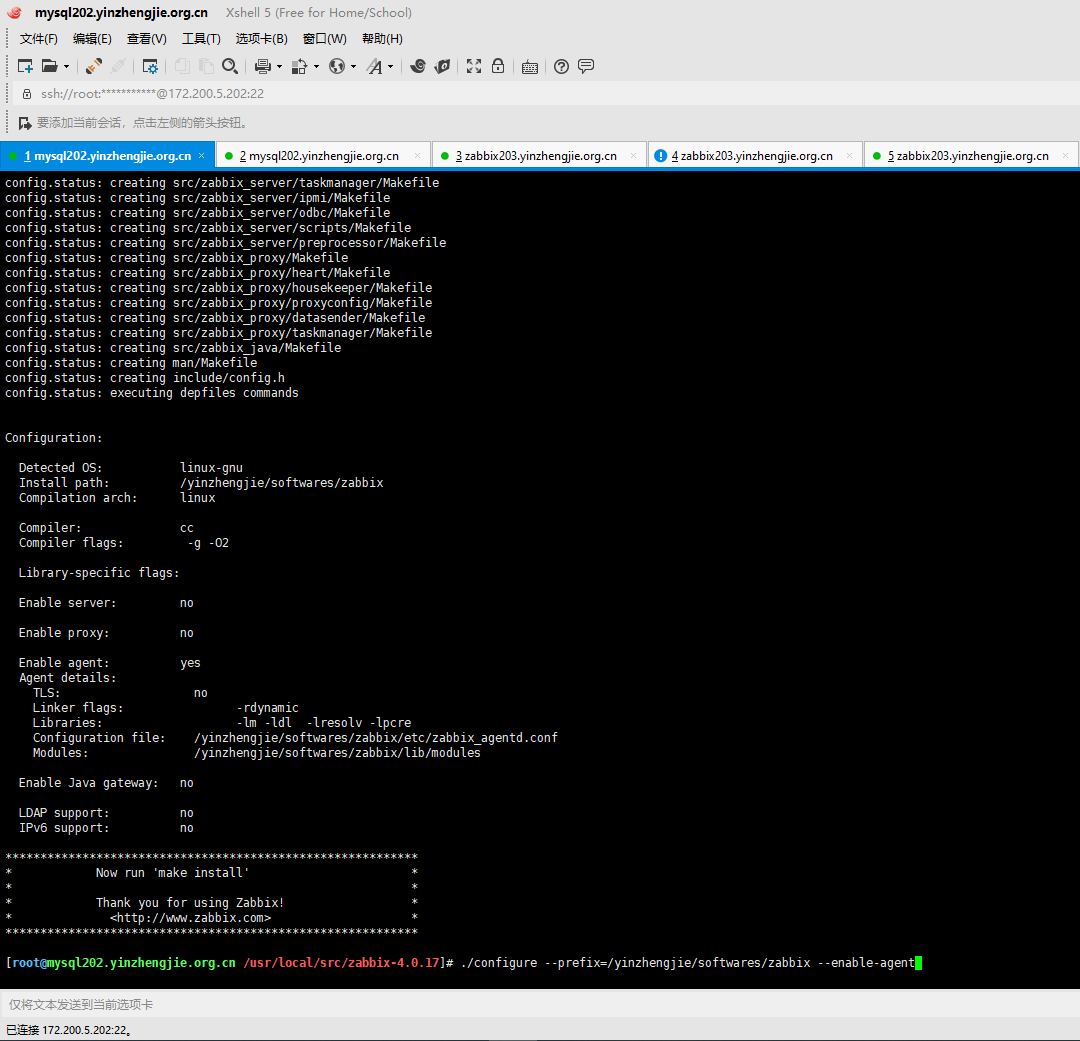
5>.编译并安装
[root@mysql202.yinzhengjie.org.cn /usr/local/src/zabbix-4.0.]# make -j && make install

6>.编写zabbix agent的启动脚本
  博主推荐阅读:

    https://www.cnblogs.com/yinzhengjie2020/p/12306215.html
三.手动启动zabbix agent程序
1>.修改zabbix agent的配置文件,指定zabbix server地址
[root@mysql202.yinzhengjie.org.cn ~]# cp /yinzhengjie/softwares/zabbix/etc/zabbix_agentd.conf /yinzhengjie/softwares/zabbix/etc/zabbix_agentd.conf-`date +%F` #修改配置文件之前别忘记先备份文件
[root@mysql202.yinzhengjie.org.cn ~]# grep ^Server= /yinzhengjie/softwares/zabbix/etc/zabbix_agentd.conf

Server=127.0.0.1

[root@mysql202.yinzhengjie.org.cn ~]#

[root@mysql202.yinzhengjie.org.cn ~]# sed -r -i 's#(Server=)127.0.0.1#\1172.200.5.203#' /yinzhengjie/softwares/zabbix/etc/zabbix_agentd.conf

[root@mysql202.yinzhengjie.org.cn ~]#

[root@mysql202.yinzhengjie.org.cn ~]# grep ^Server= /yinzhengjie/softwares/zabbix/etc/zabbix_agentd.conf

Server=172.200.5.203

[root@mysql202.yinzhengjie.org.cn ~]#

[root@mysql202.yinzhengjie.org.cn ~]#
[root@mysql202.yinzhengjie.org.cn ~]# sed -r -i 's#(Server=)127.0.0.1#\1172.200.5.203#' /yinzhengjie/softwares/zabbix/etc/zabbix_agentd.conf
[root@mysql202.yinzhengjie.org.cn ~]# grep ^Hostname= /yinzhengjie/softwares/zabbix/etc/zabbix_agentd.conf

Hostname=Zabbix server

[root@mysql202.yinzhengjie.org.cn ~]#

[root@mysql202.yinzhengjie.org.cn ~]#

[root@mysql202.yinzhengjie.org.cn ~]# sed -r -i 's#(Hostname=)Zabbix server#\1mysql202.yinzhengjie.org.cn#' /yinzhengjie/softwares/zabbix/etc/zabbix_agentd.conf

[root@mysql202.yinzhengjie.org.cn ~]#

[root@mysql202.yinzhengjie.org.cn ~]# grep ^Hostname= /yinzhengjie/softwares/zabbix/etc/zabbix_agentd.conf

Hostname=mysql202.yinzhengjie.org.cn

[root@mysql202.yinzhengjie.org.cn ~]#

[root@mysql202.yinzhengjie.org.cn ~]#
[root@mysql202.yinzhengjie.org.cn ~]# sed -r -i 's#(Hostname=)Zabbix server#\1mysql202.yinzhengjie.org.cn#' /yinzhengjie/softwares/zabbix/etc/zabbix_agentd.conf
2>.修改zabbix的守护进程为root用户(默认是zabbix用户)
[root@mysql202.yinzhengjie.org.cn ~]# grep User= /yinzhengjie/softwares/zabbix/etc/zabbix_agentd.conf

# User=zabbix

[root@mysql202.yinzhengjie.org.cn ~]#

[root@mysql202.yinzhengjie.org.cn ~]# sed -r -i 's@# (User=)zabbix@\1root@' /yinzhengjie/softwares/zabbix/etc/zabbix_agentd.conf

[root@mysql202.yinzhengjie.org.cn ~]#

[root@mysql202.yinzhengjie.org.cn ~]# grep User= /yinzhengjie/softwares/zabbix/etc/zabbix_agentd.conf

User=root

[root@mysql202.yinzhengjie.org.cn ~]#

[root@mysql202.yinzhengjie.org.cn ~]#
[root@mysql202.yinzhengjie.org.cn ~]# sed -r -i 's@# (User=)zabbix@\1root@' /yinzhengjie/softwares/zabbix/etc/zabbix_agentd.conf
[root@mysql202.yinzhengjie.org.cn ~]# grep AllowRoot= /yinzhengjie/softwares/zabbix/etc/zabbix_agentd.conf

# AllowRoot=

[root@mysql202.yinzhengjie.org.cn ~]#

[root@mysql202.yinzhengjie.org.cn ~]# sed -r -i 's@# (AllowRoot=)0@\11@' /yinzhengjie/softwares/zabbix/etc/zabbix_agentd.conf

[root@mysql202.yinzhengjie.org.cn ~]#

[root@mysql202.yinzhengjie.org.cn ~]# grep AllowRoot= /yinzhengjie/softwares/zabbix/etc/zabbix_agentd.conf

AllowRoot=

[root@mysql202.yinzhengjie.org.cn ~]#

[root@mysql202.yinzhengjie.org.cn ~]#
[root@mysql202.yinzhengjie.org.cn ~]# sed -r -i 's@# (AllowRoot=)0@\11@' /yinzhengjie/softwares/zabbix/etc/zabbix_agentd.conf
3>.启动zabbix agent服务
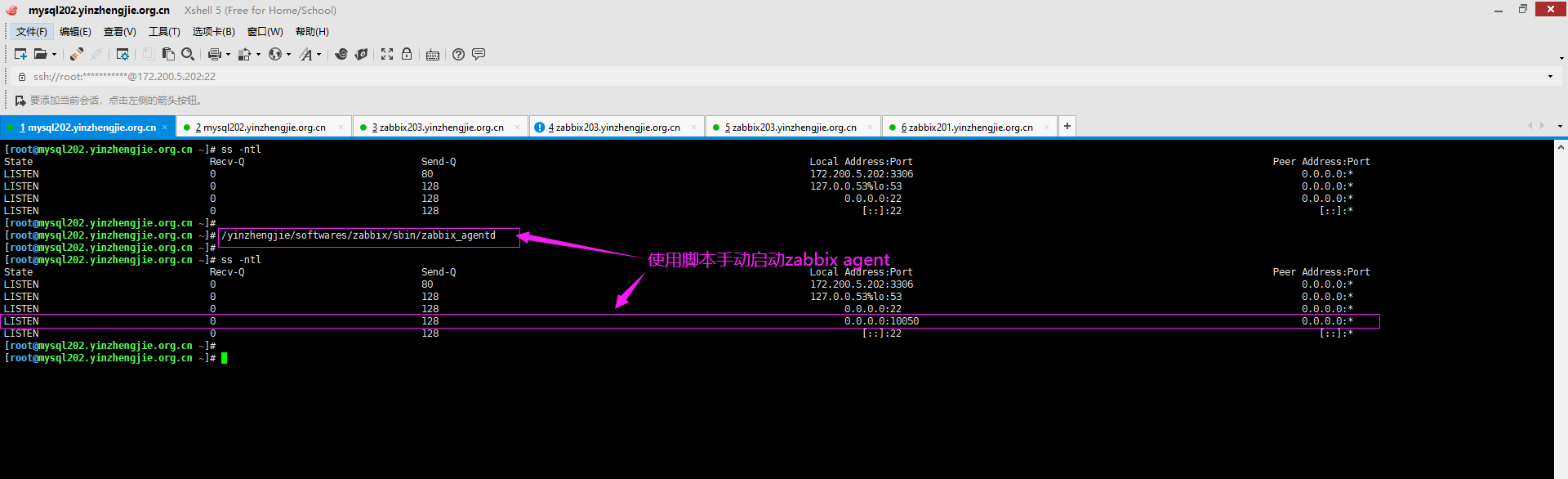
[root@mysql202.yinzhengjie.org.cn ~]# ss -ntl

State                               Recv-Q                               Send-Q                                                              Local Address:Port                                                               Peer Address:Port

LISTEN                                                                                                                                    172.200.5.202:                                                                    0.0.0.0:*

LISTEN                                                                                                                                   127.0.0.53%lo:                                                                      0.0.0.0:*

LISTEN                                                                                                                                         0.0.0.0:                                                                      0.0.0.0:*

LISTEN                                                                                                                                            [::]:                                                                         [::]:*

[root@mysql202.yinzhengjie.org.cn ~]#

[root@mysql202.yinzhengjie.org.cn ~]# /yinzhengjie/softwares/zabbix/sbin/zabbix_agentd

[root@mysql202.yinzhengjie.org.cn ~]#

[root@mysql202.yinzhengjie.org.cn ~]# ss -ntl

State                               Recv-Q                               Send-Q                                                              Local Address:Port                                                               Peer Address:Port

LISTEN                                                                                                                                    172.200.5.202:                                                                    0.0.0.0:*

LISTEN                                                                                                                                   127.0.0.53%lo:                                                                      0.0.0.0:*

LISTEN                                                                                                                                         0.0.0.0:                                                                      0.0.0.0:*

LISTEN                                                                                                                                         0.0.0.0:                                                                   0.0.0.0:*

LISTEN                                                                                                                                            [::]:                                                                         [::]:*

[root@mysql202.yinzhengjie.org.cn ~]#

[root@mysql202.yinzhengjie.org.cn ~]#
[root@mysql202.yinzhengjie.org.cn ~]# /yinzhengjie/softwares/zabbix/sbin/zabbix_agentd
Ubuntu操作系统部署zabbix agent服务的更多相关文章
- CentOS操作系统部署zabbix agent服务
CentOS操作系统部署zabbix agent服务 作者:尹正杰 版权声明:原创作品,谢绝转载!否则将追究法律责任. 一.查看zabbix的官方手册 1>.点击下载 2>.查看Ubunt ...
- Ubuntu操作系统编写zabbix的启动管理脚本
Ubuntu操作系统编写zabbix的启动管理脚本 作者:尹正杰 版权声明:原创作品,谢绝转载!否则将追究法律责任. 一.修改zabbix的pid存放路径 1>.创建存放zabbix的pid目录 ...
- 运维监控-基于yum的方式部署 Zabbix Agent 4.0 版本
运维监控-基于yum的方式部署 Zabbix Agent 4.0 版本 作者:尹正杰 版权声明:原创作品,谢绝转载!否则将追究法律责任. 上一篇博客我们分享了如何基于yum的方式部署zabbix 4. ...
- centos6.5安装部署zabbix监控服务端和客户端
部署zabbix服务端需要LNMP环境(nginx,mysql,php),其它数据库也可以,我这里使用mysql,关于LNMP环境部署,可以参考我的另一遍文章:http://www.cnblogs.c ...
- CentOS 7.2 Ubuntu 18部署Rsync + Lsyncd服务实现文件实时同步/备份
发送端配置: 一.配置密钥 1. 主/从服务器之间启用基于密钥的身份验证.登录发送端服务器并用 " ssh-keygen " 命令生成公共或私有的密钥. 2. 使用 " ...
- Linux下Ubuntu 操作系统 部署
1.1 先更新系统 环境 更新命令为: apt-get update 1.2 安装jdk 安装JDK命令为:sudo apt-get install o penjdk-7-jdk 1.3 安装tomc ...
- 通过ansible自动化部署zabbix应用
zabbix在实际的应用中,可能需要监控的主机非常多,而每个主机的操作系统类型.版本也都不尽相同,在这种环境下,通过手动安装zabbix的agent端已经不现实了,此时就需要借助自动化工具完成zabb ...
- zabbix agent配置详解(windows)
客户端操作 标注:监控zabbix_agentd客户端安装对象是win server 2008操作系统 64位. 1. 下载zabbix_agentd监控客户端软件安装包(windows操作系统客 ...
- Windows server 安装和配置zabbix agent
1.下载Windows 平台的zabbix agent 先到官网下载zabbix_agentd监控客户端软件安装包(windows操作系统客户端),客户端版本尽量与服务器版本一致,下载地址:http: ...
随机推荐
- Linux查看当前系统32位还是64位
getconf LONG_BIT 此方法会直接返回32或64
- Inject shellcode into PE file
先声明这是不免杀的,只是演示. 哔哩哔哩视频 新增节 一般能实现特定功能的shellcode的长度都比较长,可以分到几个节上的空白区,但是这样麻烦啊,或者把最后一个节扩大,但是最后一个节一般没有执行的 ...
- IntelliJ IDEA常用快捷键大全
如果想要非常高效的使用IDEA这款工具,应该掌握图中已被标记的快捷键. 另: 代码实时模板生成:psvm/sout/ifn等 按Tab键快速生成模板. 转载请保留或注明出处:http://www.cn ...
- Java基础 -4.4
For循环 for循环也是一种常规的使用结构 public static void main(String[] args) { for(定义循环的初始值;循环判断;修改循环条件) { 循环语句的执行; ...
- k短路算法
k短路算法 求解k短路用到了A* 算法,A* ( A star )算法,又称启发式搜索算法,与之相对的,dfs与bfs都成为盲目型搜索:即为带有估价函数的优先队列BFS称为A*算法. 该算法的核心思想 ...
- 学习黑马教学视频SSM整合中Security遇到的问题org.springframework.security.access.AccessDeniedException: Access is denied
问题已解决. 总结: 报错:org.springframework.security.access.AccessDeniedException: Access is denied 当您遇到同样问题时, ...
- Steam游戏《Zengeon(神明在上)》修改器制作-[先使用CE写,之后有时间的话改用C#](2020年寒假小目标06)
日期:2020.01.30 博客期:138 星期四 [温馨提示]: 只是想要修改器的网友,可以直接点击此链接下载: 只是想拿CT文件的网友,可以直接点击此链接下载: 没有博客园账号的网友,可以将页面下 ...
- P3919 【模板】可持久化数组 -初步探究主席树
本篇blog主要是给自己(大家)看的. 感谢longlongzhu123奆佬(此人初二LCT)的指点,使本蒟蒻可以快速开始主席树入门. what is 主席树? $ $主席树这个名字只不 ...
- java set的线程安全
CopyOnWriteArraySet和ConcurrentSkipListSet 与线程不安全的集合类的对应关系 HashSet -> CopyOnWriteArraySet TreeSet ...
- 如何更改linux(centos)下的Apache http端口号
# vi /etc/httpd/conf/httpd.conf 文件 修改两个地方 #Listen 12.34.56.78:80 Listen 80 #把80改为你设置的端 ...