
MyBatis缓存机制(一级缓存,二级缓存)
一,MyBatis一级缓存(本地缓存)
<select id="selectStudentByIdAndName"  flushCache=”true”  resultType="student">

    select * from student where sid=#{Sid} and s_name=#{Sname}

</select>
public class MyBatisTest {

    public static void main( String[] args ) {

        SqlSession openSession = null;

        try {

            //mybatis配置文件

            String resourse="mybatis-cfg.xml";

            //通过 Resources 工具类将 ti -config.xm 配置文件读入 Reader

            InputStream inputStream=Resources.getResourceAsStream(resourse);

            //通过 SqlSessionFactoryBuilder 建造类使用 Reader 创建 SqlSessionFactory工厂对象

            SqlSessionFactory sqlSessionFactory=new SqlSessionFactoryBuilder().build(inputStream);

            //通过SqlSessionFactory工厂得到SqlSession

            openSession = sqlSessionFactory.openSession();

            //通过反射机制来获取对应的Mapper实例

            StudentMapper mapper=openSession.getMapper(StudentMapper.class);

            Student student1=mapper.selectStudentByIdAndName(2,"danghh");

            Student student2=mapper.selectStudentByIdAndName(2,"danghh");

            System.out.println(student1);

            openSession.commit();

        } catch (IOException e) {

            e.printStackTrace();

        }finally {

            //最后一定不要忘记关闭 SqlSession ,否则会因为连接没有关闭导致数据库连接数过多,造成系统崩旗

            openSession.close();

        }

    }

}
[DEBUG] - Setting autocommit to false on JDBC Connection[com.mysql.jdbc.JDBC4Connection@dfd3711]

[DEBUG] - ==>  Preparing: select * from student where sid=? and s_name=?

[DEBUG] - ==> Parameters: 2(Integer), danghh(String)

[DEBUG] - <==      Total: 1

 Student{SID=2, Sname='danghh', Sage=22, Ssex='nv', course=null}
 Student{SID=2, Sname='danghh', Sage=22, Ssex='nv', course=null}
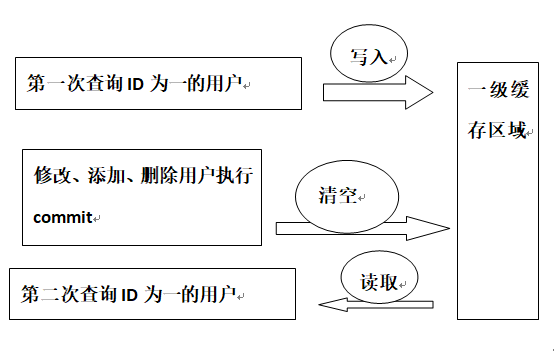
通过结果可以看出,由于代码中查询是在一个SqlSession,且两次查询过程中没有更新信息,不会导致一级缓存失效,所以结果只进行了一次数据库查询。
那如果是在两个SqlSession中分别进行查询呢?
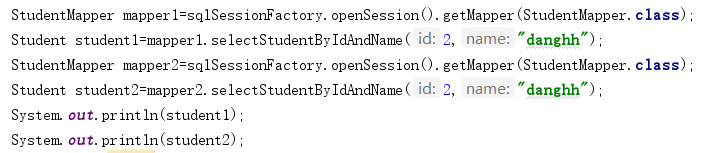
结果:
[DEBUG] - Opening JDBC Connection

[DEBUG] - Checked out connection 234698513 from pool.

[DEBUG] - Setting autocommit to false on JDBC Connection [com.mysql.jdbc.JDBC4Connection@dfd3711]

[DEBUG] - ==>  Preparing: select * from student where sid=? and s_name=?

[DEBUG] - ==> Parameters: 2(Integer), danghh(String)

[DEBUG] - <==      Total: 1

[DEBUG] - Opening JDBC Connection

[DEBUG] - Created connection 1836797772.

[DEBUG] - Setting autocommit to false on JDBC Connection [com.mysql.jdbc.JDBC4Connection@6d7b4f4c]

[DEBUG] - ==>  Preparing: select * from student where sid=? and s_name=?

[DEBUG] - ==> Parameters: 2(Integer), danghh(String)

[DEBUG] - <==      Total: 1

Student{SID=2, Sname='danghh', Sage=22, Ssex='nv', course=null}

Student{SID=2, Sname='danghh', Sage=22, Ssex='nv', course=null}

 [DEBUG] - ==>  Preparing: select * from student where sid=? and s_name=?

 [DEBUG] - ==> Parameters: 2(Integer), hjj(String)

 [DEBUG] - <==      Total: 1

 [DEBUG] - ==>  Preparing: update student set S_name=?,Sage=?,Ssex=? where Sid=?

 [DEBUG] - ==> Parameters: hjj(String), 23(Integer), null, 2(Integer)

 [DEBUG] - <==    Updates: 1

 [DEBUG] - ==>  Preparing: select * from student where sid=? and s_name=?

 [DEBUG] - ==> Parameters: 2(Integer), hjj(String)

 [DEBUG] - <==      Total: 1

  Student{SID=2, Sname='hjj', Sage=23, Ssex='null', course=null}

  Student{SID=2, Sname='hjj', Sage=23, Ssex='null', course=null}

(这个参数是二级缓存的全局开关,默认值是 true ,初始状态为启用状态,所以也可忽略此步的配置)
(由于MyBatis二级缓存和命名空间namespace是绑定的 ,即二级缓存还需要在 Mapper.xml 映射文件中配置或者在 Mapper.java 接口中配置。)

- LRU (最近最少使用的) 移除最长时间不被使用的对象,这是默认值
- FIFO (先进先出〉 按对象进入缓存的顺序来移除它们
- SOFT (软引用) 移除基于垃圾回收器状态和软引用规则的对象
- WEAK (弱引用) 更积极地移除基于垃圾收集器状态和弱引用规则的对象

代码:
public class MyBatisTest {

    public static void main( String[] args ) {

        SqlSession openSession1 = null;

        SqlSession openSession2 = null;

        try {

            //mybatis配置文件

            String resourse="mybatis-cfg.xml";

            //通过 Resources 工具类将 ti -config.xm 配置文件读入 Reader

            InputStream inputStream=Resources.getResourceAsStream(resourse);

            //通过 SqlSessionFactoryBuilder 建造类使用 Reader 创建 SqlSessionFactory工厂对象

            SqlSessionFactory sqlSessionFactory=new SqlSessionFactoryBuilder().build(inputStream);

            //通过SqlSessionFactory工厂得到SqlSession1

            openSession1 = sqlSessionFactory.openSession();

            StudentMapper mapper1=openSession1.getMapper(StudentMapper.class);

            //通过SqlSessionFactory工厂得到SqlSession2

            openSession2 = sqlSessionFactory.openSession();

            StudentMapper mapper2=openSession2.getMapper(StudentMapper.class);

            //使用会话1进行查询,此次查询结果只会存储在一级缓存中

            Student student1=mapper1.selectStudentByIdAndName(2,"hjj");

            System.out.println(student1);

            //使用会话2进行查询,前面会话未关闭,数据不会被刷到二级缓存中,所以本次仍会执行sql

            Student student2=mapper2.selectStudentByIdAndName(2,"hjj");

            System.out.println(student2);

            //使用会话2进行查询,由于前面已执行过该方法,所以可在一级缓存中查到

            Student student3=mapper2.selectStudentByIdAndName(2,"hjj");

            System.out.println(student3);

            openSession1.commit();

        } catch (IOException e) {

            e.printStackTrace();

        }finally {

            //最后一定不要忘记关闭 SqlSession ,否则会因为连接没有关闭导致数据库连接数过多,造成系统崩旗

            openSession1.close();

        }

    }

}
[DEBUG] - Cache Hit Ratio [MyBatisDemo.StudentMapper]: 0.0

[DEBUG] - Opening JDBC Connection

[DEBUG] - Checked out connection 234698513 from pool.

[DEBUG] - Setting autocommit to false on JDBC Connection [com.mysql.jdbc.JDBC4Connection@dfd3711]

[DEBUG] - ==>  Preparing: select * from student where sid=? and s_name=?

[DEBUG] - ==> Parameters: 2(Integer), hjj(String)

[DEBUG] - <==      Total: 1

     Student{SID=2, Sname='hjj', Sage=23, Ssex='null', course=null}

[DEBUG] - Cache Hit Ratio [MyBatisDemo.StudentMapper]: 0.0

[DEBUG] - Opening JDBC Connection

[DEBUG] - Created connection 1843368112.

[DEBUG] - Setting autocommit to false on JDBC Connection [com.mysql.jdbc.JDBC4Connection@6ddf90b0]

[DEBUG] - ==>  Preparing: select * from student where sid=? and s_name=?

[DEBUG] - ==> Parameters: 2(Integer), hjj(String)

[DEBUG] - <==      Total: 1

     Student{SID=2, Sname='hjj', Sage=23, Ssex='null', course=null}

[DEBUG] - Cache Hit Ratio [MyBatisDemo.StudentMapper]: 0.0

      Student{SID=2, Sname='hjj', Sage=23, Ssex='null', course=null}

[DEBUG] - Resetting autocommit to true on JDBC Connection [com.mysql.jdbc.JDBC4Connection@dfd3711]

[DEBUG] - Closing JDBC Connection [com.mysql.jdbc.JDBC4Connection@dfd3711]

[DEBUG] - Returned connection 234698513 to pool.
该颜色:表示会话1第一次查询的结果,由于第一次查询,一级缓存和二级缓存中都没有数据,所以Mapper命中率为0.0,且进行了数据库查询,并将结果存储到会话1一级缓存中。
该颜色:表示会话2第一次查询的结果,由于会话1没有关闭,所以会话1的一级缓存不会刷到Mapper的二级缓存中,并且是在会话2中第一次查询该方法,所以Mapper命中率为0.0,且进行了数据库查询,并将结果存储到会话2的一级缓存中。

运行结果:
[DEBUG] - Cache Hit Ratio [MyBatisDemo.StudentMapper]: 0.0

[DEBUG] - Opening JDBC Connection

[DEBUG] - Checked out connection 234698513 from pool.

[DEBUG] - Setting autocommit to false on JDBC Connection [com.mysql.jdbc.JDBC4Connection@dfd3711]

[DEBUG] - ==>  Preparing: select * from student where sid=? and s_name=?

[DEBUG] - ==> Parameters: 2(Integer), hjj(String)

[DEBUG] - <==      Total: 1

  Student{SID=2, Sname='hjj', Sage=23, Ssex='null', course=null}

[DEBUG] - Cache Hit Ratio [MyBatisDemo.StudentMapper]: 0.0

  Student{SID=2, Sname='hjj', Sage=23, Ssex='null', course=null}

[DEBUG] - Resetting autocommit to true on JDBC Connection [com.mysql.jdbc.JDBC4Connection@dfd3711]

[DEBUG] - Closing JDBC Connection [com.mysql.jdbc.JDBC4Connection@dfd3711]

[DEBUG] - Returned connection 234698513 to pool.

[DEBUG] - Cache Hit Ratio [MyBatisDemo.StudentMapper]: 0.3333333333333333

  Student{SID=2, Sname='hjj', Sage=23, Ssex='null', course=null}

[DEBUG] - Cache Hit Ratio [MyBatisDemo.StudentMapper]: 0.5

  Student{SID=2, Sname='hjj', Sage=23, Ssex='null', course=null}
MyBatis缓存机制(一级缓存,二级缓存)的更多相关文章
- mybatis学习--缓存(一级和二级缓存)
声明:学习摘要! MyBatis缓存 我们知道,频繁的数据库操作是非常耗费性能的(主要是因为对于DB而言,数据是持久化在磁盘中的,因此查询操作需要通过IO,IO操作速度相比内存操作速度慢了好几个量级) ...
- Mybatis学习(五)————— 延迟加载和缓存机制(一级二级缓存)
一.延迟加载 延迟加载就是懒加载,先去查询主表信息,如果用到从表的数据的话,再去查询从表的信息,也就是如果没用到从表的数据的话,就不查询从表的信息.所以这就是突出了懒这个特点.真是懒啊. Mybati ...
- Mybatis(五) 延迟加载和缓存机制(一级二级缓存)
踏踏实实踏踏实实,开开心心,开心是一天不开心也是一天,路漫漫其修远兮. --WH 一.延迟加载 延迟加载就是懒加载,先去查询主表信息,如果用到从表的数据的话,再去查询从表的信息,也就是如果没用到从表的 ...
- MyBatis加强(1)~缓存机制(一级缓存、二级缓存、第三方缓存技术redis、ehcache)
一.缓存机制 使用缓存可以使应用更快地获取数据,避免频繁的数据库交互操作,尤其是在查询越多,缓存命中率越高 的情况下,缓存的作用就越明显. 1.缓存原理:Map ■ 查询时,先从缓存区查询:找到,返回 ...
- Mybatis一级、二级缓存
Mybatis一级.二级缓存 一级缓存 首先做一个测试,创建一个mapper配置文件和mapper接口,我这里用了最简单的查询来演示. <mapper namespace="c ...
- mybatis缓存,包含一级缓存与二级缓存,包括ehcache二级缓存
一,引言 首先我们要明白一点,缓存所做的一切都是为了提高性能.明白了这一点下面我们开始进入正题. 二,mybatis缓存概要 ①.mybatis的缓存有两种,分别是一级缓存和二级缓存.两者都属于查询缓 ...
- Mybatis 的一级、二级缓存?
1)一级缓存: 基于 PerpetualCache 的 HashMap 本地缓存,其存储作用域为 Session,当 Session flush 或 close 之后,该 Session 中的所有 C ...
- Mybatis 的一级、二级缓存?
1)一级缓存: 基于 PerpetualCache 的 HashMap 本地缓存,其存储作用域为 Session,当 Session flush 或 close 之后,该 Session 中的所有 C ...
- Mybatis 源码分析之一二级缓存
一级缓存 其实关于 Mybatis 的一级缓存是比较抽象的,并没有什么特别的配置,都是在代码中体现出来的. 当调用 Configuration 的 newExecutor 方法来创建 executor ...
- Mybatis基于注解开启使用二级缓存
关于Mybatis的一级缓存和二级缓存的概念以及理解可以参照前面文章的介绍.前文连接:https://www.cnblogs.com/hopeofthevillage/p/11427438.html, ...
随机推荐
- beego rel/reverse
用户可以发布多个文章 对用户来说是一对多 对文章来说是多对一 用户是主表 文章是用户的从表 rel用在从表中,给主表结构体设置主键,也就是文章表对应用户表的外键 reverse用在主表中,指定主表与从 ...
- kubernetes (一)使用Rancher搭建集群
目录 如何快速高效部署K8s集群 Rancher是什么 为什么是Rancher 1.0.安装Rancher 1.1.环境 1.2.选择Rancher版本 1.3.拉取镜像 2.0.容器启动高级选项 2 ...
- 2019-2020-1 20199303《Linux内核原理与分析》第五周作业
系统调用的三层机制 API:第一层是指Libc中定义的API,这些API封装了系统调用,使用int 0x80触发一个系统调用中断:当然,并非所有的API都使用了系统调用,如完成数学加减运算的API就没 ...
- 2019-2020-20199303《Linux内核原理与分析》第四周作业
构造一个简单的Linux内核 Linux是一种开源电脑操作系统内核,它是一个用C语言写成.主要子系统: 1.系统调用接口 2.进程管理 3.内存管理 4.虚拟文件系统 qemu是一个开源模拟处理器,在 ...
- VHD VHDX 区别
A Virtual hard disk is saved either with VHD or VHDX file extension. VHD is the older while VHDX is ...
- 获取 保存 系统信息 [Windows]
出处:https://www.technig.com/find-windows-10-system-information/ 在“运行”里,运行 msinfo32. System Informatio ...
- (转)SQLite数据库的加密
1.创建空的SQLite数据库. //数据库名的后缀你可以直接指定,甚至没有后缀都可以 //方法一:创建一个空sqlite数据库,用IO的方式 FileStream fs = File.Create( ...
- Linux网络服务第一章Linux网络基础设置
1.笔记 systenctl restart network:重启网卡网络服务 bash:刷新主机名称 netstat:查看网络状态 route -n:不做地址解析 mii-tool eno16777 ...
- .net 使用TCP模拟UDP广播通信加强广播通信的稳定性
应用场景:当每一台终端开启程序后发出消息,其他终端必须收到消息然后处理 思路1:使用UDP广播. 缺点:UDP广播信号不稳定,无法确定每一台机器能接收到信号 思路2:将一台主机作为服务器,使用 ...
- C++操作Kafka使用Protobuf进行跨语言数据交互
C++操作Kafka使用Protobuf进行跨语言数据交互 Kafka 是一种分布式的,基于发布 / 订阅的消息系统.主要设计目标如下: 以时间复杂度为 O(1) 的方式提供消息持久化能力,即使对 T ...