
.NET外挂系列:6. harmony中一些实用的反射工具包
一:背景
1. 讲故事
本来想研究一下 IL编织和反向补丁的相关harmony知识,看了下其实这些东西对 .NET高级调试 没什么帮助,所以本篇就来说一些比较实用的反射工具包吧。
二:反射工具包
1. AccessTools
AccessTools这个工具包用来简化反射操作,你如果看过 harmony 的底层代码,就会发现无处不在 AccessTools,比如 HarmonyPatch 的第20个重载方法。
    //

    // Summary:

    //     An annotation that specifies a method, property or constructor to patch

    //

    // Parameters:

    //   typeName:

    //     The full name of the declaring class/type

    //

    //   methodName:

    //     The name of the method, property or constructor to patch

    //

    //   methodType:

    //     The HarmonyLib.MethodType

    public HarmonyPatch(string typeName, string methodName, MethodType methodType = MethodType.Normal)

    {

        info.declaringType = AccessTools.TypeByName(typeName);

        info.methodName = methodName;

        info.methodType = methodType;

    }
现在的好消息是你也可以直接使用 AccessTools,使用方式和 HarmonyPatch的构造函数注入方式几乎一摸一样, 为了方便演示,我们还是用 Thread 来跟大家聊一聊,我用大模型生成了一批例子。参考如下:
        static void Main(string[] args)

        {

            var thread = new Thread(() => { });

            thread.Start();

            //1. 反射出 Thread.Start 方法。

            var original1 = AccessTools.Method(typeof(Thread), "Start", new Type[] { });

            Console.WriteLine($"1. {original1.Name}");

            //2. 获取 Thread.Priority 属性

            var original2 = AccessTools.PropertyGetter(typeof(Thread), "Priority");

            Console.WriteLine($"2. {original2.Name}");

            //3. 获取 Thread(ThreadStart start) 构造函数信息

            var original3 = AccessTools.Constructor(typeof(Thread), new Type[] { typeof(ThreadStart) });

            Console.WriteLine($"3. {original3.Name}");

            //4. 获取 Thread.Join() 方法

            var original4 = AccessTools.Method(typeof(Thread), "Join", new Type[] { });

            Console.WriteLine($"4. {original4.Name}");

            //5. 获取 Thread.Sleep(int) 方法

            var original5 = AccessTools.Method(typeof(Thread), "Sleep", new Type[] { typeof(int) });

            Console.WriteLine($"5. {original5.Name}");

            //6. 获取 Thread.ManagedThreadId 属性

            var original6 = AccessTools.PropertyGetter(typeof(Thread), "ManagedThreadId");

            Console.WriteLine($"6. {original6.Name}");

            //7. 获取 Thread.CurrentThread 静态属性

            var original7 = AccessTools.PropertyGetter(typeof(Thread), "CurrentThread");

            Console.WriteLine($"7. {original7.Name}");

            //8. 获取 Thread.IsBackground 属性设置器

            var original8 = AccessTools.PropertySetter(typeof(Thread), "IsBackground");

            Console.WriteLine($"8. {original8.Name}");

            //9. 获取 Thread.Abort() 方法 (已过时,但仍可获取)

            var original9 = AccessTools.Method(typeof(Thread), "Abort", new Type[] { });

            Console.WriteLine($"9. {original9?.Name ?? "null"}");

            //10. 获取 Thread.Start(object) 方法 (参数化线程启动)

            var original10 = AccessTools.Method(typeof(Thread), "Start", new Type[] { typeof(object) });

            Console.WriteLine($"10. {original10?.Name ?? "null"}");

            //11. 获取 Thread 类的所有字段

            var allFields = AccessTools.GetDeclaredFields(typeof(Thread));

            Console.WriteLine($"11. Thread类字段数量: {allFields.Count}");

            //12. 获取 Thread 类的所有方法

            var allMethods = AccessTools.GetDeclaredMethods(typeof(Thread));

            Console.WriteLine($"12. Thread类方法数量: {allMethods.Count}");

            //13. 获取 Thread 类的内部类 "StartHelper"

            var threadHelperType = AccessTools.Inner(typeof(Thread), "StartHelper");

            Console.WriteLine($"13. 获取Thread.ThreadHelper内部类: {(threadHelperType != null ? "成功" : "失败")}");

            //14. 获取 ThreadPool.QueueUserWorkItem 方法

            var original15 = AccessTools.Method(typeof(ThreadPool), "QueueUserWorkItem",

                new Type[] { typeof(WaitCallback) });

            Console.WriteLine($"14. {original15.Name}");

            Console.ReadLine();

        }
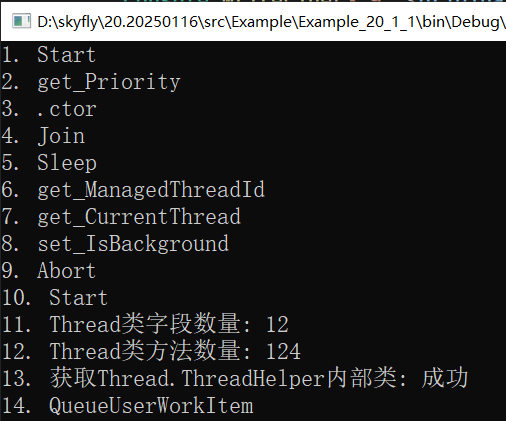
是不是非常的方便,不管你爱不爱,反正我是爱了。
2. Traverse
如果说AccessTools 针对类型反射,那Travers就是针对实例反射,并且它还能够挖沟一个对象的全部细节,参考代码如下:
        static void Main(string[] args)

        {

            var thread = new Thread(() =>

            {

                Thread.Sleep(1000);

                Console.WriteLine("5. 线程执行完成");

            });

            // 使用 Traverse 访问线程内部状态

            var traverse = Traverse.Create(thread);

            // 1. 获取线程的委托 (_start 字段)

            var startDelegate = traverse.Field("_startHelper").Field("_start").GetValue<ThreadStart>();

            Console.WriteLine($"1. 线程委托方法: {startDelegate?.Method.Name ?? "null"}");

            // 2. 获取线程的执行状态 (_threadState 字段)

            var threadState = traverse.Field("_threadState").GetValue<int>();

            Console.WriteLine($"2. 线程状态: {threadState} (0=未启动, 1=运行中, 2=停止)");

            // 3. 设置线程的 IsBackground 属性

            traverse.Property("IsBackground").SetValue(true);

            Console.WriteLine($"3. 设置后台线程: {thread.IsBackground}");

            // 4. 调用 Start 方法

            traverse.Method("Start").GetValue();

            Console.WriteLine("4. 调用 Start() 方法启动线程");

            Console.ReadLine();

        }
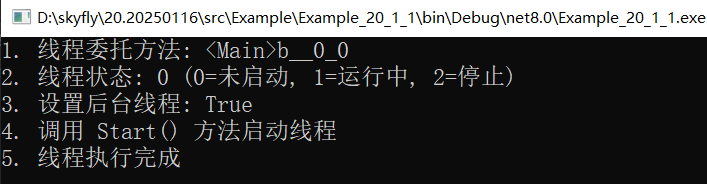
3. FileLog
像 Harmony 这种外挂,一旦有注入失败,很难分析为什么,所以必须要有详细的日志才能帮我们排查问题,在 harmony 中有两种记录日志的方式:全局模式和局部模式,这里我们说下前者,对,只要写上 Harmony.DEBUG = true; 这句话即可,然后harmony就会在桌面创建一个 harmony.log.txt 文件,参考如下:
    internal class Program

    {

        static void Main(string[] args)

        {

            Harmony.DEBUG = true;

            var harmony = new Harmony("com.example.threadhook");

            harmony.PatchAll();

            Console.ReadLine();

        }

    }

    [HarmonyPatch(typeof(Thread), "Start", new Type[] { typeof(object) })]

    public class ThreadStartHook

    {

        public static void Prefix(Thread __instance)

        {

        }

    }
打开之后就可以看到 patch Thread.Start 方法的IL 细节了。
### Harmony id=com.example.threadhook, version=2.3.6.0, location=D:\skyfly\20.20250116\src\Example\Example_20_1_1\bin\Debug\net8.0\0Harmony.dll, env/clr=8.0.13, platform=Win32NT

### Started from static System.Void Example_20_1_1.Program::Main(System.String[] args), location D:\skyfly\20.20250116\src\Example\Example_20_1_1\bin\Debug\net8.0\Example_20_1_1.dll

### At 2025-05-21 05.43.09

### Patch: System.Void System.Threading.Thread::Start(System.Object parameter)

### Replacement: static System.Void System.Threading.Thread::System.Threading.Thread.Start_Patch1(System.Threading.Thread this, System.Object parameter)

IL_0000: ldarg.0

IL_0001: call       static System.Void Example_20_1_1.ThreadStartHook::Prefix(System.Threading.Thread __instance)

IL_0006: // start original

IL_0006: ldarg.0

IL_0007: ldarg.1

IL_0008: ldc.i4.1

IL_0009: ldc.i4.0

IL_000A: call       System.Void System.Threading.Thread::Start(System.Object parameter, System.Boolean captureContext, System.Boolean internalThread)

IL_000F: // end original

IL_000F: ret

DONE
其实这些日志底层都是通过 FileLog 来写的,万幸的是它也开了口子给开发者,见下面参考代码。
        static void Main(string[] args)

        {

            Harmony.DEBUG = true;

            var harmony = new Harmony("com.example.threadhook");

            harmony.PatchAll();

            FileLog.Debug("hello world!");

            Console.ReadLine();

        }
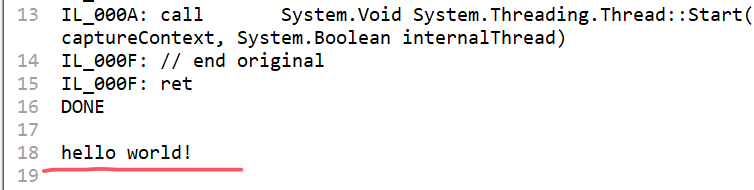
三:总结
这篇我们讲述的三个小工具包,更多的还是提高我们工作效率而准备的,用完之后也确实让人爱不释手。

.NET外挂系列:6. harmony中一些实用的反射工具包的更多相关文章
- 给Source Insight做个外挂系列之三--构建外挂软件的定制代码框架
上一篇文章介绍了“TabSiPlus”是如何进行代码注入的,本篇将介绍如何构建一个外挂软件最重要的部分,也就是为其扩展功能的定制代码.本文前面提到过,由于windows进程管理的限制,扩展代码必须以动 ...
- 给Source Insight做个外挂系列之一--发现Source Insight
一提到外挂程序,大家肯定都不陌生,QQ就有很多个版本的去广告外挂,很多游戏也有用于扩展功能或者作弊的工具,其中很多也是以外挂的形式提供的.外挂和插件的区别在于插件通常依赖于程序的支持,如果程序不支持插 ...
- iOS流布局UICollectionView系列七——三维中的球型布局
摘要: 类似标签云的球状布局,也类似与魔方的3D布局 iOS流布局UICollectionView系列七——三维中的球型布局 一.引言 通过6篇的博客,从平面上最简单的规则摆放的布局,到不规则的瀑 ...
- css3系列-2.css中常见的样式属性和值
css3系列-2.css中常见的样式属性和值 继续上一篇文章的继续了解css的基础知识,关注我微信公众号:全栈学习笔记 css中常见的样式属性和值 字体与颜色 背景属性 文本属性 边框属性 内外边距 ...
- Web 开发中很实用的10个效果【附源码下载】
在工作中,我们可能会用到各种交互效果.而这些效果在平常翻看文章的时候碰到很多,但是一时半会又想不起来在哪,所以养成知识整理的习惯是很有必要的.这篇文章给大家推荐10个在 Web 开发中很有用的效果,记 ...
- 网站开发中很实用的 HTML5 & jQuery 插件
这篇文章挑选了15款在网站开发中很实用的 HTML5 & jQuery 插件,如果你正在寻找能优化网站,使其更具创造力和视觉冲击,那么本文正是你需要的.这些优秀的 jQuery 插件能为你的网 ...
- C#基础系列:实现自己的ORM(反射以及Attribute在ORM中的应用)
反射以及Attribute在ORM中的应用 一. 反射什么是反射?简单点吧,反射就是在运行时动态获取对象信息的方法,比如运行时知道对象有哪些属性,方法,委托等等等等.反射有什么用呢?反射不但让你在运行 ...
- 浏览器扩展系列————在WPF中定制WebBrowser快捷菜单
原文:浏览器扩展系列----在WPF中定制WebBrowser快捷菜单 关于如何定制菜单可以参考codeproject上的这篇文章:http://www.codeproject.com/KB/book ...
- 20.翻译系列:Code-First中的数据库迁移技术【EF 6 Code-First系列】
原文链接:https://www.entityframeworktutorial.net/code-first/migration-in-code-first.aspx EF 6 Code-First ...
- 8.翻译系列: EF 6中配置领域类(EF 6 Code-First 系列)
原文地址:http://www.entityframeworktutorial.net/code-first/configure-classes-in-code-first.aspx EF 6 Cod ...
随机推荐
- 仓储层当前有接口 IRepository<T> 抽象类 BaseRepository<T> 业务逻辑层有抽象类 BaseBusiness<M, E> 接口 IBusiness<M, E> 请用C# 给出一个案例,支持不同表对应不同的业务逻辑层,然后不同仓储实例。
以下是一个简单的C#示例,展示了如何实现不同表对应不同的业务逻辑层和不同的仓储实例: // 仓储层 public interface IRepository<T> { void Add(T ...
- Windows编程----CreateProcess函数
CreateProcess函数原型 CreateProcess 函数用于创建一个新进程(子进程)及其主线程,其函数原型如下: BOOL CreateProcess( LPCWSTR lpApplica ...
- Web前端入门第 13 问:HTML 标签和属性是否区分大小写?
HELLO,这里是大熊学习前端开发的入门笔记. 本系列笔记基于 windows 系统. 注意:以下截图都来源于 Chrome 浏览器,不同浏览器可能会产生不同的渲染结果. 思考一个问题:英文写法都分大 ...
- 基于PHPstream扩展手动实现一个redis客户端
描述 redis是一个经典的key-value缓存数据库,采用C/S架构.当我们安装成功以后,你就知道它有个服务端,启动后默认监听6379端口,然后提供一个客户端工具redis-cli. 我们可以使用 ...
- php nginx 504 Gateway Timeout 网关超时错误
对于 Nginx + FastCGI上的504网关超时错误(php-fpm),我们可以修改PHP和nginx的执行超时时间. 配置php 修改 php.ini(CentOS路径是/etc/php.in ...
- DeepSeek 3FS 与 JuiceFS:架构与特性比较
近期,DeepSeek 开源了其文件系统 Fire-Flyer File System (3FS),使得文件系统这一有着 70 多年历时的"古老"的技术,又获得了各方的关注.在 A ...
- Ubuntu 下查看当前用户
博客地址:https://www.cnblogs.com/zylyehuo/ 在终端执行以下命令 whoami
- Delphi 增加/获得windows用户帐号
unit Unit1; interface uses Windows, Messages, SysUtils, Variants, Classes, Graphics, Controls, Forms ...
- 卧槽!C 语言宏定义原来可以玩出这些花样?高手必看!
大家好啊!我是小康. 今天我们来聊一个听起来枯燥但实际上暗藏玄机的话题 -- C 语言的宏定义. 啥?宏定义?那不就是个简单的替换工具吗? 兄dei,如果你也是这么想的,那可就大错特错了!宏定义在 C ...
- 【前端JSP思考】JSP中#{},${}和%{}的区别
JSP中#{},${}和%{}的区别: #{} #{}:对语句进行预编译,此语句解析的是占位符?,可以防止SQL注入, 比如打印出来的语句 select * from table where id=? ...