
C#:MVC打印PDF文件
在百度上找了许多PDF文件打印,但是符合我需求的打印方式还没看到,所以根据看了https://www.cnblogs.com/TiestoRay/p/3380717.html的范例后,研究了一下,做出来符合自己需求的打印方式分享一下。
1、先要引用一个插件,可以从网上搜索下载就好

2、前端JS,比较简单一句代码,重点放在后台操作。

3、后台代码。
 public class PdfResult:ActionResult

 {

         private string FileName;

         public event DocRenderHandler DocRenderEvent;

         public delegate void DocRenderHandler(ref Document Doc);

         /// <summary>

         /// 将FileName赋值一次

         /// </summary>

         /// <param name="FileName"></param>

         public PdfResult(string FileName)

         {

             this.FileName = FileName;

         }

         /// <summary>

         /// 向页面输出时才会执行该方法

         /// </summary>

         /// <param name="context"></param>

         public override void ExecuteResult(ControllerContext context)

         {

             Document Doc = new Document();

             using (MemoryStream Memory=new MemoryStream())

             {

                 PdfWriter PdfWriter = PdfWriter.GetInstance(Doc, Memory);

                 if (DocRenderEvent != null)

                     DocRenderEvent(ref Doc);

                 HttpResponseBase Response = context.HttpContext.Response;

                 Response.Clear();

                 Response.Cache.SetCacheability(HttpCacheability.NoCache);

                 Response.AddHeader("Content-Disposition", "attachment;filename=" + FileName);

                 Response.ContentType = "application/pdf";

                 Response.OutputStream.Write(Memory.GetBuffer(), , Memory.GetBuffer().Length);

                 Response.OutputStream.Flush();

                 Response.OutputStream.Close();

                 Response.Flush();

             }

             context.HttpContext.Response.End();

         }

 }
        public ActionResult Print(string OrderID)

        {

            string FileName = OrderID + ".pdf";

            PdfResult pr = new PdfResult(FileName);

            pr.DocRenderEvent += RenderPdfDoc;

            return pr;

        }

        private void RenderPdfDoc(ref Document Doc)

        {

            Doc.SetPageSize(PageSize.A4);

            Doc.SetMargins(, , , );

            #region 相关元素准备

            BaseFont bfChinese = BaseFont.CreateFont(@"C:\windows\fonts\simsun.ttc,1", BaseFont.IDENTITY_H,

                BaseFont.NOT_EMBEDDED);

            Font Font16 = new Font(bfChinese, );

            Font Font14 = new Font(bfChinese, );

            Font Font12 = new Font(bfChinese, );

            Font Font12Bold = new Font(bfChinese, , Font.BOLD);

            Font Font12Italic = new Font(bfChinese, , Font.BOLDITALIC);

            Font Font10Bold = new Font(bfChinese, , Font.BOLD);

            Paragraph parag;

            //Chunk chunk;

            PdfPTable table;

            #endregion

            #region 文件标题

            Doc.Open();

            Doc.AddAuthor("TiestoRay");

            Doc.AddTitle("POP项目供应商结算单");

            #endregion

            #region 正文

            parag = new Paragraph("京东商城\r\nPOP项目供应商结算单", Font16);

            parag.Alignment = Element.ALIGN_CENTER;

            Doc.Add(parag);

            parag = new Paragraph();

            parag.Add(new Chunk("供应商名称:", Font12Bold));

            Doc.Add(parag);

            parag = new Paragraph();

            parag.Add(new Chunk("结算单编号:", Font12Bold));

            parag.Add(new Chunk("63930272255\r\n", Font12));

            Doc.Add(parag);

            parag = new Paragraph();

            parag.Add(new Chunk("店铺名称:", Font12Bold));

            parag.Add(new Chunk("MOKO数码配件旗舰店\r\n", Font12));

            Doc.Add(parag);

            parag = new Paragraph();

            parag.Add(new Chunk("结算期间:", Font12Bold));

            parag.Add(new Chunk("2017-11-30 至 2017-11-30\r\n", Font12));

            Doc.Add(parag);

            parag = new Paragraph();

            parag.Add(new Chunk("基准币种:", Font12Bold));

            parag.Add(new Chunk("元\r\n\r\n", Font12));

            Doc.Add(parag);

            parag = new Paragraph();

            parag.Add(new Chunk("结算信息\r\n\r\n", Font16));

            Doc.Add(parag);

            table = new PdfPTable(new float[] { , , ,  });

            table.WidthPercentage = 100f;

            table.AddCell(new Phrase("业务类型", Font12Bold));

            table.AddCell(new Phrase("收付发票机构", Font12Bold));

            table.AddCell(new Phrase("项目", Font12Bold));

            table.AddCell(new Phrase("结算金额", Font12Bold));

            Doc.Add(table);

            table = new PdfPTable(new float[] { , , ,  });

            table.WidthPercentage = 100f;

            table.AddCell(new Phrase("SOP", Font12));

            table.AddCell(new Phrase("POP", Font12));

            table.AddCell(new Phrase("货款:1097.70, 佣金:-84.50", Font12));

            table.AddCell(new Phrase("1013.2", Font12));

            Doc.Add(table);

            table = new PdfPTable(new float[] { , , ,  });

            table.WidthPercentage = 100f;

            table.AddCell(new Phrase("", Font12));

            table.AddCell(new Phrase("", Font12));

            table.AddCell(new Phrase("", Font12));

            table.AddCell(new Phrase("1013.2", Font12));

            Doc.Add(table);

            //Doc.NewPage();//换页

            parag = new Paragraph();

            parag.Add(new Chunk("\r\n\r\n\r\n\r\n\r\n\r\n\r\n\r\n供应商开票信息\r\n\r\n", Font16));

            Doc.Add(parag);

            parag = new Paragraph();

            parag.Add(new Chunk("公司名称:", Font12Bold));

            Doc.Add(parag);

            parag = new Paragraph();

            parag.Add(new Chunk("纳税人识别号:", Font12Bold));

            Doc.Add(parag);

            parag = new Paragraph();

            parag.Add(new Chunk("地址、电话:", Font12Bold));

            Doc.Add(parag);

            parag = new Paragraph();

            parag.Add(new Chunk("开户行及账号:", Font12Bold));

            Doc.Add(parag);

            parag = new Paragraph();

            parag.Add(new Chunk("尊敬的供应商,如数据核对无误,请及时确认结算单。\r\n\r\n", Font12Bold));

            parag.Add(new Chunk("供应商签章(公章)\r\n\r\n\r\n\r\n\r\n\r\n\r\n", Font12Bold));

            parag.Add(new Chunk("如有结算问题,可拨打商家客服电话,或联系商家在线客服咨询。", Font16));

            Doc.Add(parag);

            Doc.Close();

            #endregion

        }
4、配上效果图:
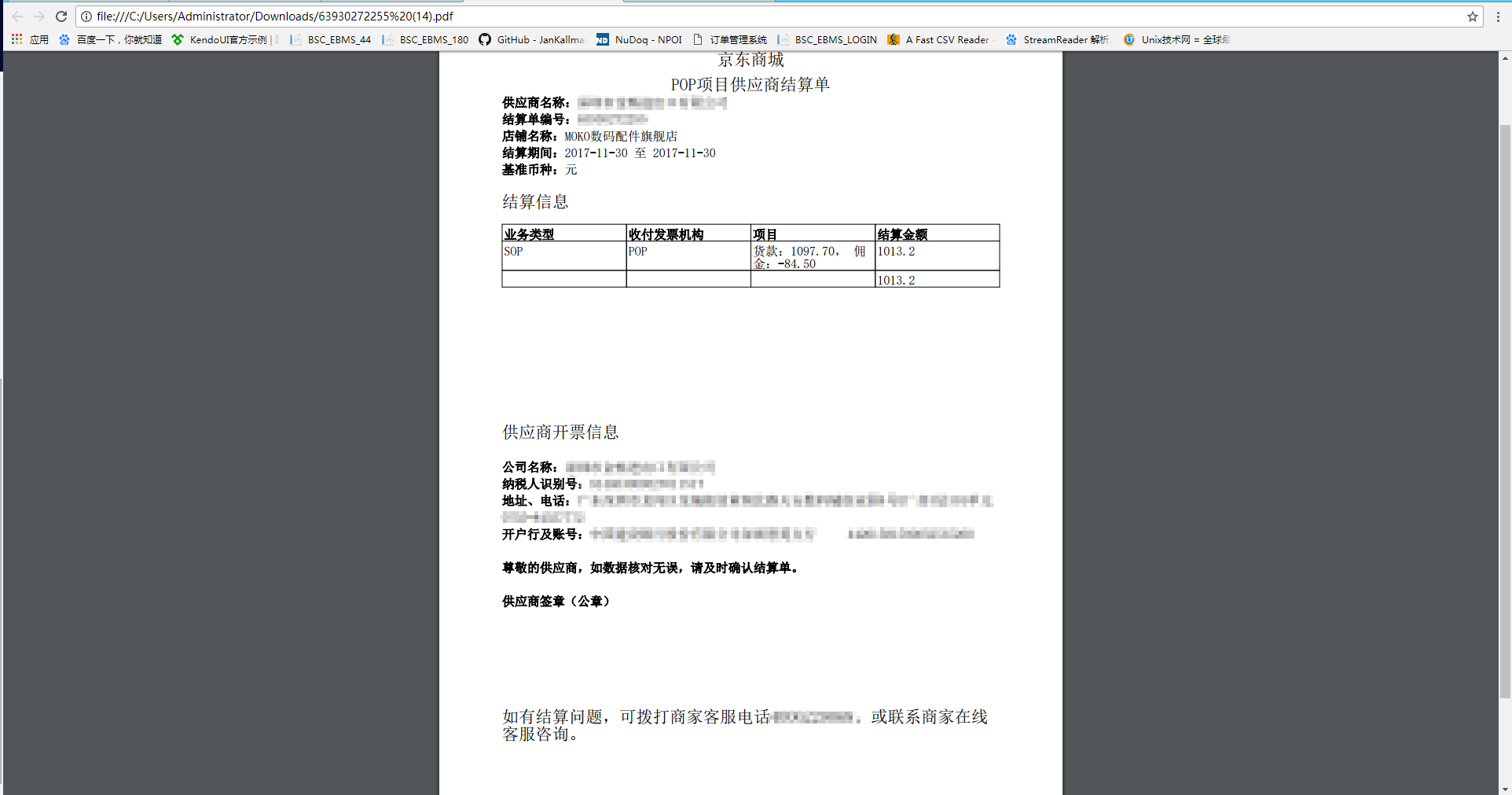
以上方法可以个人分享研究!
不可做商业项目,违者必究!
C#:MVC打印PDF文件的更多相关文章
- C# 打印PDF文件之使用不同打印机打印所有页面或部分页面
C# 打印PDF文件之使用不同打印机打印所有页面或部分页面 最近在逛国外各大编程社区论坛的时候,发现很多人都在问一个关于PDF文件打印的问题:打印时如何选择非默认打印机并设置打印页面的范围.而一般情况 ...
- PDFBox创建并打印PDF文件, 以及缩放问题的处理.
PDFBox带了一些很方便的API, 可以直接创建 读取 编辑 打印PDF文件. 创建PDF文件 public static byte[] createHelloPDF() { ByteArrayOu ...
- C#调用Python脚本打印pdf文件
介绍:通过pdf地址先将文件下载到本地,然后调用打印机打印,最后将下载的文件删除. 环境:windows系统.(windows64位) windows系统中安装python3.6.2环境 资料: O ...
- (转)C# 打印PDF文件使用第三方DLL
本文为转载,原文:http://www.cnblogs.com/Yesi/p/5066835.html DLL地址:https://freepdf.codeplex.com 下面是该解决方案的详细代码 ...
- javaWeb项目springMVC框架下利用ITextpdf 工具打印PDF文件的方法(打印表单、插入图片)
方法一:打印PDF表单以及在PDF中加入图片 需要的资料: jar包:iTextAsian.jar ,itext-2.1.7.jar: 源码: public static void main(Stri ...
- 根据第三方库spire.pdf使用指定打印机打印pdf文件
private void button1_Click(object sender, EventArgs e) { PdfDocument doc = new PdfDocument(); string ...
- Spring MVC生成PDF文件
以下示例演示如何使用Spring Web MVC框架生成PDF格式的文件.首先使用Eclipse IDE,并按照以下步骤使用Spring Web Framework开发基于动态表单的Web应用程序: ...
- 打印机打印pdf文件特别慢怎么解决
PDF等文件中都包含了一些或者很多光栅化数据(图片.嵌入的字体等).这些文件在打印时,打印机驱动程序都会在系统中生成大量EMF文件(增强型变换文件),小到1MB,大到500MB,过大的EMF临时文件会 ...
- java从远程服务器获取PDF文件并后台打印(使用pdfFox)
一.java原生方式打印PDF文件 正反面都打印,还未研究出只打印单面的方法,待解决 public static void printFile(String path) throws Exceptio ...
随机推荐
- php中生成标准uuid(guid)的方法
);// "}" return $uuid; }}echo guid();?>
- 详解:PHP加速器配置神器opcache
什么是opcode? 当解释器完成对脚本代码的分析后,便将它们生成可以直接运行的中间代码,也称为操作码(Operate Code,opcode).Opcode cache的目地是避免重复编译,减少CP ...
- 在Eclipse中创建Dynamic Web Project具有和MyEclipse中Web Project一样的目录结构
1.在Eclipse中新建Dynamic Web Project 1.1.修改default output folder build\classes修改为:WebRoot\WEB-INF\classe ...
- STM32硬件IIC (转)
源: STM32硬件IIC
- USB概述
源: USB
- MySQL PXC集群部署
安装 Percona-XtraDB-Cluster 架构: 三个节点: pxc_node_0 30.0.0.196 pxc_node_1 30.0.0.198 pxc_node_2 30.0.0.19 ...
- js条件判断if-else和switch、循环for和while
条件判断和循环都使用{ }将代码块括起来,如果代码块只有一行,则可省略{ }. 在循环中,continue表示跳过当前循环继续进行下一次循环,break表示跳出整个循环. 1.条件判断if-else, ...
- 09:vuex组件间通信
1.1 vuex简介 官网:https://vuex.vuejs.org/zh/guide/ 参考博客:https://www.cnblogs.com/first-time/p/6815036.htm ...
- js获取对象的key
var obj = {"name":"名字","age":"18"};var temp = "";f ...
- 解决*.props打开失败问题
由于不同机器的绝对地址不一样,可能会出现解决*.props打开失败问题,解决方向如下: 1.找到这里缺失的.props文件,复制到固定路径下: 2.强行打开代码,这个时候是报错的 3.选择编辑 4.将 ...