
mipmap和drawable文件夹的区别
在Android上创建工程,会默认创建mipmap文件夹。之前在Eclipse上创建的是drawable的文件夹。那么这两个有什么区别呢?
问题:
I’m working with android studio 1.1 Preview 1
我使用android studio 1.1 Preview 1版本工作。
And I noticed that when I create a new project I’m getting next hierarchy:
我注意到当创建新的工程时,得到了下面的目录层级: 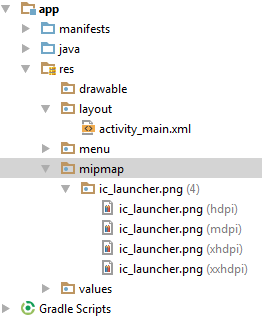
mipmap folders for diffrent DPIs, No more diffrent DPIs drawable folders.
4个不同分辨率的mipmap文件夹,与不同DPI的drawable文件夹没啥区别。
Should I put all my resources in the mipmap folders, or just the app icon?
我应该把所有资源都放到mipmap文件夹么?或者只放应用的图标?
答案:
The mipmap folders are for placing your app icons in only. Any other drawable assets you use should be placed in the relevant drawable folders as before.
mipmap文件夹只放应用图标。其他需要使用的drawable资源象之前一样放到对应的drawable文件夹。
According to this Google blogpost:
根据这篇google的博文:
It’s best practice to place your app icons in mipmap- folders (not the drawable- folders) because they are used at resolutions different from the device’s current density.
应用的启动图标最好放到mipmap文件夹(不是drawable文件夹),因为它们用在不同分辨率的设备上。
When referencing the mipmap- folders ensure you are using the following reference:
当引用mipmap文件夹的资源时,需要使用下面的方式:
android:icon="@mipmap/ic_launcher"
结论:
mipmap仅仅用于应用启动图标,可以根据不同分辨率进行优化。其他的图标资源,还是要放到drawable文件夹中。
Android 官方解释[3]:
Note: You should place all launcher icons in the res/mipmap-[density]/ folders, rather than drawable/ folders to ensure launcher apps use the best resolution icon.
注意:你应当将虽有启动图标放到res/mipmap-[density]/文件夹中,而不是drawable/文件夹,来确保启动图片使用最好的分辨率图标。
参考[1]:http://stackoverflow.com/questions/28065267/mipmap-vs-drawable-folders
参考[2]:http://stackoverflow.com/questions/23935810/mipmap-drawables-for-icons
参考[3]:https://developer.android.com/training/multiscreen/screendensities.html
mipmap和drawable文件夹的区别的更多相关文章
- Android:不同drawable文件夹的区别
4.0后,新建android工程,会自动生成drawable,drawalbe-ldpi,drawable-mdpi,drawable-hdpi,drawable-xhdpi,drawable-xxh ...
- 关于Android中图片大小、内存占用与drawable文件夹关系的研究与分析
原文:关于Android中图片大小.内存占用与drawable文件夹关系的研究与分析 相关: Android drawable微技巧,你所不知道的drawable的那些细节 经常会有朋友问我这个问题: ...
- Android学习笔记之Drawable 文件夹
PS:最近闲着无聊..模仿去写个QQapp..效果还不错..并且从中又学习到了一些相关的东西,在这里进行一些相关总结.. 学习内容: Android 中 Drawable 文件夹内部相关属性.. ...
- Android Studio 复制粘贴图片到drawable文件夹没有效果 - 解决方法
我想放一些图片到drawable文件夹里面,但是简单的复制文件,粘贴文件,或者拖拽文件,都不起作用.不知道为什么,之前是可以的,突然就不行了. 解决方案 在drawable文件夹的目录上右键,选择Re ...
- AndroidStudio 新建不同的Drawable文件夹
以前习惯eclipse开发Android的朋友们知道 新创建一个Android项目的时候eclipse会自动生成多个drawable文件夹来存放图片 但是Android Studio 新建项目的时候只 ...
- vue-cli中自定义路径别名 assets和static文件夹的区别
转自:vue-cli中自定义路径别名 assets和static文件夹的区别 静态资源处理: assets和static文件夹的区别 相信有很多人知道vue-cli有两个放置静态资源的地方,分别是sr ...
- Android 适配(drawable文件夹)图片适配(二)
参考自(https://blog.csdn.net/myoungmeng/article/details/54090891) Android资源文件存放: android的drawable文件一共可以 ...
- assets文件夹与static文件夹的区别
assets文件夹与static文件夹的区别原地址==>https://www.cnblogs.com/x123811/p/9230700.html 相同点===>assets文件夹和st ...
- iOS Xcode工程目录的 folder 和 group的区别(蓝色和黄色文件夹的区别)
1. 来自 http://blog.csdn.net/fanjunxi1990/article/details/9352917 XCode工程目录里面,有时你会发现2个不同颜色的文件夹,一种是蓝色的, ...
随机推荐
- PHP获取文件后缀名
PHP获取文件后缀名是PHP学习者常见的一种操作,无论是在面试过程中还是PHP新手自学中.PHP获取文件后缀名都是很普遍的需要掌握的一个知识点. 下面我们就给大家总结介绍PHP获取文件扩展名也就是后缀 ...
- WebApi的调用-1.前端调用
前端调用 html <div class="row"> <form id="queryForm"> <input name=&qu ...
- canvas扩散圆环
最近看了很多牛的动画,想想自己的canvas的确很菜. 公式在那里,但是不是太会套.找demo发现都是很难的 于是找了个简单的效果 圆环从中间扩散的效果 关键是 globalCompositeOper ...
- Asp.Net Core 2.0 项目实战(1) NCMVC开源下载了
Asp.Net Core 2.0 项目实战(1) NCMVC开源下载了 Asp.Net Core 2.0 项目实战(2)NCMVC一个基于Net Core2.0搭建的角色权限管理开发框架 Asp.Ne ...
- java.lang.NumberFormatException: multiple points问题
一般这种问题主要是因为SimpleDateFormat在多线程环境下,是线程不安全的,所以如果你在多线程环境中共享了SimpleDateFormat的实例,比如你在类似日期类中定义了一个全局的Simp ...
- IPv6升级改造包括什么?
关于IPv6技术升级具体做了什么,在我脑海里只是更换了域名解析的IP而已,所以找了这篇文章,帮助初步解惑. 原文地址:https://www.maczd.com/post/web-ipv6-upgra ...
- C# 创建多级文件夹示例
string str = ""; ; i < j; i++) { str = str + "\\新建文件夹" ; } System.IO.Director ...
- canvas学习-----1px线条模糊问题
canvas有时候会出现1像素的线条模糊不清且好像更宽的情况,如下图: 这样的线条显然不是我们想要的. 这篇文章的目的就是弄清楚里面的原理,以及解决它. 大家都知道屏幕上最小的显示尺寸就是1像素,虽然 ...
- Python图形编程探索系列-08-再次认识标签
标签的各种属性 代码展示: import tkinter as tk root = tk.Tk() root.geometry = '500x300' label1 = tk.Label(root, ...
- 1013 ACM 杭电 root
题目:http://acm.hdu.edu.cn/showproblem.php?pid=1013 题意:求两个数的根 如: 12->3,99->9,80->8 注意题目没有限制数的 ...