
[CSS] @keyframes

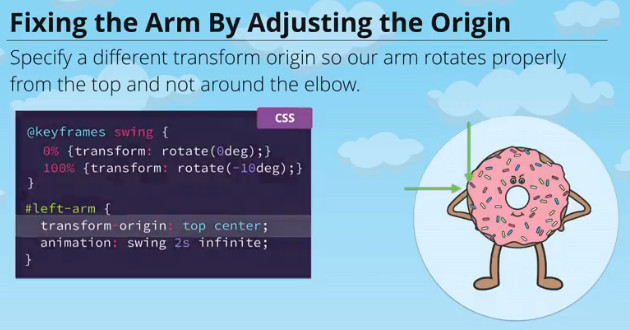
@keyframes swing{

  0% { transform: rotate(0deg)}

  100% {transform: rotate(-30deg)}

}

#sweetlandia{

    animation: swing 2s infinite ease-in-out;

}

Muli-steps keyframes
@keyframes swing {

  0% {

    transform: rotate(-30deg);

  }

  50% {

    transform: rotate(30deg);

  }

  100% {

    transform: rotate(-30deg);

  }

}

#sweetlandia {

  animation: swing 2s infinite ease-in-out;

}
@keyframes swing {

  0%, 100% { transform: rotate(-30deg); }

  20% {transform: scale(0.95)}

  80% {transform: scale(0.95)}

  50% { transform: rotate(30deg); }

}

#sweetlandia {

  animation: swing 2s infinite ease-in-out;

}
More Advanced Keyframe Animations
A fadeIn keyframe animation has been started. Style the element to be completely hidden in its starting state. Hide it in a way that will allow us to fade it in.
@keyframes fadeIn {

  0% {

    opacity:;

    visibility: hidden;

  }

  100% {

  }

}
Complete the animation by making the end state visible.
@keyframes fadeIn {

  0% {

    opacity:;

    visibility: hidden;

  }

  100% {

        opacity:;

    visibility: visible;

  }

}
Apply the fadeIn animation to the .modal-overlay when it is .active.
@keyframes fadeIn {

  0% {

    opacity:;

    visibility: hidden;

  }

  100% {

        opacity:;

    visibility: visible;

  }

}

.modal-overlay.active{

    animation: fadeIn .25s;

}
Finally, in order to make the overlay stay visible after it is done animating, give the animation a fill-mode of forwards.
@keyframes fadeIn {

  0% {

    opacity:;

    visibility: hidden;

  }

  100% {

        opacity:;

    visibility: visible;

  }

}

.modal-overlay.active{

    animation: fadeIn .25s forwards;

}
Create a slideUp keyframe animation.
Have the slideUp animation start by moving down (translating Y) by 400px.
End the animation by moving up (translating Y) by -300px up the page.
@keyframes slideUp{

  from {

      transform: translateY(400px);

  }

  to{

    transform: translateY(-300px);

  }

}
The fadeIn animation has already been applied for you to the modal when active. Now apply the newly created slideUp animation. Give the animation a0.65s duration with a 0.5s delay.
.modal.active {

  animation: fadeIn 0.25s forwards, slideUp 0.65s 0.5s;

}
Give the slideUp animation a custom cubic bezier with these values 0.175, 0.885, 0.32, 1.275. This will cause the modal to slideUp, overshoot the -300px, and then slide back down to its resting spot at -300px. Neat, right?!
Finally, have the modal stay at its final resting state on the page, by giving theslideUp animation a fill-mode of forwards.
@keyframes slideUp{

  from {

      transform: translateY(400px);

  }

  to{

    transform: translateY(-300px);

  }

}

.modal.active {

  animation: fadeIn 0.25s forwards, slideUp 0.65s 0.5s cubic-bezier(0.175,0.885,0.32,1.275) forwards;

}
<!DOCTYPE>
<html lang='en'>
<head>
<meta charset='utf-8'>
<title>Cosplay Happenings</title>
<link href='level3.css' rel='stylesheet' type='text/css'>
</head>
<body>
<!-- Nav -->
<nav class='nav'>
<div class='cell'>
<a class='nav-logo' href='/'>
<div class='shing'>
<img src='logo.png' alt='Sweet Lands' />
</div>
</a>
<ul class='nav-menu'>
<li><a href='#retweets'>Retweets</a></li>
<li><a href='#pictures'>Pictures</a></li>
<li><a href='#event'>Upcoming</a></li>
</ul>
</div>
</nav> <!-- Header -->
<header class='header'>
<div class='cell well'>
<h1 class='header-title'>Cosplay Happenings</h1>
<p class='header-subtitle'>Welcome to our candy-coated community!</p>
</div>
</header> <!-- Most Retweeted -->
<section class='retweets' id='retweets'>
<div class='cell well'>
<h2>Most Retweeted</h2>
<div class='retweet group'>
<img src='unicorn.jpg' alt='Unicorn' width='200' height='200' />
<p>
Sparkles the Unicorn saunters down the Lemony Brick Road and
prances past the Soda Pop River! Her majestic horn points the way
to the Frosting Fortress, as her glittery mane and tail sway in the
bubblegum breeze.
</p>
</div>
<div class='retweet group'>
<img src='fairy.jpg' alt='Fairy' width='200' height='200' />
<p>
Who’s that there in the Candy Corn Fields? Why, it’s Sarsaparilla
the Sherbet Sprite! He’s thoughtfully pondering which treat to
partake of next. The Lollipop Forest is in the distance, in case he
needs a place to rest his sweet head.
</p>
</div>
</div>
</section> <!-- Purchase -->
<section class='pictures' id='pictures'>
<div class='cell well'>
<h2>Pictures</h2>
<ul class='pictures-list group'>
<li><img src='group-01.jpg' alt='Group' width='200' height='200' /></li>
<li><img src='cupcake.jpg' alt='Cupcake' width='200' height='200' /></li>
<li><img src='rainbow.jpg' alt='Rainbow' width='200' height='200' /></li>
<li><img src='donut.jpg' alt='Donut' width='200' height='200' /></li>
<li><img src='dog.jpg' alt='Dog' width='200' height='200' /></li>
<li><img src='fairy.jpg' alt='Fairy' width='200' height='200' /></li>
<li><img src='unicorn.jpg' alt='Unicorn' width='200' height='200' /></li>
<li><img src='group-02.jpg' alt='Group' width='200' height='200' /></li>
</ul>
</div>
</section> <!-- Contact -->
<section class='event' id='event'>
<div class='cell well'>
<h2>Upcoming Event</h2>
<div class='event-content'>
<img src='sweetlandia.png' alt='SweetLandia' id='sweetlandia' width='200' />
<h3>SweetLandia</h3>
<p>
Once upon a time, there was a magical place called Sweet Lands — a
world we may now only travel to in our imaginations. But one
weekend every year, when the sugar cane stalks bend toward the east
and the cotton candy is at its swirliest, the Sweetlandia
convention brings this wondrous world within reach! So join
Sparkles, Pierre, and the rest of the gang for a meeting of the
sweet-minded in sunny Omaha, Nebraska! It’s sure to be your
sweetest adventure yet.
</p>
<div class='event-action'>
<a href='#' class='btn buy-button'>
<span class='top content'>Register Now!</span>
<span class='bottom content'>Hurry, Limited Space!</span>
</a>
</div>
</div>
</div>
</section> <!-- Register Modal -->
<div class='modal-overlay'></div>
<div class='modal'>
<div class='modal-header'>
<a class='modal-close' href='#' aria-label='Close'>×</a>
<h3>Register</h3>
</div>
<div class='modal-content'>
<form class='form' action=''>
<fieldset class='form-field'>
<!-- <label class='form-label' for='type'>CC Type</label> -->
<select class='cs-select cs-skin-elastic' name='type'>
<option value='visa'>Visa</option>
<option value='mastercard'>MasterCard</option>
<option value='american_express'>American Express</option>
</select>
</fieldset> <fieldset class='form-field'>
<input class='form-input' type='text' id='number' />
<label class='form-label' for='number'>CC Number</label>
</fieldset> <fieldset class='form-field'>
<input class='form-input' type='text' id='expiration' />
<label class='form-label' for='expiration'>CC Expiration</label>
</fieldset> <div class='form-submit'>
<input class='btn' type='Submit' value='Submit' />
</div>
</form>
</div>
</div>
<script src='application.min.js'></script>
</body>
</html>
Apply the slideUpSmall animation to the modal's header using a 0.25second duration.
Give the slideUpSmall animation a 0.75 second delay and a fill-mode offorwards.
Nice job! Now apply the slideUpSmall animation to the modal's content using the same duration as before.
Give the slideUpSmall animation for the modal's content a 0.8 second delay and a fill-mode of forwards.
@keyframes fadeIn {

  0% {

    opacity:;

    visibility: hidden;

  }

  100% {

    opacity:;

    visibility: visible;

  }

}

.modal-overlay.active {

  animation: fadeIn 0.25s forwards ;

}

@keyframes slideUp {

  from {transform: translateY(400px);}

  to   {transform: translateY(-300px);}

}

.modal {

  transform: translateY(700px);

}

.modal.active {

  animation: fadeIn 0.25s forwards,

    slideUp 0.65s 0.5s cubic-bezier(0.175, 0.885, 0.32, 1.275) forwards;

}

@keyframes slideUpSmall {

  from {transform: translateY(80px);}

  to   {transform: translateY(0px);}

}

.modal.active .modal-header {

  animation: fadeIn 0.25s 0.8s forwards, slideUpSmall 0.25s 0.75s forwards;

}

.modal.active .modal-content {

  animation: fadeIn 0.25s 0.85s forwards, slideUpSmall 0.25s 0.8s forwards;

}
<!DOCTYPE>
<html lang='en'>
<head>
<meta charset='utf-8'>
<title>Cosplay Happenings</title>
<link href='level3.css' rel='stylesheet' type='text/css'>
</head>
<body>
<!-- Nav -->
<nav class='nav'>
<div class='cell'>
<a class='nav-logo' href='/'>
<div class='shing'>
<img src='logo.png' alt='Sweet Lands' />
</div>
</a>
<ul class='nav-menu'>
<li><a href='#retweets'>Retweets</a></li>
<li><a href='#pictures'>Pictures</a></li>
<li><a href='#event'>Upcoming</a></li>
</ul>
</div>
</nav> <!-- Header -->
<header class='header'>
<div class='cell well'>
<h1 class='header-title'>Cosplay Happenings</h1>
<p class='header-subtitle'>Welcome to our candy-coated community!</p>
</div>
</header> <!-- Most Retweeted -->
<section class='retweets' id='retweets'>
<div class='cell well'>
<h2>Most Retweeted</h2>
<div class='retweet group'>
<img src='unicorn.jpg' alt='Unicorn' width='200' height='200' />
<p>
Sparkles the Unicorn saunters down the Lemony Brick Road and
prances past the Soda Pop River! Her majestic horn points the way
to the Frosting Fortress, as her glittery mane and tail sway in the
bubblegum breeze.
</p>
</div>
<div class='retweet group'>
<img src='fairy.jpg' alt='Fairy' width='200' height='200' />
<p>
Who’s that there in the Candy Corn Fields? Why, it’s Sarsaparilla
the Sherbet Sprite! He’s thoughtfully pondering which treat to
partake of next. The Lollipop Forest is in the distance, in case he
needs a place to rest his sweet head.
</p>
</div>
</div>
</section> <!-- Purchase -->
<section class='pictures' id='pictures'>
<div class='cell well'>
<h2>Pictures</h2>
<ul class='pictures-list group'>
<li><img src='group-01.jpg' alt='Group' width='200' height='200' /></li>
<li><img src='cupcake.jpg' alt='Cupcake' width='200' height='200' /></li>
<li><img src='rainbow.jpg' alt='Rainbow' width='200' height='200' /></li>
<li><img src='donut.jpg' alt='Donut' width='200' height='200' /></li>
<li><img src='dog.jpg' alt='Dog' width='200' height='200' /></li>
<li><img src='fairy.jpg' alt='Fairy' width='200' height='200' /></li>
<li><img src='unicorn.jpg' alt='Unicorn' width='200' height='200' /></li>
<li><img src='group-02.jpg' alt='Group' width='200' height='200' /></li>
</ul>
</div>
</section> <!-- Contact -->
<section class='event' id='event'>
<div class='cell well'>
<h2>Upcoming Event</h2>
<div class='event-content'>
<img src='sweetlandia.png' alt='SweetLandia' id='sweetlandia' width='200' />
<h3>SweetLandia</h3>
<p>
Once upon a time, there was a magical place called Sweet Lands — a
world we may now only travel to in our imaginations. But one
weekend every year, when the sugar cane stalks bend toward the east
and the cotton candy is at its swirliest, the Sweetlandia
convention brings this wondrous world within reach! So join
Sparkles, Pierre, and the rest of the gang for a meeting of the
sweet-minded in sunny Omaha, Nebraska! It’s sure to be your
sweetest adventure yet.
</p>
<div class='event-action'>
<a href='#' class='btn buy-button'>
<span class='top content'>Register Now!</span>
<span class='bottom content'>Hurry, Limited Space!</span>
</a>
</div>
</div>
</div>
</section> <!-- Register Modal -->
<div class='modal-overlay'></div>
<div class='modal'>
<div class='modal-header'>
<a class='modal-close' href='#' aria-label='Close'>×</a>
<h3>Register</h3>
</div>
<div class='modal-content'>
<form class='form' action=''>
<fieldset class='form-field'>
<!-- <label class='form-label' for='type'>CC Type</label> -->
<select class='cs-select cs-skin-elastic' name='type'>
<option value='visa'>Visa</option>
<option value='mastercard'>MasterCard</option>
<option value='american_express'>American Express</option>
</select>
</fieldset> <fieldset class='form-field'>
<input class='form-input' type='text' id='number' />
<label class='form-label' for='number'>CC Number</label>
</fieldset> <fieldset class='form-field'>
<input class='form-input' type='text' id='expiration' />
<label class='form-label' for='expiration'>CC Expiration</label>
</fieldset> <div class='form-submit'>
<input class='btn' type='Submit' value='Submit' />
</div>
</form>
</div>
</div>
<script src='application.min.js'></script>
</body>
</html>
[CSS] @keyframes的更多相关文章
- css @keyframes属性 语法
css @keyframes属性 语法 @keyframes是什么?直线电机生产厂家 @keyframes是CSS的一种规则,可以用来定义CSS动画的一个周期的行为,创建简单的动画. 作用:通过 @k ...
- vue 动画框架Animate.css @keyframes
<script src="vue.js"></script> <link rel="stylesheet" href=" ...
- css keyframes动画属性设置
<!DOCTYPE html> <html> <head> <meta charset="utf-8"> <title> ...
- [TypeStyle] Use TypeStyle keyframes to create CSS animations
We cover CSS keyframes and how to create them using TypeStyle. We then show how to use the keyframes ...
- css中animation和@keyframes 动画
Animation 使用简写属性,将动画与 div 元素绑定: div { animation:mymove 5s infinite; -webkit-animation:mymove 5s infi ...
- 关于 CSS 反射倒影的研究思考
原文地址:https://css-tricks.com/state-css-reflections 译者:nzbin 友情提示:由于演示 demo 的兼容性,推荐火狐浏览.该文章篇幅较长,内容庞杂,有 ...
- Css 进阶篇
一.Css2 高阶知识(常用) 1. css 优先权 优先权(从低到高) 浏览器缺省设置 外部样式表 内部样式表(位于 <head> 标签内部) 内联样式(在 HTML 元素内部) 因此, ...
- python css基本操作
1. 概述 css是英文Cascading Style Sheets的缩写,称为层叠样式表,用于对页面进行美化. 存在方式有三种:元素内联.页面嵌入和外部引入,比较三种方式的优缺点. 语法:style ...
- CSS详解
Web前端开发css基础样式总结 颜色和单位的使用 颜色 用颜色的名字表示颜色,比如:red 用16进制表示演示 比如:#FF0000 用rgb数值表示颜色,rgb(红,绿,蓝),每个值都在0-255 ...
随机推荐
- 使用php发送电子邮件(phpmailer)
在项目开发过程中,经常会用到通过程序发送电子邮件,例如:注册用户通过邮件激活,通过邮件找回密码,发送报表等.这里介绍几种通过PHP发送电子邮件的 方式(1)通过mail()函数发送邮件(2)使用fso ...
- Android中UI线程与后台线程交互设计的5种方法
我想关于这个话题已经有很多前辈讨论过了.今天算是一次学习总结吧. 在android的设计思想中,为了确保用户顺滑的操作体验.一 些耗时的任务不能够在UI线程中运行,像访问网络就属于这类任务.因此我们必 ...
- Python函数式编程初级学习
函数式编程即函数可以作为参数传入函数,也可以返回函数. 1.高阶函数 函数可以作为参数传入函数. def add(x,y,f): return f(x)+f(y) ...
- iOS+Swift: 使用MessageUI.framework发送短信
在iOS中, 可以使用MessageUI.framework框架发送短信, 步骤如下: 代码下载http://git.oschina.net/yao_yu/swift_cnblogs_samples/ ...
- 学习Swift -- 泛型
泛型 泛型代码可以让你写出根据自我需求定义.适用于任何类型的,灵活且可重用的函数和类型.它的可以让你避免重复的代码,用一种清晰和抽象的方式来表达代码的意图. 泛型所解决的问题 先来看一个交换两个int ...
- zookeeper kazoo Basic Usage
http://kazoo.readthedocs.org/en/latest/basic_usage.html Basic Usage Connection Handling To begin usi ...
- CentOS中JAVA_HOME的环境变量设置
http://blog.csdn.net/wind520/article/details/9308809 运行Java应用的时候,提示无法找到JAVA_HOME,查询java -version [ji ...
- Vim识别编码
http://blog.chinaunix.net/uid-20357359-id-1963123.html
- 【转】不同VLAN之间相互通信及VTP、STP、EtherChannel概念
厘清最后一个概念. 转了网上两个相关帖子: http://www.net130.com/CMS/Pub/Tech/tech_zh/2009_03_12_97386_3.htm http://blog. ...
- lc面试准备:Number of 1 Bits
1 题目 Write a function that takes an unsigned integer and returns the number of ’1' bits it has (also ...