
Thrift初探:简单实现C#通讯服务程序
Thrift是一种可伸缩的跨语言服务框架,它结合了功能强大的软件堆栈的代码生成引擎,以建设服务,工作效率和无缝地与C++,C#,Java,Python和PHP和Ruby结合。thrift允许你定义一个简单的定义文件中的数据类型和服务接口。以作为输入文件,编译器生成代码用来方便地生成RPC客户端和服务器通信的无缝跨编程语言。
它的好处是什么?当然是它支持大多数时下流行的语言。通过Thrift命令自动生成相应的语言脚本。而进行一些性能对比中,它的好处显而易见。
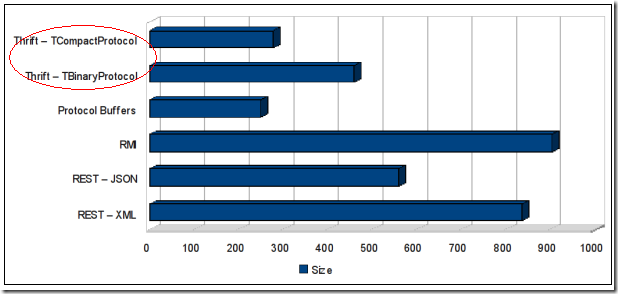
以上是传输相同的内容时内容大小的对比。
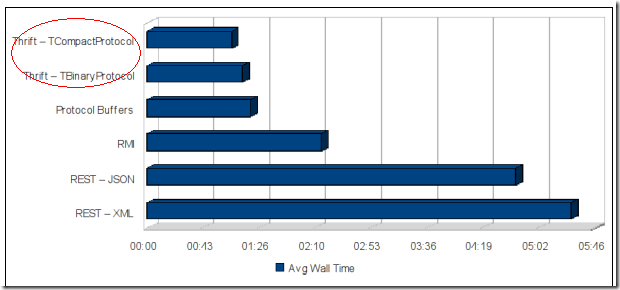
以上是运行开销比较结果。
TCompactProtocol和TBinaryProtocol是Thrift支持的两种协议,其中TCompactProtocol使用Variable-Length Quantity (VLQ) 编码对数据进行压缩。
详细可以查看:http://www.javabloger.com/article/apache-thrift-architecture.html
接下来,我想讲述一下如何使用Thrift搭建C#版的客户端以及服务端通讯的程序。
1. 先从官网下载Thrift安装包以及签出SVN源码:
官网下载地址:http://thrift.apache.org/download/
这里我下载了一个Thrift compiler for Windows版本的EXE文件(thrift-0.7.0.exe)
签出SVN源码地址:http://svn.apache.org/repos/asf/thrift/trunk
2. 这里我利用文章(http://www.javabloger.com/article/thrift-java-code-example.html)的例子(该例子生成Java源码的),完成一个C#版本的示例。
3. 首先创建脚本,命名为textCsharp.thrift,脚本内容如下:

struct Blog { # 注释2
1: string topic
2: binary content
3: i64 createdTime
4: string id
5: string ipAddress
6: map<string,string> props
}
service ThriftCase { # 注释3
i32 testCase1(1:i32 num1, 2:i32 num2, 3:string num3) # 注释4
list<string> testCase2(1:map<string,string> num1)
void testCase3()
void testCase4(1:list<Blog> blog)
}
4. 执行thrift命令:thrift -gen csharp testCsharp.thrift,这里说明一下:参数"csharp”意味着这里将自动生成C#代码,如果这里写java,python等等,可以用"java"或者"py”代替。
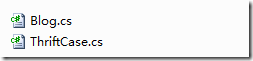
于是得到gen-csharp的目录,这个目录里面就包含支持Thrift的Blog以及ThriftCase的源代码,具体里面都生成什么代码,后面会做出介绍。
5. 然后,我现在打开SVN源码中的 trunk\lib\csharp\ 路径,我用项目打开
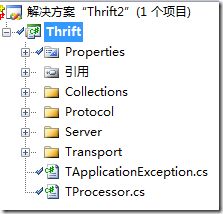
编译后,得到Thrift.dll文件,为了后面使用Thrift做准备。
6.新建工程,添加Server以及Client项目,把刚才生成的代码文件放入Common项目中。让Client和Server项目引用Thrift.dll类库。
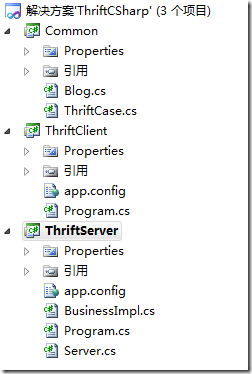
7. 编写服务端程序:
{
public void Start()
{
TServerSocket serverTransport = new TServerSocket(7911, 0, false);
ThriftCase.Processor processor = new ThriftCase.Processor(new BusinessImpl());
TServer server = new TSimpleServer(processor, serverTransport);
Console.WriteLine("Starting server on port 7911 ...");
server.Serve();
}
}
其中BusinessImpl具体提供业务逻辑的实现:
{
public int testCase1(int num1, int num2, String num3)
{
int i = num1 + num2;
Console.Write( "testCase1 num1+num2 is :"+ i);
Console.WriteLine( " num3 is :"+ num3);
return i;
}
public List<String> testCase2(Dictionary<String, String> num1)
{
Console.WriteLine("testCase2 num1 :" + num1);
List<String> list = new List<String>();
list.Add("num1");
return list;
}
public void testCase3()
{
Console.WriteLine("testCase3 ..........." + DateTime.Now);
}
public void testCase4(List<Blog> blogs)
{
Console.WriteLine("testCase4 ...........");
for (int i = 0; i < blogs.Count; i++)
{
Blog blog = blogs[i];
Console.Write("id:" + blog.Id);
Console.Write(",IpAddress:" + blog.IpAddress);
//Console.Write (",Content:" + new String(blog.Content));
Console.Write(",topic:" + blog.Topic);
Console.Write(",time:" + blog.CreatedTime);
}
Console.WriteLine("\n");
}
}
让它继承ThriftCase.Iface接口。
8. 编写客户端程序:
{
static Dictionary<String, String> map = new Dictionary<String, String>();
static List<Blog> blogs = new List<Blog>();
static void Main(string[] args)
{
TTransport transport = new TSocket("localhost", 7911);
TProtocol protocol = new TBinaryProtocol(transport);
ThriftCase.Client client = new ThriftCase.Client(protocol);
transport.Open();
Console.WriteLine("Client calls .....");
map.Add("blog", "http://www.javabloger.com%22);/
client.testCase1(10, 21, "3");
client.testCase2(map);
client.testCase3();
Blog blog = new Blog();
//blog.setContent("this is blog content".getBytes());
blog.CreatedTime = DateTime.Now.Ticks;
blog.Id = "123456";
blog.IpAddress = "127.0.0.1";
blog.Topic = "this is blog topic";
blogs.Add(blog);
client.testCase4(blogs);
transport.Close();
Console.ReadKey();
}
}
9. 运行Server以及Client:
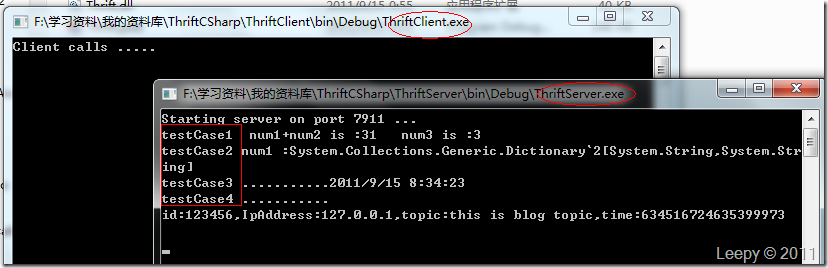
从客户端调用的方法,服务端已经接收到了数据。
源代码下载:ThriftCSharp.rar
后面的文章,我会具体介绍下Thrift的工作机制和原理。
Thrift初探:简单实现C#通讯服务程序的更多相关文章
- Thrift 简单实现C#通讯服务程序 (跨语言 MicroServices)
Thrift是一种可伸缩的跨语言服务框架,它结合了功能强大的软件堆栈的代码生成引擎,以建设服务,工作效率和无缝地与C++,C#,Java,Python和PHP和Ruby结合.thrift允许你定义一个 ...
- Thrift实现C#通讯服务程序
Thrift初探:简单实现C#通讯服务程序 好久没有写文章了,由于换工作了,所以一直没有时间来写博.今天抽个空练练手下~最近接触了下Thrift,网上也有很多文章对于Thrift做了说明: ...
- Apache Thrift的简单使用
Apache Thrift的简单使用 ---------------------- 1. 简介 Thrift是Facebook的一个开源项目,主要是一个跨语言的服务开发框架.它有一个代码生成器来对它所 ...
- thrift实现js与C#通讯
利用thrift实现js与C#通讯的实例代码 1.为什么要用thrift js C#? 1.1 首先,js 通过 thrift 访问C#,实际上是一种c/s模式.thrift是通信工具,js是客户端, ...
- Linux 下 简单客户端服务器通讯模型(TCP)
原文:Linux 下 简单客户端服务器通讯模型(TCP) 服务器端:server.c #include<stdio.h> #include<stdlib.h> #include ...
- 【node+小程序+web端】简单的websocket通讯
[node+小程序+web端]简单的websocket通讯 websoket是用来做什么的? 聊天室 消息列表 拼多多 即时通讯,推送, 实时交互 websoket是什么 websocket是一个全新 ...
- Apache Thrift的简单介绍
1.什么是Thrift thrift是一种可伸缩的跨语言服务的发展软件框架.它结合了功能强大的软件堆栈的代码生成引擎,以建设服务.不同开发语言开发的服务可以通过该框架实现通信. thrift是face ...
- 最简单的C# Windows服务程序
通过这个示例了解如何通过C#如何创建一个Windows服务程序. 工具/原料 Vistual Studio 2015 c# 方法/步骤 打开vs2015 文件->新建项目->V ...
- 编程作业—C++初探 简单的学生信息处理程序实现
简单的学生信息处理程序实现 来源: POJ (Coursera声明:在POJ上完成的习题将不会计入Coursera的最后成绩.) 注意: 总时间限制: 1000ms 内存限制: 65536kB 描述 ...
随机推荐
- repeater控件 + marquee标签 实现文字滚动显示
各种信息网站.BBS等网站上的公告信息模块的实现 拖出一个repeater控件绑定数据库中要显示的信息 在repeater的 <ItemTemplate> ... </ItemTem ...
- jquery get checkbox inside element(td).
<td id="skill"><input name="skill" type="checkbox" value=&quo ...
- 如何修改Linux系统下的PATH(如何添加自己的路径到PATH)
修改Linux的PATH方法有三(添加用户的路径到PATH): 方法一: 直接在命令行中输入:#PATH=$PATH:/etc/apache/bin.这种方法只对当前会话有效,也就是说每当登出或注销系 ...
- 你好,C++(32) 类是对现实世界的抽象和描述 6.2.1 类的声明和定义
6.2 类:当C++爱上面向对象 类这个概念是面向对象思想在C++中的具体体现:它既是封装的结果,同时也是继承和多态的载体.因此,要想学习C++中的面向对象程序设计,也就必须从“类”开始. 6.2. ...
- Android JNI 之 环境安装
在配置环境之前,我们得了解 JNI 和NDK JNI JNI是Java Native Interface的缩写,中文为JAVA本地调用.它提供了若干的API实现了和Java和其他语言的通信(主要是C& ...
- 【USACO 1.5.4】跳棋的挑战
[问题描述] 检查一个如下的6 x 6的跳棋棋盘,有六个棋子被放置在棋盘上,使得每行,每列,每条对角线(包括两条主对角线的所有对角线)上都至多有一个棋子,如下例,就是一种正确的布局. 上面的布局可以用 ...
- underscorejs-min学习
2.16 min 2.16.1 语法: _.min(list, [iteratee], [context]) 2.16.2 说明: 返回list中的最小值. list为集合,数组.对象.字符串或arg ...
- JS form表单提交的方法
1.当输入用户名和密码为空的时候,需要判断.这时候就用到了校验用户名和密码,这个需要在jsp的前端页面写:有两种方法,一种是用submit提交.一种是用button提交.方法一: 在jsp的前端页面的 ...
- HTML&CSS基础学习笔记1.28-给网页添加一个css样式
CSS是什么? 当HTML配合CSS一起使用时,我们发现页面变得好看了很多.那么CSS到底是什么呢? CSS指层叠样式表 (Cascading Style Sheets),它主要是用于定义HTML标签 ...
- Python按行读取文件
1:readline() file = open("sample.txt") while 1: line = file.readline() if not line: break ...