
绘制函数y=(x^2-2x+1)/(x^2+x+2)的曲线
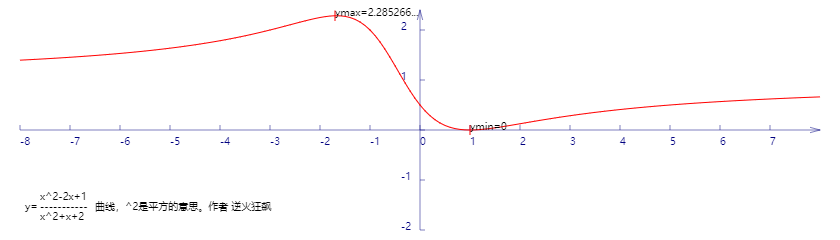

代码:
<!DOCTYPE html>
<html lang="utf-8">
<meta http-equiv="Content-Type" content="text/html; charset=utf-8"/>
<head>
     <title>函数曲线勾画</title>
    </head>

     <body onload="draw()">
        <canvas id="myCanvus" width="1300px" height="240px" style="border:1px dashed black;">
            出现文字表示你的浏览器不支持HTML5
        </canvas>
     </body>
</html>
<script type="text/javascript">
<!--
    function draw(){
        var canvas=document.getElementById("myCanvus");
        var canvasWidth=1300;
        var canvasHeight=240;

        var context=canvas.getContext("2d");

        context.fillStyle = "white";
        context.fillRect(0, 0, canvasWidth, canvasHeight);

        context.strokeStyle = "black";
        context.fillStyle = "black";

        //context.save();

        // 进行坐标变换:把原点放在左下角,东方为X轴正向,北方为Y轴正向
        var offsetY=110;// Y向偏移值,正值向上偏,用来画坐标轴
        var offsetX=620;// X向偏移值,正值向右偏,用来画坐标轴

        context.save();
        context.translate(0+offsetX,canvasHeight-offsetY);
        context.rotate(getRad(180));
        context.scale(-1,1);

        drawAxisX(context);
        drawAxisY(context);
        drawCurve(context);

        context.restore();

        context.fillText("x^2-2x+1",40,200);
        context.fillText("-----------",40,210);
        context.fillText("x^2+x+2",40,220);
        context.fillText("y=",25,210);
        context.fillText("曲线,^2是平方的意思。作者 逆火狂飙",95,210);
    }

    function drawCurve(ctx){
        var cds=[{}];// 初始化cds为空json

        var x,y;
        for(x=-12;x<=12;x+=0.1){
            y=(x*x-2*x+1)/(x*x+x+2);
            var arr={"x":x,"y":y};
            cds.push(arr);
        }

        // 将数组里面的点一段段连线
        var ymax=-4,ymin=4,xmax,xmin;

        ctx.strokeStyle = "red";
        ctx.beginPath();

        for(var i=0; i<cds.length; i++)
        {
            //console.log("x="+cds[i].x*50+" y="+cds[i].y*50);
            ctx.lineTo(cds[i].x*50,cds[i].y*50);

            // 求y最大值
            if(cds[i].y>ymax){
                ymax=cds[i].y;
                xmax=cds[i].x;
            }

            // 求y最小值
            if(cds[i].y<ymin){
                ymin=cds[i].y;
                xmin=cds[i].x;
            }
        }

        ctx.stroke();
        ctx.closePath();

        // 极大值
        ctx.beginPath();
        ctx.moveTo(xmax*50,ymax*50-5);
        ctx.lineTo(xmax*50,ymax*50+5);

        ctx.save();
        ctx.scale(1,-1);
        ctx.fillText("ymax="+cutShort(ymax.toString(),8),xmax*50,-ymax*50);
        ctx.restore();

        ctx.stroke();
        ctx.closePath();

        // 极小值
        ctx.beginPath();
        ctx.moveTo(xmin*50,ymin*50-5);
        ctx.lineTo(xmin*50,ymin*50+5);

        ctx.save();
        ctx.scale(1,-1);
        ctx.fillText("ymin="+ymin,xmin*50,-ymin*50);
        ctx.restore();

        ctx.stroke();
        ctx.closePath();
    }

    function drawAxisX(ctx){
        ctx.save();

        ctx.lineWidth=0.5;
        ctx.strokeStyle='navy';
        ctx.fillStyle='navy';

        var start=-600;
        var end=600;

        // 画轴
        ctx.beginPath();
        ctx.moveTo(start, 0);
        ctx.lineTo(end, 0);
        ctx.stroke();
        ctx.closePath();

        // 画箭头
        ctx.beginPath();
        ctx.moveTo(end-Math.cos(getRad(15))*10, Math.sin(getRad(15))*10);
        ctx.lineTo(end, 0);
        ctx.lineTo(end-Math.cos(getRad(15))*10, -Math.sin(getRad(15))*10);
        ctx.stroke();
        ctx.closePath();

        // 画刻度
        var x,y;
        y=5;
        for(x=start;x<end;x+=50){
            ctx.beginPath();
            ctx.moveTo(x, 0);
            ctx.lineTo(x, y);

            ctx.stroke();
            ctx.closePath();
        }

        // 写文字
        var i=0;
        for(x=start;x<end;x+=50){
            ctx.save();
            ctx.scale(1,-1);
            ctx.fillText(x/50,x,y+10);
            ctx.restore();
        }

        ctx.restore();
    }

    function drawAxisY(ctx){
        ctx.save();

        ctx.lineWidth=0.5;
        ctx.strokeStyle='navy';
        ctx.fillStyle='navy';

        var start=-100;
        var end=120;

        // 画轴
        ctx.beginPath();
        ctx.moveTo(0, start);
        ctx.lineTo(0, end);
        ctx.stroke();
        ctx.closePath();

        // 画箭头
        ctx.beginPath();
        ctx.moveTo(Math.sin(getRad(15))*10, end-Math.cos(getRad(15))*10);
        ctx.lineTo(0, end);
        ctx.lineTo(-Math.sin(getRad(15))*10, end-Math.cos(getRad(15))*10);
        ctx.stroke();
        ctx.closePath();

        // 画刻度
        var x,y;
        x=5;
        for(y=start;y<end;y+=50){
            ctx.beginPath();
            ctx.moveTo(x, y);
            ctx.lineTo(0, y);

            ctx.stroke();
            ctx.closePath();
        }

        // 写文字
        x=-19;
        for(y=start;y<end;y+=50){
            ctx.save();

            ctx.scale(1,-1);

            if(y!=0){
                ctx.fillText(-y/50,x,y);
            }

            ctx.restore();
        }

        ctx.restore();
    }

    function getRad(degree){
        return degree/180*Math.PI;
    }

    function cutShort(str,length){
        if(str.length>length){
            str=str.substr(0,length)+"...";
        }

        return str;
    }
//-->
</script>
绘制函数y=(x^2-2x+1)/(x^2+x+2)的曲线的更多相关文章
- 绘制函数 y=x^2-2x-3/2x^2+2x+1 的曲线
代码: <!DOCTYPE html> <html lang="utf-8"> <meta http-equiv="Content-Type ...
- 求函数 y=x^2-2x-3/2x^2+2x+1 的极值
解:展开函数式得到2yx2+2xy+y=x2-2x-3 继而得到(2y-1)x2+(2y+2)x+(y+3)=0 将上式看作x的二次方程,y组成了方程的系数. 只有Δ>=0,x才有实值. Δ=( ...
- MATLAB绘制函数图
序言 Matlab可以根据用户给出的数据绘制相应的函数图.对于单个2D函数图,需要给出一个行向量x作为函数图上离散点集的横坐标,以及一个与x列数一样的横坐标y作为函数图上点集的纵坐标. 向量x和y的取 ...
- 2017年全国卷3的21题与2018年全国卷3的21题命题背景是同一个函数$y=\frac{2x}{\ln(x+1)}$(再次瞎谈)
2017年四川高考数学(全国卷3)理科21题第1问 已知函数\(f(x)=x-1-a\ln x\) (1)若\(f(x)\geqslant 0\),求\(a\)的值\(.\) 该不等式等价于$a\ln ...
- 学习windows编程 day3 之窗口绘画二:边框绘制函数
#include <windows.h> LRESULT CALLBACK WndProc(HWND hwnd, UINT message, WPARAM wParam, LPARAM l ...
- python之绘制函数pyplot初探
我们想将我们手里的数据通过图形的方式展示出来,这样我们更直观的,更可以发现数据带给我们的信息.今天给大家介绍要给python中pyplot绘制函数.一般我们想将手里的数据绘制成图形,分为四大步:1.准 ...
- 使用神经网络来拟合函数y = x^3 +b
我们使用一个三层的小网络来,模拟函数y = x^3+b函数 import tensorflow as tf import numpy as np import matplotlib.pyplot as ...
- 函数 y=x^x的分析
关于函数 y=xx的分析: 由图像得,y在负无穷大到0图像处处不连续,故y的定义域为(0,正无穷大): 故该函数不就是y=e^(lnxx)吗? 1.定义域:我们变形一下,y=e^(xlnx),显然是0 ...
- 2、函数y=f(x)
/* Note:Your choice is C IDE */ #include "stdio.h" /* 3.函数y=f(x)可表示为: */ void main() { int ...
随机推荐
- keycloack docker 本地运行
参考github地址:https://github.com/jboss-dockerfiles/keycloak 首先使用git 下载该项目 使用docker-compose运行项目,需要进入至doc ...
- XSL
前言 XSL,拓展样式表语言,可以理解为XML用的CSS,在其中定义xml格式对应的东西 放在xsl文件中 XSLT,按照XSL中的格式将XML转为XHTML 语法 XML声明: <?xml v ...
- python之面向对象编程二
类的成员 类的成员可以分为三大类:字段.方法.属性. 字段:普通字段.静态字段. 方法:普通方法.类方法.静态方法 属性:普通属性. 注:所有成员中,只有普通字段的内容保存对象中,即:根据此类创建了多 ...
- BestCoder Round #65 (ZYB's Biology)
ZYB's Biology Accepts: 848 Submissions: 1199 Time Limit: 2000/1000 MS (Java/Others) Memory Limit: 13 ...
- Line Reflection -- LeetCode
Given n points on a 2D plane, find if there is such a line parallel to y-axis that reflect the given ...
- 【DFS】【贪心】Codeforces Round #411 (Div. 1) C. Ice cream coloring
对那个树进行dfs,在动态维护那个当前的冰激凌集合的时候,显然某种冰激凌仅会进出集合各一次(因为在树上形成连通块). 于是显然可以对当前的冰激凌集合贪心染色.暴力去维护即可.具体实现看代码.map不必 ...
- JDK源码学习笔记——TreeMap及红黑树
找了几个分析比较到位的,不再重复写了…… Java 集合系列12之 TreeMap详细介绍(源码解析)和使用示例 [Java集合源码剖析]TreeMap源码剖析 java源码分析之TreeMap基础篇 ...
- TZOJ 数据结构实验--循环队列
描述 创建一个循环队列,队列元素个数为4.能够实现队列的初始化.入队列.出队列.求队列长度等操作. 循环队列数据类型定义如下: typedef struct{ int data[Max]; in ...
- Python的函数参数和递归参数
位置参数 def power(x): return x*x; 默认参数 指的是在函数定义的时候,就赋予一些参数默认值,在调用这个函数的时候不必多次传入重复的参数值. 如定义一个多次输出同一个年龄阶段和 ...
- maven项目修改项目名
修改pom文件下面三处