
初识yeoman
最近开始新项目,在项目构建上面寻找合适的东西,grunt,bower到发现yeoman;学习了下,把一些东西记录下来然留着以后用.
1.什么是Yeoman
Yeoman是Google的团队和外部贡献者团队合作开发的,他的目标是通过Grunt(一个用于开发任务自动化的命令行工具)和Bower(一个HTML、CSS、Javascript和图片等前端资源的包管理器)的包装为开发者创建一个易用的工作流。
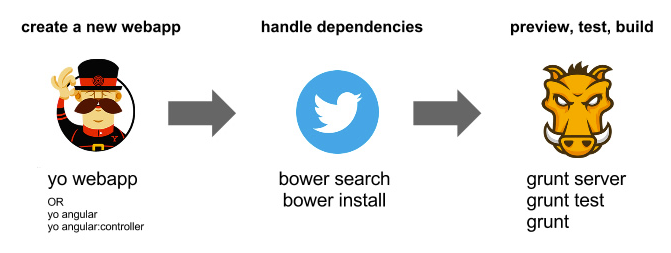
npm install -g yonpm install -g grunt-cli bower
3.install 基本的项目模板(generator);
yeoman提供了一些基本的模板 如:
generator-webapp
generator-angular
使用命令添加
npm install generator-angular -g
4.可以创建自己的 generator
5. generator-angular 示例
初始化项目
i 初始化一个以angualr为基础的项目
yo angular
终端显示如下:

根据需求选择你需要的依赖
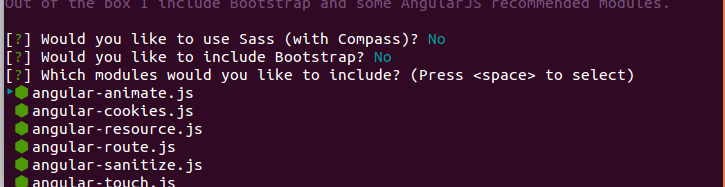
一段时间后项目生成如下结构

其中很多配置文件yeoman都给我们自动创建好了 比如package.json Gruntfile.js .gitignore 等配置文件.
到这里项目创建成功了!
-----------------
6.分析下 Gruntfile.js
这是创建的示例Gruntfile.js
// Generated on 2014-07-02 using generator-angular 0.9.1

'use strict';

// # Globbing

// for performance reasons we're only matching one level down:

// 'test/spec/{,*/}*.js'

// use this if you want to recursively match all subfolders:

// 'test/spec/**/*.js'

module.exports = function (grunt) {

  // Load grunt tasks automatically

  require('load-grunt-tasks')(grunt);

  // Time how long tasks take. Can help when optimizing build times

  require('time-grunt')(grunt);

  // Configurable paths for the application

  var appConfig = {

    app: require('./bower.json').appPath || 'app',

    dist: 'build'

  };

  // Define the configuration for all the tasks

  grunt.initConfig({

    // Project settings

    yeoman: appConfig,

    // Watches files for changes and runs tasks based on the changed files

    watch: {

      bower: {

        files: ['bower.json'],

        tasks: ['wiredep']

      },

      js: {

        files: ['<%= yeoman.app %>/scripts/{,*/}*.js'],

        tasks: ['newer:jshint:all'],

        options: {

          livereload: '<%= connect.options.livereload %>'

        }

      },

      jsTest: {

        files: ['test/spec/{,*/}*.js'],

        tasks: ['newer:jshint:test', 'karma']

      },

      styles: {

        files: ['<%= yeoman.app %>/styles/{,*/}*.css'],

        tasks: ['newer:copy:styles', 'autoprefixer']

      },

      gruntfile: {

        files: ['Gruntfile.js']

      },

      livereload: {

        options: {

          livereload: '<%= connect.options.livereload %>'

        },

        files: [

          '<%= yeoman.app %>/{,*/}*.html',

          '.tmp/styles/{,*/}*.css',

          '<%= yeoman.app %>/images/{,*/}*.{png,jpg,jpeg,gif,webp,svg}'

        ]

      }

    },

    // The actual grunt server settings

    connect: {

      options: {

        port: 9000,

        // Change this to '0.0.0.0' to access the server from outside.

        hostname: 'localhost',

        livereload: 35729

      },

      livereload: {

        options: {

          open: true,

          middleware: function (connect) {

            return [

              connect.static('.tmp'),

              connect().use(

                '/bower_components',

                connect.static('./bower_components')

              ),

              connect.static(appConfig.app)

            ];

          }

        }

      },

      test: {

        options: {

          port: 9001,

          middleware: function (connect) {

            return [

              connect.static('.tmp'),

              connect.static('test'),

              connect().use(

                '/bower_components',

                connect.static('./bower_components')

              ),

              connect.static(appConfig.app)

            ];

          }

        }

      },

      dist: {

        options: {

          open: true,

          base: '<%= yeoman.dist %>'

        }

      }

    },

    // Make sure code styles are up to par and there are no obvious mistakes

    jshint: {

      options: {

        jshintrc: '.jshintrc',

        reporter: require('jshint-stylish')

      },

      all: {

        src: [

          'Gruntfile.js',

          '<%= yeoman.app %>/scripts/{,*/}*.js'

        ]

      },

      test: {

        options: {

          jshintrc: 'test/.jshintrc'

        },

        src: ['test/spec/{,*/}*.js']

      }

    },

    // Empties folders to start fresh

    clean: {

      dist: {

        files: [{

          dot: true,

          src: [

            '.tmp',

            '<%= yeoman.dist %>/{,*/}*',

            '!<%= yeoman.dist %>/.git*'

          ]

        }]

      },

      server: '.tmp'

    },

    // Add vendor prefixed styles

    autoprefixer: {

      options: {

        browsers: ['last 1 version']

      },

      dist: {

        files: [{

          expand: true,

          cwd: '.tmp/styles/',

          src: '{,*/}*.css',

          dest: '.tmp/styles/'

        }]

      }

    },

    // Automatically inject Bower components into the app

    wiredep: {

      options: {

        cwd: '<%= yeoman.app %>'

      },

      app: {

        src: ['<%= yeoman.app %>/index.html'],

        ignorePath:  /..\//

      }

    },

    // Renames files for browser caching purposes

    filerev: {

      dist: {

        src: [

          '<%= yeoman.dist %>/scripts/{,*/}*.js',

          '<%= yeoman.dist %>/styles/{,*/}*.css',

          '<%= yeoman.dist %>/images/{,*/}*.{png,jpg,jpeg,gif,webp,svg}',

          '<%= yeoman.dist %>/styles/fonts/*'

        ]

      }

    },

    // Reads HTML for usemin blocks to enable smart builds that automatically

    // concat, minify and revision files. Creates configurations in memory so

    // additional tasks can operate on them

    useminPrepare: {

      html: '<%= yeoman.app %>/index.html',

      options: {

        dest: '<%= yeoman.dist %>',

        flow: {

          html: {

            steps: {

              js: ['concat', 'uglifyjs'],

              css: ['cssmin']

            },

            post: {}

          }

        }

      }

    },

    // Performs rewrites based on filerev and the useminPrepare configuration

    usemin: {

      html: ['<%= yeoman.dist %>/{,*/}*.html'],

      css: ['<%= yeoman.dist %>/styles/{,*/}*.css'],

      options: {

        assetsDirs: ['<%= yeoman.dist %>','<%= yeoman.dist %>/images']

      }

    },

    /*The following *-min tasks will produce minified files in the dist folder

    By default, your `index.html`'s <!-- Usemin block --> will take care of

    minification. These next options are pre-configured if you do not wish

    to use the Usemin blocks.*/

    cssmin: {

       dist: {

         files: {

           '<%= yeoman.dist %>/styles/main.css': [

             '.tmp/styles/{,*/}*.css'

           ]

         }

       }

    },

    uglify: {

       dist: {

         files: {

           '<%= yeoman.dist %>/scripts/scripts.js': [

             '<%= yeoman.dist %>/scripts/scripts.js'

           ]

         }

       }

    },

    concat: {

       dist: {}

    },

    imagemin: {

      dist: {

        files: [{

          expand: true,

          cwd: '<%= yeoman.app %>/images',

          src: '{,*/}*.{png,jpg,jpeg,gif}',

          dest: '<%= yeoman.dist %>/images'

        }]

      }

    },

    svgmin: {

      dist: {

        files: [{

          expand: true,

          cwd: '<%= yeoman.app %>/images',

          src: '{,*/}*.svg',

          dest: '<%= yeoman.dist %>/images'

        }]

      }

    },

    htmlmin: {

      dist: {

        options: {

          collapseWhitespace: true,

          conservativeCollapse: true,

          collapseBooleanAttributes: true,

          removeCommentsFromCDATA: true,

          removeOptionalTags: true

        },

        files: [{

          expand: true,

          cwd: '<%= yeoman.dist %>',

          src: ['*.html', 'views/{,*/}*.html'],

          dest: '<%= yeoman.dist %>'

        }]

      }

    },

    // ngmin tries to make the code safe for minification automatically by

    // using the Angular long form for dependency injection. It doesn't work on

    // things like resolve or inject so those have to be done manually.

    ngmin: {

      dist: {

        files: [{

          expand: true,

          cwd: '.tmp/concat/scripts',

          src: '*.js',

          dest: '.tmp/concat/scripts'

        }]

      }

    },

    // Replace Google CDN references

    cdnify: {

      dist: {

        html: ['<%= yeoman.dist %>/*.html']

      }

    },

    // Copies remaining files to places other tasks can use

    copy: {

      dist: {

        files: [{

          expand: true,

          dot: true,

          cwd: '<%= yeoman.app %>',

          dest: '<%= yeoman.dist %>',

          src: [

            '*.{ico,png,txt}',

            '.htaccess',

            '*.html',

            'views/{,*/}*.html',

            'images/{,*/}*.{webp}',

            'fonts/*'

          ]

        }, {

          expand: true,

          cwd: '.tmp/images',

          dest: '<%= yeoman.dist %>/images',

          src: ['generated/*']

        }]

      },

      styles: {

        expand: true,

        cwd: '<%= yeoman.app %>/styles',

        dest: '.tmp/styles/',

        src: '{,*/}*.css'

      }

    },

    // Run some tasks in parallel to speed up the build process

    concurrent: {

      server: [

        'copy:styles'

      ],

      test: [

        'copy:styles'

      ],

      dist: [

        'copy:styles',

        'imagemin',

        'svgmin'

      ]

    },

    // Test settings

    karma: {

      unit: {

        configFile: 'test/karma.conf.js',

        singleRun: true

      }

    }

  });

  grunt.registerTask('serve', 'Compile then start a connect web server', function (target) {

    if (target === 'dist') {

      return grunt.task.run(['build', 'connect:dist:keepalive']);

    }

    grunt.task.run([

      'clean:server',

      'wiredep',

      'concurrent:server',

      'autoprefixer',

      'connect:livereload',

      'watch'

    ]);

  });

  grunt.registerTask('server', 'DEPRECATED TASK. Use the "serve" task instead', function (target) {

    grunt.log.warn('The `server` task has been deprecated. Use `grunt serve` to start a server.');

    grunt.task.run(['serve:' + target]);

  });

  grunt.registerTask('test', [

    'clean:server',

    'concurrent:test',

    'autoprefixer',

    'connect:test',

    'karma'

  ]);

  grunt.registerTask('build', [

    'clean:dist',

    'wiredep',

    'useminPrepare',

    'concurrent:dist',

    'autoprefixer',

    'concat',

    'ngmin',

    'copy:dist',

    'cdnify',

    'cssmin',

    'uglify',

    'filerev',

    'usemin',

    'htmlmin'

  ]);

  grunt.registerTask('default', [

    'newer:jshint',

    'test',

    'build'

  ]);

};
Gruntfile.js
------------
参考:
http://yeoman.io/
http://www.cnblogs.com/cocowool/archive/2013/03/09/2952003.html
http://www.36ria.com/6144
初识yeoman的更多相关文章
- 前端自动化构建工具-yoman浅谈
如今随着前端技术的飞速发展,前端项目也变得越来越复杂. 快速的搭建一个集成多种工具和框架的复杂前端项目也越来越成为一种需求. 当然如果你要自己从0开始完全自己diy,绝对可以,只不过需要耗费一些不少的 ...
- 基于Yeoman实现自定义脚手架
什么是脚手架? Yeoman是什么? 实现自定义脚手架 基于Yeoman实现Vue-cli 一.什么是脚手架? 手脚架从功能上来讲就是创建项目初始文件,这其中包括生成功能模块配置.自动安装依赖.自动生 ...
- Yeoman 官网教学案例:使用 Yeoman 构建 WebApp
STEP 1:设置开发环境 与yeoman的所有交互都是通过命令行.Mac系统使用terminal.app,Linux系统使用shell,windows系统可以使用cmder/PowerShell/c ...
- Yeoman 学习笔记
yoeman 简介:http://www.infoq.com/cn/news/2012/09/yeoman yeoman 官网: http://yeoman.io/ yeoman 是快速创建骨架应用程 ...
- Android动画效果之初识Property Animation(属性动画)
前言: 前面两篇介绍了Android的Tween Animation(补间动画) Android动画效果之Tween Animation(补间动画).Frame Animation(逐帧动画)Andr ...
- 初识Hadoop
第一部分: 初识Hadoop 一. 谁说大象不能跳舞 业务数据越来越多,用关系型数据库来存储和处理数据越来越感觉吃力,一个查询或者一个导出,要执行很长 ...
- python学习笔记(基础四:模块初识、pyc和PyCodeObject是什么)
一.模块初识(一) 模块,也叫库.库有标准库第三方库. 注意事项:文件名不能和导入的模块名相同 1. sys模块 import sys print(sys.path) #打印环境变量 print(sy ...
- 开发属于自己的yeoman脚手架(generator-reactpackage)
自从前后端开始分离之后,前端项目工程化也显得越来越重要了,之前写过一篇搭建基于Angular+Requirejs+Grunt的前端项目教程,有兴趣的可以点这里去看 但是有些项目可以使用这种方式,但有些 ...
- 初识IOS,Label控件的应用。
初识IOS,Label控件的应用. // // ViewController.m // Gua.test // // Created by 郭美男 on 16/5/31. // Copyright © ...
随机推荐
- mysql中如何统计某字段里某个字符的个数
select * from order where length(order_num)-length(replace(order_num,'8','')) = 4
- 系统流畅/性能受限 谷歌Nexus4详细评测
http://mobile.it168.com/a2012/1220/1437/000001437938_8.shtml
- Linux 下Tomcat的启动、关闭、杀死进程
Linux下Tomcat的启动.关闭.杀死进程 打开终端 cd /java/tomcat #执行 bin/startup.sh #启动tomcat bin/shutdown.sh #停止tomcat ...
- 使用DotNetZip压缩与解压缩
下载地址:http://dotnetzip.codeplex.com/ 解压后找到\\DotNetZipLib-DevKit-v1.9\zip-v1.9\Release下的Ionic.Zip.dll文 ...
- redis conf 详解
2.8配置 # Redis configuration file example # Note on units: when memory size is needed, it is possible ...
- 点滴积累【C#】---C#实现上传word将路径保存到数据库,文件保存到服务器。并且按照名称读取服务器的word
效果: 1. . . 数据库: 思路: 上传:先获取word物理地址,然后根据文件的类型判断,然后再保存到相应的文件夹下,再把路径插入到数据库中. 读取:首先根据输入的文件名字在数据库中查找出来文件的 ...
- nginx 查看访问 IP 并封禁 IP 详解
1.查找服务器所有访问者ip方法: awk '{print $1}' nginx_access.log |sort |uniq -c|sort -n nginx.access.log 为nginx访问 ...
- 从request获取各种路径总结
一.获得都是当前运行文件在服务器上的绝对路径 在servlet里用: this.getServletContext().getRealPath() 在struts用: this.getServlet( ...
- redis源码学习_字典
redis中字典有以下要点: (1)它就是一个键值对,对于hash冲突的处理采用了头插法的链式存储来解决. (2)对rehash,扩展就是取第一个大于等于used * 2的2 ^ n的数作为新的has ...
- .htaccess中的apache rewrite规则写法详解
.htaccess中的apache rewrite写法: 1 RewriteEngine On 2 RewriteCond %{HTTP_HOST} ^(www\.)?xxx\.com$ 3 Rewr ...