
初识yeoman
最近开始新项目,在项目构建上面寻找合适的东西,grunt,bower到发现yeoman;学习了下,把一些东西记录下来然留着以后用.
1.什么是Yeoman
Yeoman是Google的团队和外部贡献者团队合作开发的,他的目标是通过Grunt(一个用于开发任务自动化的命令行工具)和Bower(一个HTML、CSS、Javascript和图片等前端资源的包管理器)的包装为开发者创建一个易用的工作流。
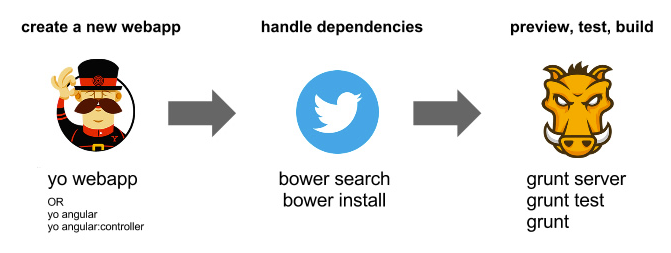
npm install -g yonpm install -g grunt-cli bower
3.install 基本的项目模板(generator);
yeoman提供了一些基本的模板 如:
generator-webapp
generator-angular
使用命令添加
npm install generator-angular -g
4.可以创建自己的 generator
5. generator-angular 示例
初始化项目
i 初始化一个以angualr为基础的项目
yo angular
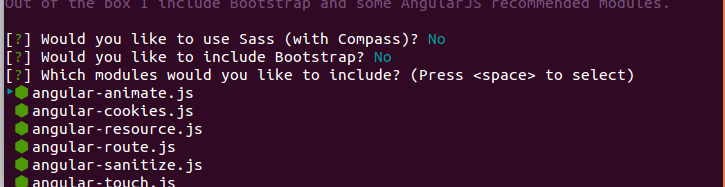
终端显示如下:

根据需求选择你需要的依赖
一段时间后项目生成如下结构

其中很多配置文件yeoman都给我们自动创建好了 比如package.json Gruntfile.js .gitignore 等配置文件.
到这里项目创建成功了!
-----------------
6.分析下 Gruntfile.js
这是创建的示例Gruntfile.js
// Generated on 2014-07-02 using generator-angular 0.9.1

'use strict';

// # Globbing

// for performance reasons we're only matching one level down:

// 'test/spec/{,*/}*.js'

// use this if you want to recursively match all subfolders:

// 'test/spec/**/*.js'

module.exports = function (grunt) {

  // Load grunt tasks automatically

  require('load-grunt-tasks')(grunt);

  // Time how long tasks take. Can help when optimizing build times

  require('time-grunt')(grunt);

  // Configurable paths for the application

  var appConfig = {

    app: require('./bower.json').appPath || 'app',

    dist: 'build'

  };

  // Define the configuration for all the tasks

  grunt.initConfig({

    // Project settings

    yeoman: appConfig,

    // Watches files for changes and runs tasks based on the changed files

    watch: {

      bower: {

        files: ['bower.json'],

        tasks: ['wiredep']

      },

      js: {

        files: ['<%= yeoman.app %>/scripts/{,*/}*.js'],

        tasks: ['newer:jshint:all'],

        options: {

          livereload: '<%= connect.options.livereload %>'

        }

      },

      jsTest: {

        files: ['test/spec/{,*/}*.js'],

        tasks: ['newer:jshint:test', 'karma']

      },

      styles: {

        files: ['<%= yeoman.app %>/styles/{,*/}*.css'],

        tasks: ['newer:copy:styles', 'autoprefixer']

      },

      gruntfile: {

        files: ['Gruntfile.js']

      },

      livereload: {

        options: {

          livereload: '<%= connect.options.livereload %>'

        },

        files: [

          '<%= yeoman.app %>/{,*/}*.html',

          '.tmp/styles/{,*/}*.css',

          '<%= yeoman.app %>/images/{,*/}*.{png,jpg,jpeg,gif,webp,svg}'

        ]

      }

    },

    // The actual grunt server settings

    connect: {

      options: {

        port: 9000,

        // Change this to '0.0.0.0' to access the server from outside.

        hostname: 'localhost',

        livereload: 35729

      },

      livereload: {

        options: {

          open: true,

          middleware: function (connect) {

            return [

              connect.static('.tmp'),

              connect().use(

                '/bower_components',

                connect.static('./bower_components')

              ),

              connect.static(appConfig.app)

            ];

          }

        }

      },

      test: {

        options: {

          port: 9001,

          middleware: function (connect) {

            return [

              connect.static('.tmp'),

              connect.static('test'),

              connect().use(

                '/bower_components',

                connect.static('./bower_components')

              ),

              connect.static(appConfig.app)

            ];

          }

        }

      },

      dist: {

        options: {

          open: true,

          base: '<%= yeoman.dist %>'

        }

      }

    },

    // Make sure code styles are up to par and there are no obvious mistakes

    jshint: {

      options: {

        jshintrc: '.jshintrc',

        reporter: require('jshint-stylish')

      },

      all: {

        src: [

          'Gruntfile.js',

          '<%= yeoman.app %>/scripts/{,*/}*.js'

        ]

      },

      test: {

        options: {

          jshintrc: 'test/.jshintrc'

        },

        src: ['test/spec/{,*/}*.js']

      }

    },

    // Empties folders to start fresh

    clean: {

      dist: {

        files: [{

          dot: true,

          src: [

            '.tmp',

            '<%= yeoman.dist %>/{,*/}*',

            '!<%= yeoman.dist %>/.git*'

          ]

        }]

      },

      server: '.tmp'

    },

    // Add vendor prefixed styles

    autoprefixer: {

      options: {

        browsers: ['last 1 version']

      },

      dist: {

        files: [{

          expand: true,

          cwd: '.tmp/styles/',

          src: '{,*/}*.css',

          dest: '.tmp/styles/'

        }]

      }

    },

    // Automatically inject Bower components into the app

    wiredep: {

      options: {

        cwd: '<%= yeoman.app %>'

      },

      app: {

        src: ['<%= yeoman.app %>/index.html'],

        ignorePath:  /..\//

      }

    },

    // Renames files for browser caching purposes

    filerev: {

      dist: {

        src: [

          '<%= yeoman.dist %>/scripts/{,*/}*.js',

          '<%= yeoman.dist %>/styles/{,*/}*.css',

          '<%= yeoman.dist %>/images/{,*/}*.{png,jpg,jpeg,gif,webp,svg}',

          '<%= yeoman.dist %>/styles/fonts/*'

        ]

      }

    },

    // Reads HTML for usemin blocks to enable smart builds that automatically

    // concat, minify and revision files. Creates configurations in memory so

    // additional tasks can operate on them

    useminPrepare: {

      html: '<%= yeoman.app %>/index.html',

      options: {

        dest: '<%= yeoman.dist %>',

        flow: {

          html: {

            steps: {

              js: ['concat', 'uglifyjs'],

              css: ['cssmin']

            },

            post: {}

          }

        }

      }

    },

    // Performs rewrites based on filerev and the useminPrepare configuration

    usemin: {

      html: ['<%= yeoman.dist %>/{,*/}*.html'],

      css: ['<%= yeoman.dist %>/styles/{,*/}*.css'],

      options: {

        assetsDirs: ['<%= yeoman.dist %>','<%= yeoman.dist %>/images']

      }

    },

    /*The following *-min tasks will produce minified files in the dist folder

    By default, your `index.html`'s <!-- Usemin block --> will take care of

    minification. These next options are pre-configured if you do not wish

    to use the Usemin blocks.*/

    cssmin: {

       dist: {

         files: {

           '<%= yeoman.dist %>/styles/main.css': [

             '.tmp/styles/{,*/}*.css'

           ]

         }

       }

    },

    uglify: {

       dist: {

         files: {

           '<%= yeoman.dist %>/scripts/scripts.js': [

             '<%= yeoman.dist %>/scripts/scripts.js'

           ]

         }

       }

    },

    concat: {

       dist: {}

    },

    imagemin: {

      dist: {

        files: [{

          expand: true,

          cwd: '<%= yeoman.app %>/images',

          src: '{,*/}*.{png,jpg,jpeg,gif}',

          dest: '<%= yeoman.dist %>/images'

        }]

      }

    },

    svgmin: {

      dist: {

        files: [{

          expand: true,

          cwd: '<%= yeoman.app %>/images',

          src: '{,*/}*.svg',

          dest: '<%= yeoman.dist %>/images'

        }]

      }

    },

    htmlmin: {

      dist: {

        options: {

          collapseWhitespace: true,

          conservativeCollapse: true,

          collapseBooleanAttributes: true,

          removeCommentsFromCDATA: true,

          removeOptionalTags: true

        },

        files: [{

          expand: true,

          cwd: '<%= yeoman.dist %>',

          src: ['*.html', 'views/{,*/}*.html'],

          dest: '<%= yeoman.dist %>'

        }]

      }

    },

    // ngmin tries to make the code safe for minification automatically by

    // using the Angular long form for dependency injection. It doesn't work on

    // things like resolve or inject so those have to be done manually.

    ngmin: {

      dist: {

        files: [{

          expand: true,

          cwd: '.tmp/concat/scripts',

          src: '*.js',

          dest: '.tmp/concat/scripts'

        }]

      }

    },

    // Replace Google CDN references

    cdnify: {

      dist: {

        html: ['<%= yeoman.dist %>/*.html']

      }

    },

    // Copies remaining files to places other tasks can use

    copy: {

      dist: {

        files: [{

          expand: true,

          dot: true,

          cwd: '<%= yeoman.app %>',

          dest: '<%= yeoman.dist %>',

          src: [

            '*.{ico,png,txt}',

            '.htaccess',

            '*.html',

            'views/{,*/}*.html',

            'images/{,*/}*.{webp}',

            'fonts/*'

          ]

        }, {

          expand: true,

          cwd: '.tmp/images',

          dest: '<%= yeoman.dist %>/images',

          src: ['generated/*']

        }]

      },

      styles: {

        expand: true,

        cwd: '<%= yeoman.app %>/styles',

        dest: '.tmp/styles/',

        src: '{,*/}*.css'

      }

    },

    // Run some tasks in parallel to speed up the build process

    concurrent: {

      server: [

        'copy:styles'

      ],

      test: [

        'copy:styles'

      ],

      dist: [

        'copy:styles',

        'imagemin',

        'svgmin'

      ]

    },

    // Test settings

    karma: {

      unit: {

        configFile: 'test/karma.conf.js',

        singleRun: true

      }

    }

  });

  grunt.registerTask('serve', 'Compile then start a connect web server', function (target) {

    if (target === 'dist') {

      return grunt.task.run(['build', 'connect:dist:keepalive']);

    }

    grunt.task.run([

      'clean:server',

      'wiredep',

      'concurrent:server',

      'autoprefixer',

      'connect:livereload',

      'watch'

    ]);

  });

  grunt.registerTask('server', 'DEPRECATED TASK. Use the "serve" task instead', function (target) {

    grunt.log.warn('The `server` task has been deprecated. Use `grunt serve` to start a server.');

    grunt.task.run(['serve:' + target]);

  });

  grunt.registerTask('test', [

    'clean:server',

    'concurrent:test',

    'autoprefixer',

    'connect:test',

    'karma'

  ]);

  grunt.registerTask('build', [

    'clean:dist',

    'wiredep',

    'useminPrepare',

    'concurrent:dist',

    'autoprefixer',

    'concat',

    'ngmin',

    'copy:dist',

    'cdnify',

    'cssmin',

    'uglify',

    'filerev',

    'usemin',

    'htmlmin'

  ]);

  grunt.registerTask('default', [

    'newer:jshint',

    'test',

    'build'

  ]);

};
Gruntfile.js
------------
参考:
http://yeoman.io/
http://www.cnblogs.com/cocowool/archive/2013/03/09/2952003.html
http://www.36ria.com/6144
初识yeoman的更多相关文章
- 前端自动化构建工具-yoman浅谈
如今随着前端技术的飞速发展,前端项目也变得越来越复杂. 快速的搭建一个集成多种工具和框架的复杂前端项目也越来越成为一种需求. 当然如果你要自己从0开始完全自己diy,绝对可以,只不过需要耗费一些不少的 ...
- 基于Yeoman实现自定义脚手架
什么是脚手架? Yeoman是什么? 实现自定义脚手架 基于Yeoman实现Vue-cli 一.什么是脚手架? 手脚架从功能上来讲就是创建项目初始文件,这其中包括生成功能模块配置.自动安装依赖.自动生 ...
- Yeoman 官网教学案例:使用 Yeoman 构建 WebApp
STEP 1:设置开发环境 与yeoman的所有交互都是通过命令行.Mac系统使用terminal.app,Linux系统使用shell,windows系统可以使用cmder/PowerShell/c ...
- Yeoman 学习笔记
yoeman 简介:http://www.infoq.com/cn/news/2012/09/yeoman yeoman 官网: http://yeoman.io/ yeoman 是快速创建骨架应用程 ...
- Android动画效果之初识Property Animation(属性动画)
前言: 前面两篇介绍了Android的Tween Animation(补间动画) Android动画效果之Tween Animation(补间动画).Frame Animation(逐帧动画)Andr ...
- 初识Hadoop
第一部分: 初识Hadoop 一. 谁说大象不能跳舞 业务数据越来越多,用关系型数据库来存储和处理数据越来越感觉吃力,一个查询或者一个导出,要执行很长 ...
- python学习笔记(基础四:模块初识、pyc和PyCodeObject是什么)
一.模块初识(一) 模块,也叫库.库有标准库第三方库. 注意事项:文件名不能和导入的模块名相同 1. sys模块 import sys print(sys.path) #打印环境变量 print(sy ...
- 开发属于自己的yeoman脚手架(generator-reactpackage)
自从前后端开始分离之后,前端项目工程化也显得越来越重要了,之前写过一篇搭建基于Angular+Requirejs+Grunt的前端项目教程,有兴趣的可以点这里去看 但是有些项目可以使用这种方式,但有些 ...
- 初识IOS,Label控件的应用。
初识IOS,Label控件的应用. // // ViewController.m // Gua.test // // Created by 郭美男 on 16/5/31. // Copyright © ...
随机推荐
- form表单中的id 与name的区别
以前经常写form表单时,不写id和name,总觉得没有什么用.后来一看后台套完的页面发现,他们都补上name,不知道所以然,就查了一下资料,吓我一跳,要是照我那样写根本不会有数据传到服务器.原来表单 ...
- MongoDB Query 判断为空 取值为空的时间
if (!string.IsNullOrEmpty(STATES)) { DateTime? dtnull = null; //Return if (STATES == "Return&qu ...
- 现在的C语言编辑器里的int范围为什么是-2147483648~2147483647 2014-08-05 10:21 100人阅读 评论(0) 收藏
下面是引用百度文库的一段话: "这得从二进制的原码说起: 如果以最高位为符号位,二进制原码最大为0111111111111111=215-1=32767 最小为111111111111111 ...
- 使用PHP创建一个REST API(Create a REST API with PHP)
译者前言: 首先这是一篇国外的英文文章,非常系统.详尽的介绍了如何使用PHP创建REST API,国内这方面的资料非常非常的有限,而且基本没有可操作性.这篇文章写的非常好,只要对PHP稍有了解的程序员 ...
- Atitit JAVA p2p设计与总结 JXTA 2
Atitit JAVA p2p设计与总结 JXTA 2 JXTA 2 是开放源代码 P2P 网络的第二个主要版本,它利用流行的.基于 Java 的参考实现作为构建基础.在设计方面进行了重要的修改,以 ...
- C/C++ 错误笔记-解决swap函数与标准库的std::swap函数冲突的问题
下午写了一份代码: #include <iostream> using namespace std; // 模板1:交换基本类型的值 template<typename T> ...
- matplotlib 添加注释的方式
matplotlib 添加注释的方式 matplotlib.pyplot.annotate Annotate the point xy with text s s : str The text of ...
- HTML5之canvas元素
定义和用法 fillStyle 属性设置或返回用于填充绘画的颜色.渐变或模式. 默认值: #000000 JavaScript 语法: context.fillStyle=color|gradient ...
- hdu 1000&hdu1001
1001 #include<iostream> #include<stdio.h> using namespace std; int main() { long long n; ...
- DIV的内容自动换行
word-break:break-all和word-wrap:break-word都是能使其容器如DIV的内容自动换行. 它们的区别就在于: 1,word-break:break-all 例如div宽 ...