
matplotlib 添加注释的方式
matplotlib 添加注释的方式
matplotlib.pyplot.annotate
Annotate the point xy with text s
s : str The text of the annotation
xy : iterable Length 2 sequence specifying the (x,y) point to annotate
xytext : iterable, optional Length 2 sequence specifying the (x,y) to place the text at. If None, defaults to xy.
xycoords : str, Artist, Transform, callable or tuple, optional
The coordinate system that xy is given in.
'data' use the coordinate system of the object being annotated (default)
textcoords : str, Artist, Transform, callable or tuple, optional
The coordinate system that xytext is given, which may be different than the coordinate system used for xy.
arrowprops : dict, optional
arrowstyle & connectionstyle: str, ConnectionStyle, or None, optional
The allowed values of 'arrowstyle' are:
| Name | Attrs |
|---|---|
'-' |
None |
'->' |
head_length=0.4,head_width=0.2 |
'-[' |
widthB=1.0,lengthB=0.2,angleB=None |
'|-|' |
widthA=1.0,widthB=1.0 |
'-|>' |
head_length=0.4,head_width=0.2 |
'<-' |
head_length=0.4,head_width=0.2 |
'<->' |
head_length=0.4,head_width=0.2 |
'<|-' |
head_length=0.4,head_width=0.2 |
'<|-|>' |
head_length=0.4,head_width=0.2 |
'fancy' |
head_length=0.4,head_width=0.4,tail_width=0.4 |
'simple' |
head_length=0.5,head_width=0.5,tail_width=0.2 |
'wedge' |
tail_width=0.3,shrink_factor=0.5 |
The following connection styles are available:
| Class | Name | Attrs |
|---|---|---|
| Angle | angle |
angleA=90,angleB=0,rad=0.0 |
| Angle3 | angle3 |
angleA=90,angleB=0 |
| Arc | arc |
angleA=0,angleB=0,armA=None,armB=None,rad=0.0 |
| Arc3 | arc3 |
rad=0.0 |
| Bar | bar |
armA=0.0,armB=0.0,fraction=0.3,angle=None |
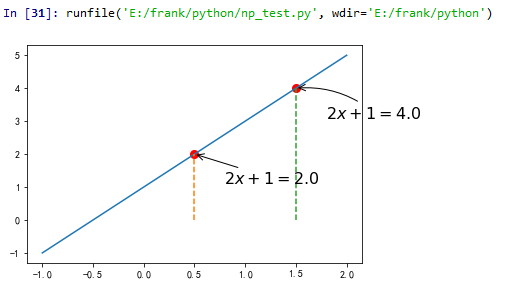
import matplotlib.pyplot as plt

import numpy as np

#matplotlib.pyplot.annotate()函数的基本使用

x = np.linspace(-1,2,50)

y1 = 2*x +1

l1, =plt.plot(x,y1,label = 'one')

x0 = 0.5;

y0 = 2*x0 +1

plt.scatter(x0,y0,s = 50,color = 'r',lw= 2)#

plt.plot([x0,x0],[0,y0],'--')

x2 = 1.5;

y2 = 2*x2 +1

plt.scatter(x2,y2,s = 50,color = 'r',lw= 2)#

plt.plot([x2,x2],[0,y2],'--')

plt.annotate(r'$2x+1=%s$'%y2,xy = (x2,y2),xycoords = 'data',xytext= (+30,-30),textcoords = 'offset points'

             ,fontsize = 16,arrowprops = dict(arrowstyle = '->',connectionstyle = 'arc3,rad = .2'))

plt.annotate(r'$2x+1=%s$'%y0,xy = (x0,y0),xycoords = 'data',xytext= (+30,-30),textcoords = 'offset points'

             ,fontsize = 16,arrowprops = dict(arrowstyle = '->',connectionstyle = None))
matplotlib.pyplot.text
Add text to the axes.
Add the text s to the axes at location x, y in data coordinates.
x, y : scalars
The position to place the text. By default, this is in data coordinates.
The coordinate system can be changed using the transform parameter.
s : str
The text.
fontdict : dictionary, optional, default: None
A dictionary to override the default text properties.
If fontdict is None, the defaults are determined by your rc parameters.
withdash : boolean, optional, default: False
Creates a TextWithDash instance instead of a Text instance.
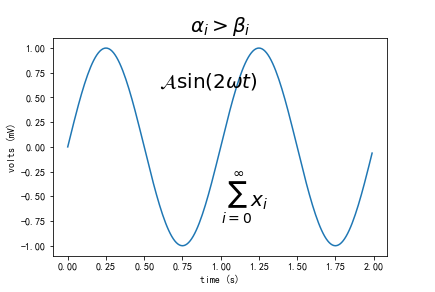
import matplotlib.pyplot as plt

import numpy as np

#matplotlib.pyplot.text()函数的基本使用

t = np.arange(0.0, 2.0, 0.01)

s = np.sin(2*np.pi*t)

plt.plot(t,s)

#标题

plt.title(r'$\alpha_i > \beta_i$', fontsize=20)

#在点(1,-0.6)处添加

plt.text(1, -0.6, r'$\sum_{i=0}^\infty x_i$', fontsize=20)

plt.text(0.6, 0.6, r'$\mathcal{A}\mathrm{sin}(2 \omega t)$',fontsize=20)

plt.xlabel('time (s)')

plt.ylabel('volts (mV)')

plt.show()
matplotlib 添加注释的方式的更多相关文章
- 5 给我们的c#程序添加注释
注释是你的程序中的一个重要部分.在程序中添加注释是用来告诉你和其他人你的程序是做什么用的,你的思路是怎样的.注释可以用你熟悉的中文进行添加. 当你想暂时把你程序中的某些语句去掉的时候,不需要把他们删除 ...
- VS 自动添加注释
现在大多数公司都规定程序员在程序文件的头部加上版权信息,这样每个人写的文件都可以区分开来,如果某个文件出现问题就可以快速的找到文件的创建人,用最短的时间来解决问题,常常是以下格式: //======= ...
- C#如何给PDF文档添加注释
整理文档时,我们可能会需要在一些或一段文字上添加注释加以说明,那如何以编程的方式实现呢?本文将实例讲述C#中如何使用免费组件给PDF文档添加文本注释,包括自由文本注释.自由文本注释能允许我们自定义它的 ...
- C# 类库中添加注释方法
C# 类库中添加注释方法 C#中新建的类库添加注释时,应注意以下问题: 1.编译动态类库时命名空间要规范,一般不要和类同名,命名空间一般定义格式:项目名+类文件名: 2.动态类库中,类.方法的注释都采 ...
- [转]Intellij Idea自动添加注释的方法
Intellij Idea自动添加注释的方法 阿历Ali 关注 2017.08.20 21:22* 字数 914 阅读 2741评论 0喜欢 6 程序媛阿历终于要写第一篇关于开发的文章了!!! 阿历用 ...
- MySQL字段添加注释,但不改变字段的类型
之前在导数据库数据的时候,忘记将字段的注释导过来了.现在需要将所有字段都加上注释(崩溃).由于导数据的过程比较长,业务那边从原始数据库导出了一个 Excel,里面有所有字段的注释,然后让我们根据这个注 ...
- 在C#里面给PPT添加注释
平常开会或者做总结报告的时候我们通常都会用到PowerPoint演示文稿,我们可以在单个幻灯片或者全部幻灯片里面添加注释,这样观众可以从注释内容里面获取更多的相关信息. 有些朋友不清楚如何在幻灯片里面 ...
- kobject.c 添加注释
最近结合<Linux Device Drivers>对kobject的理解,对kobject.c文件添加注释,仅供参考! 1 /** 2 * populate_dir - pop ...
- 在Excel里用vba给合并的单元格添加注释
Excel里使用VBA对已经合并的单元格添加注释,直接使用AddComment会报: 运行时错误 '1004':应用程序定义或者对象定义错误 找了很多文章都没找到怎么解决,最后发现在AddCommen ...
随机推荐
- activiti源码笔记对标的博客
http://blog.csdn.net/bluejoe2000/article/category/2812511/2 白乔专栏 http://blog.csdn.net/bluejoe2000/ar ...
- python的globals()使用
使用命令pyrasite-shell pid,可以与进程进行shell交互,获取,在shell里执行globals(),可以获取整个进程的全部全局变量,比如django应用.flask应用的变量,而不 ...
- linux如何修改登录用户密码
root登录后,passwd root可以修改root帐号的密码 其他具有sudo权限的用户登录后,sudo passwd root可以修改根帐号的密码 sudo passwd admin可以修改ad ...
- Do Chrome extensions access iframes? chrome扩展插件访问所有iframes
32down voteaccepted Yes, a Chrome Extension "content script" can run in all iframes (that ...
- unity 实时间接光照 解决方案
https://www.youtube.com/watch?v=D7LjsabD4V4 这个很强 他runtime bake lightprobe 之后走assetbundle加载 Place Pro ...
- C# this.Hide()
C# this.Hide() 第一次用的时候是在_Load函数里: BookSystem bs = new BookSystem(); bs.ShowDialog(); ...
- 【ACM】Largest prime factor
/*打表把素数能组合的数先设置成相应的位数*/ /* if n equals two and n is No.1 position of prime factors so four position ...
- unicode 编码在线转换工具
字符串 unideo的16进制值
- c++11 学习
#include <iostream> // std::cout #include <functional> // std::ref #include <thread&g ...
- cpu时间 / cpu利用率计算
CPU时间即反映CPU全速工作时完成该进程所花费的时间 cpu时间计算CPU TIME = (# of CPU Clock Cycles) x Clock Period // “#” 表示消耗 ...