
Java实现打包下载BLOB字段中的文件
概述
web项目的文件打包下载实现;servlet接收请求,spring工具类访问数据库及简化大字段内容获取,org.apache.tools.zip打包。
必要提醒:当前总结是继Java实现下载BLOB字段中的文件之后的总结,如有不解之处,请参考之。
核心代码
jdk提供了java.util.zip包,用于实现文件打包的功能,但是对中文名的文件没有很好的支持。org.apache.tools.zip包提供了几乎相同的接口,且额外提供了设置编码的接口。
 public void write(OutputStream os, List fileList) throws IOException {

   org.apache.tools.zip.ZipOutputStream zos

      = new org.apache.tools.zip.ZipOutputStream(os);

   zos.setEncoding(System.getProperty("sun.jnu.encoding"));

   byte[] buff = new byte[1024];

   for (int i = 0; i < fileList.size(); i++) {

      cn.com.hnisi.fzyw.xzfy.gz.download.domain.File file =

           (cn.com.hnisi.fzyw.xzfy.gz.download.domain.File) fileList.get(i);

      String name = "file" + (i + 1) + "_" + file.getName();

      InputStream content = file.getIs();

      zos.putNextEntry(new org.apache.tools.zip.ZipEntry(name));

      for (int len = content.read(buff); len > 0;) {

        zos.write(buff, 0, len);

        len = content.read(buff);

      }

      content.close();

      zos.closeEntry();

   }

   zos.close();

 }
核心代码
上述代码实现了打包输出的功能:将指定的文件列表打包之后写到到指定的输出流。
代码优化
包图
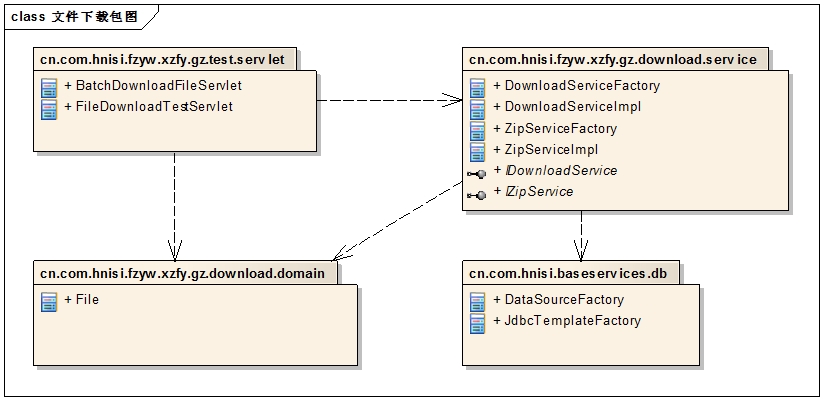
各种包的作用与Java实现下载BLOB字段中的文件中相同。
类图
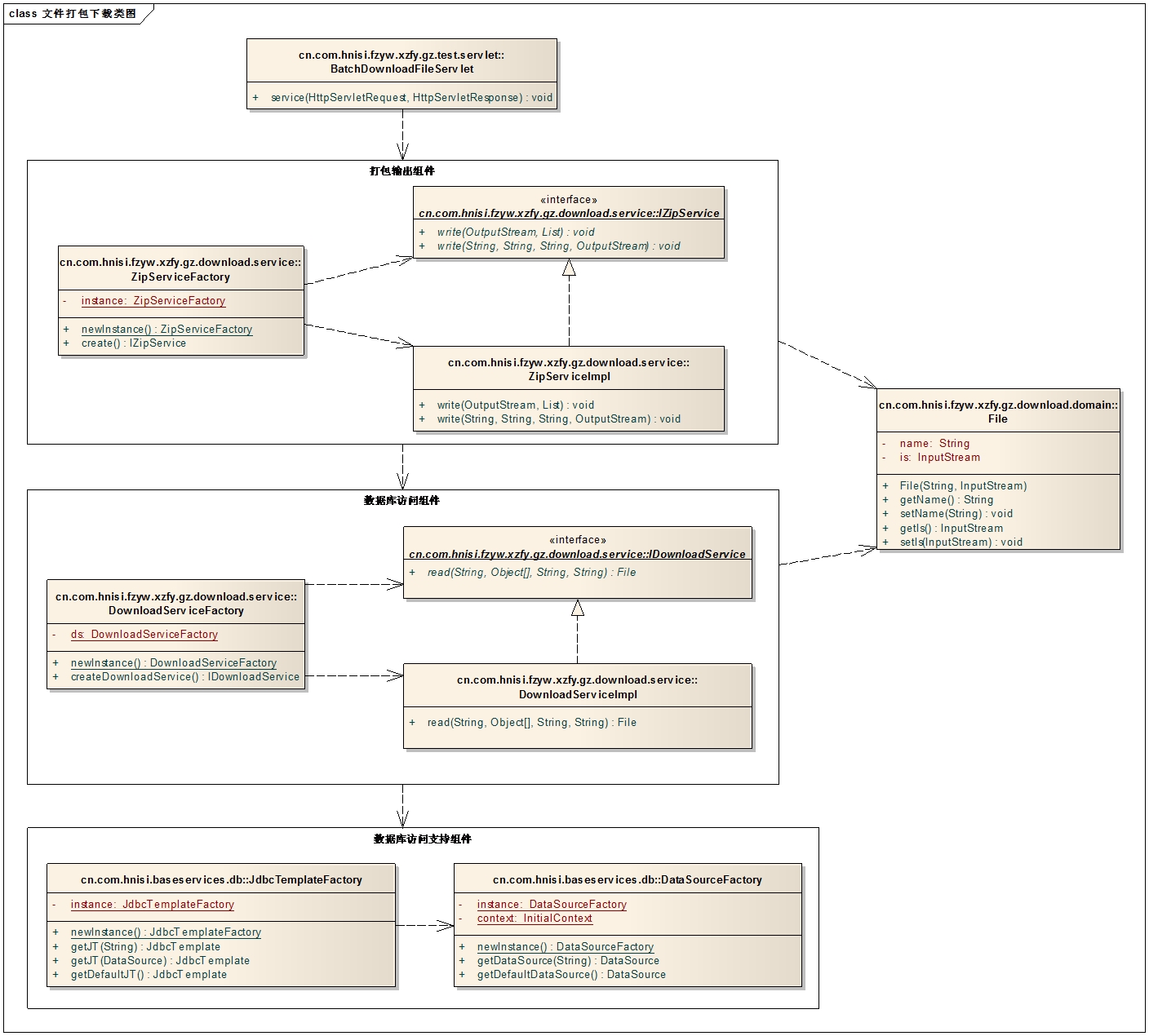
数据库访问支持组件
参考Java实现下载BLOB字段中的文件,没有变化。
File
参考Java实现下载BLOB字段中的文件,没有变化。
数据库访问组件
组件所包含的服务接口和实现类,添加了获取批量数据的相关方法;同时为了避免代码重复,原有方法的实现也稍有调整:
IDownloadService
 package cn.com.hnisi.fzyw.xzfy.gz.download.service;

 import java.util.List;

 import cn.com.hnisi.fzyw.xzfy.gz.download.domain.File;

 public interface IDownloadService {

     /**

      * 读取文件.<br>

      *

      * @param sql

      *            查询sql语句,必须包含文件名字段和文件内容字段.

      * @param args

      *            参数 - 确保sql查询的结果只有一条.

      * @param colNameFileName

      *            存放文件名的字段名,大写.

      * @param colNameFileContent

      *            存放文件内容的字段名,大写.

      * @return

      */

     public File read(final String sql, final Object[] args,

             final String colNameFileName, final String colNameFileContent);

     /**

      * SINOBEST 文件下载 批量读取文件以供打包下载.

      * @param sql

      * @param colNameFileName

      * @param colNameFileContent

      * @return

      */

     public List batchRead(final String sql, final String colNameFileName,

             final String colNameFileContent);

 }
IDownloadService
DownloadServiceImpl
 package cn.com.hnisi.fzyw.xzfy.gz.download.service;

 import java.io.IOException;

 import java.sql.ResultSet;

 import java.sql.SQLException;

 import java.util.ArrayList;

 import java.util.List;

 import org.springframework.dao.DataAccessException;

 import org.springframework.jdbc.core.JdbcTemplate;

 import org.springframework.jdbc.core.support.AbstractLobStreamingResultSetExtractor;

 import org.springframework.jdbc.support.lob.DefaultLobHandler;

 import org.springframework.jdbc.support.lob.LobHandler;

 import cn.com.hnisi.baseservices.db.JdbcTemplateFactory;

 import cn.com.hnisi.fzyw.xzfy.gz.download.domain.File;

 public class DownloadServiceImpl implements IDownloadService {

     /**

      * SINOBEST common 文件下载实现.

      */

     public File read(final String sql, final Object[] args,

             final String colNameFileName, final String colNameFileContent) {

         String sql1 = sql.replaceFirst("\\?", "'"+(String)args[0]+"'");

         List fileList = batchRead(sql1, colNameFileName, colNameFileContent);

         File file = (File)fileList.get(0);

         return file;

     }

     /**

      *  SINOBEST 批量读取BLOB类型数据

      */

     public List batchRead(String sql, final String colNameFileName,

             final String colNameFileContent) {

         JdbcTemplate jt = JdbcTemplateFactory.newInstance().getDefaultJT();

         final LobHandler lobHandler = new DefaultLobHandler();

         final List listFile = new ArrayList();

         jt.query(sql, new AbstractLobStreamingResultSetExtractor() {

             protected void streamData(ResultSet rs) throws SQLException,

                     IOException, DataAccessException {

                 do{   //SINOBEST 文件下载 ,此处的rs初始化时已经指向第一条记录

                     File file = new File();

                     file.setName(rs.getString(colNameFileName));

                     file.setIs(lobHandler.getBlobAsBinaryStream(rs,

                             colNameFileContent));

                     listFile.add(file);

                 }while(rs.next());

             }

         });

         return listFile;

     }

 }
DownloadServiceImpl
DownloadServiceFactory
参考Java实现下载BLOB字段中的文件,没有变化。
打包输出组件
这是一个新的组件,用以打包、输出到指定的输出流。
IZipService
打包服务的接口。
 package cn.com.hnisi.fzyw.xzfy.gz.download.service;

 import java.io.IOException;

 import java.io.OutputStream;

 import java.util.List;

 /**

  * SINONBEST 文件打包接口.

  *

  * @author lijinlong

  *

  */

 public interface IZipService {

     /**

      * SINOBEST 文件打包 将指定的多个文件打包成一个压缩文件,输出到指定的输出流.<br>

      *

      * @param os

      *            指定的输出流

      * @param fileList

      *            指定的文件列表,每个元素都包含了文件名和输入流格式的文件内容

      */

     public void write(OutputStream os, List fileList) throws IOException;

     /**

      * SINOBEST 文件打包 将数据库中查询到的多个文件压缩之后输出到指定的输出流.<br>

      *

      * @param sql 文件查询语句,包括文件名、文件内容(BLOB)两个字段.

      * @param colNameFileName 存放文件名的字段名.

      * @param colNameFileContent 存放文件内容的字段名.

      * @param os 指定的输出流.

      */

     public void write(final String sql, final String colNameFileName,

             final String colNameFileContent, final OutputStream os) throws IOException;

 }
IZipService
ZipServiceImpl
打包服务实现类。
 package cn.com.hnisi.fzyw.xzfy.gz.download.service;

 import java.io.IOException;

 import java.io.InputStream;

 import java.io.OutputStream;

 import java.util.List;

 public class ZipServiceImpl implements IZipService {

     public void write(OutputStream os, List fileList) throws IOException {

         // 使用java.util.zip不支持设置编码格式

         org.apache.tools.zip.ZipOutputStream zos

             = new org.apache.tools.zip.ZipOutputStream(os);

         zos.setEncoding(System.getProperty("sun.jnu.encoding"));

         byte[] buff = new byte[1024];

         for (int i = 0; i < fileList.size(); i++) {

             cn.com.hnisi.fzyw.xzfy.gz.download.domain.File file =

                     (cn.com.hnisi.fzyw.xzfy.gz.download.domain.File) fileList.get(i);

             String name = "file" + (i + 1) + "_" + file.getName();

             InputStream content = file.getIs();

             zos.putNextEntry(new org.apache.tools.zip.ZipEntry(name));

             for (int len = content.read(buff); len > 0;) {

                 zos.write(buff, 0, len);

                 len = content.read(buff);

             }

             content.close();

             zos.closeEntry();

         }

         zos.close();

     }

     public void write(String sql, String colNameFileName,

             String colNameFileContent, OutputStream os) throws IOException {

         IDownloadService ids = DownloadServiceFactory.newInstance()

                 .createDownloadService();

         List fileList = ids.batchRead(sql, colNameFileName, colNameFileContent);

         write(os, fileList);

     }

 }
ZipServiceImpl
ZipServiceFactory
 package cn.com.hnisi.fzyw.xzfy.gz.download.service;

 public class ZipServiceFactory {

     private static ZipServiceFactory instance;

     private ZipServiceFactory() {

     }

     public static final synchronized ZipServiceFactory newInstance() {

         if (instance == null)

             instance = new ZipServiceFactory();

         return instance;

     }

     public IZipService create() {

         IZipService service = new ZipServiceImpl();

         return service;

     }

 }
ZipServiceFactory
Servlet
BatchDownloadFileServlet
 package cn.com.hnisi.fzyw.xzfy.gz.test.servlet;

 import java.io.IOException;

 import javax.servlet.ServletException;

 import javax.servlet.http.HttpServlet;

 import javax.servlet.http.HttpServletRequest;

 import javax.servlet.http.HttpServletResponse;

 import cn.com.hnisi.fzyw.xzfy.gz.download.service.IZipService;

 import cn.com.hnisi.fzyw.xzfy.gz.download.service.ZipServiceFactory;

 public class BatchDownloadFileServlet extends HttpServlet {

     private static final long serialVersionUID = -1288924386578872984L;

     /**

      * SINOBEST 文件打包下载 测试servlet.<br>

      */

     public void service(HttpServletRequest request, HttpServletResponse response)

             throws ServletException, IOException {

         /* 1. 设置响应内容类型 */

         response.setContentType("Application/Octet-stream;charset=utf-8");

         /* 2. 将文件名加入响应头 */

         String zipName = "打包下载" + System.currentTimeMillis() + ".zip";

         zipName = new String(zipName.getBytes(), "ISO-8859-1");

         response.addHeader("Content-Disposition",

                 "attachment; filename=" + zipName);

         /* 3. 输出文件内容 */

         String systemids = request.getParameter("systemids"); // systemids是多个systemid以逗号分隔拼接而成的字符序列

         systemids = ("'" + systemids + "'").replaceAll(",", "','");

         String sql = "select CLMC, SQCL from V_FZYWGZ_JK_XZFYSQXX_CL where SYSTEMID in (?)"

                 .replaceFirst("\\?", systemids);

         String colNameFileName = "CLMC";

         String colNameFileContent = "SQCL";

         IZipService service = ZipServiceFactory.newInstance().create();

         service.write(sql, colNameFileName, colNameFileContent, response.getOutputStream());

         /* 4. 关闭流 */

         response.getOutputStream().flush();

         response.getOutputStream().close();

     }

 }
BatchDownloadFileServlet
Java实现打包下载BLOB字段中的文件的更多相关文章
- Java实现下载BLOB字段中的文件
概述 web项目的文件下载实现:servlet接收请求,spring工具类访问数据库及简化大字段内容获取. 虽然文章的demo中是以sevlet为平台,想必在spring mvc中也有参考意义. 核心 ...
- hadoop学习笔记(十):hdfs在命令行的基本操作命令(包括文件的上传和下载和hdfs中的文件的查看等)
hdfs命令行 ()查看帮助 hdfs dfs -help ()查看当前目录信息 hdfs dfs -ls / ()上传文件 hdfs dfs -put /本地路径 /hdfs路径 ()剪切文件 hd ...
- ORACLE 向BLOB字段中出入图片等二进制文件,使用Oracle SQl Developer工具
使用PL/SQL也可以 create directory "image" as 'e:\'; --"image" 要带双引号,网上很多不带的,我测试时出错,并且 ...
- Java 打包下载服务器上选中的文件或目录(带进度条提示)
http://www.cnblogs.com/interdrp/p/6702482.html 由于此次文件管理系统的升级确实给我们带来了很多方便且在性能上有很大提升,经过这段时间的使用 也发现了些问题 ...
- HttpClient使用之下载远程服务器中的文件(注意目录遍历漏洞)
参考文献: http://bbs.csdn.net/topics/390952011 http://blog.csdn.net/ljj_9/article/details/53306468 1.下载地 ...
- 利用backgroundwork----递归读取网页源代码,并下载href链接中的文件
今天闲着没事,研究了一下在线更新程序版本的问题.也是工作中的需要,开始不知道如何下手,各种百度也没有找到自己想要的,因为我的需求比较简单,所以就自己琢磨了一下.讲讲我的需求吧.自己在IIs上发布了一个 ...
- Java笔记(二十七)……IO流中 File文件对象与Properties类
File类 用来将文件或目录封装成对象 方便对文件或目录信息进行处理 File对象可以作为参数传递给流进行操作 File类常用方法 创建 booleancreateNewFile():创建新文件,如果 ...
- Java读取oracle数据库中blob字段数据文件保存到本地文件(转载)
转自:https://www.cnblogs.com/forever2698/p/4747349.html package com.bo.test; import java.io.FileOutput ...
- mybatis查询mysql 数据库中 BLOB字段,结果出现乱码
起因 mybatis-plus 通过Mapper 查询数据,映射出来的BLOB字段中的yml数据中文是乱码的 --- DefaultValue: '' Formula: '' HintContent: ...
随机推荐
- [USACO Mar08] 牛跑步
http://www.cogs.pro/cogs/problem/problem.php?pid=133 ★★★ 输入文件:cowjog.in 输出文件:cowjog.out 简单对比时间 ...
- 鸽巢排序Pigeonhole sort
原理类似桶排序,同样需要一个很大的鸽巢[桶排序里管这个叫桶,名字无所谓了] 鸽巢其实就是数组啦,数组的索引位置就表示值,该索引位置的值表示出现次数,如果全部为1次或0次那就是桶排序 例如 var pi ...
- Linux 文件编码问题及iconv命令
iconv命令是运行于linux/unix平台的文件编码装换工具.当我们在linux/unix系统shell查看文本文件时,常常会发现文件的中文是乱码的,这是由于文本文件的编码与当前操作系统设置的编码 ...
- Druid连接池及监控在spring中的配置
Druid连接池及监控在spring配置如下: <bean id="dataSource" class="com.alibaba.druid.pool.DruidD ...
- quick-cocos2dx 悬浮节点(NotificationNode)
cocos2dx 开发游戏时,有时某些节点不需要随着场景的切换而销毁.但cocos2dx的机制只允许同时只有一个运行的场景,如果你的所有节点都是依附于这个场景的,那场景的切换必然带来节点的销毁. 比如 ...
- 项目记录 -- zfs get all [volume] python实现的数据构造
zfs get all [volume]命令实现中构造数据结构 一.zfs get all [volume]命令源代码C实现中用到的数据结构有zprop_get_cbdata 和 callback_d ...
- Mojo_1_第一个简单例子
use Mojolicious::Lite; #根目录,Get方法打开 #正接显示文本text get '/' => sub{ my $service = shift; $service-> ...
- Msfvenom学习总结-MSF反弹webshell
1. –p (- -payload-options) 添加载荷payload. 载荷这个东西比较多,这个软件就是根据对应的载荷payload生成对应平台下的后门,所以只有选对payload,再填 ...
- Django【设计】settings方案
配置文件: 目标:配置文件,默认配置和手动配置分开,参考django的配置文件方案,默认配置文件放在内部,只让用户做常用配置 /bin/settings.py(手动配置) PLUGIN_ITE ...
- V4L2(二)虚拟摄像头驱动vivi深入分析【转】
转自:http://www.cnblogs.com/tureno/articles/6694463.html 转载于: http://blog.csdn.net/lizuobin2/article/d ...