
Kendo Grid:将Edit button 移到grid view 得顶部
因为kendo grid 得toolbar 里不包括Edit button,所以我们要先用template 创建一个自定义得edit button,然后再对这个button实现edit 功能。
<script id="template" type="text/x-kendo-template">/'

     <a class="k-button" href="javascript:void(0)" onclick="eidtbtn()">Edit</a>

    </script>
然后再在 toolbar 里引用
toolbar: ["create", { template: kendo.template($("#template").html()) }],

然后是实现功能
function Editbtn(){

     var cust_grid= $("#fmeagrid").data("kendoGrid");

     var selectrow= cust_grid.items().index(cust_grid.select())+1;

     cust_grid.editRow($("#fmeagrid tr:eq("+selectrow+")"));

}
注意:这里得"#fmeagrid” 是 grid 得id
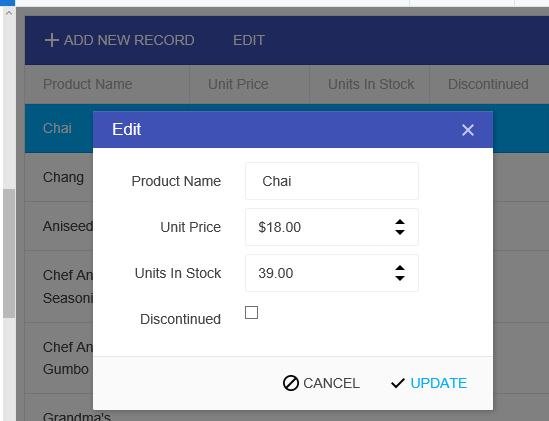
<!DOCTYPE html>

<html>

<head>

    <base href="http://demos.telerik.com/kendo-ui/grid/editing-popup">

    <style>html { font-size: 14px; font-family: Arial, Helvetica, sans-serif; }</style>

    <title></title>

    <link rel="stylesheet" href="//kendo.cdn.telerik.com/2016.3.1028/styles/kendo.common-material.min.css" />

    <link rel="stylesheet" href="//kendo.cdn.telerik.com/2016.3.1028/styles/kendo.material.min.css" />

    <link rel="stylesheet" href="//kendo.cdn.telerik.com/2016.3.1028/styles/kendo.material.mobile.min.css" />

    <script src="//kendo.cdn.telerik.com/2016.3.1028/js/jquery.min.js"></script>

    <script src="//kendo.cdn.telerik.com/2016.3.1028/js/kendo.all.min.js"></script>

</head>

<body>

        <div id="example">

            <div id="grid"></div>

          <script id="template" type="text/x-kendo-template">

                    <a class="k-button" href="javascript:void(0)" onclick="Editbtn()">Edit</a>

                    </script>

            <script>

                $(document).ready(function () {

                    var crudServiceBaseUrl = "//demos.telerik.com/kendo-ui/service",

                        dataSource = new kendo.data.DataSource({

                            transport: {

                                read:  {

                                    url: crudServiceBaseUrl + "/Products",

                                    dataType: "jsonp"

                                },

                                update: {

                                    url: crudServiceBaseUrl + "/Products/Update",

                                    dataType: "jsonp"

                                },

                                destroy: {

                                    url: crudServiceBaseUrl + "/Products/Destroy",

                                    dataType: "jsonp"

                                },

                                create: {

                                    url: crudServiceBaseUrl + "/Products/Create",

                                    dataType: "jsonp"

                                },

                                parameterMap: function(options, operation) {

                                    if (operation !== "read" && options.models) {

                                        return {models: kendo.stringify(options.models)};

                                    }

                                }

                            },

                            batch: true,

                            pageSize: 20,

                            schema: {

                                model: {

                                    id: "ProductID",

                                    fields: {

                                        ProductID: { editable: false, nullable: true },

                                        ProductName: { validation: { required: true } },

                                        UnitPrice: { type: "number", validation: { required: true, min: 1} },

                                        Discontinued: { type: "boolean" },

                                        UnitsInStock: { type: "number", validation: { min: 0, required: true } }

                                    }

                                }

                            }

                        });

                    $("#grid").kendoGrid({

                        dataSource: dataSource,

                        pageable: true,

                        height: 550,

                        toolbar: ["create", { template: kendo.template($("#template").html()) }],

                        columns: [

                            { field:"ProductName", title: "Product Name" },

                            { field: "UnitPrice", title:"Unit Price", format: "{0:c}", width: "120px" },

                            { field: "UnitsInStock", title:"Units In Stock", width: "120px" },

                            { field: "Discontinued", width: "120px" },

                            ],

                        editable: "popup",

                       selectable: "multiple row",

                    });

                });

              function Editbtn(){

     var cust_grid= $("#grid").data("kendoGrid");

     var selectrow= cust_grid.items().index(cust_grid.select())+1;

     cust_grid.editRow($("#grid tr:eq("+selectrow+")"));

}

            </script>

        </div>

</body>

</html>
demo:link http://dojo.telerik.com/OPola
function Deletebtn(){

      if (confirm("Are you sure you want to delete these records?")) {

              var cust_grid= $("#grid").data("kendoGrid")

              var selectedrows = cust_grid.select();

              cust_grid.dataSource.remove(cust_grid.dataItem(selectedrows));


       }


  }
<!DOCTYPE html>

<html>

<head>

    <base href="http://demos.telerik.com/kendo-ui/grid/editing-popup">

    <style>html { font-size: 14px; font-family: Arial, Helvetica, sans-serif; }</style>

    <title></title>

    <link rel="stylesheet" href="//kendo.cdn.telerik.com/2016.3.1028/styles/kendo.common-material.min.css" />

    <link rel="stylesheet" href="//kendo.cdn.telerik.com/2016.3.1028/styles/kendo.material.min.css" />

    <link rel="stylesheet" href="//kendo.cdn.telerik.com/2016.3.1028/styles/kendo.material.mobile.min.css" />

    <script src="//kendo.cdn.telerik.com/2016.3.1028/js/jquery.min.js"></script>

    <script src="//kendo.cdn.telerik.com/2016.3.1028/js/kendo.all.min.js"></script>

</head>

<body>

        <div id="example">

            <div id="grid"></div>

          <script id="template" type="text/x-kendo-template">

                    <a class="k-button" href="javascript:void(0)" onclick="Editbtn()">EDIT</a>

          <a class="k-button" href="javascript:void(0)" onclick="Deletebtn()">DELETE</a>

                    </script>

            <script>

                $(document).ready(function () {

                    var crudServiceBaseUrl = "//demos.telerik.com/kendo-ui/service",

                        dataSource = new kendo.data.DataSource({

                            transport: {

                                read:  {

                                    url: crudServiceBaseUrl + "/Products",

                                    dataType: "jsonp"

                                },

                                update: {

                                    url: crudServiceBaseUrl + "/Products/Update",

                                    dataType: "jsonp"

                                },

                                destroy: {

                                    url: crudServiceBaseUrl + "/Products/Destroy",

                                    dataType: "jsonp"

                                },

                                create: {

                                    url: crudServiceBaseUrl + "/Products/Create",

                                    dataType: "jsonp"

                                },

                                parameterMap: function(options, operation) {

                                    if (operation !== "read" && options.models) {

                                        return {models: kendo.stringify(options.models)};

                                    }

                                }

                            },

                            batch: true,

                            pageSize: 20,

                            schema: {

                                model: {

                                    id: "ProductID",

                                    fields: {

                                        ProductID: { editable: false, nullable: true },

                                        ProductName: { validation: { required: true } },

                                        UnitPrice: { type: "number", validation: { required: true, min: 1} },

                                        Discontinued: { type: "boolean" },

                                        UnitsInStock: { type: "number", validation: { min: 0, required: true } }

                                    }

                                }

                            }

                        });

                    $("#grid").kendoGrid({

                        dataSource: dataSource,

                        pageable: true,

                        height: 550,

                        toolbar: ["create", { template: kendo.template($("#template").html()) }],

                        columns: [

                            { field:"ProductName", title: "Product Name" },

                            { field: "UnitPrice", title:"Unit Price", format: "{0:c}", width: "120px" },

                            { field: "UnitsInStock", title:"Units In Stock", width: "120px" },

                            { field: "Discontinued", width: "120px" },

                            ],

                        editable: "popup",

                       selectable: "multiple row",

                    });

                });

              function Editbtn(){

     var cust_grid= $("#grid").data("kendoGrid");

     var selectrow= cust_grid.items().index(cust_grid.select())+1;

     cust_grid.editRow($("#grid tr:eq("+selectrow+")"));

}

              function Deletebtn(){

                   if (confirm("Are you sure you want to delete these records?")) {

                   var cust_grid= $("#grid").data("kendoGrid")

                             var selectedrows = cust_grid.select();

                   cust_grid.dataSource.remove(cust_grid.dataItem(selectedrows));

                        }

              }

            </script>

        </div>

</body>

</html>
Kendo Grid:将Edit button 移到grid view 得顶部的更多相关文章
- kendo ui 好用的小部件--grid
Kendo Ui Grid控件,继承至Widget. https://demos.telerik.com/kendo-ui/grid/index 快速上手教程 下面的代码来自本教程 做表格时非常方 ...
- ExtJS扩展:扩展grid之toolbar button禁用表达式
在前一篇文章我们扩展了grid通过选中记录数来禁用toolbar上的按钮,有时候我们需要通过记录中的数据来决定是否禁用按钮,今天我们就来扩展它. 照例,最新的代码和例子都在gi ...
- dev 中 字符串转中文拼音缩写,对grid列表进行模糊匹配,grid获取焦点行,gridlookupedit控件用拼音模糊匹配下拉选项
番外篇:. //该方法是将字符串转化为中文拼音的首写字母大写, public static string RemoveSpecialCharacters(string str){try{if (str ...
- ubuntu 14.04 将窗体button移到右边
刚刚安装了Ubuntu 14.04,想改动窗体button的位置.但依照曾经的办法发现不行了,在gconftool-->apps中找不到metacity. 多方查找后找到解决方式,例如以下 Ub ...
- 在button中加入一个view图片
#import "ViewController.h" @interface ViewController () @end @implementation ViewControlle ...
- iOS开发之--在UIWindow上展示/移除一个View
代码如下: 展示 UIWindow *window = [[UIApplication sharedApplication].windows lastObject]; [window addSubvi ...
- [HTML]点击按钮,页面总是跳回顶端的解决方法(Clicking an button,always resets the view to top of page)
1 前言 当网页页面较长或者表单较多时,右侧会出现滚动条,然而经常会出现点击底部的<button>按钮或者<a>超链接,会出现点击后,当前页面会回到顶端. 2 方案 例如样例代 ...
- WPF整理-Style
"Consistency in a user interface is an important trait; there are many facets of consistency, ...
- WPF style 换肤
原文地址:http://www.cnblogs.com/DebugLZQ/p/3181040.html 原作者:DebugLZQ UI的风格一致性是应用程序应当关注的重要特性. 1.Creating ...
随机推荐
- PAT 甲级 1048 Find Coins
https://pintia.cn/problem-sets/994805342720868352/problems/994805432256675840 Eva loves to collect c ...
- 【Docker 命令】- inspect命令
docker inspect : 获取容器/镜像的元数据. 语法 docker inspect [OPTIONS] NAME|ID [NAME|ID...] OPTIONS说明: -f :指定返回值的 ...
- C#部分语法总结
1. Frst和FirstOrDefault 1. Fist 如果查询的数据不存在, 则抛System.InvalidOperationException异常 2. FirstOrdefault 如果 ...
- 安装django 提示ImportError: No module named setuptools
安装django前要先安装setuptools 先安装一些必要的包,否则会报错:Python build finished, but the necessary bits to build these ...
- JAVA IDE IntelliJ IDEA使用简介(三)—之你不能忘记的快捷键
IDEA有许多的快捷键来帮助你更便捷的编写代码,以下列出的快捷键(默认情况下,你还没有定制你的快捷键)是工作中经常需要使用到的,请牢记 快捷键 描述 备注 Alt+F1 视图切换 切换当前工作文件的视 ...
- EL中定义函数
1.在java类中要定义一个static函数 2配置:在WEB-INF/*.tld的配置文件 3在JSP页面上 4使用
- 【bzoj3732】Network 最小生成树+倍增LCA
题目描述 给你N个点的无向图 (1 <= N <= 15,000),记为:1…N. 图中有M条边 (1 <= M <= 30,000) ,第j条边的长度为: d_j ( 1 & ...
- Elasticsearch 插件head和kibana
本次安装在win7下,linux操作差不多. Elasticsearch的版本是6.5.1 一.前置条件 1.安装nodejs,如果已经安装了,检查一下版本,最好大于6以上,不然后面会失败,官网上已经 ...
- 【题解】CF#1012 C-Hill
感觉这题的状态还是比较明显的.设置状态 \(f[i][j][0/1]\) 表示dp到第 \(i\) 个位置,前面(包括这里)已经出现了 \(j\) 个山峰,当前位置是不是山峰即可 dp.这样的状态有一 ...
- POJ3057:Evacuation——题解
http://poj.org/problem?id=3057 题目大意: .为人,D为门,X为障碍,门每秒只能出去一个人,问多少秒出光. 如果无法出光输出impossible. ——————————— ...