
WPF style 换肤
原文地址:http://www.cnblogs.com/DebugLZQ/p/3181040.html 原作者:DebugLZQ
UI的风格一致性是应用程序应当关注的重要特性。
1.Creating and using styles
用一个Demo,来总结Style。
MainWindow.xaml如下:

<Window x:Class="CreatingAndUsingStyle.MainWindow"

        xmlns="http://schemas.microsoft.com/winfx/2006/xaml/presentation"

        xmlns:x="http://schemas.microsoft.com/winfx/2006/xaml"

        Title="Styled Calculatot" Height="269" Width="180" ResizeMode="CanMinimize">

    <Window.Resources>

        <Style TargetType="Button" x:Key="numericStyle">

            <Setter Property="FontSize" Value="20" />

            <Setter Property="Margin" Value="4" />

            <Setter Property="Padding" Value="6" />

            <Setter Property="Effect">

                <Setter.Value>

                    <DropShadowEffect Color="Blue"/>

                </Setter.Value>

            </Setter>

        </Style>

        <Style TargetType="Button" x:Key="operatorStyle" BasedOn="{StaticResource numericStyle}">

            <Setter Property="FontWeight" Value="ExtraBold" />

            <Setter Property="Effect">

                <Setter.Value>

                    <DropShadowEffect Color="Red" />

                </Setter.Value>

            </Setter>

        </Style>

    </Window.Resources>

    <Grid>

    <Grid.ColumnDefinitions>

        <ColumnDefinition Width="Auto" />

        <ColumnDefinition Width="Auto" />

        <ColumnDefinition Width="Auto" />

        <ColumnDefinition Width="Auto" />

    </Grid.ColumnDefinitions>

    <Grid.RowDefinitions>

        <RowDefinition Height="Auto" />

        <RowDefinition Height="Auto" />

        <RowDefinition Height="Auto" />

        <RowDefinition Height="Auto" />

        <RowDefinition Height="Auto" />

    </Grid.RowDefinitions>

        <TextBox Background="Cyan" IsReadOnly="True"  Grid.ColumnSpan="4"/>

        <Button Content="7" Grid.Row="1" Style="{StaticResource numericStyle}"/>

        <Button Content="8" Grid.Row="1" Grid.Column="1" Style="{StaticResource numericStyle}"/>

        <Button Content="9" Grid.Row="1" Grid.Column="2" Style="{StaticResource numericStyle}"/>

        <Button Content="4" Grid.Row="2" Style="{StaticResource numericStyle}"/>

        <Button Content="5" Grid.Row="2" Grid.Column="1" Style="{StaticResource numericStyle}"/>

        <Button Content="6" Grid.Row="2" Grid.Column="2" Style="{StaticResource numericStyle}"/>

        <Button Content="1" Grid.Row="3" Style="{StaticResource numericStyle}"/>

        <Button Content="2" Grid.Row="3" Grid.Column="1" Style="{StaticResource numericStyle}"/>

        <Button Content="3" Grid.Row="3" Grid.Column="2" Style="{StaticResource numericStyle}"/>

        <Button Content="0" Grid.Row="4" Style="{StaticResource numericStyle}"/>

        <Button Content="=" Grid.Row="4" Grid.Column="1" Grid.ColumnSpan="2" Style="{StaticResource operatorStyle}">

            <Button.Effect>

                <DropShadowEffect Color="Green" />

            </Button.Effect>

        </Button>

        <Button Content="+" Grid.Row="4" Grid.Column="3" Style="{StaticResource operatorStyle}"/>

        <Button Content="-" Grid.Row="3" Grid.Column="3" Style="{StaticResource operatorStyle}"/>

        <Button Content="X" Grid.Row="2" Grid.Column="3" Style="{StaticResource operatorStyle}"/>

        <Button Content="/" Grid.Row="1" Grid.Column="3" Style="{StaticResource operatorStyle}"/>

    </Grid>

</Window>
效果如下:

Point of Interest
Setter的Property必须是依赖属性;
FrameworkStyle暴露了Style这个属性;
Style一般放在Resources中.
TargetType="Button" 指定Style应用的类型。
一般,我们使用Style的时候,我们都会设置这个(In practice ,TargetType is always specified.),想想为什么?
3. x:Key="numericStyle" 可以根据需要进行有或无。
a.当其有的时候,我们需要对需要 Style="{StaticResource numericStyle}" .
b.其不设置的时候,默认所有TargetType使用此Style。 见2.
4. BasedOn="{StaticResource numericStyle}"
这是Style的继承。
Style继承时,可以修改BaseOn Style的Setter。如operatorStyle的 部分所示。
Style继承很好用,但是要注意:基Style的修改会影响子style.
5.对于应用了Style的element,我们可以设置其属性值,且这个优先级更高(覆盖Style设置)。如"="Button的 部分所示。
2.Applying a style automatically
我们移除 x:Key="numericStyle"。让所有Button使用这个style.
1.不为Style指定x:key,这个Style将应用于所有的x:Tyle element;
没有指定x:key,不代表其没有key,其key由x:Tyle定义,就本例而言是{x:Type Button}},从Style继承中(xaml中绿色高亮代码),可见一斑。
2.如果,这样的Style被Set在Window的Resource,则影响这个Window上的所有x:Type类型的element;
如果被set在application's resources,则影响所有window。
3.如果,我们希望某个element不应用这个style,我们可以设置它的Style属性为其他style;
如果想让它保持默认的样子,我们可以设置其Style="{x:Null}",如Button
“0”。
3.动态更换Style
在Skin文件夹中添加两个Resource Dictionary,如下:

并设置其Property为:Content/Aways Copy.
“These settings prevent the default compilation to BAML and also provide the flexibility to
change the skins without recompilation. ”
请参考DebugLZQ前面的博文:WPF整理-二进制资源和内容
MainWindow.xaml,MainWindow.xaml.cs如下:
<Window x:Class="WPFStyleTriggerAndControlTemplate.MainWindow"

        xmlns="http://schemas.microsoft.com/winfx/2006/xaml/presentation"

        xmlns:x="http://schemas.microsoft.com/winfx/2006/xaml"

        Title="MainWindow" Height="303.719" Width="530.785">

    <Grid Margin="0,0,2,0">

        <TextBox HorizontalAlignment="Left" Height="23" Margin="10,35,0,0" TextWrapping="Wrap" Text="TextBox" VerticalAlignment="Top" Width="120"/>

        <TextBox HorizontalAlignment="Left" Height="23" Margin="156,35,0,0" TextWrapping="Wrap" Text="TextBox" VerticalAlignment="Top" Width="120"/>

        <TextBox HorizontalAlignment="Left" Height="23" Margin="293,35,0,0" TextWrapping="Wrap" Text="TextBox" VerticalAlignment="Top" Width="120" RenderTransformOrigin="1.577,0.303"/>

        <Button Content="Button" HorizontalAlignment="Left" Margin="433,35,0,0" VerticalAlignment="Top" Width="75"/>

        <GroupBox FontSize="28" Header="Select Skin"  Margin="75,102,62,0" VerticalAlignment="Top" Height="158">

            <StackPanel Orientation="Vertical" HorizontalAlignment="Center">

                <RadioButton Content="Normal" Checked="AllRadioButtonChecked"/>

                <RadioButton Content="Blue Skin" Checked="AllRadioButtonChecked"/>

                <RadioButton Content="Red Skin" Checked="AllRadioButtonChecked"/>

            </StackPanel>

        </GroupBox>

    </Grid>

</Window>
namespace WPFStyleTriggerAndControlTemplate

{

    /// <summary>

    /// Interaction logic for MainWindow.xaml

    /// </summary>

    public partial class MainWindow : Window

    {

        public MainWindow()

        {

            InitializeComponent();

        }

        private void AllRadioButtonChecked(object sender, RoutedEventArgs e)

        {

            switch (((RadioButton)sender).Content.ToString())

            {

                case "Blue Skin":

                    ChangeSkin("Skins/BlueSkin.xaml");

                    break;

                case "Red Skin":

                    ChangeSkin("Skins/RedSkin.xaml");

                    break;

                case "Normal":

                    Application.Current.Resources.MergedDictionaries.Clear();

                    break;

            }

        }

        void ChangeSkin(string skinRelativeUri)

        {

            var si = Application.GetContentStream(new Uri(skinRelativeUri, UriKind.Relative));

            var rd = (ResourceDictionary)XamlReader.Load(si.Stream);

            Application.Current.Resources.MergedDictionaries.Clear();

            Application.Current.Resources.MergedDictionaries.Add(rd);

        }

    }

}
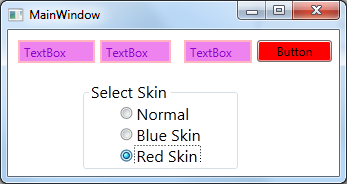
运行效果如下:

WPF style 换肤的更多相关文章
- WPF之换肤
WPF之换肤 设计原理 WPF换肤的设计原理,利用资源字典为每种皮肤资源添加不同的样式,在后台切换皮肤资源文件. 截图 上图中,第一张图采用规则样式,第二张图采用不规则样式,截图的时候略有瑕疵. 资源 ...
- WPF 实现换肤功能
将所有控件的基本样式汇集到一个资源字典中,构成界面的基本样式文件,然后进行不同颜色皮肤的定制. 即在新的皮肤资源字典文件中引入基本样式文件,然后使用资源继承,并且只设置控件的颜色属性等,形成一个皮肤文 ...
- 有点激动,WPF换肤搞定了!
一如既往没废话! wpf桌面应用开发都是window内引入很多个UserControl. 如果你有通过不同颜色来换肤的需求,那么下面我就将整个过程! 分2个步骤: 1.主窗体背景色替换: 2.同时界面 ...
- WPF中使用DynamicResource实现换肤
这篇将介绍使用DynamicResource实现动态的界面切换功能.熟悉WPF的园友应该已经猜到了实现方式,简而言之就是动态替换DataTemplate,ControlTemplate,Style等等 ...
- WPF换肤之八:创建3D浏览效果
原文:WPF换肤之八:创建3D浏览效果 上节中,我们展示了WPF中的异步以及界面线程交互的方式,使得应用程序的显示更加的流畅.这节我们主要讲解如何设计一个具有3D浏览效果的天气信息浏览器. 效果显示 ...
- WPF换肤之四:界面设计和代码设计分离
原文:WPF换肤之四:界面设计和代码设计分离 说起WPF来,除了总所周知的图形处理核心的变化外,和Winform比起来,还有一个巨大的变革,那就是真正意义上做到了界面设计和代码设计的分离.这样可以让美 ...
- 在WPF中创建可换肤的用户界面
原文:在WPF中创建可换肤的用户界面 在WPF中创建可换肤的用户界面. ...
- 【WPF】实现动态切换语言(国际化)以及动态换肤功能
前言:以下内容,手把手从搭建到最终实现,完成多语言切换以及换装功能. 本地系统环境:win 10 编译器环境:VS2022 社区版 .NET 环境: .NET 6 1.新建一个WPF项目 2.新建完毕 ...
- WPF换肤之六:酷炫的时区浏览小精灵
原文:WPF换肤之六:酷炫的时区浏览小精灵 由于工作需要,经常要查看到不同地区的 当前时间,以前总是对照着时区表来进行加减运算,现在有了这个小工具以后,感觉省心了不少.下面是软件的截图: 效果图赏析 ...
随机推荐
- 坐标转换,EPSG:4326转换成高德坐标教程
这里先给大家介绍几个坐标系: 1.WGS84:国际坐标系,为一种大地坐标系,也是目前广泛使用的GPS全球卫星定位系统使用的坐标系.2.GCJ02:火星坐标系,是由中国国家测绘局制订的地理信息系统的坐标 ...
- <每日一题>题目13:列表的简单问题
''' 分析: python赋值是通过指针来进行的. 很显然第一.三.四次调用都指向同一个列表,并未完成清空, 第二次调用只是指向了另一个列表,也未完成清空,很显然结果是累计的 结果: [0, 1] ...
- Leetcode 242.有效的字母异位词(Python3)
题目: 给定两个字符串 s 和 t ,编写一个函数来判断 t 是否是 s 的一个字母异位词. 示例 1: 输入: s = "anagram", t = "nagaram& ...
- Spring Http Basic(基本)和Digest(摘要)验证
Basic(基本)和Digest(摘要)验证都是web应用中很受欢迎的可选机制. Basic验证一般用来处理无状态的客户端,它们在每次请求都附带它们的证书. 很常见的用法是把它和基于表单的验证一起使用 ...
- vue使用远程在线更新代码
一.main.js import Vue from 'vue' import App from './App' import router from './router' import Vuex fr ...
- WPF 导出Excel 导出图片
/// <summary> /// 导出Excel /// </summary> private void ExportExcel(DataTable ExcelDt) { / ...
- 关于set的unordered特性
关于set排序无序的问题,原因是set使用哈希表做内存索引. 详细介绍可见: https://stackoverflow.com/questions/12165200/order-of-unorder ...
- [JSOI2010]连通数 (dfs或tarjan或bitset)+bitset学习
题目描述 输入格式 输入数据第一行是图顶点的数量,一个正整数N. 接下来N行,每行N个字符.第i行第j列的1表示顶点i到j有边,0则表示无边. 输出格式 输出一行一个整数,表示该图的连通数. 样例 样 ...
- windows和ubuntn互传文件
Windows和linux(ubuntu)互传文件简便快捷的方法 现在很多开发和测试的工作环境都是Linux,但测试后期报告的处理一般都是在Windows下完成的,所以需要把结果拿到Windows下. ...
- Ionic 生成icon图标
1.直接切换到项目跟目录 运行以下命令 备注:运行第一次ionic rescoures 后自动生成文件夹rescoures ,让后帮你自己的icon.png 文件放进入就ok ,在次运行ionic r ...