
TextView字符串波浪式跳动--第三方开源---JumpingBeans
在github上有一个开源项目:JumpingBeans,其项目主页是:https://github.com/frakbot/JumpingBeans
JumpingBeans将一个普通的Android TextView中显示的字符串可以做到波浪式跳动。JumpingBeans使用起来简单,
仅仅在Android的Java代码中将一个普通Android TextView加载即可:
注意:需要jdk1.7
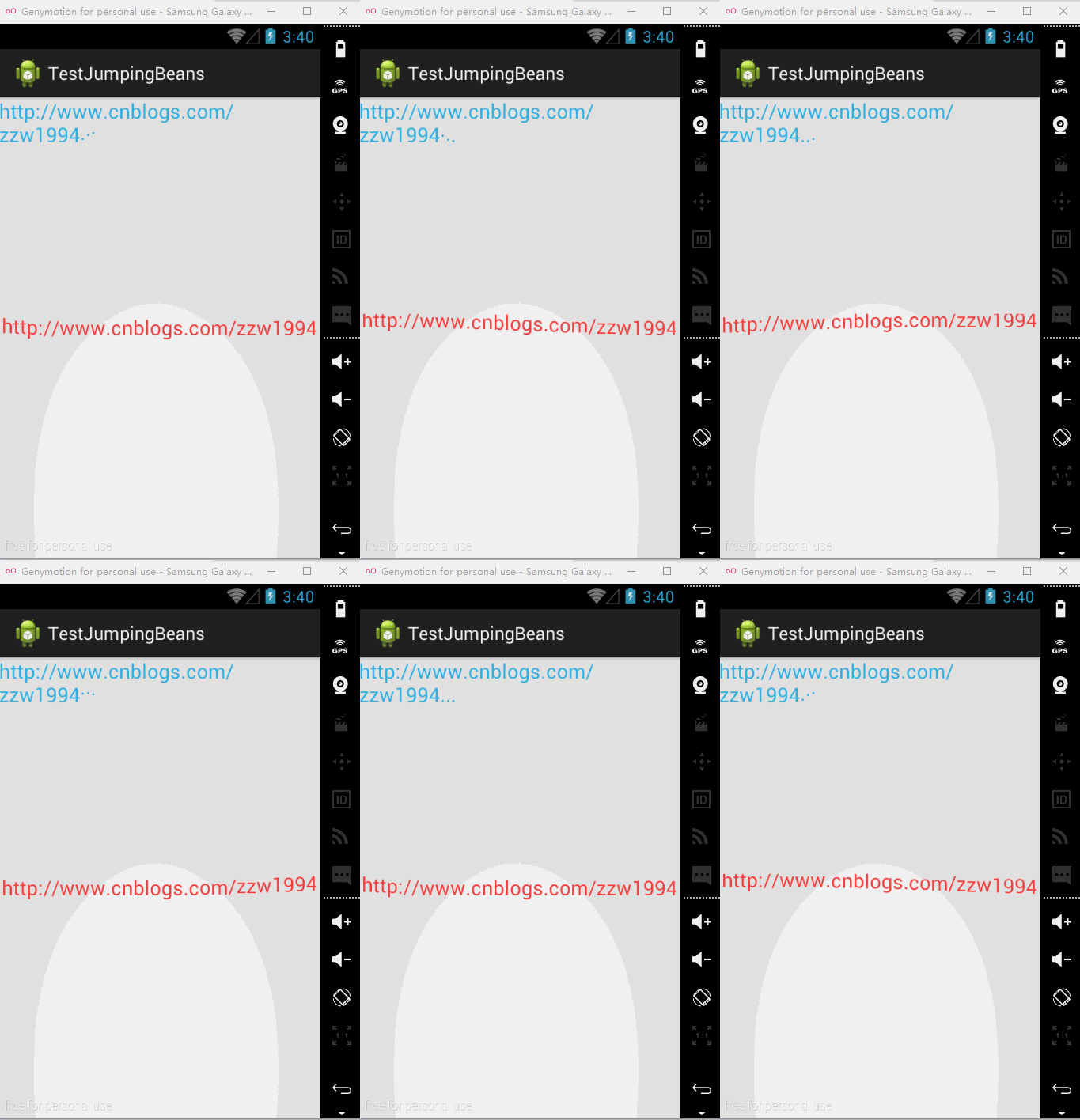
 package zzw.demo;

 import android.app.Activity;

 import android.os.Bundle;

 import android.widget.TextView;

 import net.frakbot.jumpingbeans.JumpingBeans;

 public class MainActivity extends Activity {

     @Override

     protected void onCreate(Bundle savedInstanceState) {

         super.onCreate(savedInstanceState);

         setContentView(R.layout.activity_main);

         // 增加跳动的点

         final TextView textView1 = (TextView) findViewById(R.id.textView1);

         JumpingBeans jumpingBeans1 = JumpingBeans.with(textView1)

                 .appendJumpingDots()

                 .build();

         // 从第一个字符串到最后一个字符串波浪式循环跳动, textView2.getText().length()不能为0

         final TextView textView2 = (TextView) findViewById(R.id.textView2);

         JumpingBeans jumpingBeans2 = JumpingBeans.with(textView2)

                 .makeTextJump(0, textView2.getText().length())

                 .setIsWave(true)

                 .setLoopDuration(3000)

                 .build();

     }

 }
xml:
 <RelativeLayout xmlns:android="http://schemas.android.com/apk/res/android"

     xmlns:tools="http://schemas.android.com/tools"

     android:layout_width="match_parent"

     android:layout_height="match_parent"

     tools:context="com.zzw.testjumpingbeans.MainActivity" >

     <TextView

         android:id="@+id/textView1"

         android:layout_width="wrap_content"

         android:layout_height="wrap_content"

         android:layout_alignParentTop="true"

         android:layout_centerHorizontal="true"

         android:text="http://www.cnblogs.com/zzw1994"

         android:textColor="@android:color/holo_blue_light"

         android:textSize="20sp" />

     <TextView

         android:id="@+id/textView2"

         android:layout_width="wrap_content"

         android:layout_height="wrap_content"

         android:layout_centerInParent="true"

         android:text="http://www.cnblogs.com/zzw1994"

         android:textColor="@android:color/holo_red_light"

         android:textSize="20sp" />

 </RelativeLayout>
TextView字符串波浪式跳动--第三方开源---JumpingBeans的更多相关文章
- 开源框架】Android之史上最全最简单最有用的第三方开源库收集整理,有助于快速开发
[原][开源框架]Android之史上最全最简单最有用的第三方开源库收集整理,有助于快速开发,欢迎各位... 时间 2015-01-05 10:08:18 我是程序猿,我为自己代言 原文 http: ...
- 粉笔网iPhone端使用的第三方开源库
粉笔网iPhone端使用的第三方开源库 前言 最近有朋友问我粉笔网 iPhone 端使用了哪些第三方的开源库.我在这儿整理了一下,分享给大家. ASIHttpRequest ASIHttpReques ...
- Android 第三方开源下拉框:NiceSpinner
Android原生的下拉框Spinner基本上可以满足Android开发对于下拉选项的设计需求,但现在越来越流行的下拉框不满足于Android原生提供的下拉框Spinner所提供的设计样式,而改用自定 ...
- Android 第三方开源库收集整理(转)
原文地址:http://blog.csdn.net/caoyouxing/article/details/42418591 Android开源库 自己一直很喜欢Android开发,就如博客签名一样, ...
- 45.Android 第三方开源库收集整理(转)
原文地址:http://blog.csdn.net/caoyouxing/article/details/42418591 Android开源库 自己一直很喜欢Android开发,就如博客签名一样, ...
- Android第三方开源对话消息提示框:SweetAlertDialog(sweet-alert-dialog)
Android第三方开源对话消息提示框:SweetAlertDialog(sweet-alert-dialog) Android第三方开源对话消息提示框:SweetAlertDialog(sweet- ...
- Android的SwipeToDismiss第三方开源框架模拟QQ对话列表侧滑删除,置顶,将头像图片圆形化处理。
<Android SwipeToDismiss:左右滑动删除ListView条目Item> Android的SwipeToDismiss是github上一个第三方开源框架(github ...
- 第三方开源框架的下拉刷新列表(QQ比较常用的)。
PullToRefreshListView是第三方开源框架下拉刷新列表,比较流行的QQ 微信等上面都在用. 下载地址(此开源框架于2013年后不再更新) 点此下载 package com.lixu.k ...
- 强大的网络通信框架(实现缓存)--第三方开源--volley
Android Volley是Android平台上很好用的第三方开源网络通信框架.使用简答,功能强大. Android Volley的库jar包Volley.ja下载连接地址:Volley下载 下载后 ...
随机推荐
- LeetCode 58. Length of Last Word
Given a string s consists of upper/lower-case alphabets and empty space characters ' ', return the l ...
- [POJ 1155] TELE (树形dp)
题目链接:http://poj.org/problem?id=1155 题目大意:电视台要广播电视节目,要经过中转机构,到观众.从电视台到中转商到观众是一个树形结构,经过一条边需要支付成本.现在给你每 ...
- php 通过PATH_SEPARATOR判断当前服务器系统类型
PATH_SEPARATOR是php中的一个预定义常量,我们可以直接echo这个常量,在linux系统中,该常量输出":",在windows系统中,该常量输出";&quo ...
- silverlight,动态数据集合中,移除动态集合自身的内容
在xaml的页面上创建一个x:Name为_list1的ListBox,其中ListBox里面的每一项是ListBoxItem if (_list1.SelectedItem == null)//如果_ ...
- 【Robot Framework】robot framework 学习以及selenium、appnium、requests实践(三)
看了上一章的内容,想必较为简单的case也都会编写了吧,但是是不是觉得,如果能够实现用例参数化,是不是会节省很多劳动力,这节就来学下RF中的user keywords,会让你发现写用例原来可以这么简单 ...
- Android打造带透明圆弧的ImageView
这几天因为项目需求,需要在ImageView上面叠加一层透明圆弧,并且在沿着圆弧的方向显示相应的文字,效果如下图所示: 拿到这个需求,首先想到的是自定义一个ImageView来实现此功能,即在onDr ...
- 在 mvc 中使用下拉列表
在mvc中经常会使用到下拉列表,以下以两种方式来实现,一种是以 @Html.DropDownList 扩展方法,一种是以 <select><option></optio ...
- java学习之(内部类)
大部分时候,类被定义成一个独立的程序单元,在某些情况下,也会把一个类放在另一个类的内部定义,这个定义在其他类内部的类就被称为内部类,内部类有如下特点: 1.内部类提供了更好的封闭,可以把内部类隐 ...
- 深入探讨ES6生成器
如果对于ES6生成器不熟悉,请先阅读并运行下http://www.cnblogs.com/linda586586/p/4282359.html里面的代码.当你感觉掌握了基础之后,我们可以深入探讨一些细 ...
- 智能指针(二):shared_ptr实现原理
前面讲到auto_ptr有个很大的缺陷就是所有权的转移,就是一个对象的内存块只能被一个智能指针对象所拥有.但我们有些时候希望共用那个内存块.于是C++ 11标准中有了shared_ptr这样的智能指针 ...