
Attach source code to a Netbeans Library Wrapper Module
http://rubenlaguna.com/wp/2008/02/22/attach-source-code-to-a-netbeans-library-wrapper-module/
Attach Source Code to a Netbeans Library Wrapper Module
Feb 22nd, 2008
I’m new in NetBeans and today I’ve been struggling a couple of hours with the simple task of attaching the source code for an external JAR (NetBean Library Wrapper Module).
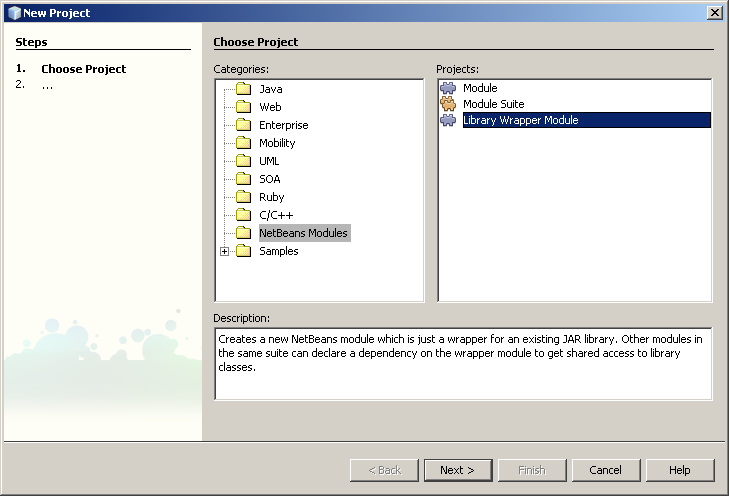
I’ve been trying to find in google how to do it without success until I reached this post in the netbeans-users mailing list.
Then I realized that I should been looking into the NetBeans Help first. The entry at Help → Help contents → Java Applications → Debugging Applications → Attaching Source Code to a JAR File explains how to do it.
first go to Tools→Libraries to open the Library Manager. Then click on New Library. Give it a name and select the jar. +But you should be careful when adding the Library, though. You must point to the JAR file INSIDE your module library wrapper (that’s <module library wrapper folder>/release/modules/ext/) NOT to the original location of the JAR. (As pointed out in the Help → Help contents → Netbeans Modules → Getting started → Module and Rich-Client Application Tasks: Quick Reference → Attach source code to libraries for debugging.)
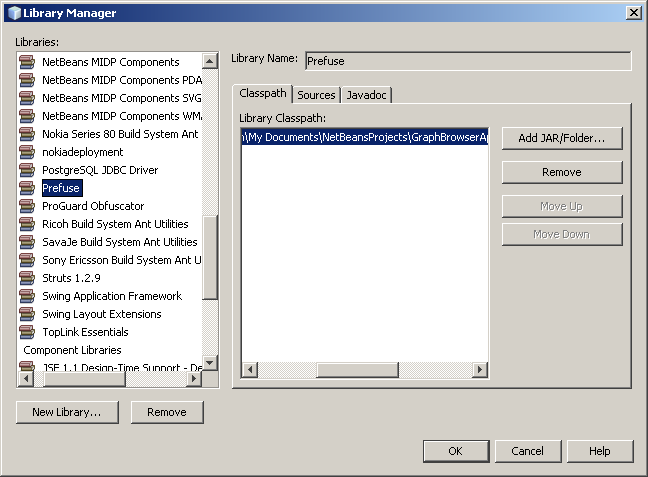
Then you should add the library’s source folder in the Source tab of the Library in the Library Manager (you can point to the Javadoc as well).
NOTE: If you plan to attached the sources to the jar because you would like to stepping into the library’s code while debugging, or set a breakpoint in the jar, then you should make sure that the sources are marked for debugging. What?!? Yes, I know. This sounds weird but you have to do it. Start the debugging session in Netbeans open the Sources window (Window→Debugging→Sources) and locate the sources folder in the table, check the box “Use for debugging”.

Attach source code to a Netbeans Library Wrapper Module的更多相关文章
- How to build the Robotics Library from source code on Windows
The Robotics Library is an open source C++ library for robot kinematics, motion planning and control ...
- 3 Ways of JDK Source Code Attachment in Eclipse---reference
You wanna look at a JVM class while you are coding and you cannot. Here is the solution. First of al ...
- Tips for newbie to read source code
This post is first posted on my WeChat public account: GeekArtT Reading source code is always one bi ...
- XML.ObjTree -- XML source code from/to JavaScript object like E4X
转载于:http://www.kawa.net/works/js/xml/objtree-try-e.html // ========================================= ...
- Indenting source code
Artistic Style 1.15.3 A Free , Fast and Small Automatic Formatterfor C , C++ , C# , Java Source Code ...
- Artistic Style 3.1 A Free, Fast, and Small Automatic Formatter for C, C++, C++/CLI, Objective‑C, C#, and Java Source Code
Artistic Style - Index http://astyle.sourceforge.net/ Artistic Style 3.1 A Free, Fast, and Small Aut ...
- How to compile and install Snort from source code on Ubuntu
http://www.tuicool.com/articles/v6j2Ab Snort is by far the most popular open-source network intrusio ...
- Tree - Decision Tree with sklearn source code
After talking about Information theory, now let's come to one of its application - Decision Tree! No ...
- Website's Game source code
A Darkroom by doublespeakgames <!DOCTYPE html> <html itemscope itemtype="https://schem ...
随机推荐
- Map和hash_map
map和hash_map 今天在写拼流的程序时碰到一个问题,要根据流的四元组的结构信息映射到该流的数据.也就是我在网络数据包拼接的过程中,要根据包的地址和端口信息,对应到其对应的一个流的数据上去,把端 ...
- 纠结和郁闷的存在感-关于DirectX与HLSL的矩阵存储方式---转载好文章
我常常这么大胆的认为,搞科学的人总是喜欢用各种让常人难以理解的复杂方式去处理某些其实可能很简单的事情,这种情况在他自身擅长的.有着诸多对手竞争的领域上极为常见.比如吧,搞DirectX的人用了左手坐标 ...
- github概念和实战
fork: 通过fork操作,你将拥有了别人创建的repo的ownership,但是url却变成了/youraccount/repo,这时你将可以做git push操作 clone: 该命令是直接将r ...
- C# 对List成员排序的简单方法
网上看到的方法,实在太方便了,转过来保存,原链接: http://blog.csdn.net/wanzhuan2010/article/details/6205884 using System; us ...
- Session随便写的(抄书笔记)
会话是web开发中常用的一种对象.会话是存在于服务器端的对象,因此会话超时是保证性能效率的必要手段,本章将学习几种常用的使会话失效的办法.大多数容器都使用cookie作为会话跟踪的基础,但是cooki ...
- BZOJ 1010 玩具装箱
斜率优化. 事实上是选一个大于某个数的最小斜率.维护下凸壳. #include<iostream> #include<cstdio> #include<cstring&g ...
- Windows bat with adb
/********************************************************************* * Windows bat with adb * 说明: ...
- mysql 数据库常用命令总结
(1)查看数据库可以支持的存储引擎 命令:show engines; (2)查看表结构命令:desc table_name:(3)显示表的创建语句 show create table ta ...
- phonegap 单例模式
今天在使用云推送的时候 app打开着,然后 控制台推送一条消息 结果点击后又重新打开了一个客户端... ok,我需要的是单例,我使用了singleInstance ,达到了效果. 引用百度知道的 ...
- 【转】iOS开发-Protocol协议及委托代理(Delegate)传值
原文网址:http://www.cnblogs.com/GarveyCalvin/p/4210828.html 前言:因为Object-C是不支持多继承的,所以很多时候都是用Protocol(协议)来 ...