
ZBar之自定义二维码扫描
//
//  YvanQRCodeViewController.m
//  zBar
//
//  Created by City--Online on 15/6/8.
//  Copyright (c) 2015年 CYW. All rights reserved.
//

#import "YvanQRCodeViewController.h"
#import "ZBarSDK.h"
#define SCANVIEW_EdgeTop 40.0
#define SCANVIEW_EdgeLeft 50.0
#define TINTCOLOR_ALPHA 0.2 //浅色透明度
#define DARKCOLOR_ALPHA 0.5 //深色透明度
#define VIEW_WIDTH self.view.bounds.size.width
#define VIEW_HEIGHT self.view.bounds.size.height

@interface YvanQRCodeViewController ()<ZBarReaderViewDelegate>
{
    UIView *_QrCodeline;
    NSTimer *_timer;
    //设置扫描画面
    UIView *_scanView;
    ZBarReaderView *_readerView;
}
@end

@implementation YvanQRCodeViewController

- (void)viewDidLoad {
    [super viewDidLoad];

    self.title = @"扫描二维码" ;
    //初始化扫描界面
    [ self setScanView ];
    _readerView = [[ ZBarReaderView alloc ] init ];
    _readerView.frame = CGRectMake (  ,  , VIEW_WIDTH , VIEW_HEIGHT );
    _readerView.tracksSymbols = NO ;
    _readerView.readerDelegate = self ;
    [ _readerView addSubview : _scanView ];
    //关闭闪光灯
    _readerView.torchMode =  ;
    [ self.view addSubview : _readerView ];
    //扫描区域
    //readerView.scanCrop =
    [ _readerView start ];
    [ self createTimer ];

}
#pragma mark -- ZBarReaderViewDelegate
-( void )readerView:( ZBarReaderView *)readerView didReadSymbols:( ZBarSymbolSet *)symbols fromImage:( UIImage *)image
{
    const zbar_symbol_t *symbol = zbar_symbol_set_first_symbol (symbols. zbarSymbolSet );
    NSString *symbolStr = [ NSString stringWithUTF8String : zbar_symbol_get_data (symbol)];
    //判断是否包含 头'http:'
    NSString *regex = @"http+:[^//s]*" ;
    NSPredicate *predicate = [ NSPredicate predicateWithFormat : @"SELF MATCHES %@" ,regex];
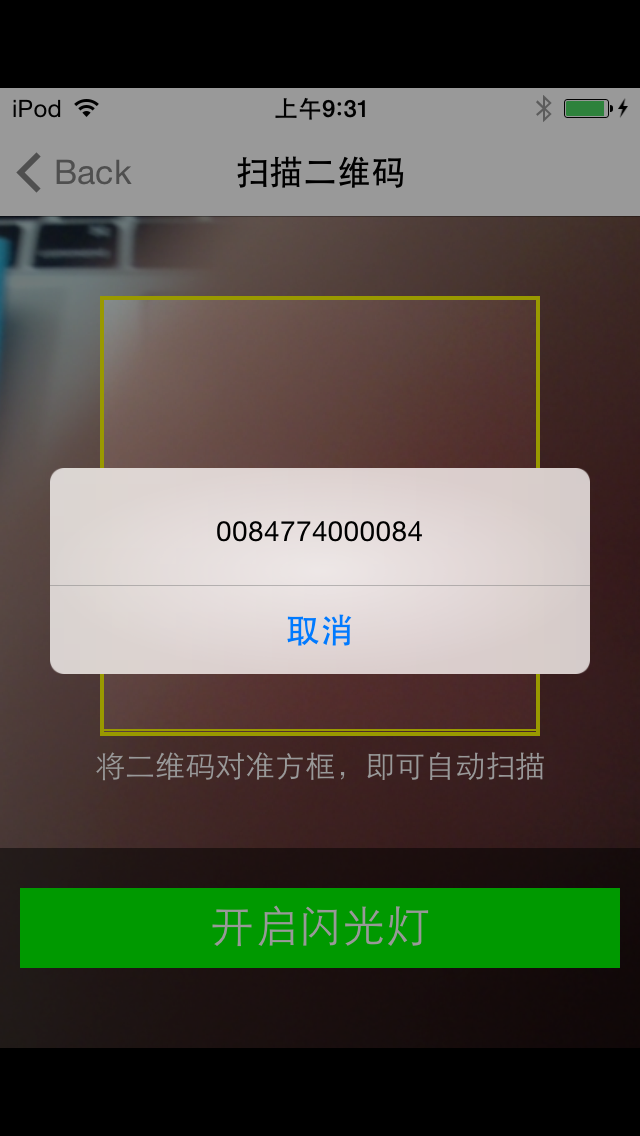
    UIAlertView *alertView=[[ UIAlertView alloc ] initWithTitle : @"" message :symbolStr delegate : nil cancelButtonTitle : @"取消" otherButtonTitles : nil ];
    [alertView show ];
    //判断是否包含 头'ssid:'
    NSString *ssid = @"ssid+:[^//s]*" ;
    NSPredicate *ssidPre = [ NSPredicate predicateWithFormat : @"SELF MATCHES %@" ,ssid];
    if ([predicate evaluateWithObject :symbolStr]) {
    }
    else if ([ssidPre evaluateWithObject :symbolStr]){
        NSArray *arr = [symbolStr componentsSeparatedByString : @";" ];
        NSArray * arrInfoHead = [[arr objectAtIndex :  ] componentsSeparatedByString : @":" ];
        NSArray * arrInfoFoot = [[arr objectAtIndex :  ] componentsSeparatedByString : @":" ];
        symbolStr = [ NSString stringWithFormat : @"ssid: %@ /n password:%@" ,
                     [arrInfoHead objectAtIndex :  ],[arrInfoFoot objectAtIndex :  ]];
        UIPasteboard *pasteboard=[ UIPasteboard generalPasteboard ];
        //然后,可以使用如下代码来把一个字符串放置到剪贴板上:
        pasteboard. ];
    }

}
- ( void )setScanView
{
    _scanView =[[ UIView alloc ] initWithFrame : CGRectMake (  ,  , VIEW_WIDTH , VIEW_HEIGHT )];
    _scanView . backgroundColor =[ UIColor clearColor ];
    //最上部view
    UIView * upView = [[ UIView alloc ] initWithFrame : CGRectMake (  ,  , VIEW_WIDTH , SCANVIEW_EdgeTop )];
    upView. alpha = TINTCOLOR_ALPHA ;
    upView. backgroundColor = [ UIColor blackColor ];
    [ _scanView addSubview :upView];
    //左侧的view
    UIView *leftView = [[ UIView alloc ] initWithFrame : CGRectMake (  , SCANVIEW_EdgeTop , SCANVIEW_EdgeLeft , VIEW_WIDTH -  * SCANVIEW_EdgeLeft )];
    leftView. alpha = TINTCOLOR_ALPHA ;
    leftView. backgroundColor = [ UIColor blackColor ];
    [ _scanView addSubview :leftView];
    /******************中间扫描区域****************************/
    UIImageView *scanCropView=[[ UIImageView alloc ] initWithFrame : CGRectMake ( SCANVIEW_EdgeLeft , SCANVIEW_EdgeTop , VIEW_WIDTH -  * SCANVIEW_EdgeLeft , VIEW_WIDTH -  * SCANVIEW_EdgeLeft )];
    //scanCropView.image=[UIImage imageNamed:@""];
    scanCropView. layer . borderColor =[ UIColor  yellowColor]. CGColor ;
    scanCropView. layer . borderWidth = 2.0 ;
    scanCropView. backgroundColor =[ UIColor clearColor ];
    [ _scanView addSubview :scanCropView];
    //右侧的view
    UIView *rightView = [[ UIView alloc ] initWithFrame : CGRectMake ( VIEW_WIDTH - SCANVIEW_EdgeLeft , SCANVIEW_EdgeTop , SCANVIEW_EdgeLeft , VIEW_WIDTH -  * SCANVIEW_EdgeLeft )];
    rightView. alpha = TINTCOLOR_ALPHA ;
    rightView. backgroundColor = [ UIColor blackColor ];
    [ _scanView addSubview :rightView];
    //底部view
    UIView *downView = [[ UIView alloc ] initWithFrame : CGRectMake (  , VIEW_WIDTH -  * SCANVIEW_EdgeLeft + SCANVIEW_EdgeTop , VIEW_WIDTH , VIEW_HEIGHT -( VIEW_WIDTH -  * SCANVIEW_EdgeLeft + SCANVIEW_EdgeTop )-  )];
    //downView.alpha = TINTCOLOR_ALPHA;
    downView. backgroundColor = [[ UIColor blackColor ] colorWithAlphaComponent : TINTCOLOR_ALPHA ];
    [ _scanView addSubview :downView];
    //用于说明的label
    UILabel *labIntroudction= [[ UILabel alloc ] init ];
    labIntroudction. backgroundColor = [ UIColor clearColor ];
    labIntroudction. frame = CGRectMake (  ,  , VIEW_WIDTH ,  );
    labIntroudction. numberOfLines =  ;
    labIntroudction. font =[ UIFont systemFontOfSize : 15.0 ];
    labIntroudction. textAlignment = NSTextAlignmentCenter ;
    labIntroudction. textColor =[ UIColor whiteColor ];
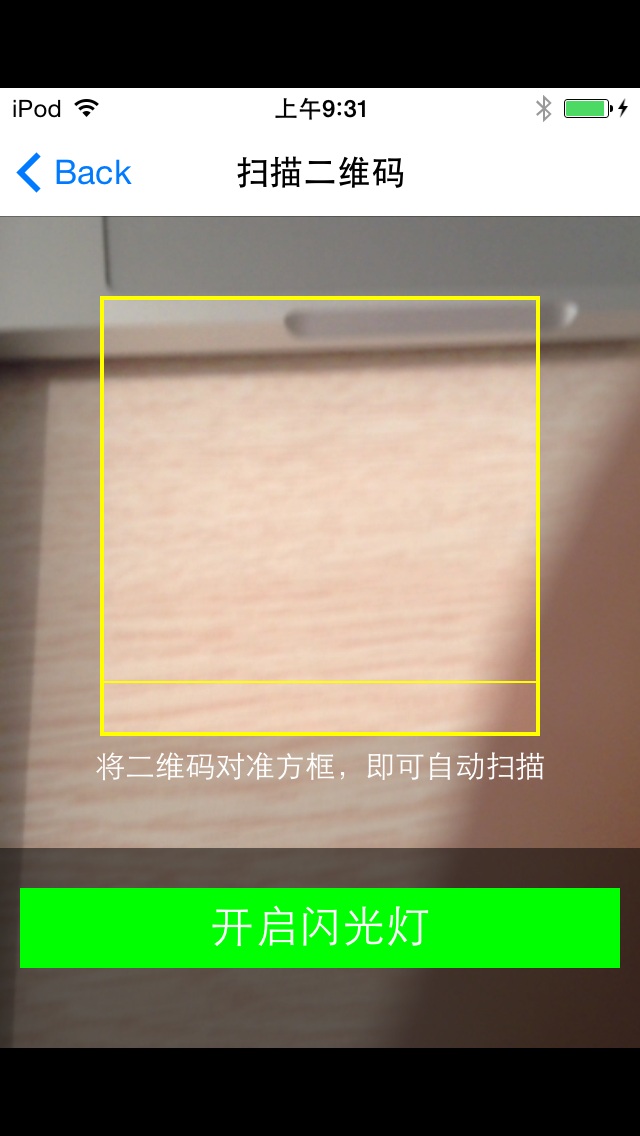
    labIntroudction. text = @"将二维码对准方框,即可自动扫描" ;
    [downView addSubview :labIntroudction];
    UIView *darkView = [[ UIView alloc ] initWithFrame : CGRectMake (  , downView. frame . size . height - 100.0 , VIEW_WIDTH , 100.0 )];
    darkView. backgroundColor = [[ UIColor blackColor ]  colorWithAlphaComponent : DARKCOLOR_ALPHA ];
    [downView addSubview :darkView];
    //用于开关灯操作的button
    UIButton *openButton=[[ UIButton alloc ] initWithFrame : CGRectMake (  ,  , 300.0 , 40.0 )];
    [openButton setTitle : @"开启闪光灯" forState: UIControlStateNormal ];
    [openButton setTitleColor :[ UIColor whiteColor ] forState : UIControlStateNormal ];
    openButton. titleLabel . textAlignment = NSTextAlignmentCenter ;
    openButton. backgroundColor =[ UIColor greenColor ];
    openButton. titleLabel . font =[ UIFont systemFontOfSize : 22.0 ];
    [openButton addTarget : self action : @selector (openLight) forControlEvents : UIControlEventTouchUpInside ];
    [darkView addSubview :openButton];
    //画中间的基准线
    _QrCodeline = [[ UIView alloc ] initWithFrame : CGRectMake ( SCANVIEW_EdgeLeft , SCANVIEW_EdgeTop , VIEW_WIDTH -  * SCANVIEW_EdgeLeft ,  )];
    _QrCodeline . backgroundColor = [ UIColor yellowColor];
    [ _scanView addSubview : _QrCodeline ];
}
- ( void )openLight
{
     ) {
        _readerView.torchMode =  ;
    } else
    {
        _readerView.torchMode =  ;
    }
}
- ( void )viewWillDisappear:( BOOL )animated
{
    [ super viewWillDisappear :animated];
     ) {
        _readerView . torchMode =  ;
    }
    [ self stopTimer ];
    [ _readerView stop ];
}
//二维码的横线移动
- ( void )moveUpAndDownLine
{
    CGFloat Y= _QrCodeline.frame.origin.y ;
    //CGRectMake(SCANVIEW_EdgeLeft, SCANVIEW_EdgeTop, VIEW_WIDTH-2*SCANVIEW_EdgeLeft, 1)]
     *SCANVIEW_EdgeLeft+SCANVIEW_EdgeTop==Y){
        [UIView beginAnimations: @"asa" context: nil ];
        [UIView setAnimationDuration:  ];
        _QrCodeline.frame=CGRectMake(SCANVIEW_EdgeLeft, SCANVIEW_EdgeTop, VIEW_WIDTH-  *SCANVIEW_EdgeLeft,  );
        [UIView commitAnimations];
    } else if (SCANVIEW_EdgeTop==Y){
        [UIView beginAnimations: @"asa" context: nil ];
        [UIView setAnimationDuration:  ];
        _QrCodeline.frame=CGRectMake(SCANVIEW_EdgeLeft, VIEW_WIDTH-  *SCANVIEW_EdgeLeft+SCANVIEW_EdgeTop, VIEW_WIDTH-  *SCANVIEW_EdgeLeft,  );
        [UIView commitAnimations];
    }
}
- ( void )createTimer
{
    //创建一个时间计数
    _timer=[NSTimer scheduledTimerWithTimeInterval: 1.0 target: self selector: @selector (moveUpAndDownLine) userInfo: nil repeats: YES ];
}
- ( void )stopTimer
{
    if ([_timer isValid] == YES ) {
        [_timer invalidate];
        _timer = nil ;
    }
}

// 是否支持转屏
- (BOOL)shouldAutorotate
{
    return YES;
}

// 支持的屏幕方向,此处可直接返回 UIInterfaceOrientationMask 类型
// 也可以返回多个 UIInterfaceOrientationMask 取或运算后的值
- (NSUInteger)supportedInterfaceOrientations
{
    return UIInterfaceOrientationMaskPortrait;
}

- (void)didReceiveMemoryWarning {
    [super didReceiveMemoryWarning];
    // Dispose of any resources that can be recreated.
}

/*
#pragma mark - Navigation

// In a storyboard-based application, you will often want to do a little preparation before navigation
- (void)prepareForSegue:(UIStoryboardSegue *)segue sender:(id)sender {
    // Get the new view controller using [segue destinationViewController].
    // Pass the selected object to the new view controller.
}
*/

@end

ZBar之自定义二维码扫描的更多相关文章
- ios二维码扫描插件,适配当前主流扫描软件,自定义扫描界面。
二维码介绍: 二维码(QR(Quick Response)code),又称二维条码,最早起源于日本. 它是用特定的几何图形按一定规律在平面(二维方向)上分布的黑白相间的图形,是所有信息 ...
- ZBar 是款桌面电脑用条形码/二维码扫描工具
ZBar 是款桌面电脑用条形码/二维码扫描工具 windows平台python 2.7环境编译安装zbar 最近一个项目需要识别二维码,找来找去找到了zbar和zxing,中间越过无数坑,总算基本 ...
- Qt之二维码扫描
简述 二维码(QR Code)是用某种特定的几何图形按一定规律在平面(二维方向)分布的黑白相间的图形记录数据符号信息的.是所有信息数据的一把钥匙.应用十分广泛,如:产品防伪/溯源.广告推送.网站链接. ...
- Android快速实现二维码扫描--Zbar
Android中二维码扫描的最常用库是zxing和zbar,上一篇<Android快速实现二维码扫描–Zxing>介绍了Zxing.这次说Zbar,Zbar速度极快,我就比较常用,项目地址 ...
- 二维码扫描利用ZBar实现
上次是根据系统的属性自己封装的一个二维码扫描,这次给大家介绍一下基于ZBar集成的类似于QQ二维码扫描界面的二维码扫描的效果. ...
- android利用zbar二维码扫描-(解决中文乱码及扫描区域定义)
写在最前(这是对上一篇博文的问题做的更新[android利用zbar二维码扫描]) project下载 zbarLib编译project project下载0积分 bug 在2.3的系统中Hol ...
- iOS - 二维码扫描和应用跳转
序言 前面我们已经调到过怎么制作二维码,在我们能够生成二维码之后,如何对二维码进行扫描呢? 在iOS7之前,大部分应用中使用的二维码扫描是第三方的扫描框架,例如ZXing或者ZBar.使用时集成麻烦, ...
- iOS开发-二维码扫描和应用跳转
iOS开发-二维码扫描和应用跳转 序言 前面我们已经调到过怎么制作二维码,在我们能够生成二维码之后,如何对二维码进行扫描呢? 在iOS7之前,大部分应用中使用的二维码扫描是第三方的扫描框架,例如Z ...
- 【转】Android手机客户端关于二维码扫描的源码--不错
原文网址:https://github.com/SkillCollege/QrCodeScan QrCodeScan 这是Android手机客户端关于二维码扫描的源码,使用了高效的ZBar解码库,并修 ...
随机推荐
- cpack
一. 简介 CPack是CMake 2.4.2之后的一个内置工具,主要作用就是生成制定类型的安装包.它可以脱离cmake单独运行. 二. 基本设置 (mandatory) 设置包类型set(CPACK ...
- debug版本和release版本的区别?
好久没有做web项目了,这项目完成了要发布网站,不好忘了 以前操作过的? 还好脑子还是有点印象 现还是 写个文档吧记录吧 免得 以后作别的了又忘了 那可不妙啊 网站发布步骤:1.先将
- 查看软、硬raid信息的方法
软件raid:只能通过Linux系统本身来查看cat /proc/mdstat可以看到raid级别,状态等信息. 硬件raid:最佳的办法是通过已安装的raid厂商的管理工具来查看,有cmdline, ...
- ElasticSearch部署
安装jdk1.7 1.卸载Liunx自带的openjdk rpm -qa | grep jdk 查看当前的jdk版本 sudo yum -y remove java-1.7.0-openjdk-hea ...
- 第一节 MongoDB介绍及下载与安装
引言 MongoDB是一个介于关系数据库和非关系数据库之间的产品,是非关系数据库当中功能最丰富,最像关系数据库的.他支持的数据结构非常松散,是类似json的bjson格式,因此可以存储比较复杂的数据类 ...
- (转)Arcgis API常用接口调用方法
var map, navToolbar, editToolbar, tileLayer, toolbar;//var mapBaseUrl = "http://localhost:8399/ ...
- 升级Mac X Mavericks MacMiv 无法启动
今天把Mac 系统升级到了 Mac X Mavericks ,确实有不少的惊喜.虽然体验不出Mac X Mavericks拥有更强的性能/更好的电池表现,但是新版的Safari浏览器的提供了更方便的主 ...
- 【转】MessageBox
MessageBox对话框是比较常用的一个信息对话框,其不仅能够定义显示的信息内容.信息提示图标,而且可以定义按钮组合及对话框的标题,是一个功能齐全的信息对话框. 1.函数原型及参数 function ...
- 如何让dapper支持oracle游标呢?
Dapper是一个轻型的ORM类.它有啥优点.缺点相信很多朋友都知道了,园里也有很多朋友都有相关介绍,这里就不多废话. 如果玩过Oracle都知道,存储过程基本都是通过游标返回数据的,但是dapper ...
- 从客户端检测到有潜在危险的Request.Form 值【转】
asp.net开发中,经常遇到“从客户端检测到有潜在危险的Request.Form 值”错误提示,很多人给出的解决方案是: 1.web.config文档<system.web>后面加入这一 ...