
ZBar之自定义二维码扫描
//
//  YvanQRCodeViewController.m
//  zBar
//
//  Created by City--Online on 15/6/8.
//  Copyright (c) 2015年 CYW. All rights reserved.
//

#import "YvanQRCodeViewController.h"
#import "ZBarSDK.h"
#define SCANVIEW_EdgeTop 40.0
#define SCANVIEW_EdgeLeft 50.0
#define TINTCOLOR_ALPHA 0.2 //浅色透明度
#define DARKCOLOR_ALPHA 0.5 //深色透明度
#define VIEW_WIDTH self.view.bounds.size.width
#define VIEW_HEIGHT self.view.bounds.size.height

@interface YvanQRCodeViewController ()<ZBarReaderViewDelegate>
{
    UIView *_QrCodeline;
    NSTimer *_timer;
    //设置扫描画面
    UIView *_scanView;
    ZBarReaderView *_readerView;
}
@end

@implementation YvanQRCodeViewController

- (void)viewDidLoad {
    [super viewDidLoad];

    self.title = @"扫描二维码" ;
    //初始化扫描界面
    [ self setScanView ];
    _readerView = [[ ZBarReaderView alloc ] init ];
    _readerView.frame = CGRectMake (  ,  , VIEW_WIDTH , VIEW_HEIGHT );
    _readerView.tracksSymbols = NO ;
    _readerView.readerDelegate = self ;
    [ _readerView addSubview : _scanView ];
    //关闭闪光灯
    _readerView.torchMode =  ;
    [ self.view addSubview : _readerView ];
    //扫描区域
    //readerView.scanCrop =
    [ _readerView start ];
    [ self createTimer ];

}
#pragma mark -- ZBarReaderViewDelegate
-( void )readerView:( ZBarReaderView *)readerView didReadSymbols:( ZBarSymbolSet *)symbols fromImage:( UIImage *)image
{
    const zbar_symbol_t *symbol = zbar_symbol_set_first_symbol (symbols. zbarSymbolSet );
    NSString *symbolStr = [ NSString stringWithUTF8String : zbar_symbol_get_data (symbol)];
    //判断是否包含 头'http:'
    NSString *regex = @"http+:[^//s]*" ;
    NSPredicate *predicate = [ NSPredicate predicateWithFormat : @"SELF MATCHES %@" ,regex];
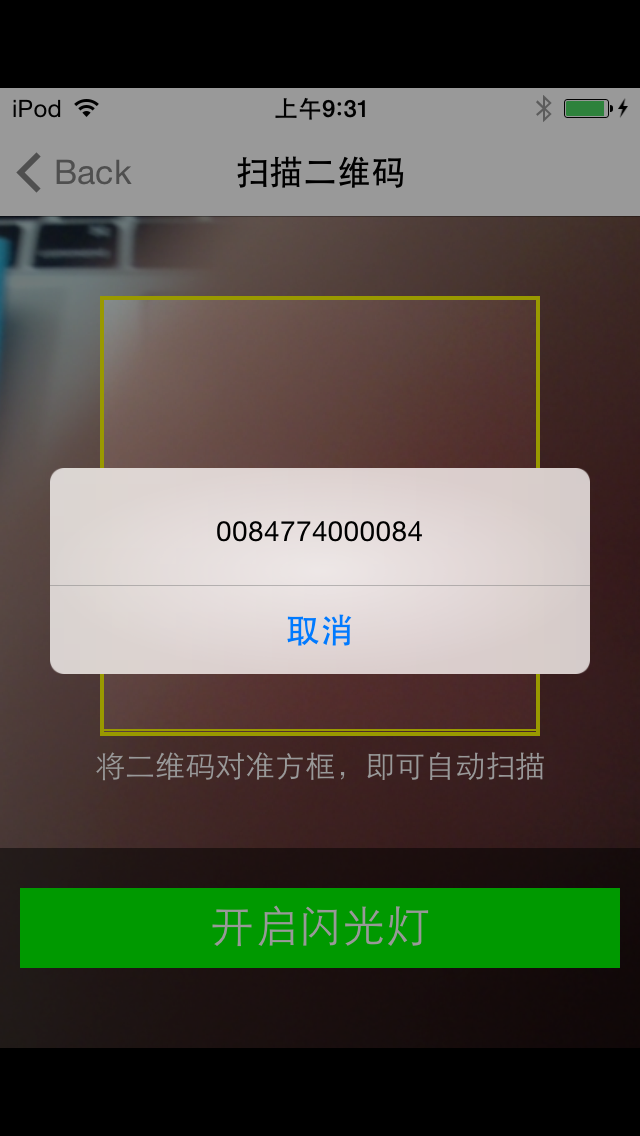
    UIAlertView *alertView=[[ UIAlertView alloc ] initWithTitle : @"" message :symbolStr delegate : nil cancelButtonTitle : @"取消" otherButtonTitles : nil ];
    [alertView show ];
    //判断是否包含 头'ssid:'
    NSString *ssid = @"ssid+:[^//s]*" ;
    NSPredicate *ssidPre = [ NSPredicate predicateWithFormat : @"SELF MATCHES %@" ,ssid];
    if ([predicate evaluateWithObject :symbolStr]) {
    }
    else if ([ssidPre evaluateWithObject :symbolStr]){
        NSArray *arr = [symbolStr componentsSeparatedByString : @";" ];
        NSArray * arrInfoHead = [[arr objectAtIndex :  ] componentsSeparatedByString : @":" ];
        NSArray * arrInfoFoot = [[arr objectAtIndex :  ] componentsSeparatedByString : @":" ];
        symbolStr = [ NSString stringWithFormat : @"ssid: %@ /n password:%@" ,
                     [arrInfoHead objectAtIndex :  ],[arrInfoFoot objectAtIndex :  ]];
        UIPasteboard *pasteboard=[ UIPasteboard generalPasteboard ];
        //然后,可以使用如下代码来把一个字符串放置到剪贴板上:
        pasteboard. ];
    }

}
- ( void )setScanView
{
    _scanView =[[ UIView alloc ] initWithFrame : CGRectMake (  ,  , VIEW_WIDTH , VIEW_HEIGHT )];
    _scanView . backgroundColor =[ UIColor clearColor ];
    //最上部view
    UIView * upView = [[ UIView alloc ] initWithFrame : CGRectMake (  ,  , VIEW_WIDTH , SCANVIEW_EdgeTop )];
    upView. alpha = TINTCOLOR_ALPHA ;
    upView. backgroundColor = [ UIColor blackColor ];
    [ _scanView addSubview :upView];
    //左侧的view
    UIView *leftView = [[ UIView alloc ] initWithFrame : CGRectMake (  , SCANVIEW_EdgeTop , SCANVIEW_EdgeLeft , VIEW_WIDTH -  * SCANVIEW_EdgeLeft )];
    leftView. alpha = TINTCOLOR_ALPHA ;
    leftView. backgroundColor = [ UIColor blackColor ];
    [ _scanView addSubview :leftView];
    /******************中间扫描区域****************************/
    UIImageView *scanCropView=[[ UIImageView alloc ] initWithFrame : CGRectMake ( SCANVIEW_EdgeLeft , SCANVIEW_EdgeTop , VIEW_WIDTH -  * SCANVIEW_EdgeLeft , VIEW_WIDTH -  * SCANVIEW_EdgeLeft )];
    //scanCropView.image=[UIImage imageNamed:@""];
    scanCropView. layer . borderColor =[ UIColor  yellowColor]. CGColor ;
    scanCropView. layer . borderWidth = 2.0 ;
    scanCropView. backgroundColor =[ UIColor clearColor ];
    [ _scanView addSubview :scanCropView];
    //右侧的view
    UIView *rightView = [[ UIView alloc ] initWithFrame : CGRectMake ( VIEW_WIDTH - SCANVIEW_EdgeLeft , SCANVIEW_EdgeTop , SCANVIEW_EdgeLeft , VIEW_WIDTH -  * SCANVIEW_EdgeLeft )];
    rightView. alpha = TINTCOLOR_ALPHA ;
    rightView. backgroundColor = [ UIColor blackColor ];
    [ _scanView addSubview :rightView];
    //底部view
    UIView *downView = [[ UIView alloc ] initWithFrame : CGRectMake (  , VIEW_WIDTH -  * SCANVIEW_EdgeLeft + SCANVIEW_EdgeTop , VIEW_WIDTH , VIEW_HEIGHT -( VIEW_WIDTH -  * SCANVIEW_EdgeLeft + SCANVIEW_EdgeTop )-  )];
    //downView.alpha = TINTCOLOR_ALPHA;
    downView. backgroundColor = [[ UIColor blackColor ] colorWithAlphaComponent : TINTCOLOR_ALPHA ];
    [ _scanView addSubview :downView];
    //用于说明的label
    UILabel *labIntroudction= [[ UILabel alloc ] init ];
    labIntroudction. backgroundColor = [ UIColor clearColor ];
    labIntroudction. frame = CGRectMake (  ,  , VIEW_WIDTH ,  );
    labIntroudction. numberOfLines =  ;
    labIntroudction. font =[ UIFont systemFontOfSize : 15.0 ];
    labIntroudction. textAlignment = NSTextAlignmentCenter ;
    labIntroudction. textColor =[ UIColor whiteColor ];
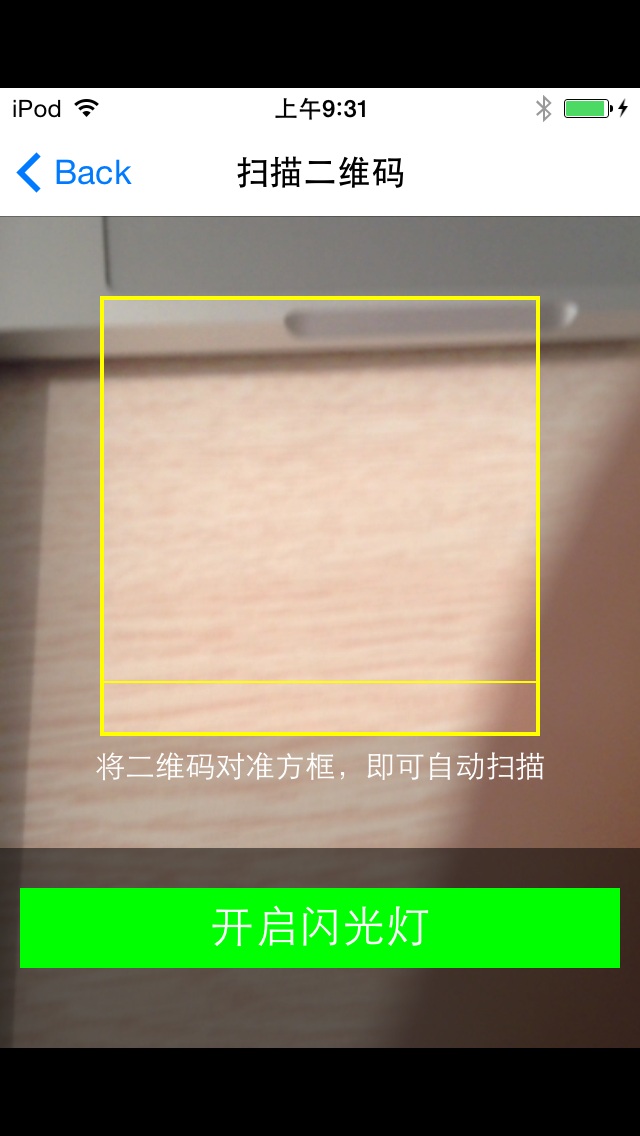
    labIntroudction. text = @"将二维码对准方框,即可自动扫描" ;
    [downView addSubview :labIntroudction];
    UIView *darkView = [[ UIView alloc ] initWithFrame : CGRectMake (  , downView. frame . size . height - 100.0 , VIEW_WIDTH , 100.0 )];
    darkView. backgroundColor = [[ UIColor blackColor ]  colorWithAlphaComponent : DARKCOLOR_ALPHA ];
    [downView addSubview :darkView];
    //用于开关灯操作的button
    UIButton *openButton=[[ UIButton alloc ] initWithFrame : CGRectMake (  ,  , 300.0 , 40.0 )];
    [openButton setTitle : @"开启闪光灯" forState: UIControlStateNormal ];
    [openButton setTitleColor :[ UIColor whiteColor ] forState : UIControlStateNormal ];
    openButton. titleLabel . textAlignment = NSTextAlignmentCenter ;
    openButton. backgroundColor =[ UIColor greenColor ];
    openButton. titleLabel . font =[ UIFont systemFontOfSize : 22.0 ];
    [openButton addTarget : self action : @selector (openLight) forControlEvents : UIControlEventTouchUpInside ];
    [darkView addSubview :openButton];
    //画中间的基准线
    _QrCodeline = [[ UIView alloc ] initWithFrame : CGRectMake ( SCANVIEW_EdgeLeft , SCANVIEW_EdgeTop , VIEW_WIDTH -  * SCANVIEW_EdgeLeft ,  )];
    _QrCodeline . backgroundColor = [ UIColor yellowColor];
    [ _scanView addSubview : _QrCodeline ];
}
- ( void )openLight
{
     ) {
        _readerView.torchMode =  ;
    } else
    {
        _readerView.torchMode =  ;
    }
}
- ( void )viewWillDisappear:( BOOL )animated
{
    [ super viewWillDisappear :animated];
     ) {
        _readerView . torchMode =  ;
    }
    [ self stopTimer ];
    [ _readerView stop ];
}
//二维码的横线移动
- ( void )moveUpAndDownLine
{
    CGFloat Y= _QrCodeline.frame.origin.y ;
    //CGRectMake(SCANVIEW_EdgeLeft, SCANVIEW_EdgeTop, VIEW_WIDTH-2*SCANVIEW_EdgeLeft, 1)]
     *SCANVIEW_EdgeLeft+SCANVIEW_EdgeTop==Y){
        [UIView beginAnimations: @"asa" context: nil ];
        [UIView setAnimationDuration:  ];
        _QrCodeline.frame=CGRectMake(SCANVIEW_EdgeLeft, SCANVIEW_EdgeTop, VIEW_WIDTH-  *SCANVIEW_EdgeLeft,  );
        [UIView commitAnimations];
    } else if (SCANVIEW_EdgeTop==Y){
        [UIView beginAnimations: @"asa" context: nil ];
        [UIView setAnimationDuration:  ];
        _QrCodeline.frame=CGRectMake(SCANVIEW_EdgeLeft, VIEW_WIDTH-  *SCANVIEW_EdgeLeft+SCANVIEW_EdgeTop, VIEW_WIDTH-  *SCANVIEW_EdgeLeft,  );
        [UIView commitAnimations];
    }
}
- ( void )createTimer
{
    //创建一个时间计数
    _timer=[NSTimer scheduledTimerWithTimeInterval: 1.0 target: self selector: @selector (moveUpAndDownLine) userInfo: nil repeats: YES ];
}
- ( void )stopTimer
{
    if ([_timer isValid] == YES ) {
        [_timer invalidate];
        _timer = nil ;
    }
}

// 是否支持转屏
- (BOOL)shouldAutorotate
{
    return YES;
}

// 支持的屏幕方向,此处可直接返回 UIInterfaceOrientationMask 类型
// 也可以返回多个 UIInterfaceOrientationMask 取或运算后的值
- (NSUInteger)supportedInterfaceOrientations
{
    return UIInterfaceOrientationMaskPortrait;
}

- (void)didReceiveMemoryWarning {
    [super didReceiveMemoryWarning];
    // Dispose of any resources that can be recreated.
}

/*
#pragma mark - Navigation

// In a storyboard-based application, you will often want to do a little preparation before navigation
- (void)prepareForSegue:(UIStoryboardSegue *)segue sender:(id)sender {
    // Get the new view controller using [segue destinationViewController].
    // Pass the selected object to the new view controller.
}
*/

@end

ZBar之自定义二维码扫描的更多相关文章
- ios二维码扫描插件,适配当前主流扫描软件,自定义扫描界面。
二维码介绍: 二维码(QR(Quick Response)code),又称二维条码,最早起源于日本. 它是用特定的几何图形按一定规律在平面(二维方向)上分布的黑白相间的图形,是所有信息 ...
- ZBar 是款桌面电脑用条形码/二维码扫描工具
ZBar 是款桌面电脑用条形码/二维码扫描工具 windows平台python 2.7环境编译安装zbar 最近一个项目需要识别二维码,找来找去找到了zbar和zxing,中间越过无数坑,总算基本 ...
- Qt之二维码扫描
简述 二维码(QR Code)是用某种特定的几何图形按一定规律在平面(二维方向)分布的黑白相间的图形记录数据符号信息的.是所有信息数据的一把钥匙.应用十分广泛,如:产品防伪/溯源.广告推送.网站链接. ...
- Android快速实现二维码扫描--Zbar
Android中二维码扫描的最常用库是zxing和zbar,上一篇<Android快速实现二维码扫描–Zxing>介绍了Zxing.这次说Zbar,Zbar速度极快,我就比较常用,项目地址 ...
- 二维码扫描利用ZBar实现
上次是根据系统的属性自己封装的一个二维码扫描,这次给大家介绍一下基于ZBar集成的类似于QQ二维码扫描界面的二维码扫描的效果. ...
- android利用zbar二维码扫描-(解决中文乱码及扫描区域定义)
写在最前(这是对上一篇博文的问题做的更新[android利用zbar二维码扫描]) project下载 zbarLib编译project project下载0积分 bug 在2.3的系统中Hol ...
- iOS - 二维码扫描和应用跳转
序言 前面我们已经调到过怎么制作二维码,在我们能够生成二维码之后,如何对二维码进行扫描呢? 在iOS7之前,大部分应用中使用的二维码扫描是第三方的扫描框架,例如ZXing或者ZBar.使用时集成麻烦, ...
- iOS开发-二维码扫描和应用跳转
iOS开发-二维码扫描和应用跳转 序言 前面我们已经调到过怎么制作二维码,在我们能够生成二维码之后,如何对二维码进行扫描呢? 在iOS7之前,大部分应用中使用的二维码扫描是第三方的扫描框架,例如Z ...
- 【转】Android手机客户端关于二维码扫描的源码--不错
原文网址:https://github.com/SkillCollege/QrCodeScan QrCodeScan 这是Android手机客户端关于二维码扫描的源码,使用了高效的ZBar解码库,并修 ...
随机推荐
- s3c6410_MMU地址映射过程详述
参考: 1)<ARM1176 JZF-S Technical Reference Manual>: Chapter 3 System Control Coprocessor Chapter ...
- MySQL语法
sql(structure query language)结构化查询语言ansi iso/iec组织制定ddl(data definition language) 数据定义语言dml(manipula ...
- Win2003打不开https的问题
碰到客户做问题是能打开https://www.baidu.com 这个网页 打不开 https://sha256.alipay.com/SHA256/index.htm支付宝这个网页 解决办 ...
- WPF: 读取XPS文件或将word、txt文件转化为XPS文件
读取XPS格式文件或将doc,txt文件转化为XPS文件,效果图如下: 1.XAML页面代码: <Window x:Class="WpfWord.MainWindow" xm ...
- ThinkPHP常用变量
__ROOT__ : 网站根目录地址 __APP__ : 当前项目(入口文件)地址 __GROUP__:当前分组地址 __URL__ : 当前模块地址 __ACTION__ : 当前操作地址 _ ...
- 多端口站点设置,以APMSERV集成环境为例!
以下以APMSERV集成环境为例: 1.找到你的apache上的配置文件httpd.conf,用记事本打开, D:\APMServ\Apache\conf 2.修改以下几项: Listen 80 下增 ...
- mysql报错Table '.\erchina_news\v9_search' is marked as crashed and should be repaired
直切正题 报该问题的是表引导坏了,需要修复表就行 方法一: 找到mysql的安装目录的bin/myisamchk工具,在命令行中输入: myisamchk -c -r ../data/erchina_ ...
- Android消息推送完美方案[转]
转自 Android消息推送完美方案 推送功能在手机应用开发中越来越重要,已经成为手机开发的必须.在Android应用开发中,由于众所周知的原因,Android消息推送我们不得不大费周折.本文就是用来 ...
- for循环绑定事件,闭包思想!
1.选项卡问题 总结:用alert()测试,是否得到对象. 2.闭包,解决作用域. <script> window.onload=function(){ var li=document.g ...
- DevExpress GridControl 部分用法
1.GridControl赋值:this.GridControl1.DataSouce=dt; 2.GridContro总合计及分组合计: 常规总合计直接RunDesigner-Group Summa ...