
Swagger2简单使用教程
Swagger2简单使用教程
1、简介
Swagger是为了解决企业中接口(api)中定义统一标准规范的文档生成工具。很多采用前后端分离的模式,前端只负责调用接口,进行渲染,前端和后端的唯一联系,变成了API接口。因此,API文档变得越来越重要。swagger是一个方便我们更好的编写API文档的框架,而且swagger可以模拟http请求调用。
2、常用注解与示例
@Api()用于类:表示标识这个类是swagger的资源
@Api("用于类")

 @Controller

 public class swaggerTest(){

 }
@ApiOperation()用于方法:表示一个http请求的操作
@Api("ApiOperation测试")

@Controller

public class swaggerTest(){

    @ApiOperation(value = "apiOperationTest", notes = "apiOperation测试")

    public void apiOperationSwaggerTest(){

    }

}
@ApiParam():用于方法,参数,字段说明:表示对参数的添加元数据(说明或是否必填等)
@Api("ApiParam测试")

@Controller

public class swaggerTest(){

    @ApiOperation(value = "apiOperationTest", notes = "apiOperation测试")

    public void apiOperationTest(@ApiParam(name = "id", value = "1", required = true) Integer id){

    }

}
@ApiModel()用于类:表示对类进行说明,用于参数用实体类接收
@ApiModel(description = "实体类", value = "实体类")

public class City implements Serializable {

}
@ApiModelProperty()用于方法,字段:表示对model属性的说明或者是数据操作更改
@ApiModel(description = "实体类", value = "实体类")

public class City implements Serializable {

    @ApiModelProperty(name = "id", value = "编号", required = false, exmaple = "1")

    private int id;

}
@ApiIgnore()用于类,方法,方法参数:表示这个方法或者类被忽略
@ApiIgnore

@Api(tags = {"Xxx控制类"})

@RestController

@RequestMapping("/xxx")

public class XxxController {

}
@ApiImplicitParam()用于方法:表示单独的请求参数
@ApiImplicitParams()用于方法,包含多个@ApiImplicitParam
@Api("测试1")

  @Controller

  public class swaggerTest(){

      @ApiOperation(value = "apiOperationTest", notes = "apiOperation测试")

      @ApiImplicitParams({@ApiImplicitParam(name = "id", value = "id", required = true, dataType = "Integer", paramType = "query"),

                        @ApiImplicitParam(name = "name", value = "name", required = true, dataType = "String", paramType = "query")

    })

      public void apiOperationSwaggerTest(Integer id, String name){

      }

  }
3、使用步骤
maven导入依赖
<dependency>

	<groupId>io.springfox</groupId>

	<artifactId>springfox-swagger-ui</artifactId>

	<version>2.9.2</version>

</dependency>

<dependency>

	<groupId>io.springfox</groupId>

	<artifactId>springfox-swagger2</artifactId>

	<version>2.9.2</version>

</dependency>
创建配置类
给出一些基础配置
@Configuration

@EnableSwagger2 //开启Swagger2

public class Swagger2 {

    //是否开启swagger,正式环境一般是需要关闭的,可根据springboot的多环境配置进行设置

    @Value(value = "${swagger.enabled}")

    Boolean swaggerEnabled;

    @Bean

    public Docket createRestApi(){

        return new Docket(DocumentationType.SWAGGER_2)

                .apiInfo(apiInfo())

                .select()

                .apis(RequestHandlerSelectors.basePackage("com.xxxxxx.xxxxx")) //你的项目基础包名

                .paths(PathSelectors.any())

                .build();

    }

    private ApiInfo apiInfo(){

        return new ApiInfoBuilder()

                .title("标题")

                .description("api接口文档")

                .version("1.0") //版本

                .build();

    }

}
SpringBoot 配置文件 开启swagger
- application-dev.yml文件
swagger:

    enabled: true
注意导包不要导错
import org.springframework.beans.factory.annotation.Value;

import org.springframework.context.annotation.Bean;

import org.springframework.context.annotation.Configuration;

import springfox.documentation.builders.ApiInfoBuilder;

import springfox.documentation.builders.PathSelectors;

import springfox.documentation.builders.RequestHandlerSelectors;

import springfox.documentation.service.ApiInfo;

import springfox.documentation.spi.DocumentationType;

import springfox.documentation.spring.web.plugins.Docket;

import springfox.documentation.swagger2.annotations.EnableSwagger2;
实体类demo
@Entity

@Table(name = "city")

public class City implements Serializable {

    private static final long serialVersionUID = 1L;

    @Id

    @GeneratedValue(strategy = GenerationType.AUTO)

    @Column(name = "ID")

    @Getter

    @Setter

    private int ID;

    @Column(name = "Name")

    @ApiModelProperty(value = "城市名字", dataType = "String", name = "name", example = "Kabul")

    @Getter

    @Setter

    private String Name;
代码中的@Getter@Setter 注解是使用 lombok代替get与set方法,使用方法参考另一篇
service与dao略过 看controller的写法
 @ApiOperation(value="按id查询城市信息")

    @ResponseBody

    @GetMapping("/queryCityList")

    public String queryCityList(@RequestParam("id") int id)  {

        List<City> queryCityList = cityService.queryCityList(id);

        String jsonString = JSON.toJSONString(queryCityList);

        return  jsonString;

    }
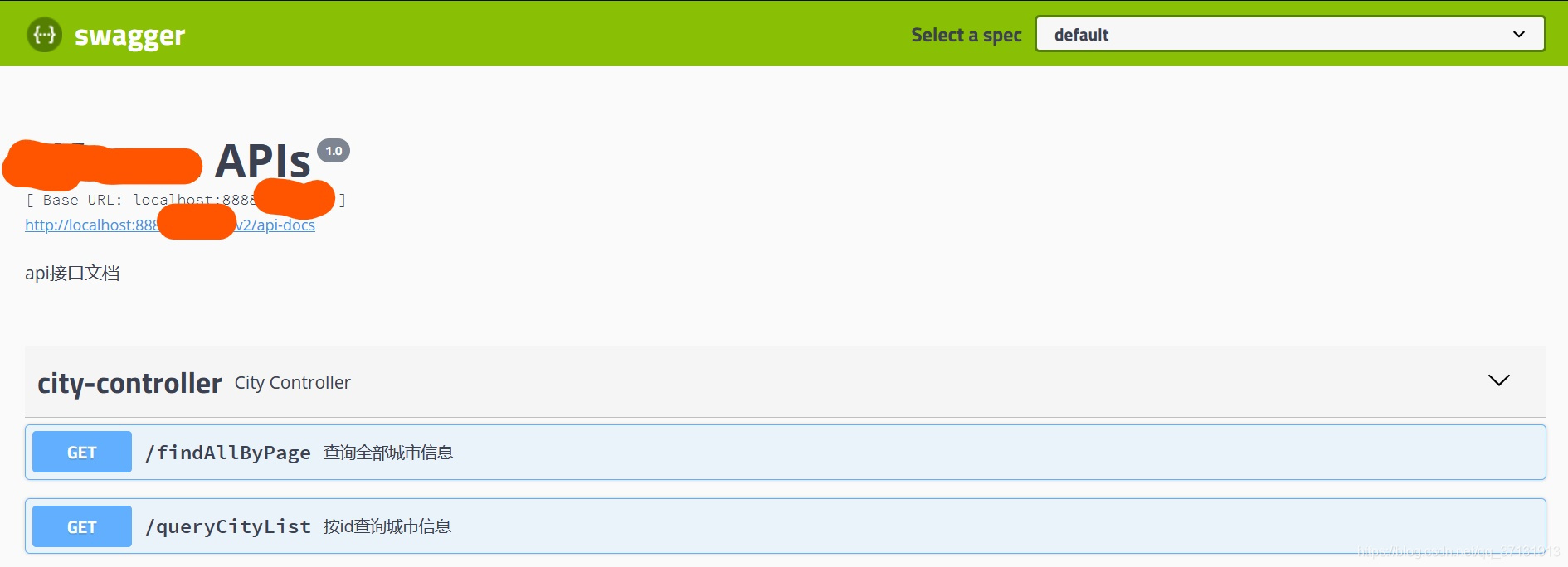
4、浏览器中使用
http://服务器ip:端口/swagger-ui.html
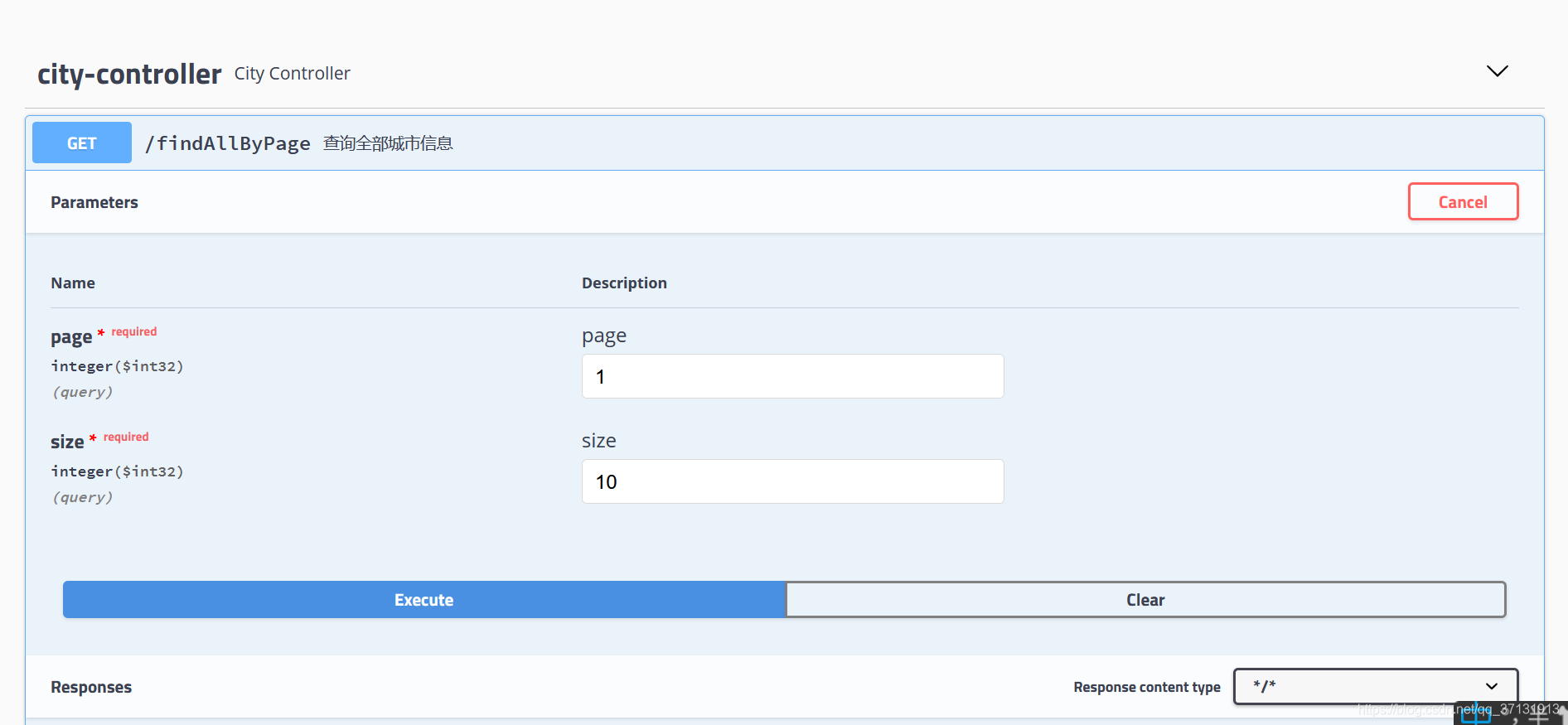
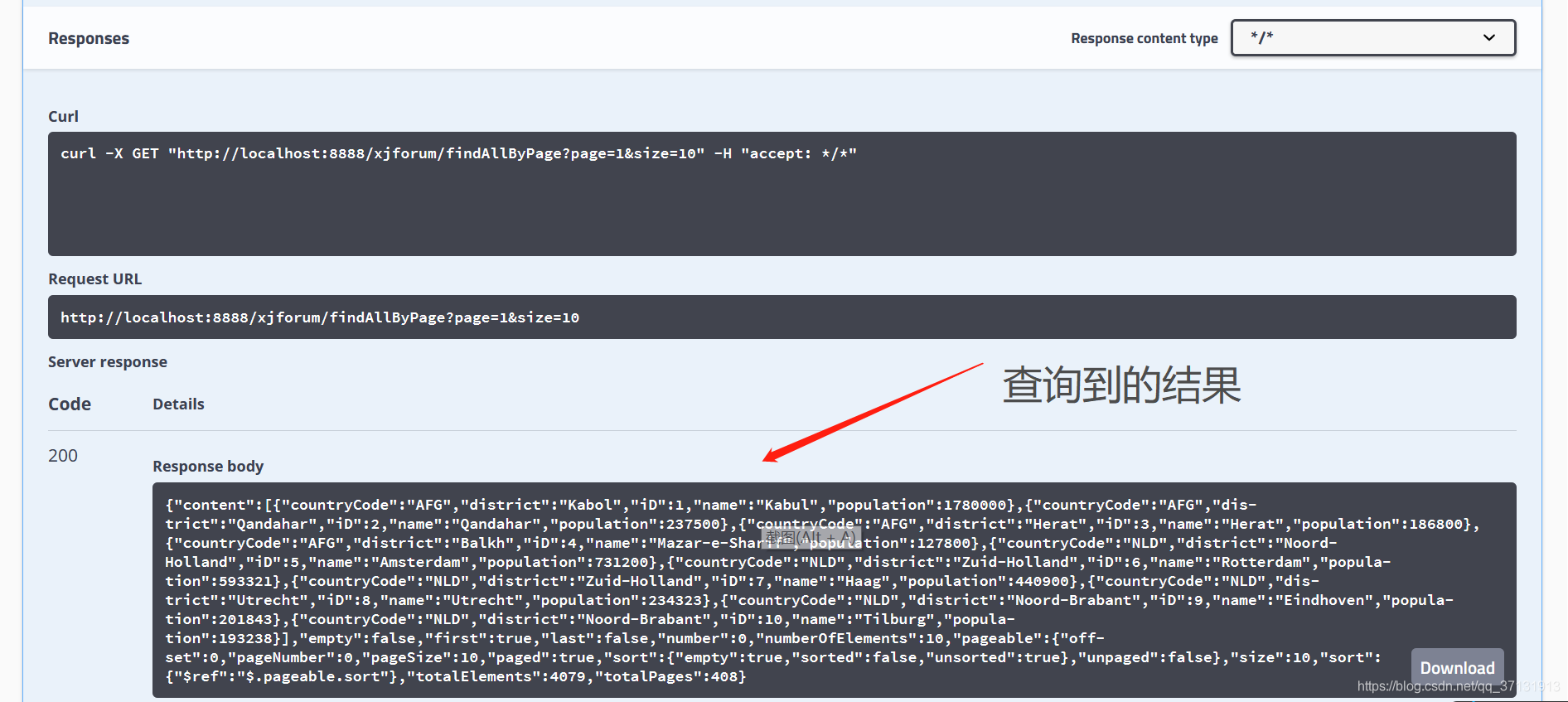
界面
可以看到刚才我们写的两个方法
Swagger2简单使用教程的更多相关文章
- OpenMP的简单使用教程
转自:http://binglispace.com/2015/01/09/openmp-intro/ OpenMP的简单使用教程 今天有幸参加了一个XSEDE OpenMP的workshop讲座,真是 ...
- 程序员,一起玩转GitHub版本控制,超简单入门教程 干货2
本GitHub教程旨在能够帮助大家快速入门学习使用GitHub,进行版本控制.帮助大家摆脱命令行工具,简单快速的使用GitHub. 做全栈攻城狮-写代码也要读书,爱全栈,更爱生活. 更多原创教程请关注 ...
- knockout简单实用教程3
在之前的文章里面介绍了一些KO的基本用法.包括基本的绑定方式,基本的ko的绑定语法包括text绑定,html绑定等等(如有不明请参照上两篇文章),下面呢介绍一下关于ko的其他方面的知识.包括比较特殊绑 ...
- GitHub这么火,程序员你不学学吗? 超简单入门教程 【转载】
本GitHub教程旨在能够帮助大家快速入门学习使用GitHub. 本文章由做全栈攻城狮-写代码也要读书,爱全栈,更爱生活.原创.如有转载,请注明出处. GitHub是什么? GitHub首先是个分布式 ...
- sea.js简单使用教程
sea.js简单使用教程 下载sea.js, 并引入 官网: http://seajs.org/ github : https://github.com/seajs/seajs 将sea.js导入项目 ...
- vim简单使用教程【转】
vim的学习曲线相当的大(参看各种文本编辑器的学习曲线),所以,如果你一开始看到的是一大堆VIM的命令分类,你一定会对这个编辑器失去兴趣的.下面的文章翻译自<Learn Vim Progress ...
- 简单脱壳教程笔记(2)---手脱UPX壳(1)
本笔记是针对ximo早期发的脱壳基础视频教程,整理的笔记. ximo早期发的脱壳基础视频教程 下载地址如下: http://down.52pojie.cn/%E5%90%BE%E7%88%B1%E7% ...
- 【git】git简单使用教程
git的简单使用教程: 1.安装git bash客户端 2.打开git bash,cd到需要存储代码的路径下, 执行:git clone -b deploy ssh://git@gitlab.xxxx ...
- Flyway 简单入门教程
原文地址:Flyway 简单入门教程 博客地址:http://www.extlight.com 一.前言 Flyway 是一款开源的数据库版本管理工具,它更倾向于规约优于配置的方式.Flyway 可以 ...
随机推荐
- django 1.11.16之环境搭建
django版本:django1.11.16 windows环境 python 3.6.3 !!!可先安装虚拟环境在进行环境搭建 1.安装django:pip install django= ...
- DevOps 时代的高效测试之路
10 月 22 日,2021 届 DevOps 国际峰会在北京顺利召开,来自国内外的顶级技术专家共同畅谈 DevOps 体系与方法.过程与实践.工具与技术.CODING 测试及研发流程管理产品总监程胜 ...
- PinPoint单节点部署及客户端配置方法
在一次做项目中,需要涉及全链路压测,为了更好定位链路中某一节点可能会出现的问题,在繁忙之余,快速部署及应用了该链路工具,分享给大家~ 话不多说,开始部署~ 一.环境配置1.1 获取需要的依赖包进入ho ...
- [对对子队]会议记录4.11(Scrum Meeting 2)
今天已完成的工作 何瑞 工作内容:完成指令的衔接:完成合成指南界面的制作:初步实现成本系统 相关issue:实现用户指令编辑系统的逻辑 马嘉 工作内容:完成游戏内暂停界面 相关issu ...
- 「总结」$dp1$
大概就是做点题. 先列一下要做的题目列表,从\(UOJ\)上找的. 129寿司晚宴 348州区划分 370滑稽树上滑稽果 457数树 22外星人 37主旋律 300吉夫特 196线段树 311积劳成疾 ...
- NB-IoT的DRX、eDRX、PSM三个模式怎么用?通俗解释,看完就懂!
面我们讲了不少NB-IOT的应用.软件和硬件设计的变动. (链接在文章末尾). 今天讲讲NB-IoT的三大模式,在各种物联网和智能硬件场景中的使用方法 DRX.eDRx.PSM是什么? DRX虽然叫做 ...
- 一文带你掌握【TCP拥塞窗口】原理
❝ 关注公众号:高性能架构探索.后台回复[资料],可以免费领取 ❞ 学过网络相关课程的,都知道TCP中,有两个窗口: 滑动窗口(在我们的上一篇文章中有讲),接收方通过通告发送方自己的可以接受缓冲区大小 ...
- vue混入mixin的使用,保证你看的明明白白!
场景描述 有些时候,我们发现有些组件部分功能代码是几乎是一样的. 这个时候,我们就可以将相同的逻辑代码抽离出来 此时我们的主角混入mixin就登场了 下面我们有a-test和b-test两个组件,点击 ...
- Shadertoy 教程 Part 2 - 圆和动画
Note: This series blog was translated from Nathan Vaughn's Shaders Language Tutorial and has been au ...
- (转载)linux chmod命令用法
chmod----改变一个或多个文件的存取模式(mode) chmod [options] mode files 只能文件属主或特权用户才能使用该功能来改变文件存取模式.mode可以是数字形式(八 ...