
SpringBoot实现整合mybatis-generator-maven-plugin 1.4.0
创建 Maven 工程
网上有很多教程且 Idea 可以直接创建 这里就不进行
pom.xml 引入依赖和插件
pom中generalto-maven-plugs中必须指定mysql驱动,并且明确版本
<?xml version="1.0" encoding="UTF-8"?>

<project xmlns="http://maven.apache.org/POM/4.0.0" xmlns:xsi="http://www.w3.org/2001/XMLSchema-instance"

         xsi:schemaLocation="http://maven.apache.org/POM/4.0.0 https://maven.apache.org/xsd/maven-4.0.0.xsd">

    <modelVersion>4.0.0</modelVersion>

    <parent>

        <groupId>org.springframework.boot</groupId>

        <artifactId>spring-boot-starter-parent</artifactId>

        <version>2.5.0</version>

        <relativePath/> <!-- lookup parent from repository -->

    </parent>

    <groupId>top.orginly</groupId>

    <artifactId>mall</artifactId>

    <version>0.0.1-SNAPSHOT</version>

    <name>mall</name>

    <description>Demo project for Spring Boot</description>

    <properties>

        <java.version>11</java.version>

    </properties>

    <dependencies>

        <dependency>

            <groupId>org.springframework.boot</groupId>

            <artifactId>spring-boot-starter-web</artifactId>

        </dependency>

        <dependency>

            <groupId>org.springframework.boot</groupId>

            <artifactId>spring-boot-starter-test</artifactId>

            <scope>test</scope>

        </dependency>

        <dependency>

            <groupId>org.mybatis.spring.boot</groupId>

            <artifactId>mybatis-spring-boot-starter</artifactId>

            <version>2.2.0</version>

        </dependency>

        <!-- mysql8 驱动 -->

        <dependency>

            <groupId>mysql</groupId>

            <artifactId>mysql-connector-java</artifactId>

            <version>8.0.24</version>

        </dependency>

    </dependencies>

    <build>

        <plugins>

            <!-- springboot的maven插件 -->

            <plugin>

                <groupId>org.springframework.boot</groupId>

                <artifactId>spring-boot-maven-plugin</artifactId>

            </plugin>

            <plugin>

                <groupId>org.mybatis.generator</groupId>

                <artifactId>mybatis-generator-maven-plugin</artifactId>

                <version>1.4.0</version>

                <configuration>

                    <!-- mybatis用于生成代码的配置文件 如果配置文件名为generatorConfig.xml 则不需要配置 -->

                    <!-- <configurationFile>src/main/resources/generator/generatorConfig.xml</configurationFile>-->

                    <!-- 允许移动生成的文件 -->

                    <verbose>true</verbose>

                    <!-- 启用覆盖 -->

                    <overwrite>true</overwrite>

                </configuration>

                <!-- 引入插件所需要的依赖 -->

                <dependencies>

                    <dependency>

                        <groupId>mysql</groupId>

                        <artifactId>mysql-connector-java</artifactId>

                        <version>8.0.24</version>

                    </dependency>

                </dependencies>

            </plugin>

        </plugins>

    </build>

</project>
generatorConfig.xml 自动生成配置文件
table标签中需要指定tableName和生成的实体名字
<?xml version="1.0" encoding="UTF-8"?>
<!DOCTYPE generatorConfiguration PUBLIC "-//mybatis.org//DTD MyBatis Generator Configuration 1.0//EN"
"http://mybatis.org/dtd/mybatis-generator-config_1_0.dtd">
<generatorConfiguration>
<context id="DB2Tables" targetRuntime="MyBatis3">
<commentGenerator>
<!-- 是否生成注释代时间戳-->
<property name="suppressDate" value="true"/>
<!-- 是否去除自动生成的注释 true:是 : false:否 -->
<property name="suppressAllComments" value="true"/>
</commentGenerator>
<!--数据库链接地址账号密码-->
<jdbcConnection driverClass="com.mysql.cj.jdbc.Driver"
connectionURL="jdbc:mysql://172.17.0.2:3306/spring-boot-mall?useUnicode=true&characterEncoding=UTF-8&serverTimezone=Asia/Shanghai"
userId="root"
password="000">
</jdbcConnection>
<javaTypeResolver>
<!--该属性可以控制是否强制DECIMAL和NUMERIC类型的字段转换为Java类型的java.math.BigDecimal,默认值为false,一般不需要配置。-->
<property name="forceBigDecimals" value="false"/>
</javaTypeResolver>
<!--生成Model类存放位置-->
<javaModelGenerator targetPackage="top.orginly.mall.model.pojo" targetProject="src/main/java">
<!--enableSubPackages:如果true,MBG会根据catalog和schema来生成子包。如果false就会直接用targetPackage属性。默认为false。-->
<property name="enableSubPackages" value="true"/>
<!--trimStrings:是否对数据库查询结果进行trim操作,如果设置为true就会生成类似这样public void setUsername(String username) {this.username = username == null ? null : username.trim();}的setter方法。默认值为false。-->
<property name="trimStrings" value="true"/>
</javaModelGenerator>
<!--生成映射xml文件存放位置-->
<sqlMapGenerator targetPackage="mappers" targetProject="src/main/resources">
<property name="enableSubPackages" value="true"/>
</sqlMapGenerator>
<!--生成Dao类存放位置(*Mapper.java)-->
<!-- 客户端代码,生成易于使用的针对Model对象和XML配置文件 的代码
type="ANNOTATEDMAPPER",生成Java Model 和基于注解的Mapper对象
type="MIXEDMAPPER",生成基于注解的Java Model 和相应的Mapper对象
type="XMLMAPPER",生成SQLMap XML文件和独立的Mapper接口
-->
<javaClientGenerator type="XMLMAPPER" targetPackage="top.orginly.mall.dao" targetProject="src/main/java">
<property name="enableSubPackages" value="true"/>
</javaClientGenerator>
<!--生成对应表及类名-->
<table tableName="mall_user" domainObjectName="User" enableCountByExample="false" enableUpdateByExample="false"
enableDeleteByExample="false" enableSelectByExample="false" selectByExampleQueryId="false">
<!--useActualColumnNames:如果设置为true,那么MBG会使用从数据库元数据获取的列名作为生成的实体对象的属性。 如果为false(默认值),MGB将会尝试将返回的名称转换为驼峰形式。 在这两种情况下,可以通过 元素显示指定,在这种情况下将会忽略这个(useActualColumnNames)属性。-->
<property name="useActualColumnNames" value="true"/>
<!-- 数据库表主键 可以不设置 -->
<generatedKey column="id" sqlStatement="Mysql" identity="true"/>
</table>
</context>
</generatorConfiguration>
运行生成文件
这里推荐使用IDEA
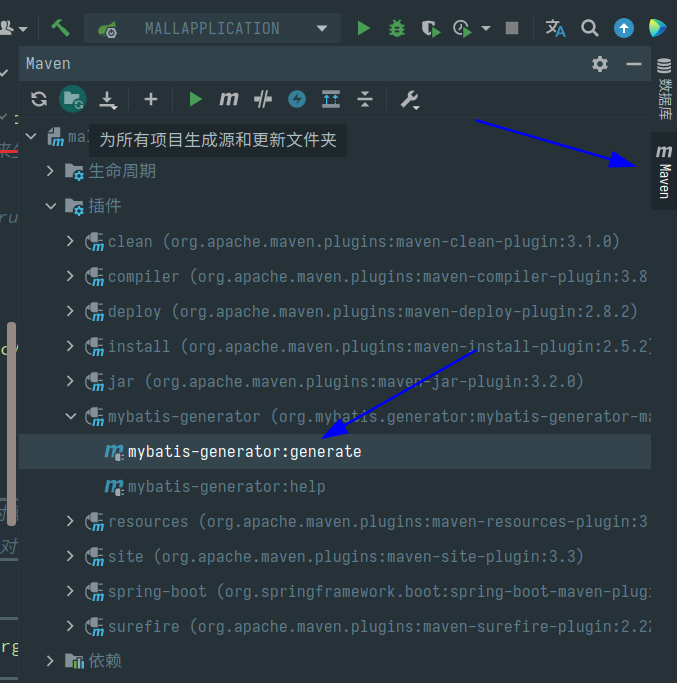
我们只需要找到右边侧栏中的maven
依次找到plugins–>mybatis-generaltor–>mybatis-generaltor:generaltor
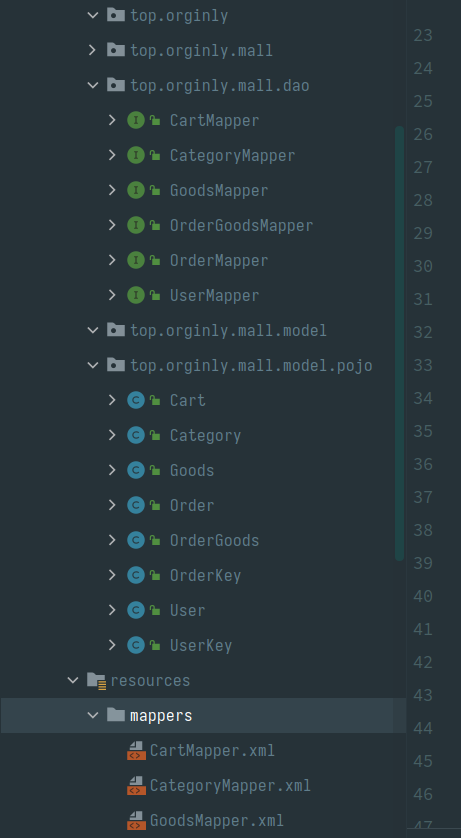
之后双击即可,此时刷新一下项目就自动生成我们想要的,mapper和xml以及pojo
提示
BUILD SUCCESS即生成成功!
[INFO] Scanning for projects...

[INFO]

[INFO] --------------------------< top.orginly:mall >--------------------------

[INFO] Building mall 0.0.1-SNAPSHOT

[INFO] --------------------------------[ jar ]---------------------------------

[INFO]

[INFO] --- mybatis-generator-maven-plugin:1.4.0:generate (default-cli) @ mall ---

[INFO] Connecting to the Database

[INFO] Introspecting table mall_user

[INFO] Introspecting table mall_category

[INFO] Introspecting table mall_goods

[INFO] Introspecting table mall_order

[INFO] Introspecting table mall_order_goods

[INFO] Introspecting table mall_cart

[INFO] Generating Primary Key class for table mall_user

[INFO] Generating Record class for table mall_user

[INFO] Generating Mapper Interface for table mall_user

[INFO] Generating SQL Map for table mall_user

[INFO] Generating Record class for table mall_category

[INFO] Generating Mapper Interface for table mall_category

[INFO] Generating SQL Map for table mall_category

[INFO] Generating Record class for table mall_goods

[INFO] Generating Mapper Interface for table mall_goods

[INFO] Generating SQL Map for table mall_goods

[INFO] Generating Primary Key class for table mall_order

[INFO] Generating Record class for table mall_order

[INFO] Generating Mapper Interface for table mall_order

[INFO] Generating SQL Map for table mall_order

[INFO] Generating Record class for table mall_order_goods

[INFO] Generating Mapper Interface for table mall_order_goods

[INFO] Generating SQL Map for table mall_order_goods

[INFO] Generating Record class for table mall_cart

[INFO] Generating Mapper Interface for table mall_cart

[INFO] Generating SQL Map for table mall_cart

[INFO] Saving file UserMapper.xml

[INFO] Saving file CategoryMapper.xml

[INFO] Saving file GoodsMapper.xml

[INFO] Saving file OrderMapper.xml

[INFO] Saving file OrderGoodsMapper.xml

[INFO] Saving file CartMapper.xml

[INFO] Saving file UserKey.java

[INFO] Saving file User.java

[INFO] Saving file UserMapper.java

[INFO] Saving file Category.java

[INFO] Saving file CategoryMapper.java

[INFO] Saving file Goods.java

[INFO] Saving file GoodsMapper.java

[INFO] Saving file OrderKey.java

[INFO] Saving file Order.java

[INFO] Saving file OrderMapper.java

[INFO] Saving file OrderGoods.java

[INFO] Saving file OrderGoodsMapper.java

[INFO] Saving file Cart.java

[INFO] Saving file CartMapper.java

[INFO] ------------------------------------------------------------------------

[INFO] BUILD SUCCESS

[INFO] ------------------------------------------------------------------------

[INFO] Total time:  2.193 s

[INFO] Finished at: 2021-06-01T22:33:37+08:00

[INFO] ------------------------------------------------------------------------
SpringBoot实现整合mybatis-generator-maven-plugin 1.4.0的更多相关文章
- spingBoot整合mybatis+generator+pageHelper
spingBoot整合mybatis+generator+pageHelper 环境/版本一览: 开发工具:Intellij IDEA 2018.1.4 springboot: 2.0.4.RELEA ...
- idea + mybatis generator + maven 插件使用
idea + mybatis generator + maven 插件使用 采用的是 generator 的 maven 插件的方式 ~ 1 pom.xml mybatis其它配置一样,下面是配置my ...
- Spring学习总结(五)——Spring整合MyBatis(Maven+MySQL)二
接着上一篇博客<Spring整合MyBatis(Maven+MySQL)一>继续. Spring的开放性和扩张性在J2EE应用领域得到了充分的证明,与其他优秀框架无缝的集成是Spring最 ...
- SpringBoot之整合Mybatis(增,改,删)
一,在上一篇文章SpringBoot之整合Mybatis中,我们使用spring boot整合了Mybatis,并演示了查询操作.接下来我们将完善这个示例,增加增,删,改的功能. 二,改动代码 1.修 ...
- SpringBoot系列-整合Mybatis(注解方式)
目录 一.常用注解说明 二.实战 三.测试 四.注意事项 上一篇文章<SpringBoot系列-整合Mybatis(XML配置方式)>介绍了XML配置方式整合的过程,本文介绍下Spring ...
- maven 从svn导入项目遇到的问题 No marketplace entries found to handle yuicompressor maven plugin:1.3.0:compile
版权声明:本文为博主原创文章,未经博主同意不得转载.安金龙 的博客. https://blog.csdn.net/smile0198/article/details/25463825 RT.使用ecl ...
- SpringBoot入门篇--整合mybatis+generator自动生成代码+druid连接池+PageHelper分页插件
原文链接 我们这一篇博客讲的是如何整合Springboot和Mybatis框架,然后使用generator自动生成mapper,pojo等文件.然后再使用阿里巴巴提供的开源连接池druid,这个连接池 ...
- mybatis generator maven插件自动生成代码
如果你正为无聊Dao代码的编写感到苦恼,如果你正为怕一个单词拼错导致Dao操作失败而感到苦恼,那么就可以考虑一些Mybatis generator这个差价,它会帮我们自动生成代码,类似于Hiberna ...
- SpringBoot之整合Mybatis范例
依赖包: <?xml version="1.0" encoding="UTF-8"?> <project xmlns="http:/ ...
- SpringBoot之整合MyBatis
今天了解一下SpringBoot如何与我们最常用的ORM框架Mybatis整合. 一. 需要在pom.xml文件里加入mybatis的依赖 <dependency> <groupId ...
随机推荐
- Cube painting UVA - 253
We have a machine for painting cubes. It is supplied with three different colors: blue, red and gre ...
- 自动AC机qwq(大雾)以及trie图fail图的一些结论
1 #include<iostream> 2 #include<cstdio> 3 #include<cstring> 4 #include<string&g ...
- 1083 List Grades
Given a list of N student records with name, ID and grade. You are supposed to sort the records with ...
- 1.8.5- input按钮组
- 08- adb常用命令以及模拟器链接adb命令
adb 命令简介 ADB即 Android debug bridge.是Android下面一个通用的调试工具. 熟练使用adb命令会大大增加开发效率,作为测试人员,熟练掌握adb,我们可以管理设备或手 ...
- 360加固保so动态脱壳
环境及工具 手机 : 中兴 U887 系统版本: Android 2.3.5 工具 : IDA pro 6.6 .0101Editor 目前so加壳有很多家,我己知的有 爱加密,梆 ...
- 如何在C或C++代码中嵌入ARM汇编代码
转载自:http://blog.csdn.net/roland_sun/article/details/42921131 大家知道,用C或者C++等高级语言编写的程序,会被编译器编译成最终的机器指令. ...
- DVWA之File Inclusion(文件包含)
目录 LOW: Medium: High Impossible LOW: 源代码: <?php // The page we wish to display $file = $_GET[ 'pa ...
- Python中python-nmap模块的使用
目录 python-nmap的安装 python-nmap模块的使用 portScanner()类 环境: python 2.7.13 Windows和Linux默认都是不安装python-nmap ...
- 插入排序——Python实现
插入排序Python实现 # -*- coding: utf-8 -*- # @Time : 2019/10/28 20:47 # @Author : yuzhou_1shu # @Email : y ...