
【Azure Developer】调用SDK的runPowerShellScript方法,在Azure VM中执行PowerShell脚本示例
当需要通过代码的方式执行PowerShell脚本时,可以参考以下的示例。
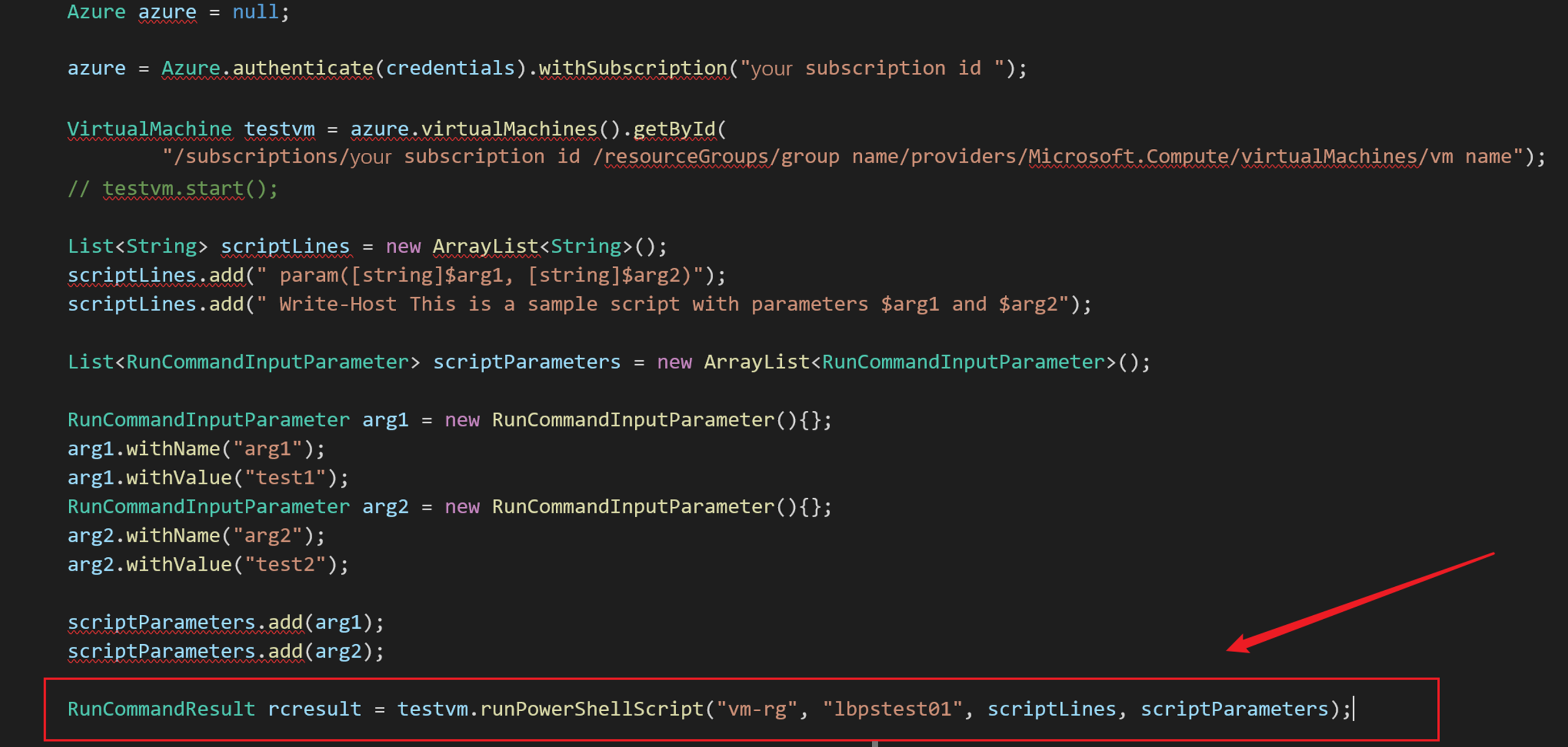
Azure SDK中提供了两个方法来执行PowerShell脚本 (SDK Source Code: https://github.com/Azure/azure-libraries-for-java/blob/master/azure-mgmt-compute/src/main/java/com/microsoft/azure/management/compute/implementation/VirtualMachineImpl.java#L400)
- public RunCommandResult runPowerShellScript(String groupName, String name, List<String> scriptLines, List<RunCommandInputParameter> scriptParameters)
- public Observable<RunCommandResult> runPowerShellScriptAsync(List<String> scriptLines, List<RunCommandInputParameter> scriptParameters)
在使用的时候,需要注意的是参数scriptLines 和 scriptParameters。 下面部分为关键代码,以Java SDK的同步方法runPowerShellScript为例
        Azure azure = null;

        azure = Azure.authenticate(credentials).withSubscription("xxxxxxxx-xxxx-xxxx-xxxx-xxxxxxxxxxxx");

        // 获取虚拟机对象

        VirtualMachine testvm = azure.virtualMachines().getById(

                "/subscriptions/xxxxxxxx-xxxx-xxxx-xxxx-xxxxxxxxxxxx/resourceGroups/vm resource group /providers/Microsoft.Compute/virtualMachines/vm name");

        //testvm.start();

        // 准备PowerShell脚本

        List<String> scriptLines = new ArrayList<String>();

        scriptLines.add(" param([string]$arg1, [string]$arg2 )");

        scriptLines.add(" Write-Host This is a sample script with parameters $arg1 and $arg2");

        scriptLines.add(" Get-Host | Select-Object Version");

        //设置参数arg1 和 arg2

        List<RunCommandInputParameter> scriptParameters = new ArrayList<RunCommandInputParameter>();

        RunCommandInputParameter arg1 = new RunCommandInputParameter(){};

        arg1.withName("arg1");

        arg1.withValue("test1");

        RunCommandInputParameter arg2 = new RunCommandInputParameter(){};

        arg2.withName("arg2");

        arg2.withValue("test2");

        scriptParameters.add(arg1);

        scriptParameters.add(arg2);

        //执行 PowerShell

        RunCommandResult rcresult = testvm.runPowerShellScript("vm-rg", "lbpstest01", scriptLines, scriptParameters);

        System.out.println(rcresult.value().get(0).message());

        System.out.println(rcresult.value().get(1).message());
注意:
- 在获取 azure对象时,需要通过AAD认证。并且当前使用的认证有权限操作所选择的虚拟机(VM)。获取认证信息部分参考博文 “使用Java代码启动Azure VM(虚拟机)”
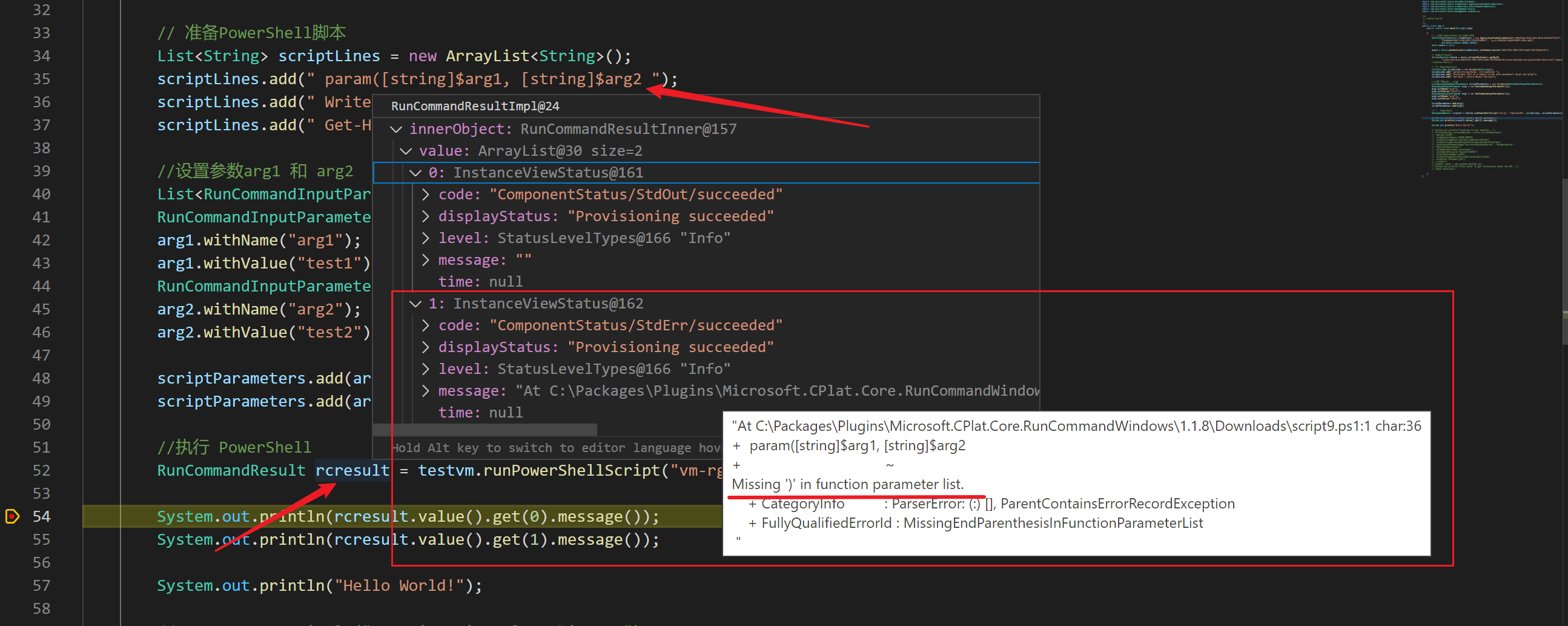
- 如PowerShell脚本中需要传入参数,则必须在脚本中进行声明,如:param([string]$arg1, [string]$arg2 ),然后通过scriptParameters对象传入。
- PowerShell执行成功的结果包含在RunCommandResult对象的Value 1中,如果所输入的PowerShell脚本有语法等操作,则在Value 2中输出详细的异常消息.
在执行PowerShell脚本时,如发现脚本有错误。在RunCommandResult中会返回PowerShell提示的错误信息:
| 错误的PowerShell脚本 |
 |
| RunCommandResult中的提示消息 |
 |
示例完整代码:
package org.example;

import java.util.ArrayList;

import java.util.List;

import com.microsoft.azure.AzureEnvironment;

import com.microsoft.azure.credentials.ApplicationTokenCredentials;

import com.microsoft.azure.credentials.AzureTokenCredentials;

import com.microsoft.azure.management.Azure;

import com.microsoft.azure.management.compute.*;

/**

 * s Hello world!

 *

 */

public class App {

    public static void main(String[] args)

    {

        //使用AAD Application 方式获取 认证

        AzureTokenCredentials credentials = new ApplicationTokenCredentials("application id",

                "tenant id "securt key",

                AzureEnvironment.AZURE_CHINA);

        Azure azure = null;

        azure = Azure.authenticate(credentials).withSubscription("subscription id");

        // 获取虚拟机对象

        VirtualMachine testvm = azure.virtualMachines().getById("resource id");

        //testvm.start();

        // 准备PowerShell脚本

        List<String> scriptLines = new ArrayList<String>();

        scriptLines.add(" param([string]$arg1, [string]$arg2)");

        scriptLines.add(" Write-Host This is a sample script with parameters $arg1 and $arg2");

        scriptLines.add(" Get-Host | Select-Object Version");

        //设置参数arg1 和 arg2

        List<RunCommandInputParameter> scriptParameters = new ArrayList<RunCommandInputParameter>();

        RunCommandInputParameter arg1 = new RunCommandInputParameter(){};

        arg1.withName("arg1");

        arg1.withValue("test1");

        RunCommandInputParameter arg2 = new RunCommandInputParameter(){};

        arg2.withName("arg2");

        arg2.withValue("test2");

        scriptParameters.add(arg1);

        scriptParameters.add(arg2);

        //执行 PowerShell

        RunCommandResult rcresult = testvm.runPowerShellScript("vm-rg", "lbpstest01", scriptLines, scriptParameters);

        System.out.println(rcresult.value().get(0).message());

        System.out.println(rcresult.value().get(1).message());

        System.out.println("Hello World!");

    }

}
在POM.XML中引用的SDK Version:
    <dependency>

      <groupId>com.microsoft.azure</groupId>

      <artifactId>azure</artifactId>

      <version>1.37.1</version>

    </dependency>
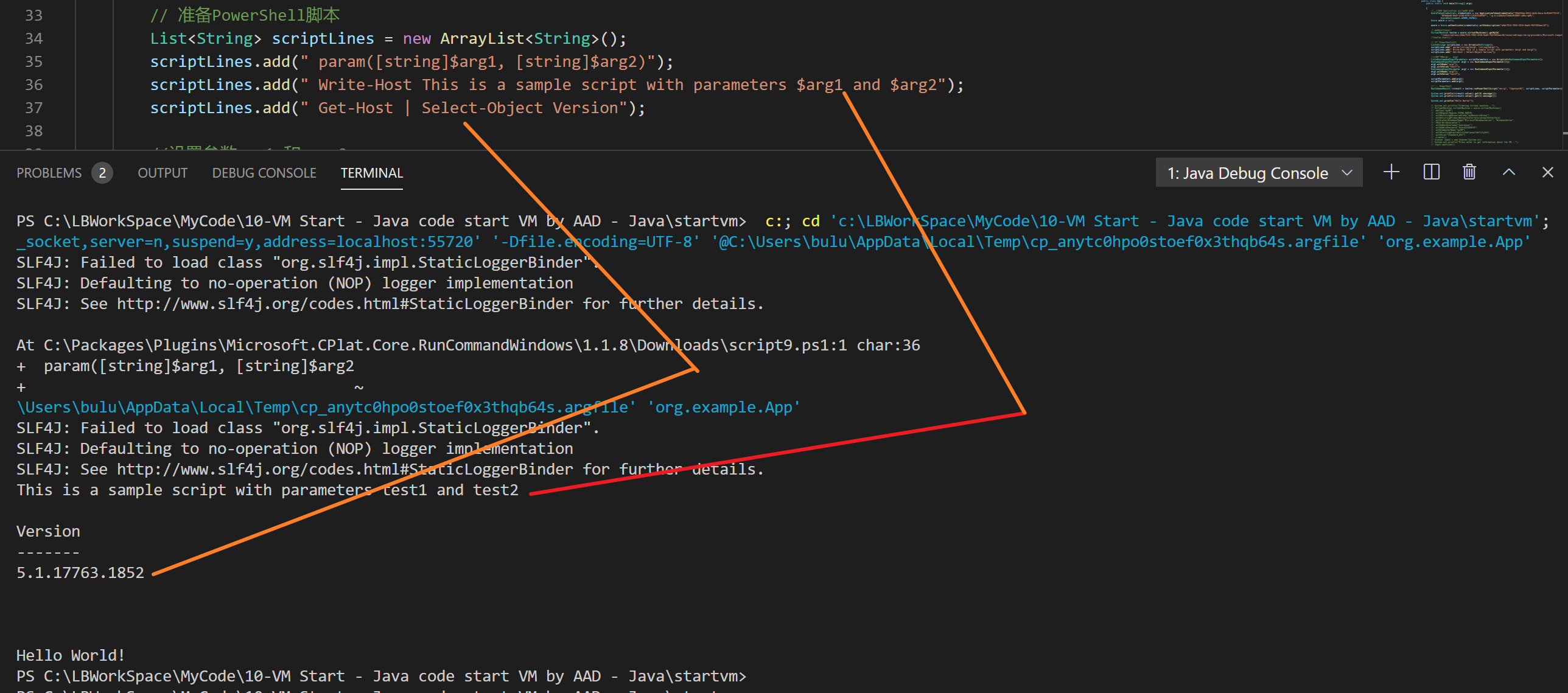
执行结果的正确输出:
参考资料
使用Java代码启动Azure VM(虚拟机):https://www.cnblogs.com/lulight/p/14295089.html
Run PowerShell scripts in your Windows VM by using Run Command: https://docs.microsoft.com/en-us/azure/virtual-machines/windows/run-command#azure-cli
azure-libraries-for-java VirtualMachineImpl.java : https://github.com/Azure/azure-libraries-for-java/blob/master/azure-mgmt-compute/src/main/java/com/microsoft/azure/management/compute/implementation/VirtualMachineImpl.java#L400
【Azure Developer】调用SDK的runPowerShellScript方法,在Azure VM中执行PowerShell脚本示例的更多相关文章
- 在WebBrowser中执行javascript脚本的几种方法整理(execScript/InvokeScript/NavigateScript) 附完整源码
[实例简介] 涵盖了几种常用的 webBrowser执行javascript的方法,详见示例截图以及代码 [实例截图] [核心代码] execScript方式: 1 2 3 4 5 6 7 8 9 1 ...
- 【Azure Developer】VS Code运行Java 版Azure Storage SDK操作Blob (新建Container, 上传Blob文件,下载及清理)
问题描述 是否可以用Java代码来管理Azure blob? 可以.在代码中加入azure-storage-blob依赖.即可使用以下类操作Azure Storage Blob. BlobServic ...
- 【Azure Developer - 密钥保管库 】使用 Python Azure SDK 实现从 Azure Key Vault Certificate 中下载证书(PEM文件)
问题描述 在Azure Key Vault中,我们可以从Azure门户中下载证书PEM文件到本地. 可以通过OpenSSL把PFX文件转换到PEM文件.然后用TXT方式查看内容,操作步骤如下图: Op ...
- Linux中执行shell脚本的4种方法总结
bash shell 脚本的方法有多种,现在作个小结.假设我们编写好的shell脚本的文件名为hello.sh,文件位置在/data/shell目录中并已有执行权限. 方法一:切换到shell脚本所在 ...
- Linux中执行shell脚本的4种方法
bash shell 脚本的方法有多种,现在作个小结.假设我们编写好的shell脚本的文件名为hello.sh,文件位置在/data/shell目录中并已有执行权限. 方法一:切换到shell脚本所在 ...
- 每天一个linux命令(62):sh命令 /Linux中执行shell脚本的4种方法总结
bash shell 脚本的方法有多种,现在作个小结.假设我们编写好的shell脚本的文件名为hello.sh,文件位置在/data/shell目录中并已有执行权限. 方法一:切换到shell脚本所在 ...
- Linux中执行shell脚本命令的4种方法总结
bash shell 脚本的方法有多种,现在作个小结.假设我们编写好的shell脚本的文件名为hello.sh,文件位置在/data/shell目录中并已有执行权限. 方法一:切换到shell脚本所在 ...
- 自动化测试中执行JS脚本方法封装
执行JS脚本方法封装: class JavaScript(Base): def execute_javascript(self, js): """执行 JavaScrip ...
- Linux 中执行Shell 脚本的方式(三种方法)
Shell 脚本的执行方式通常有如下三种: (1)bash script-name 或者 sh script-name:(2)path/script-name或者./script-name:(3)so ...
随机推荐
- Github上优秀的.NET Core开源项目的集合
内容包括:库.工具.框架.模板引擎.身份认证.数据库.ORM框架.图片处理.文本处理.机器学习.日志.代码分析.教程等. Github地址:https://github.com/jasonhua95/ ...
- Mybatis注解开发之@CacheNamespace:实现注解二级缓存的使用
MyBatis二级缓存使用: 官方建议在service使用缓存,但是你也可以直接在mapper层缓存,这里的二级缓存就是直接在Mapper层进行缓存操作 Mybatis的二级缓存实现也十分简单,只要在 ...
- 大数据开发-Spark-Streaming处理数据到mysql
前面一篇讲到streamin读取kafka数据加工处理后写到kafka数据,大数据开发-Spark-开发Streaming处理数据 && 写入Kafka是针对比如推荐领域,实时标签等场 ...
- 聊一聊JVM
JVM 什么是JVM? JVM是java虚拟机的缩写,本质上是一个程序,能识别.class字节码文件(.java文件编译后产生的二进制代码),并且能够解析它的指令,最终调用操作系统上的函数,完成我 ...
- [源码解析] 消息队列 Kombu 之 基本架构
[源码解析] 消息队列 Kombu 之 基本架构 目录 [源码解析] 消息队列 Kombu 之 基本架构 0x00 摘要 0x01 AMQP 1.1 基本概念 1.2 工作过程 0x02 Poll系列 ...
- Linux自学之旅-基础命令(chown和chgrp)
转: Linux自学之旅-基础命令(chown和chgrp) Linux自学之旅-基础命令(改变所有者与所属组的命令) 文章目录 前言 一.chown命令 二.chgrp命令 总结 前言 1.上一节我 ...
- 微信小程序左滑删除
<view class="touch-item {{item.isTouchMove ? 'touch-move-active' : ''}}" data-index=&qu ...
- 简单的ssm练手联手项目
简单的ssm练手联手项目 这是一个简单的ssm整合项目 实现了汽车的品牌,价格,车型的添加 ,修改,删除,所有数据从数据库中拿取 使用到了jsp+mysql+Mybatis+spring+spring ...
- 如何在 ASP.Net Core 中使用 MiniProfiler
web应用程序的性能相信是大家普遍关心的一个问题,也相信大家有很多工具可用来分析应用程序的性能并能够找到其中的瓶颈,MiniProfiler 就是这个领域中的一款产品,它是一款简单的,功能强大的web ...
- CVE-2019-2618 任意文件上传
漏洞描述:CVE-2019-2618漏洞主要是利用了WebLogic组件中的DeploymentService接口,该接口支持向服务器上传任意文件.攻击者突破了OAM(Oracle Access Ma ...