
【Azure Developer】调用SDK的runPowerShellScript方法,在Azure VM中执行PowerShell脚本示例
当需要通过代码的方式执行PowerShell脚本时,可以参考以下的示例。
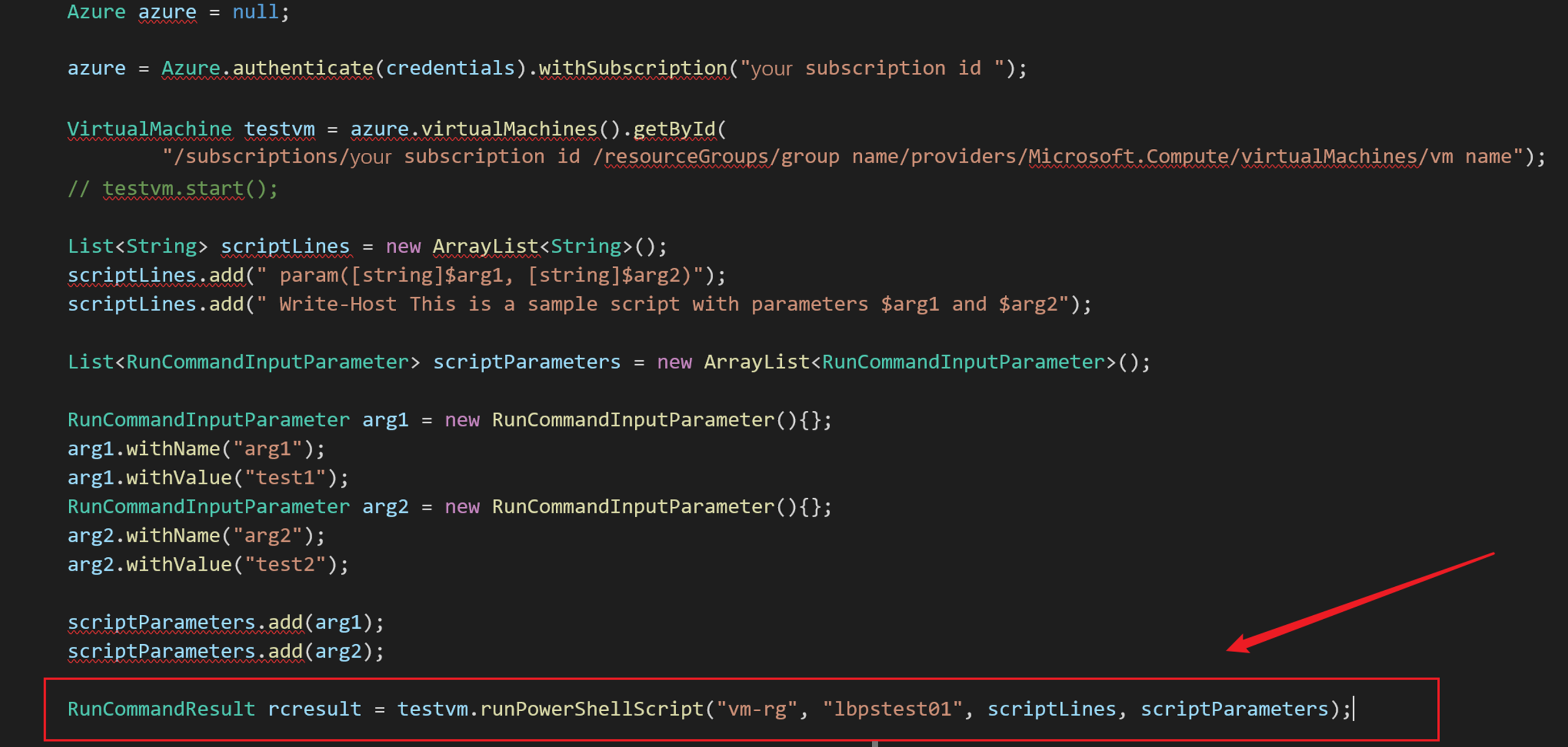
Azure SDK中提供了两个方法来执行PowerShell脚本 (SDK Source Code: https://github.com/Azure/azure-libraries-for-java/blob/master/azure-mgmt-compute/src/main/java/com/microsoft/azure/management/compute/implementation/VirtualMachineImpl.java#L400)
- public RunCommandResult runPowerShellScript(String groupName, String name, List<String> scriptLines, List<RunCommandInputParameter> scriptParameters)
- public Observable<RunCommandResult> runPowerShellScriptAsync(List<String> scriptLines, List<RunCommandInputParameter> scriptParameters)
在使用的时候,需要注意的是参数scriptLines 和 scriptParameters。 下面部分为关键代码,以Java SDK的同步方法runPowerShellScript为例
        Azure azure = null;

        azure = Azure.authenticate(credentials).withSubscription("xxxxxxxx-xxxx-xxxx-xxxx-xxxxxxxxxxxx");

        // 获取虚拟机对象

        VirtualMachine testvm = azure.virtualMachines().getById(

                "/subscriptions/xxxxxxxx-xxxx-xxxx-xxxx-xxxxxxxxxxxx/resourceGroups/vm resource group /providers/Microsoft.Compute/virtualMachines/vm name");

        //testvm.start();

        // 准备PowerShell脚本

        List<String> scriptLines = new ArrayList<String>();

        scriptLines.add(" param([string]$arg1, [string]$arg2 )");

        scriptLines.add(" Write-Host This is a sample script with parameters $arg1 and $arg2");

        scriptLines.add(" Get-Host | Select-Object Version");

        //设置参数arg1 和 arg2

        List<RunCommandInputParameter> scriptParameters = new ArrayList<RunCommandInputParameter>();

        RunCommandInputParameter arg1 = new RunCommandInputParameter(){};

        arg1.withName("arg1");

        arg1.withValue("test1");

        RunCommandInputParameter arg2 = new RunCommandInputParameter(){};

        arg2.withName("arg2");

        arg2.withValue("test2");

        scriptParameters.add(arg1);

        scriptParameters.add(arg2);

        //执行 PowerShell

        RunCommandResult rcresult = testvm.runPowerShellScript("vm-rg", "lbpstest01", scriptLines, scriptParameters);

        System.out.println(rcresult.value().get(0).message());

        System.out.println(rcresult.value().get(1).message());
注意:
- 在获取 azure对象时,需要通过AAD认证。并且当前使用的认证有权限操作所选择的虚拟机(VM)。获取认证信息部分参考博文 “使用Java代码启动Azure VM(虚拟机)”
- 如PowerShell脚本中需要传入参数,则必须在脚本中进行声明,如:param([string]$arg1, [string]$arg2 ),然后通过scriptParameters对象传入。
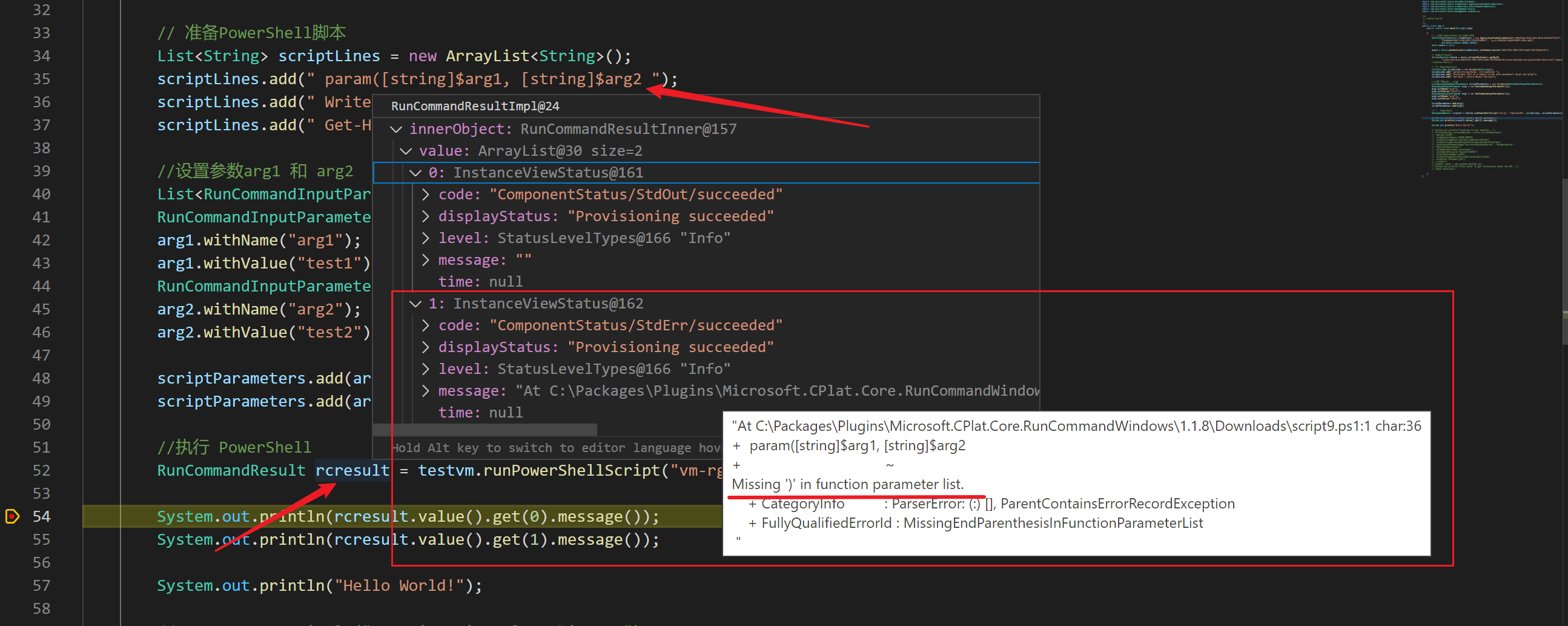
- PowerShell执行成功的结果包含在RunCommandResult对象的Value 1中,如果所输入的PowerShell脚本有语法等操作,则在Value 2中输出详细的异常消息.
在执行PowerShell脚本时,如发现脚本有错误。在RunCommandResult中会返回PowerShell提示的错误信息:
| 错误的PowerShell脚本 |
 |
| RunCommandResult中的提示消息 |
 |
示例完整代码:
package org.example;

import java.util.ArrayList;

import java.util.List;

import com.microsoft.azure.AzureEnvironment;

import com.microsoft.azure.credentials.ApplicationTokenCredentials;

import com.microsoft.azure.credentials.AzureTokenCredentials;

import com.microsoft.azure.management.Azure;

import com.microsoft.azure.management.compute.*;

/**

 * s Hello world!

 *

 */

public class App {

    public static void main(String[] args)

    {

        //使用AAD Application 方式获取 认证

        AzureTokenCredentials credentials = new ApplicationTokenCredentials("application id",

                "tenant id "securt key",

                AzureEnvironment.AZURE_CHINA);

        Azure azure = null;

        azure = Azure.authenticate(credentials).withSubscription("subscription id");

        // 获取虚拟机对象

        VirtualMachine testvm = azure.virtualMachines().getById("resource id");

        //testvm.start();

        // 准备PowerShell脚本

        List<String> scriptLines = new ArrayList<String>();

        scriptLines.add(" param([string]$arg1, [string]$arg2)");

        scriptLines.add(" Write-Host This is a sample script with parameters $arg1 and $arg2");

        scriptLines.add(" Get-Host | Select-Object Version");

        //设置参数arg1 和 arg2

        List<RunCommandInputParameter> scriptParameters = new ArrayList<RunCommandInputParameter>();

        RunCommandInputParameter arg1 = new RunCommandInputParameter(){};

        arg1.withName("arg1");

        arg1.withValue("test1");

        RunCommandInputParameter arg2 = new RunCommandInputParameter(){};

        arg2.withName("arg2");

        arg2.withValue("test2");

        scriptParameters.add(arg1);

        scriptParameters.add(arg2);

        //执行 PowerShell

        RunCommandResult rcresult = testvm.runPowerShellScript("vm-rg", "lbpstest01", scriptLines, scriptParameters);

        System.out.println(rcresult.value().get(0).message());

        System.out.println(rcresult.value().get(1).message());

        System.out.println("Hello World!");

    }

}
在POM.XML中引用的SDK Version:
    <dependency>

      <groupId>com.microsoft.azure</groupId>

      <artifactId>azure</artifactId>

      <version>1.37.1</version>

    </dependency>
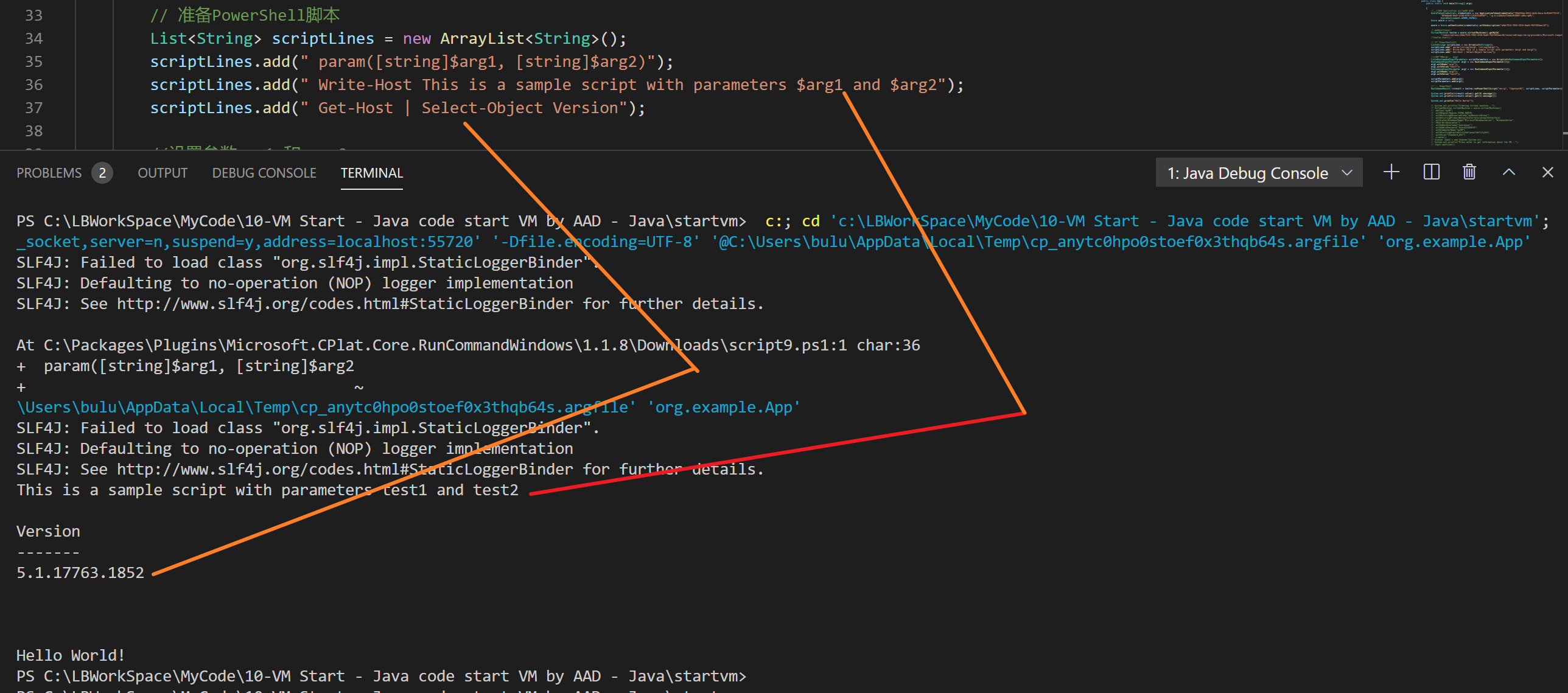
执行结果的正确输出:
参考资料
使用Java代码启动Azure VM(虚拟机):https://www.cnblogs.com/lulight/p/14295089.html
Run PowerShell scripts in your Windows VM by using Run Command: https://docs.microsoft.com/en-us/azure/virtual-machines/windows/run-command#azure-cli
azure-libraries-for-java VirtualMachineImpl.java : https://github.com/Azure/azure-libraries-for-java/blob/master/azure-mgmt-compute/src/main/java/com/microsoft/azure/management/compute/implementation/VirtualMachineImpl.java#L400
【Azure Developer】调用SDK的runPowerShellScript方法,在Azure VM中执行PowerShell脚本示例的更多相关文章
- 在WebBrowser中执行javascript脚本的几种方法整理(execScript/InvokeScript/NavigateScript) 附完整源码
[实例简介] 涵盖了几种常用的 webBrowser执行javascript的方法,详见示例截图以及代码 [实例截图] [核心代码] execScript方式: 1 2 3 4 5 6 7 8 9 1 ...
- 【Azure Developer】VS Code运行Java 版Azure Storage SDK操作Blob (新建Container, 上传Blob文件,下载及清理)
问题描述 是否可以用Java代码来管理Azure blob? 可以.在代码中加入azure-storage-blob依赖.即可使用以下类操作Azure Storage Blob. BlobServic ...
- 【Azure Developer - 密钥保管库 】使用 Python Azure SDK 实现从 Azure Key Vault Certificate 中下载证书(PEM文件)
问题描述 在Azure Key Vault中,我们可以从Azure门户中下载证书PEM文件到本地. 可以通过OpenSSL把PFX文件转换到PEM文件.然后用TXT方式查看内容,操作步骤如下图: Op ...
- Linux中执行shell脚本的4种方法总结
bash shell 脚本的方法有多种,现在作个小结.假设我们编写好的shell脚本的文件名为hello.sh,文件位置在/data/shell目录中并已有执行权限. 方法一:切换到shell脚本所在 ...
- Linux中执行shell脚本的4种方法
bash shell 脚本的方法有多种,现在作个小结.假设我们编写好的shell脚本的文件名为hello.sh,文件位置在/data/shell目录中并已有执行权限. 方法一:切换到shell脚本所在 ...
- 每天一个linux命令(62):sh命令 /Linux中执行shell脚本的4种方法总结
bash shell 脚本的方法有多种,现在作个小结.假设我们编写好的shell脚本的文件名为hello.sh,文件位置在/data/shell目录中并已有执行权限. 方法一:切换到shell脚本所在 ...
- Linux中执行shell脚本命令的4种方法总结
bash shell 脚本的方法有多种,现在作个小结.假设我们编写好的shell脚本的文件名为hello.sh,文件位置在/data/shell目录中并已有执行权限. 方法一:切换到shell脚本所在 ...
- 自动化测试中执行JS脚本方法封装
执行JS脚本方法封装: class JavaScript(Base): def execute_javascript(self, js): """执行 JavaScrip ...
- Linux 中执行Shell 脚本的方式(三种方法)
Shell 脚本的执行方式通常有如下三种: (1)bash script-name 或者 sh script-name:(2)path/script-name或者./script-name:(3)so ...
随机推荐
- (原创)用.NET Core实现微信自动回复工具(上篇)
全文 没有视频的介绍显得尤为空白仓促.所以,如果你不赶时间,看看视频先 → → http://wexin.fuyue.xyz/Resource/Video/wechatTool.mp4 ← ← 功能列 ...
- tep环境变量、fixtures、用例三者之间的关系
tep是一款测试工具,在pytest测试框架基础上集成了第三方包,提供项目脚手架,帮助以写Python代码方式,快速实现自动化项目落地. 在tep项目中,自动化测试用例都是放到tests目录下的,每个 ...
- mysql主从复制,主主复制,级联复制,半同步复制
-------------------------------------------------------------------------------主从复制----------------- ...
- wxWidgets源码分析(5) - 窗口管理
窗口管理 所有的窗口均继承自wxTopLevelWindows: WXDLLIMPEXP_DATA_CORE(wxWindowList) wxTopLevelWindows; wxTopLevelWi ...
- WIFI6 基本知识(一)
什么是WI-FI6(802.11ax) Wi-Fi 6 是下一代 802.11ax 标准的简称.随着 Wi-Fi 标准的演进,WFA 为了便于 Wi-Fi 用户和设备厂商轻松了解其设备连接或支持的 W ...
- const成员函数可以将非const指针作为返回值吗?
先给出一段代码 class A { int *x; public: int *f() const { return x; } }; 成员函数f返回指向私有成员 x 的非常量指针,我认为这会修改成员x ...
- c++指针数组与二维数组的最大区别
下面随笔是关于指针数组说明及与二维数组的最大区别. 指针数组 数组的元素是指针型 例 利用指针数组存放矩阵 1 #include 2 using namespace std; 3 int main() ...
- PAT-1147(Heaps)最大堆和最小堆的判断+构建树
Heaps PAT-1147 #include<iostream> #include<cstring> #include<string> #include<a ...
- HDu1087 Super Jumping! Jumping! Jumping!
题目链接:http://acm.hdu.edu.cn/showproblem.php?pid=1087 分析:简单dp:dp[i] = max (dp[i], dp[j] + a[i]) 1 #inc ...
- 小程序基于Token登录 示意图