
easypoi导出动态表头excel
easypoi导出动态表头excel
1: springBoot项目maven依赖:
 <dependency>

         <groupId>cn.afterturn</groupId>

         <artifactId>easypoi-spring-boot-starter</artifactId>

         <version>4.1.2</version>

  </dependency>
根据自己的poi版本选择
 <dependency>

    <groupId>cn.afterturn</groupId>

    <artifactId>easypoi-spring-boot-starter</artifactId>

    <version>3.3.0</version>

 </dependency>
测试导出(数据组装如下):
@Test

        public void dynaCol() {

        try {

            List<ExcelExportEntity> colList = new ArrayList<ExcelExportEntity>();

            ExcelExportEntity colEntity = new ExcelExportEntity("商品名称", "title");

            colEntity.setNeedMerge(true);

            colList.add(colEntity);

            colEntity = new ExcelExportEntity("供应商", "supplier");

            colEntity.setNeedMerge(true);

            colList.add(colEntity);

            ExcelExportEntity deliColGroup = new ExcelExportEntity("得力", "deli");

            List<ExcelExportEntity> deliColList = new ArrayList<ExcelExportEntity>();

            deliColList.add(new ExcelExportEntity("市场价", "orgPrice"));

            deliColList.add(new ExcelExportEntity("专区价", "salePrice"));

            deliColGroup.setList(deliColList);

            colList.add(deliColGroup);

            ExcelExportEntity jdColGroup = new ExcelExportEntity("京东", "jd");

            List<ExcelExportEntity> jdColList = new ArrayList<ExcelExportEntity>();

            jdColList.add(new ExcelExportEntity("市场价", "orgPrice"));

            jdColList.add(new ExcelExportEntity("专区价", "salePrice"));

            jdColGroup.setList(jdColList);

            colList.add(jdColGroup);

            List<Map<String, Object>> list = new ArrayList<Map<String, Object>>();

            for (int i = 0; i < 10; i++) {

                Map<String, Object> valMap = new HashMap<String, Object>();

                valMap.put("title", "名称." + i);

                valMap.put("supplier", "供应商." + i);

                List<Map<String, Object>> deliDetailList = new ArrayList<Map<String, Object>>();

                for (int j = 0; j < 3; j++) {

                    Map<String, Object> deliValMap = new HashMap<String, Object>();

                    deliValMap.put("orgPrice", "得力.市场价." + j);

                    deliValMap.put("salePrice", "得力.专区价." + j);

                    deliDetailList.add(deliValMap);

                }

                valMap.put("deli", deliDetailList);

                List<Map<String, Object>> jdDetailList = new ArrayList<Map<String, Object>>();

                for (int j = 0; j < 2; j++) {

                    Map<String, Object> jdValMap = new HashMap<String, Object>();

                    jdValMap.put("orgPrice", "京东.市场价." + j);

                    jdValMap.put("salePrice", "京东.专区价." + j);

                    jdDetailList.add(jdValMap);

                }

                valMap.put("jd", jdDetailList);

                list.add(valMap);

            }

            Workbook workbook = ExcelExportUtil.exportExcel(new ExportParams("价格分析表", "数据"), colList,

                    list);

            FileOutputStream fos = new FileOutputStream("D:/价格分析表.tt.xls");

            workbook.write(fos);

            fos.close();

        } catch (FileNotFoundException e) {

            e.printStackTrace();

        } catch (IOException e) {

            e.printStackTrace();

        }

    }
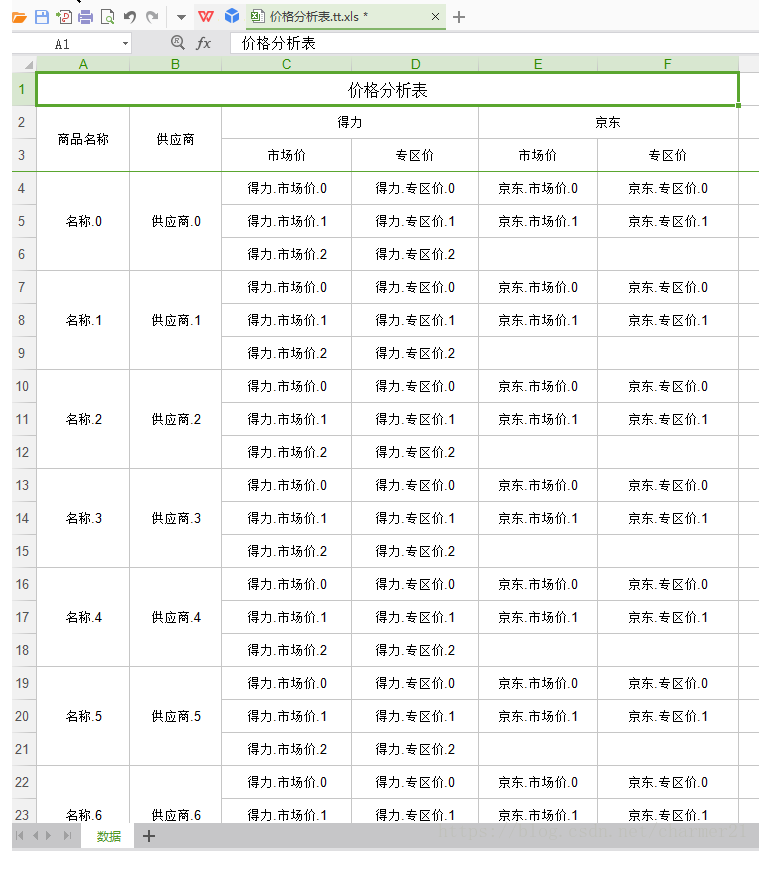
导出结果图:
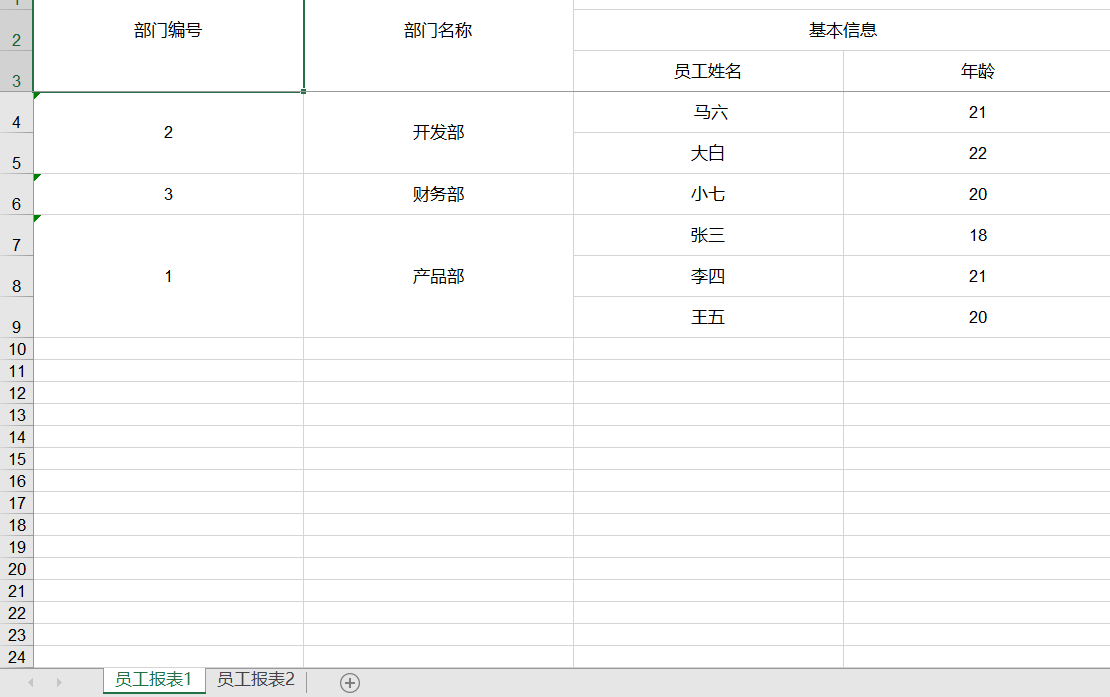
多sheet导出(数据组装)
public String export(){

        Workbook workBook = null;

        try {

            List<DeptUtil> exportList = exportService.exportList();

            System.err.println(JSONArray.toJSONString(exportList));

            // 创建参数对象(用来设定excel得sheet得内容等信息)

            ExportParams deptExportParams = new ExportParams();

            // 设置sheet得名称

            deptExportParams.setSheetName("员工报表1");

            // 创建sheet1使用得map

            Map<String, Object> deptExportMap = new HashMap<>();

            // title的参数为ExportParams类型,目前仅仅在ExportParams中设置了sheetName

            deptExportMap.put("title", deptExportParams);

            // 模版导出对应得实体类型

            deptExportMap.put("entity", DeptUtil.class);

            // sheet中要填充得数据

            deptExportMap.put("data", exportList);

            ExportParams empExportParams = new ExportParams();

            empExportParams.setSheetName("员工报表2");

            // 创建sheet2使用得map

            Map<String, Object> empExportMap = new HashMap<>();

            empExportMap.put("title", empExportParams);

            empExportMap.put("entity", DeptUtil.class);

            empExportMap.put("data", exportList);

            // 将sheet1、sheet2、sheet3使用得map进行包装

            List<Map<String, Object>> sheetsList = new ArrayList<>();

            sheetsList.add(deptExportMap);

            sheetsList.add(empExportMap);

            // 执行方法

            workBook = ExcelExportUtil.exportExcel(sheetsList, ExcelType.HSSF);

            fileName = URLEncoder.encode("员工报表导出", "UTF-8");

            ByteArrayOutputStream outputStream = new ByteArrayOutputStream();

            workBook.write(outputStream);

            outputStream.flush();

            byte[] byteArray = outputStream.toByteArray();

            excelStream = new ByteArrayInputStream(byteArray,0,byteArray.length);

            outputStream.close();

        }catch (Exception e){

            e.printStackTrace();

        }finally {

            if(workBook != null) {

                try {

                    workBook.close();

                } catch (IOException e) {

                    e.printStackTrace();

                }

            }

        }

        return "success";

    }
什么场景该用哪个方法?
- 导出

    1.正规excel导出 (格式简单,数据量可以,5W以内吧)

        注解方式:  ExcelExportUtil.exportExcel(ExportParams entity, Class<?> pojoClass,Collection<?> dataSet)

    2.不定多少列,但是格式依然简单数据库不大

        自定义方式: ExcelExportUtil.exportExcel(ExportParams entity, List<ExcelExportEntity> entityList,Collection<?> dataSet)

    3.数据量大超过5W,还在100W以内

        注解方式 ExcelExportUtil.exportBigExcel(ExportParams entity, Class<?> pojoClass,IExcelExportServer server, Object queryParams)

        自定义方式: ExcelExportUtil.exportBigExcel(ExportParams entity, List<ExcelExportEntity> excelParams,IExcelExportServer server, Object queryParams)

    4.样式复杂,数据量尽量别大

        模板导出 ExcelExportUtil.exportExcel(TemplateExportParams params, Map<String, Object> map)

    5.一次导出多个风格不一致的sheet

        模板导出 ExcelExportUtil.exportExcel(Map<Integer, Map<String, Object>> map,TemplateExportParams params)

    6.一个模板但是要导出非常多份

        模板导出 ExcelExportUtil.exportExcelClone(Map<Integer, List<Map<String, Object>>> map,TemplateExportParams params)

    7.模板无法满足你的自定义,试试html

        自己构造html,然后我给你转成excel  ExcelXorHtmlUtil.htmlToExcel(String html, ExcelType type)

    8.数据量过百万级了.放弃excel吧,csv导出

        注解方式: CsvExportUtil.exportCsv(CsvExportParams params, Class<?> pojoClass, OutputStream outputStream)

        自定义方式: CsvExportUtil.exportCsv(CsvExportParams params, List<ExcelExportEntity> entityList, OutputStream outputStream)

    9.word导出

        模板导出: WordExportUtil.exportWord07(String url, Map<String, Object> map)

    10.PDF导出

        模板导出: TODO

- 导入

    如果想提高性能 ImportParams 的concurrentTask 可以帮助并发导入,仅单行,最小1000

    excel有单个的那种特殊读取,readSingleCell 参数可以支持

    1. 不需要检验,数据量不大(5W以内)

        注解或者MAP: ExcelImportUtil.importExcel(File file, Class<?> pojoClass, ImportParams params)

    2. 需要导入,数据量不大

        注解或者MAP: ExcelImportUtil.importExcelMore(InputStream inputstream, Class<?> pojoClass, ImportParams params)

    3. 数据量大了,或者你有特别多的导入操作,内存比较少,仅支持单行

       SAX方式  ExcelImportUtil.importExcelBySax(InputStream inputstream, Class<?> pojoClass, ImportParams params, IReadHandler handler)

    4. 数据量超过EXCEL限制,CSV读取

        小数据量: CsvImportUtil.importCsv(InputStream inputstream, Class<?> pojoClass,CsvImportParams params)

        大数据量: CsvImportUtil.importCsv(InputStream inputstream, Class<?> pojoClass,CsvImportParams params, IReadHandler readHandler)
参考:
使用教程:
https://opensource.afterturn.cn/doc/easypoi.html#4
http://doc.wupaas.com/docs/easypoi/easypoi-1c0u4mo8p4ro8
链接:https://pan.baidu.com/s/1gBHBI4Lx-roEXrVwvzaBxQ
提取码:dbht
测试项目:
http://git.oschina.net/lemur/easypoi-test
.......
easypoi导出动态表头excel的更多相关文章
- 使用aspose.cell动态导出多表头 EXCEL
效果图: 前台调用: using System; using System.Collections.Generic; using System.Linq; using System.Web; usin ...
- JAVA POI导出EXCEL 动态表头、多级表头、动态数据
导出Excel文件是业务中经常遇到的需求,以下是经常遇到的一些问题: 1,导出中文文件名乱码 String filename = "sheet1";response.setChar ...
- EasyPoi导出Excel
这几天一直在忙工作中的事情,在工作中有一个问题,可能是因为刚开始接触这个EasyPoi,对其也没有太多的理解,在项目中就使用了,有一个需求,是要导出项目中所有的表格,今天就对这个需求进行分析和实现吧; ...
- C# 使用Epplus导出Excel [2]:导出动态列数据
C# 使用Epplus导出Excel [1]:导出固定列数据 C# 使用Epplus导出Excel [2]:导出动态列数据 C# 使用Epplus导出Excel [3]:合并列连续相同数据 C# 使用 ...
- SpringBoot图文教程10—模板导出|百万数据Excel导出|图片导出「easypoi」
有天上飞的概念,就要有落地的实现 概念十遍不如代码一遍,朋友,希望你把文中所有的代码案例都敲一遍 先赞后看,养成习惯 SpringBoot 图文教程系列文章目录 SpringBoot图文教程1「概念+ ...
- c# 高效率导出多维表头excel
[DllImport("User32.dll", CharSet = CharSet.Auto)] public static extern int GetWindowThread ...
- 导出多级表头表格到Excel
方法一:用NPOI定义多级表头导出: 引用头: using NPOI.DDF; using NPOI.OpenXmlFormats.Wordprocessing; using NPOI.HSSF.Us ...
- 关于EasyPoi导出Excel
如果你觉得Easypoi不好用,喜欢用传统的poi,可以参考我的这篇博客:Springmvc导出Excel(maven) 当然了,万变不离其宗.Easypoi的底层原理还是poi.正如MyBatis ...
- 使用easypoi导出excel
EasyPOI是在jeecg的poi模块基础上,继续开发独立出来的,可以说是2.0版本,EasyPoi封装的目的和jeecg一致,争取让大家write less do more ,在这个思路上easy ...
随机推荐
- 在自己的项目中使用PCL
在自己的项目中使用PCL项目设置:1.创建cpp文件,如pcd_write.cpp,文件内容如下例: #include <iostream>#include <pcl/io/pcd_ ...
- 定要过python二级 选择第3套
1 2. 3. 4. 5. 6. 7. 8. 9. 10. 11. 12. . 13. 14. 15. 16. 17. (1)说明了一个问题 所谓的方向是从左到右还是从右到左 是看的是步长 步长的 ...
- P3964-[TJOI2013]松鼠聚会【计算几何】
正题 题目链接:https://www.luogu.com.cn/problem/P3964 题目大意 给出\(n\)个点,求一个点使得它到所有点的切比雪夫距离和最小. \(0\leq n\leq 1 ...
- P4590-[TJOI2018]游园会【dp套dp】
正题 题目链接:https://www.luogu.com.cn/problem/P4590 题目大意 给出一个长度为\(m\)的字符串\(s\). 对于每个\(k\in[0,m]\)求有多少个长度为 ...
- 常见JS
1.获取当前月份第一天 var date = new Date(); var year = date.getFullYear(); var month = date.getMonth() + 1; v ...
- 【C++ Primer Plus】编程练习答案——第11章 (待更新)
最近开学,事情较多,过两天更新...
- 【C++ Primer Plus】编程练习答案——第8章
1 void ch8_1_print(const std::string & str, int n = 0 ) { 2 using namespace std; 3 static int fl ...
- 国庆总结:echarts自定义颜色主题,保证你看的明明白白
为什么需要使用颜色主题 随着用户审美越来越高,不再是过去那样只注重功能. 所以对界面的颜色样式都具有一定的审美要求 此时颜色是否好看就非常重要了 因为人都是视觉动物 对界面的第一印象肯定都是颜色. 如 ...
- spring 创建Bean最全实现方法
创建bean方式,spring创建bean的方式包含:自动注入方式和人工注入方式.分别为:1)xml 配置化方式 2)@bean注解注入方式3)@Component方式 4)接口注入方式 5)imp ...
- 《手把手教你》系列技巧篇(二十九)-java+ selenium自动化测试- Actions的相关操作上篇(详解教程)
1.简介 有些测试场景或者事件,Selenium根本就没有直接提供方法去操作,而且也不可能把各种测试场景都全面覆盖提供方法去操作.比如:就像鼠标悬停,一般测试场景鼠标悬停分两种常见,一种是鼠标悬停在某 ...