
【pytest官方文档】解读fixtures - 11. fixture的执行顺序,3要素详解(长文预警)
当pytest要执行一个测试函数,这个测试函数还请求了fixture函数,那么这时候pytest就要先确定fixture的执行顺序了。
影响因素有三:
scope,就是fixture函数的作用范围,比如scope='class'。dependencies,可能会存在fixture请求了别的fixture,所以产生了依赖关系,也要考虑进去。autouse,如果autouse=True,那么在作用范围内,这个fixture是最先调用的。
所以,像fixture函数或测试函数的名称、定义的位置、定义的顺序以及请求fixture的顺序,除了巧合之外,对执行顺序没有任何影响。
对于这些巧合情况,虽然pytest会尽力保持每次运行的顺序都一样,但是也难免会有意外。所以,如果我们想控制好顺序,最安全的方法还是
依赖上述三点,并且要弄清依赖关系。
一、使用范围更大的fixture函数优先执行
更大范围(比如session)的fixture会在小范围(比如函数或类)之前执行。
代码示例:
import pytest

@pytest.fixture(scope="session")

def order():

    return []

@pytest.fixture

def func(order):

    order.append("function")

@pytest.fixture(scope="class")

def cls(order):

    order.append("class")

@pytest.fixture(scope="module")

def mod(order):

    order.append("module")

@pytest.fixture(scope="package")

def pack(order):

    order.append("package")

@pytest.fixture(scope="session")

def sess(order):

    order.append("session")

class TestClass:

    def test_order(self, func, cls, mod, pack, sess, order):

        assert order == ["session", "package", "module", "class", "function"]
运行结果:
test_module1.py .                                                        [100%]

============================== 1 passed in 0.01s ==============================

Process finished with exit code 0
既然运行通过,那么这些fixture函数的运行顺序就是列表里的顺序["session", "package", "module", "class", "function"]。
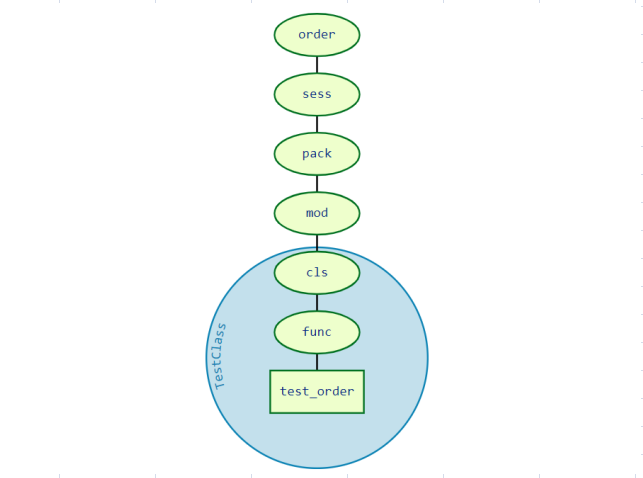
二、相同顺序的fixture基于依赖项执行
当一个fixture函数请另一个fixture函数,另一个会先执行。
比如,fixturea请求fixtureb,需要用b返回的结果。那么b先执行,因为a依赖于b,必须得让b先执行,否则a就没法干活。
另外,即使a不需要用b返回的结果,只要a需要确保在b之后执行,a仍然可以通过请求b来控制顺序。
1.请求依赖呈线性情况下
代码示例:
import pytest

@pytest.fixture

def order():

    return []

@pytest.fixture

def a(order):

    order.append("a")

@pytest.fixture

def b(a, order):

    order.append("b")

@pytest.fixture

def c(a, b, order):

    order.append("c")

@pytest.fixture

def d(c, b, order):

    order.append("d")

@pytest.fixture

def e(d, b, order):

    order.append("e")

@pytest.fixture

def f(e, order):

    order.append("f")

@pytest.fixture

def g(f, c, order):

    order.append("g")

def test_order(g, order):

    assert order == ["a", "b", "c", "d", "e", "f", "g"]
官方给出了上述代码的依赖关系图(左)和执行顺序图(右)。
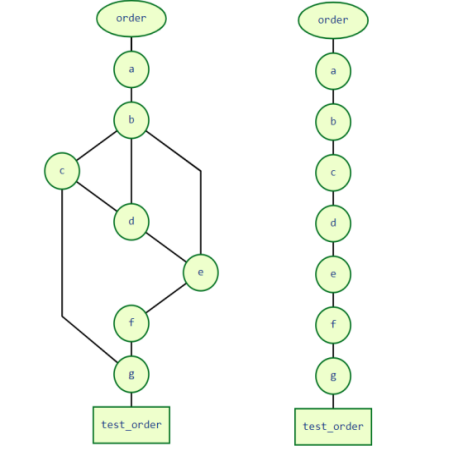
不要方,只要从测试函数test_order开始,一层一层跟着fixture的依赖一层一层梳理下去就对上了。
到这里,其实也就能更进一步理解了,如果想控制好执行顺序,就要给这些请求依赖提供足够的信息。
这样pytest能够找出一个清晰的线性依赖链,最终给调用它们的测试函数一个确定的操作顺序。
2.请求依赖不呈线性的情况,会影响操作执行
此外,如果存在歧义,出现多种执行顺序,那pytest可以在多种顺序里任选。
基于上述的请求依赖关系图(左),假设d没有请求c,那么此时的依赖关系就变成了右图所示:
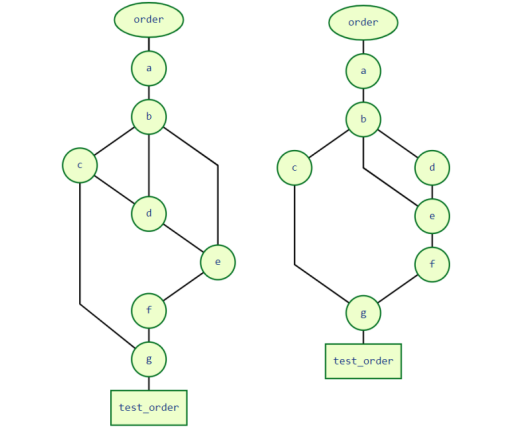
可以看出:
- c此时只被一个g请求。
- g既请求了c,还请求了f。
因为c现在除了一个g,其他没有别的依赖关系,所以现在pytest不知道c应该是在f,e之前执行,还是应该在d之后执行。
这时候,pytest就会认定,c可以在g和b之间的任何位置点执行。也就是说,c必须在b之后和g之前执行。
如果这种情况出现,那么你预期的测试行为或者测试结果可能会受到影响。可以修改下代码,让d中没有请求c,并且我加了print,方便
看fixture的运行顺序。
运行下代码:
test_module1.py

运行order

运行a

运行b

运行d

运行e

运行f

运行c

运行g

F

demo\test_module1.py:51 (test_order)

['a', 'b', 'd...'f', 'c', ...] != ['a', 'b', 'c...'e', 'f', ...]

Expected :['a', 'b', 'c...'e', 'f', ...]

Actual   :['a', 'b', 'd...'f', 'c', ...]
会看到测试失败了,因为fixture的执行顺序变了,导致添加到order列表的元素顺序也变了,实际与预期结果不相等,测试失败。
不过可以从打印出的fixture运行顺序看出,c确实在b之后和g之前运行了。
官方描述这些想要表达的什么呢?
我觉得应该是这个,如果你希望精确控制执行顺序,避免顺序不对而造成执行操作或测试结果有误,那么就要给足请求依赖,好让pytest
线性制定执行顺序。
三、Autouse的fixtures,会优先执行
1. autouse的妙用
如果请求了一个autouse=True的fixture函数,那么这个autouse的fixture函数会比请求的其他fixture都要先执行。
另外,如果fixture a是autouse的,而fixture b不是。而fixture a又请求fixture b,那么fixture b也将变成autouse的fixture ,但仅适用于请求了a的测试。
其实这点也很好理解,既然a是要先执行的,a又请求了b,说明a依赖于b,那么b自然也是要先于a执行的。
在上一个例子中,由于d没有去请求c,导致依赖关系模糊,最后影响了执行结果。
但是如果c是autouse,那么b和a也就自动变成了autouse,因为c依赖于b和a。所以,这时候,c,b,a都会在其他非autouse的fixture函数之前执行。
修改下代码,在c上加上autouse:
import pytest

@pytest.fixture

def order():

    print("\n运行order")

    return []

@pytest.fixture

def a(order):

    print("运行a")

    order.append("a")

@pytest.fixture

def b(a, order):

    print("运行b")

    order.append("b")

@pytest.fixture(autouse=True)

def c(a, b, order):

    print("运行c")

    order.append("c")

@pytest.fixture

def d(b, order):

    print("运行d")

    order.append("d")

@pytest.fixture

def e(d, b, order):

    print("运行e")

    order.append("e")

@pytest.fixture

def f(e, order):

    print("运行f")

    order.append("f")

@pytest.fixture

def g(f, c, order):

    print("运行g")

    order.append("g")

def test_order(g, order):

    assert order == ["a", "b", "c", "d", "e", "f", "g"]
运行结果:
test_module1.py

运行order

运行a

运行b

运行c

运行d

运行e

运行f

运行g

.                                                        [100%]

============================== 1 passed in 0.01s ==============================

Process finished with exit code 0
执行顺序正常了,从a到g。
它们的依赖关系图变成了这样:
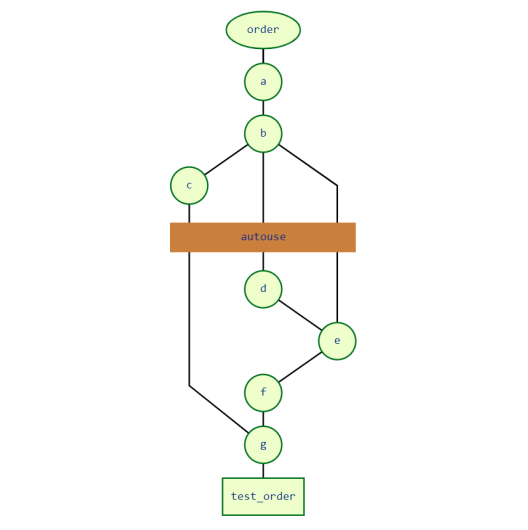
因为c变成了autouse,所以在图里处于d之上的位置,这时候pytest又可以将执行顺序线性化了。而且,c也让b和a都变成了autouse的fixture。
2. autouse的慎用
在使用autouse的时候也要小心。
因为一个测试函数即使没有直接请求一个autouse fixture,但是只要这个测试函数在这个autouse的作用范围内,那么这个autouse就会自动执行。
看代码示例:
import pytest

@pytest.fixture(scope="class")

def order():

    return []

@pytest.fixture(scope="class", autouse=True)

def c1(order):

    order.append("c1")

@pytest.fixture(scope="class")

def c2(order):

    order.append("c2")

@pytest.fixture(scope="class")

def c3(order, c1):

    order.append("c3")

class TestClassWithC1Request:

    def test_order(self, order, c1, c3):

        assert order == ["c1", "c3"]

class TestClassWithoutC1Request:

    def test_order(self, order, c2):

        assert order == ["c1", "c2"]
执行代码,运行case是通过的,说明order == ["c1", "c2"]。
可以看到,虽然类TestClassWithoutC1Request(官方写的是TestClassWithC1Request,应该是错了)没有请求c1,但是c1还是在这个类里运行了。
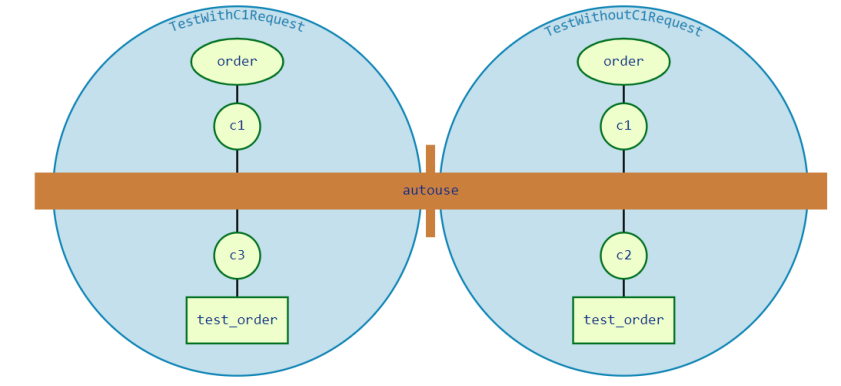
但是,仅仅是一个autouse的fixture请求了一个非autouse的话,其实这并不能说这个非autouse的fixture也成为了一个可以应用到上下文的fixture函数。
仅仅是适用于请求它的那个autouse fixture的作用范围。
例如,看下面代码:
import pytest

@pytest.fixture

def order():

    return []

@pytest.fixture

def c1(order):

    order.append("c1")

@pytest.fixture

def c2(order):

    order.append("c2")

class TestClassWithAutouse:

    @pytest.fixture(autouse=True)

    def c3(self, order, c2):

        order.append("c3")

    def test_req(self, order, c1):

        assert order == ["c2", "c3", "c1"]

    def test_no_req(self, order):

        assert order == ["c2", "c3"]

class TestClassWithoutAutouse:

    def test_req(self, order, c1):

        assert order == ["c1"]

    def test_no_req(self, order):

        assert order == []

if __name__ == '__main__':

    pytest.main(['-s', 'test_module2.py'])
运行都是可以通过的,这里的依赖关系图是这样的。
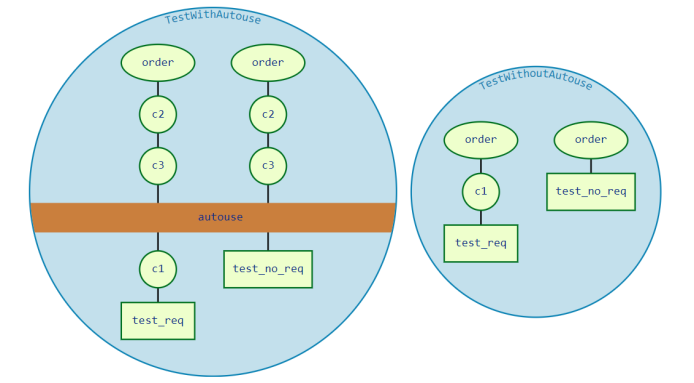
在类TestClassWithAutouse中:
test_req和test_no_req是2个测试方法。c3是autouse,并且请求了c2,所以c2也成了autouse。虽然2个测试并没去请求c2和c3,但是都执行了,而且在c1之前执行。
在这里,c3请求了还order,同样地,在c3的作用域内,order也扮演了autouse的存在。但是在TestClassWithoutAutouse,order就不是
autouse了,所以类TestClassWithoutAutouse中的test_no_req可以运行成功,因为order=[]。
【pytest官方文档】解读fixtures - 11. fixture的执行顺序,3要素详解(长文预警)的更多相关文章
- 【pytest官方文档】解读fixtures - 3. fixtures调用别的fixtures、以及fixture的复用性
pytest最大的优点之一就是它非常灵活. 它可以将复杂的测试需求简化为更简单和有组织的函数,然后这些函数可以根据自身的需求去依赖别的函数. fixtures可以调用别的fixtures正是灵活性的体 ...
- 【pytest官方文档】解读fixtures - 1.什么是fixtures
在深入了解fixture之前,让我们先看看什么是测试. 一.测试的构成 其实说白了,测试就是在特定的环境.特定的场景下.执行特定的行为,然后确认结果与期望的是否一致. 就拿最常见的登录来说,完成一次正 ...
- 【pytest官方文档】解读fixtures - 2. fixtures的调用方式
既然fixtures是给执行测试做准备工作的,那么pytest如何知道哪些测试函数 或者 fixtures要用到哪一个fixtures呢? 说白了,就是fixtures的调用. 一.测试函数声明传参请 ...
- Cuda 9.2 CuDnn7.0 官方文档解读
目录 Cuda 9.2 CuDnn7.0 官方文档解读 准备工作(下载) 显卡驱动重装 CUDA安装 系统要求 处理之前安装的cuda文件 下载的deb安装过程 下载的runfile的安装过程 安装完 ...
- 【pytest官方文档】解读fixtures - 10. fixture有效性、跨文件共享fixtures
一.fixture有效性 fixture有效性,说白了就是fixture函数只有在它定义的使用范围内,才可以被请求到.比如,在类里面定义了一个fixture, 那么就只能是这个类中的测试函数才可以请求 ...
- 【pytest官方文档】解读fixtures - 7. Teardown处理,yield和addfinalizer
当我们运行测试函数时,我们希望确保测试函数在运行结束后,可以自己清理掉对环境的影响. 这样的话,它们就不会干扰任何其他的测试函数,更不会日积月累的留下越来越多的测试数据. 用过unittest的朋友相 ...
- 【pytest官方文档】解读fixtures - 8. yield和addfinalizer的区别(填坑)
在上一章中,文末留下了一个坑待填补,疑问是这样的: 目前从官方文档中看到的是 We have to be careful though, because pytest will run that fi ...
- 【pytest官方文档】解读- 插件开发之hooks 函数(钩子)
上一节讲到如何安装和使用第三方插件,用法很简单.接下来解读下如何自己开发pytest插件. 但是,由于一个插件包含一个或多个钩子函数开发而来,所以在具体开发插件之前还需要先学习hooks函数. 一.什 ...
- 【pytest官方文档】解读- 开发可pip安装的第三方插件
在上一篇的 hooks 函数分享中,开发了一个本地插件示例,其实已经算是在编写插件了.今天继续跟着官方文档学习更多知识点. 一个插件包含一个或多个钩子函数,pytest 正是通过调用各种钩子组成的插件 ...
随机推荐
- 怎么去掉右下角的thinkphp的图标
关闭thinkphp右下角的trace可以试试以下步骤: 1.在入口文件index.php 加入 define("APP_DEBUG", false); 2.在config.php ...
- eclipse定制工具栏,修改工具栏
目前eclipse定制工具栏的入口就是window- customize perspective,在弹出的窗口中选择Tool Bar Visibility,选择要在工具栏中显示的快捷图标.注:在Too ...
- 设置ViewPager 自动滑动时间,速度 方便展示动画
ViewPager.setCurrentItem(position),即使已设置动画,但是没有动画效果 原因:因为ViewPager滑动之前的时间间隔太短,可以通过反射,去修改ViewPager自动滑 ...
- 解决vue 绑定事件会覆盖默认参数的问题
解决vue 绑定事件会覆盖默认参数的问题 在使用一些ui框架的时候,某些组件的框架中的事件所规定的参数不能满足实际开发的需要,但是直接传入参数会把默认的参数覆盖掉 解决方法:将参数放入箭头函数中,传递 ...
- POJ-2349(kruskal算法+最小生成树中最大边的长度)
Arctic POJ-2349 这题是最小生成树的变形题目.题目的意思是已经有s个卫星频道,这几个卫星频道可以构成一部分的网络,而且不用费用,剩下的需要靠d的卫星接收器.题目要求的就是最小生成树中,最 ...
- POJ-2502(Dijikstra应用+最短路)
Subway POJ-2502 这里除了直接相连的地铁站,其他图上所有的点都要连线,这里是走路的速度. 记住最后的结果需要四舍五入,否则出错. #include<iostream> #in ...
- .net 开源模板引擎jntemplate 教程:基础篇之语法
一.基本概念 上一篇我们简单的介绍了jntemplate并写了一个hello world(如果没有看过的,点击查看),本文将继续介绍jntemplate的模板语法. 我们在讲解语法前,首先要了解一下标 ...
- 翻译:《实用的Python编程》03_06_Design_discussion
目录 | 上一节 (3.5 主模块) | 下一节 (4 类) 3.6 设计讨论 本节,我们重新考虑之前所做的设计决策. 文件名与可迭代对象 考虑以下两个返回相同输出的程序. # Provide a f ...
- 漏洞复现-Flask-SSTI服务端模板注入
0x00 实验环境 攻击机:Win 10 0x01 影响版本 Python利用的一些静态框架 0x02 漏洞复现 (1)实验环境:docker运行的vulhub漏洞环境 首先,可直接访问到页面的显 ...
- 理解函数式编程中的函数组合--Monoids(二)
使用函数式语言来建立领域模型--类型组合 理解函数式编程语言中的组合--前言(一) 理解函数式编程中的函数组合--Monoids(二) 继上篇文章引出<范畴论>之后,我准备通过几篇文章,来 ...