
C# .NET Core 3.1 中 AssemblyLoadContext 的基本使用
C# .NET Core 3.1 中 AssemblyLoadContext 的基本使用
前言
之前使用 AppDomain 写过一个动态加载和释放程序的案例,基本实现了自己“兔死狗烹”,不留痕迹的设想。无奈在最新的 .NET Core 3.1 中,已经不支持创建新的 AppDomain 了(据说是因为跨平台实现太重了),改为使用 AssemblyLoadContext 了。不过总体使用下来感觉比原来的 AppDomain 要直观。
不过这一路查找资料,感觉 .NET Core 发展到 3.1 的过程还是经历了不少的。比如 2.2 的 API 与 3.1 就不一样(自己的体会,换了个版本就提示函数参数错误), preview版中 AssemblyLoadContext 卸载后无法删除库文件,但是版本升级后就好了(github 上的一篇讨论)
本文主要是关于 AssemblyLoadContext 的基本使用,加载和释放类库。
基本使用
程序的基本功能是:动态加载 Magick 的所需库,并调用其压缩图片的函数压缩给定图片。(歪个楼,Magick 和 Android 的 Magisk 这两个看起来太像了)
using System;

using System.IO;

using System.Reflection;

using System.Runtime.CompilerServices;

using System.Runtime.Loader;

namespace AssemblyLoadContextTest

{

    class Program

    {

        static void Main(string[] args)

        {

            WeakReference weakReference;

            Compress(out weakReference);

            for (int i = 0; weakReference.IsAlive && (i < 10); i++)

            {

                GC.Collect();

                GC.WaitForPendingFinalizers();

            }

            Console.WriteLine($"卸载成功: {!weakReference.IsAlive}");

        }

        [MethodImpl(MethodImplOptions.NoInlining)]

        public static void Compress(out WeakReference weakReference)

        {

            AssemblyLoadContext alc = new AssemblyLoadContext("CompressLibrary", true);	// 新建一个 AssemblyLoadContext 对象

            weakReference = new WeakReference(alc);

            Assembly assembly0 = alc.LoadFromAssemblyPath(Path.Combine(AppDomain.CurrentDomain.BaseDirectory, "Magick.NET.Core.dll"));

            Assembly assembly1 = alc.LoadFromAssemblyPath(Path.Combine(AppDomain.CurrentDomain.BaseDirectory, "Magick.NET-Q16-AnyCPU.dll"));

            string filePath = Path.Combine(AppDomain.CurrentDomain.BaseDirectory, "image_to_compress.jpg");

            Console.WriteLine("压缩前大小:" + new FileInfo(filePath).Length);

            var magickImageType = assembly1.GetType("ImageMagick.MagickImage"); // 已知该类定义在 assembly1 中

            var magickImageIns = Activator.CreateInstance(magickImageType, new object[] { filePath });  // magickImageIns = new ImageMagick.MagickImage(filePath)

            var qualityProperty = magickImageType.GetProperty("Quality");

            qualityProperty.SetValue(magickImageIns, 60);   // magickImageIns.Quality = 60

            var writeMethod = magickImageType.GetMethod("Write", new Type[] { typeof(string) });

            writeMethod.Invoke(magickImageIns, new object[] { filePath }); // magickImageIns.Write(filePath)

            Console.WriteLine("压缩后大小:" + new FileInfo(filePath).Length);

            var disposeMethod = magickImageType.GetMethod("Dispose");

            disposeMethod.Invoke(magickImageIns, null); // magickImageIns.Dispose()

            //magickImageIns = null;

            alc.Unload();

        }

    }

}

加载不用多说,创建实例加载即可;卸载时需要注意的是一下几点:
- 使用 AssemblyLoaderContext 加载和卸载的代码必须要单独放在一个方法,不可以写在 Main 方法中,否则加载的模块只有等待整个程序退出后才能卸载
- 方法中应加上 [MethodImpl(MethodImplOptions.NoInlining)] 特性,否则可能也不会正常卸载(在本例子中似乎不加也可以),官方示例是这么说的:
It is important to mark this method as NoInlining, otherwise the JIT could decide
to inline it into the Main method. That could then prevent successful unloading
of the plugin because some of the MethodInfo / Type / Plugin.Interface / HostAssemblyLoadContext
instances may get lifetime extended beyond the point when the plugin is expected to be
unloaded.
- 卸载的过程是异步的,调用了以后并不会立刻完成
- 如果一定要等待其完成可以通过创建一个 WeakReference 指向它,通过查看 WeakReference 是否存在来判断是否完成释放。 但等待释放的方法要在“加载卸载的代码”方法外,否则依然无法查看到它被回收
- 还有一点比较奇怪,如果我在最后不加 magickImageIns = null; 这一句,有时可以卸载,有时又无法卸载。如果类似的情况无法卸载,可以加上试试。
TIPS
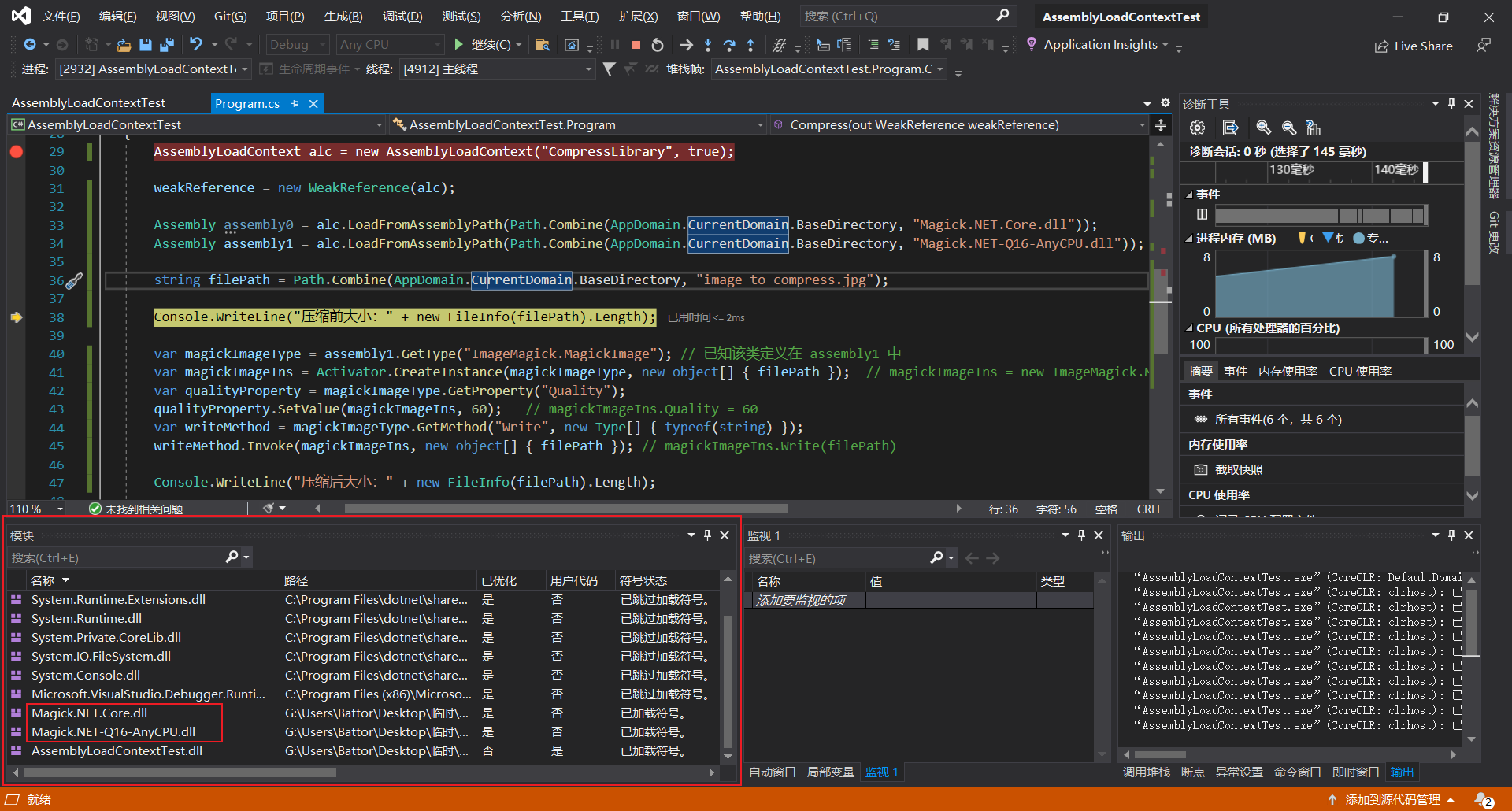
在 Visual Studio 中提供了“模块窗口”,可以及时查看加载了哪些程序集,在 “调试” > “窗口” > “模块”
简单对比 AppDomain
AppDomain 似乎是一个大而全的概念,包括了程序运行的方方面面:工作路径、引用搜索路径、配置文件、卷影复制 等,而 AssemblyLoadContext 只是一个加载程序集的工具。
参考
官方示例(参看其中的 /Host/Program.cs)
Visual Studio 中的 模块 窗口
https://docs.microsoft.com/zh-cn/visualstudio/debugger/how-to-use-the-modules-window?view=vs-2019
这篇挺详细的,很多问题我没有深入地研究,但是其中的“需要的变量放到静态字典中.在Unload之前把对应的Key值删除掉”我不认同,也可能是因为版本原因吧
https://www.cnblogs.com/LucasDot/p/13956384.html
提问者无意间通过 ref 引用了 AssemblyLoadContext 对象而导致无法回收
https://stackoverflow.com/questions/55693269/assemblyloadcontext-did-not-unload-correctly
最后的测试方法应该单独写在一个方法中而不是在 Main 函数中(作者没有显式指明,我在这困扰了好久)
https://www.cnblogs.com/maxzhang1985/p/10875278.html
C# .NET Core 3.1 中 AssemblyLoadContext 的基本使用的更多相关文章
- 使用 .NET Core 3.0 的 AssemblyLoadContext 实现插件热加载
一般情况下,一个 .NET 程序集加载到程序中以后,它的类型信息以及原生代码等数据会一直保留在内存中,.NET 运行时无法回收它们,如果我们要实现插件热加载 (例如 Razor 或 Aspx 模版的热 ...
- .net core 3.0中动态卸载程序集
动态加载程序集在一些插件式的应用中非常常见,.net core 2.0中可以通过AssemblyLoadContext中提供程序集的动态加载功能,但取不支持卸载.现在,在.net core 3.0中提 ...
- ASP.NET Core HTTP 管道中的那些事儿
前言 马上2016年就要过去了,时间可是真快啊. 上次写完 Identity 系列之后,反响还不错,所以本来打算写一个 ASP.NET Core 中间件系列的,但是中间遇到了很多事情.首先是 NPOI ...
- 在.NET Core控制台程序中使用依赖注入
之前都是在ASP.NET Core中使用依赖注入(Dependency Injection),昨天遇到一个场景需要在.NET Core控制台程序中使用依赖注入,由于对.NET Core中的依赖注入机制 ...
- ASP.NET Core 1.0 中的依赖项管理
var appInsights=window.appInsights||function(config){ function r(config){t[config]=function(){var i= ...
- 在ASP.NET Core 1.0中如何发送邮件
(此文章同时发表在本人微信公众号"dotNET每日精华文章",欢迎右边二维码来关注.) 题记:目前.NET Core 1.0中并没有提供SMTP相关的类库,那么要如何从ASP.NE ...
- EF Core 1.0中使用Include的小技巧
(此文章同时发表在本人微信公众号"dotNET每日精华文章",欢迎右边二维码来关注.) 题记:由于EF Core暂时不支持Lazy Loading,所以利用Include来加载额外 ...
- ASP.NET Core 1.0 中使用 Swagger 生成文档
github:https://github.com/domaindrivendev/Ahoy 之前文章有介绍在ASP.NET WebAPI 中使用Swagger生成文档,ASP.NET Core 1. ...
- 用ASP.NET Core 1.0中实现邮件发送功能
准备将一些项目迁移到 asp.net core 先从封装类库入手,在遇到邮件发送类时发现在 asp.net core 1.0中并示提供SMTP相关类库,于是网上一搜发现了MailKit 好东西一定要试 ...
随机推荐
- SpringCloud升级之路2020.0.x版-11.Log4j2 监控相关
本系列代码地址:https://github.com/HashZhang/spring-cloud-scaffold/tree/master/spring-cloud-iiford Log4j2 异步 ...
- Modify File Descriptor Limit on Linux
System-wide File Descriptor Limit Get current value: sysctl fs.file-max modify max fd limit: sysctl ...
- 阿里云NAS文件迁移项目实践
阿里云文件存储NAS是阿里云推出的用于传统文件共享的,使用NFS协议挂载的共享文件夹. 产品背景 下图是NAS和阿里云另一明星产品OSS以及块存储EBS的区别 NAS核心优势:无需修改程序,挂载之后, ...
- Linux搭建SQL server服务器
我们知道在Linux下安装服务有很多方式,最为简单的也就是yum安装,但是很多服务通过yum是无法安装的,如果想使用yum安装,需要指定yum安装仓库,我们今天需要安装MSQL Server,所以需要 ...
- tcp为什么要三次握手,tcp为什么可靠
转自 : https://www.cnblogs.com/LUO77/p/5771237.html大体看过,没有深入研究,有需要时继续看. 为什么不能两次握手:(防止已失效的连接请求又传送到服务器端, ...
- uwp 语音指令
Xml code -------------------------------- <Page x:Class="MyApp.MainPage" xmlns="ht ...
- Object--Date--calendar--System--StringBuilder--基本数据类型包装类型
Object java.lang.Object类是Java语言中的根类,即所有类的父类 默认toString()方法打印的是对象在堆中的地址值 默认equals()方法比较的也是地址(String中对 ...
- Maven解决依赖冲突
依赖冲突 若项目中多个Jar同时引用了相同的Jar时,会产生依赖冲突,但Maven采用了两种避免冲突的策略,因此在Maven中是不存在依赖冲突的. 短路优先 本项目-->A.jar-->B ...
- 使用元数据设计的update、query封装
package util; import java.lang.reflect.InvocationTargetException; import java.sql.Connection; import ...
- 华为音频编辑服务(Audio Editor Kit),快速构建应用音频编辑能力
音频编辑服务(Audio Editor Kit)是华为为开发者开放的各类场景音频处理能力的集合,汇聚了华为在音乐.语音等相关音频领域的先进技术.音频编辑服务提供基础编辑.伴奏提取.空间渲染.变声降噪等 ...