
Jetpack的ViewModel与LiveData
本文基于SDK 29
一、ViewModel与LiveData的作用:
1、viewModel:
数据共享,屏幕旋转不丢失数据,并且在Activity与Fragment之间共享数据。
2、LiveData:
感知生命周期并且通知观察者刷新,防止内存泄漏。
二、用法
三、原理:
1、ViewModel:
ViewModelProviders.of(this).get(MyViewModel::class.java)
我们通过这个方法来构造ViewModel。
@NonNull

@MainThread

public static ViewModelProvider of(@NonNull FragmentActivity activity) {

    return of(activity, null);

}

/**

 * Creates a {@link ViewModelProvider}, which retains ViewModels while a scope of given Activity

 * is alive. More detailed explanation is in {@link ViewModel}.

 * <p>

 * It uses the given {@link Factory} to instantiate new ViewModels.

 *

 * @param activity an activity, in whose scope ViewModels should be retained

 * @param factory  a {@code Factory} to instantiate new ViewModels

 * @return a ViewModelProvider instance

 */

@NonNull

@MainThread

public static ViewModelProvider of(@NonNull FragmentActivity activity,

        @Nullable Factory factory) {

    Application application = checkApplication(activity);

    if (factory == null) {

        factory = ViewModelProvider.AndroidViewModelFactory.getInstance(application);

    }

    return new ViewModelProvider(activity.getViewModelStore(), factory);

}
从源码中可以看出,ViewModelProviders.of(this)获取了一个ViewModelProvider 对象,而该对象中持有一个ViewModelProvider.AndroidViewModelFactory(因为我们传进入的是null)
和activity.getViewModelStore()。
private final Factory mFactory;

private final ViewModelStore mViewModelStore;

public ViewModelProvider(@NonNull ViewModelStore store, @NonNull Factory factory) {

    mFactory = factory;

    this.mViewModelStore = store;

}
我们再来看看ViewModelStore这个类,从名字中已经可以看出它的用途,那便是存储ViewModel。
public class ViewModelStore {

    private final HashMap<String, ViewModel> mMap = new HashMap<>();

    final void put(String key, ViewModel viewModel) {

        ViewModel oldViewModel = mMap.put(key, viewModel);

        if (oldViewModel != null) {

            oldViewModel.onCleared();

        }

    }

    final ViewModel get(String key) {

        return mMap.get(key);

    }

    /**

     *  Clears internal storage and notifies ViewModels that they are no longer used.

     */

    public final void clear() {

        for (ViewModel vm : mMap.values()) {

            vm.onCleared();

        }

        mMap.clear();

    }

}
我们的ViewModel便是存储在上面的HashMap中。
接下来我们再来看ViewModelProviders.of(this).get(MyViewModel::class.java)的get方法:
 @NonNull

 @MainThread

 public <T extends ViewModel> T get(@NonNull Class<T> modelClass) {

     String canonicalName = modelClass.getCanonicalName();

     if (canonicalName == null) {

         throw new IllegalArgumentException("Local and anonymous classes can not be ViewModels");

     }

     return get(DEFAULT_KEY + ":" + canonicalName, modelClass);

 }

@NonNull

@MainThread

public <T extends ViewModel> T get(@NonNull String key, @NonNull Class<T> modelClass) {

    ViewModel viewModel = mViewModelStore.get(key);

    if (modelClass.isInstance(viewModel)) {

        //noinspection unchecked

        return (T) viewModel;

    } else {

        //noinspection StatementWithEmptyBody

        if (viewModel != null) {

            // TODO: log a warning.

        }

    }

    viewModel = mFactory.create(modelClass);

    mViewModelStore.put(key, viewModel);

    //noinspection unchecked

    return (T) viewModel;

}
可以看出,所以会去存储ViewModel的ViewModelStore中拿,发现已经有了便直接返回,如果没有的话,那边使用mFactory工厂进行构建,然后再放进ViewModelStore中。
从之前的分析可以看出,这里的mFactory便是AndroidViewModelFactory。
@NonNull

@Override

public <T extends ViewModel> T create(@NonNull Class<T> modelClass) {

    if (AndroidViewModel.class.isAssignableFrom(modelClass)) {

        //noinspection TryWithIdenticalCatches

        try {

            return modelClass.getConstructor(Application.class).newInstance(mApplication);

        } catch (NoSuchMethodException e) {

            throw new RuntimeException("Cannot create an instance of " + modelClass, e);

        } catch (IllegalAccessException e) {

            throw new RuntimeException("Cannot create an instance of " + modelClass, e);

        } catch (InstantiationException e) {

            throw new RuntimeException("Cannot create an instance of " + modelClass, e);

        } catch (InvocationTargetException e) {

            throw new RuntimeException("Cannot create an instance of " + modelClass, e);

        }

    }

    return super.create(modelClass);

}
其实该工厂也只是直接实例出该类而已。
此时我们便已经拿到了ViewModel。
可是它是怎么做到数据共享的呢,想做到数据共享,按理说它应该只有一个实例对象,我们且看。
@NonNull

@MainThread

public static ViewModelProvider of(@NonNull FragmentActivity activity,

        @Nullable Factory factory) {

    Application application = checkApplication(activity);

    if (factory == null) {

        factory = ViewModelProvider.AndroidViewModelFactory.getInstance(application);

    }

    return new ViewModelProvider(activity.getViewModelStore(), factory);

}
在获取ViewModelProvider的时候传进去了activity.getViewModelStore(),那我们看一下activity.getViewModelStore()是怎么获取ViewModelStore的。
@NonNull

@Override

public ViewModelStore getViewModelStore() {

    if (getApplication() == null) {

        throw new IllegalStateException("Your activity is not yet attached to the "

                + "Application instance. You can't request ViewModel before onCreate call.")

    }

    if (mViewModelStore == null) {

        NonConfigurationInstances nc =

                (NonConfigurationInstances) getLastNonConfigurationInstance();

        if (nc != null) {

            // Restore the ViewModelStore from NonConfigurationInstances

            mViewModelStore = nc.viewModelStore;

        }

        if (mViewModelStore == null) {

            mViewModelStore = new ViewModelStore();

        }

    }

    return mViewModelStore;

}
关键的代码在于这一句:NonConfigurationInstances nc = (NonConfigurationInstances) getLastNonConfigurationInstance();
static final class NonConfigurationInstances {

        Object activity;

        HashMap<String, Object> children;

        FragmentManagerNonConfig fragments;

        ArrayMap<String, LoaderManager> loaders;

        VoiceInteractor voiceInteractor;

    }

    /* package */ NonConfigurationInstances mLastNonConfigurationInstances;

@Nullable

public Object getLastNonConfigurationInstance() {

    return mLastNonConfigurationInstances != null

            ? mLastNonConfigurationInstances.activity : null;

}
将mLastNonConfigurationInstances.activity强转成FragmentActivity中的一个类:NonConfigurationInstances,然后获取ViewModelStore
static final class NonConfigurationInstances {

    Object custom;

    ViewModelStore viewModelStore;

    FragmentManagerNonConfig fragments;

}
NonConfigurationInstances是个静态类,所以里面的ViewModelStore 也是唯一的,因此ViewModelStore 能做到数据共享。
2、LivaData
我们先看这个语句:
viewModel?.livaData?.observe(this, Observer<Int> { integer -> Log.d("MainActivity", integer!!.toString()) })
从这个语句往源码里面探究:
@MainThread

public void observe(@NonNull LifecycleOwner owner, @NonNull Observer<? super T> observer) {

    assertMainThread("observe");

    if (owner.getLifecycle().getCurrentState() == DESTROYED) {

        // ignore

        return;

    }

    LifecycleBoundObserver wrapper = new LifecycleBoundObserver(owner, observer);

    ObserverWrapper existing = mObservers.putIfAbsent(observer, wrapper);

    if (existing != null && !existing.isAttachedTo(owner)) {

        throw new IllegalArgumentException("Cannot add the same observer"

                + " with different lifecycles");

    }

    if (existing != null) {

        return;

    }

    owner.getLifecycle().addObserver(wrapper);

}
如果这个activity处于销毁状态,那么便不会添加该观察者,否则,构造一个LifecycleBoundObserver对象,放进mObservers里面,mObservers即为:
private SafeIterableMap<Observer<? super T>, ObserverWrapper> mObservers =

            new SafeIterableMap<>();
然后将LifecycleBoundObserver对象放进LifecycleRegistry里面。
LifecycleBoundObserver里面持有的对象如下:

当我们给LiveData设置值的时候:livaData.value = i
public class MutableLiveData<T> extends LiveData<T> {

    @Override

    public void postValue(T value) {

        super.postValue(value);

    }

    @Override

    public void setValue(T value) {

        super.setValue(value);

    }

}
里面还有个postValue方法:
protected void postValue(T value) {

    boolean postTask;

    synchronized (mDataLock) {

        postTask = mPendingData == NOT_SET;

        mPendingData = value;

    }

    if (!postTask) {

        return;

    }

    ArchTaskExecutor.getInstance().postToMainThread(mPostValueRunnable);

}
postValue最终也会调用到主线程。postValue可以在子线程调用,而setValue必须在主线程调用,否则会抛出异常。
我们看setValue方法:
@MainThread

protected void setValue(T value) {

    assertMainThread("setValue");

    mVersion++;

    mData = value;

    dispatchingValue(null);

}
void dispatchingValue(@Nullable ObserverWrapper initiator) {

    if (mDispatchingValue) {

        mDispatchInvalidated = true;

        return;

    }

    mDispatchingValue = true;

    do {

        mDispatchInvalidated = false;

        if (initiator != null) {

            considerNotify(initiator);

            initiator = null;

        } else {

            for (Iterator<Map.Entry<Observer<? super T>, ObserverWrapper>> iterator =

                    mObservers.iteratorWithAdditions(); iterator.hasNext(); ) {

                considerNotify(iterator.next().getValue());

                if (mDispatchInvalidated) {

                    break;

                }

            }

        }

    } while (mDispatchInvalidated);

    mDispatchingValue = false;

}
这里我们传进来的initiator为null,所以我们主要看:
for (Iterator<Map.Entry<Observer<? super T>, ObserverWrapper>> iterator =

        mObservers.iteratorWithAdditions(); iterator.hasNext(); ) {

    considerNotify(iterator.next().getValue());

    if (mDispatchInvalidated) {

        break;

    }

}
这里的mObservers即为:
private SafeIterableMap<Observer<? super T>, ObserverWrapper> mObservers =

        new SafeIterableMap<>();
里面存放着我们之前放进去的LifecycleBoundObserver对象。
iterator.next().getValue()获取的便是LifecycleBoundObserver对象。
private void considerNotify(ObserverWrapper observer) {

    if (!observer.mActive) {

        return;

    }

    // Check latest state b4 dispatch. Maybe it changed state but we didn't get the event yet.

    //

    // we still first check observer.active to keep it as the entrance for events. So even if

    // the observer moved to an active state, if we've not received that event, we better not

    // notify for a more predictable notification order.

    if (!observer.shouldBeActive()) {

        observer.activeStateChanged(false);

        return;

    }

    if (observer.mLastVersion >= mVersion) {

        return;

    }

    observer.mLastVersion = mVersion;

    //noinspection unchecked

    observer.mObserver.onChanged((T) mData);

}
检测当前生命周期,至少是处于start。
@Override

boolean shouldBeActive() {

    return mOwner.getLifecycle().getCurrentState().isAtLeast(STARTED);

}
然后执行observer.mObserver.onChanged((T) mData);回调出去。
observer.mObserver便是我们传进去的观察者:
Observer<Int> { integer -> Log.d("MainActivity", integer!!.toString()) }
由以上也可以看出:我们是可以注册多个观察者的,所以要注意在一个Activity中只能够注册一次,否则会发生多个回调。
那么有个疑问,我们这样已经实现了,那问什么在liveData?.observe方法里面,不但将LifecycleBoundObserver放进LiveData的SafeIterableMap里面,还要将其放入LifecycleRegistry
里面。owner.getLifecycle()获取到的便是LifecycleRegistry
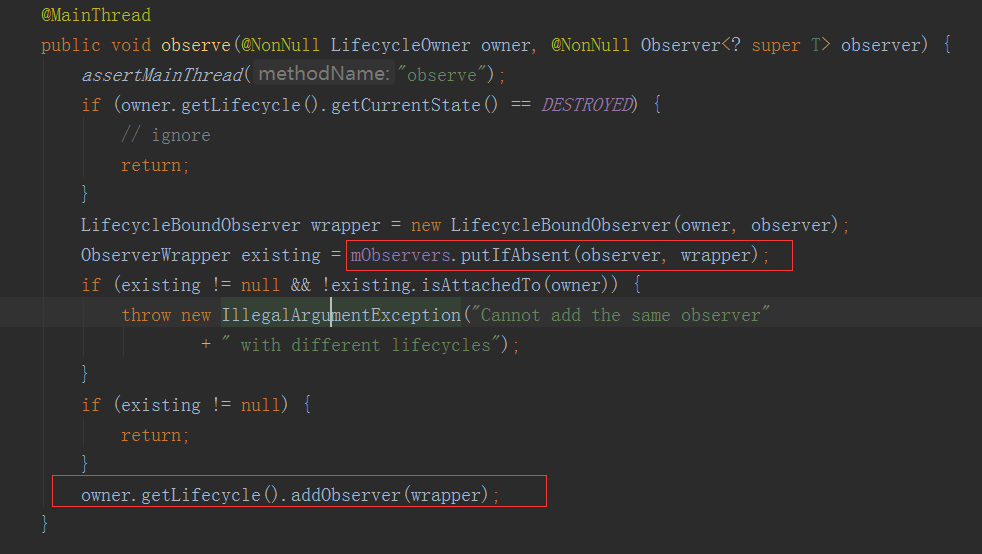
这是为了在相关的生命周期内做相关的操作,根据上一篇文章,我们可以知道,当activity的生命周期发生改变的时候,会获取添加进LifecycleRegistry的观察者,然后对每个观察者进行回调处理。
而在这里便会回调LifecycleBoundObserver的onStateChanged方法。
@Override

public void onStateChanged(@NonNull LifecycleOwner source,

        @NonNull Lifecycle.Event event) {

    if (mOwner.getLifecycle().getCurrentState() == DESTROYED) {

        removeObserver(mObserver);

        return;

    }

    activeStateChanged(shouldBeActive());

}
判断如果当前处于DESTROYED状态,那么便将我们添加进入的观察者移除。
否则会调用activeStateChanged(shouldBeActive())方法。

如果当前的活跃状态与上一次一样,那么就直接返回。
否则如果变为活跃的状态,那么会调用dispatchingValue(this);
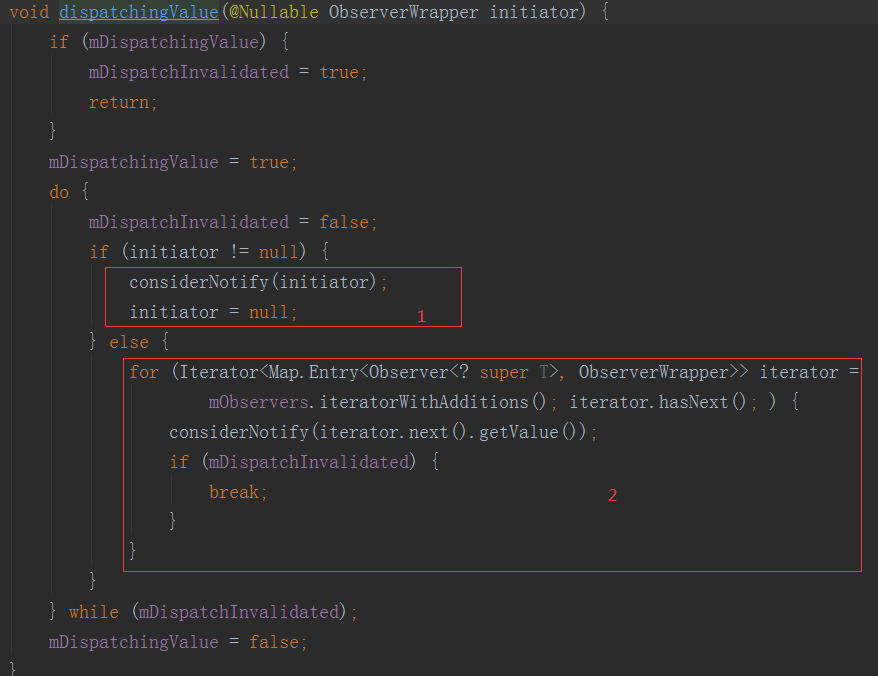
这里要注意,我们之前调用LiveData的setValue的时候,走的的2,但是现在走的是1,因为这次传进来的参数不为空。
private void considerNotify(ObserverWrapper observer) {

    if (!observer.mActive) {

        return;

    }

    // Check latest state b4 dispatch. Maybe it changed state but we didn't get the event yet.

    //

    // we still first check observer.active to keep it as the entrance for events. So even if

    // the observer moved to an active state, if we've not received that event, we better not

    // notify for a more predictable notification order.

    if (!observer.shouldBeActive()) {

        observer.activeStateChanged(false);

        return;

    }

    if (observer.mLastVersion >= mVersion) {

        return;

    }

    observer.mLastVersion = mVersion;

    observer.mObserver.onChanged((T) mData);

}
然后进入considerNotify这个方法,里面有一个判断十分重要:
if (observer.mLastVersion >= mVersion) {

    return;

}
这个判断是做什么用的呢?mVersion是什么时候被赋值的,这时候就要我们回过去头去看LiveData的setValue方法:
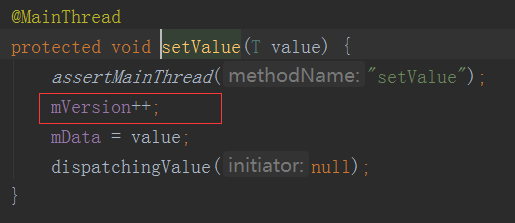
每调用一次,那么这个mVersion就会自加一。
所以这个判断便保证了,必须是刷新了LiveData里面的data值,才能够回调观察者事件:observer.mObserver.onChanged((T) mData);
如果生命周期变化的时候,LiveData里面的data值没有刷新,就不能回调出去。所以如果刷新LiveData里面的值的时候不处于活跃状态导致没有回调,当生命周期来到onStart的时候就会去回调。
Jetpack的ViewModel与LiveData的更多相关文章
- Jetpack架构组件学习(2)——ViewModel和Livedata使用
要看本系列其他文章,可访问此链接Jetpack架构学习 | Stars-One的杂货小窝 原文地址:Jetpack架构组件学习(2)--ViewModel和Livedata使用 | Stars-One ...
- Android Jetpack组件 - ViewModel,LiveData使用以及原理
本文涉及的源码版本如下: com.android.support:appcompat-v7:27.1.1 android.arch.lifecycle:extensions:1.1.1 android ...
- 【Medium 万赞好文】ViewModel 和 LIveData:模式 + 反模式
原文作者: Jose Alcérreca 原文地址: ViewModels and LiveData: Patterns + AntiPatterns 译者:秉心说 View 和 ViewModel ...
- ViewModel和LiveData问题思考与解答
嗨,大家好,面试真题系列又来了,今天我们说说MVVM架构里的两大组件:ViewModel和LiveData. 还是老样子,提出问题,做出解答. ViewModel 是什么? ViewModel 为什么 ...
- 转 Android Lifecycle、ViewModel和LiveData
转自:https://www.jianshu.com/p/982545e01d0a 1.概述 在I / O '17的时候,其中一个重要的主题是Architecture Components.这是一个官 ...
- ViewModel、LiveData、DataBinding
ViewModel ViewModel的引入 如果系统销毁或重新创建界面控制器,则存储在其中的任何临时性界面相关数据都会丢失.例如,应用的某个 Activity 中可能包含用户列表.因配置更改而重新创 ...
- Android Jetpack基本架构之ViewModel+LiveData+DataBinding入门
前提:导入所有依赖,开启DataBinding app的build.gradle android { defaultConfig { ... dataBinding { enabled true } ...
- Jetpack 架构组件 LiveData ViewModel MD
Markdown版本笔记 我的GitHub首页 我的博客 我的微信 我的邮箱 MyAndroidBlogs baiqiantao baiqiantao bqt20094 baiqiantao@sina ...
- Android 架构组件-Lifecycle、LiveData、ViewModel
Lifecycle Lifecycle组件包括LifecycleOwner.LifecleObserver,能方便监听Activity或者Fragment的生命周期. 步骤: 1.实现Lifecycl ...
随机推荐
- [flask] jinja自定义filter来过滤html标签
问题描述 数据库存储了html格式的博客文章,在主页(index)显示的时候带有html标签,如何过滤掉呢? 解决方案 用jinja自定义filter过滤掉html标签 我是用的工厂函数,因此在工厂函 ...
- Layui table 学习笔记
templet:'<div>{{createrFormat(d.accounts.name)}}</div>' function createrFormat(o){ retur ...
- 创客系列教程——认识LED灯
认识LED灯 一.初识LED灯 LED灯是一种能够将电能转化为可见光的固态的半导体器件,它可以直接把电转化为光.LED灯逐步融入到生活中的方方面面:室内外的照明.电子指示牌.酷炫的舞台灯光.车辆的 ...
- HDU 1009 FatMouse' Trade (贪心)
原题链接:http://acm.hdu.edu.cn/showproblem.php?pid=1009 题目大意:肥鼠准备了 磅的猫粮,准备和看管仓库的猫交易,仓库里装有他最喜爱的食物 豆.仓库有 个 ...
- 微服务架构 | 12.1 使用 Apache Dubbo 实现远程通信
目录 前言 1. Dubbo 基础知识 1.1 Dubbo 是什么 1.2 Dubbo 的架构图 1.3 Spring Cloud 与 Dubbo 的区别 1.4 Dubbo 的特点 1.5 Dubb ...
- Vscode不能连接应用商店
删除这两个文件即可: 1.C:\Users\Administrator\.vscode 2.C:\Users\Administrator\AppData\Roaming\Code
- POXSIX之信号量
#include<stdio.h> #include<semaphore.h> #include<fcntl.h> #include<stdlib.h> ...
- Redisson 实现分布式锁原理分析
Redisson 实现分布式锁原理分析 写在前面 在了解分布式锁具体实现方案之前,我们应该先思考一下使用分布式锁必须要考虑的一些问题. 互斥性:在任意时刻,只能有一个进程持有锁. 防死锁:即使有 ...
- golang中math常见数据数学运算
package main import ( "fmt" "math" ) func main() { fmt.Println(math.Abs(-19)) // ...
- 操作系统的发展史(并发与并行)<异步与同步>《进程与程序》[非堵塞与堵塞]
目录 一:一:手工操作 -- 穿孔卡片 1.简介 二:手工操作方式两个特点: 三:批处理 -- 磁带存储 1.联机批处理系统 2.脱机批处理系统 3.多道程序系统 4.多道批处理系统 四:总结发展史 ...