
java:快速文件分割及合并
文件分割与合并是一个常见需求,比如:上传大文件时,可以先分割成小块,传到服务器后,再进行合并。很多高大上的分布式文件系统(比如:google的GFS、taobao的TFS)里,也是按block为单位,对文件进行分割或合并。
看下基本思路:
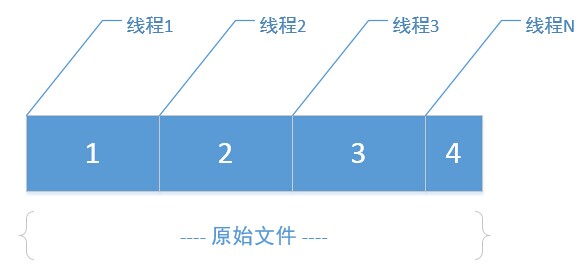
如果有一个大文件,指定分割大小后(比如:按1M切割)
step 1:
先根据原始文件大小、分割大小,算出最终分割的小文件数N
step 2:
在磁盘上创建这N个小文件
step 3:
开多个线程(线程数=分割文件数),每个线程里,利用RandomAccessFile的seek功能,将读取指针定位到原文件里每一段的段首位置,然后向后读取指定大小(即:分割块大小),最终写入对应的分割文件,因为多线程并行处理,各写各的小文件,速度相对还是比较快的。
合并时,把上面的思路逆向处理即可。
核心代码:
分割处理:
 /**

      * 拆分文件

      * @param fileName 待拆分的完整文件名

      * @param byteSize 按多少字节大小拆分

      * @return 拆分后的文件名列表

      * @throws IOException

      */

     public List<String> splitBySize(String fileName, int byteSize)

             throws IOException {

         List<String> parts = new ArrayList<String>();

         File file = new File(fileName);

         int count = (int) Math.ceil(file.length() / (double) byteSize);

         int countLen = (count + "").length();

         ThreadPoolExecutor threadPool = new ThreadPoolExecutor(count,

                 count * 3, 1, TimeUnit.SECONDS,

                 new ArrayBlockingQueue<Runnable>(count * 2));

         for (int i = 0; i < count; i++) {

             String partFileName = file.getName() + "."

                     + leftPad((i + 1) + "", countLen, '0') + ".part";

             threadPool.execute(new SplitRunnable(byteSize, i * byteSize,

                     partFileName, file));

             parts.add(partFileName);

         }

         return parts;

     }
 private class SplitRunnable implements Runnable {

         int byteSize;

         String partFileName;

         File originFile;

         int startPos;

         public SplitRunnable(int byteSize, int startPos, String partFileName,

                 File originFile) {

             this.startPos = startPos;

             this.byteSize = byteSize;

             this.partFileName = partFileName;

             this.originFile = originFile;

         }

         public void run() {

             RandomAccessFile rFile;

             OutputStream os;

             try {

                 rFile = new RandomAccessFile(originFile, "r");

                 byte[] b = new byte[byteSize];

                 rFile.seek(startPos);// 移动指针到每“段”开头

                 int s = rFile.read(b);

                 os = new FileOutputStream(partFileName);

                 os.write(b, 0, s);

                 os.flush();

                 os.close();

             } catch (IOException e) {

                 e.printStackTrace();

             }

         }

     }
合并处理:
 /**

      * 合并文件

      *

      * @param dirPath 拆分文件所在目录名

      * @param partFileSuffix 拆分文件后缀名

      * @param partFileSize 拆分文件的字节数大小

      * @param mergeFileName 合并后的文件名

      * @throws IOException

      */

     public void mergePartFiles(String dirPath, String partFileSuffix,

             int partFileSize, String mergeFileName) throws IOException {

         ArrayList<File> partFiles = FileUtil.getDirFiles(dirPath,

                 partFileSuffix);

         Collections.sort(partFiles, new FileComparator());

         RandomAccessFile randomAccessFile = new RandomAccessFile(mergeFileName,

                 "rw");

         randomAccessFile.setLength(partFileSize * (partFiles.size() - 1)

                 + partFiles.get(partFiles.size() - 1).length());

         randomAccessFile.close();

         ThreadPoolExecutor threadPool = new ThreadPoolExecutor(

                 partFiles.size(), partFiles.size() * 3, 1, TimeUnit.SECONDS,

                 new ArrayBlockingQueue<Runnable>(partFiles.size() * 2));

         for (int i = 0; i < partFiles.size(); i++) {

             threadPool.execute(new MergeRunnable(i * partFileSize,

                     mergeFileName, partFiles.get(i)));

         }

     }
 private class MergeRunnable implements Runnable {

         long startPos;

         String mergeFileName;

         File partFile;

         public MergeRunnable(long startPos, String mergeFileName, File partFile) {

             this.startPos = startPos;

             this.mergeFileName = mergeFileName;

             this.partFile = partFile;

         }

         public void run() {

             RandomAccessFile rFile;

             try {

                 rFile = new RandomAccessFile(mergeFileName, "rw");

                 rFile.seek(startPos);

                 FileInputStream fs = new FileInputStream(partFile);

                 byte[] b = new byte[fs.available()];

                 fs.read(b);

                 fs.close();

                 rFile.write(b);

                 rFile.close();

             } catch (IOException e) {

                 e.printStackTrace();

             }

         }

     }
为了方便文件操作,把关于文件读写的功能,全封装到FileUtil类:
 package com.cnblogs.yjmyzz;

 import java.io.*;

 import java.util.*;

 import java.util.concurrent.*;

 /**

  * 文件处理辅助类

  *

  * @author yjmyzz@126.com

  * @version 0.2

  * @since 2014-11-17

  *

  */

 public class FileUtil {

     /**

      * 当前目录路径

      */

     public static String currentWorkDir = System.getProperty("user.dir") + "\\";

     /**

      * 左填充

      *

      * @param str

      * @param length

      * @param ch

      * @return

      */

     public static String leftPad(String str, int length, char ch) {

         if (str.length() >= length) {

             return str;

         }

         char[] chs = new char[length];

         Arrays.fill(chs, ch);

         char[] src = str.toCharArray();

         System.arraycopy(src, 0, chs, length - src.length, src.length);

         return new String(chs);

     }

     /**

      * 删除文件

      *

      * @param fileName

      *            待删除的完整文件名

      * @return

      */

     public static boolean delete(String fileName) {

         boolean result = false;

         File f = new File(fileName);

         if (f.exists()) {

             result = f.delete();

         } else {

             result = true;

         }

         return result;

     }

     /***

      * 递归获取指定目录下的所有的文件(不包括文件夹)

      *

      * @param obj

      * @return

      */

     public static ArrayList<File> getAllFiles(String dirPath) {

         File dir = new File(dirPath);

         ArrayList<File> files = new ArrayList<File>();

         if (dir.isDirectory()) {

             File[] fileArr = dir.listFiles();

             for (int i = 0; i < fileArr.length; i++) {

                 File f = fileArr[i];

                 if (f.isFile()) {

                     files.add(f);

                 } else {

                     files.addAll(getAllFiles(f.getPath()));

                 }

             }

         }

         return files;

     }

     /**

      * 获取指定目录下的所有文件(不包括子文件夹)

      *

      * @param dirPath

      * @return

      */

     public static ArrayList<File> getDirFiles(String dirPath) {

         File path = new File(dirPath);

         File[] fileArr = path.listFiles();

         ArrayList<File> files = new ArrayList<File>();

         for (File f : fileArr) {

             if (f.isFile()) {

                 files.add(f);

             }

         }

         return files;

     }

     /**

      * 获取指定目录下特定文件后缀名的文件列表(不包括子文件夹)

      *

      * @param dirPath

      *            目录路径

      * @param suffix

      *            文件后缀

      * @return

      */

     public static ArrayList<File> getDirFiles(String dirPath,

             final String suffix) {

         File path = new File(dirPath);

         File[] fileArr = path.listFiles(new FilenameFilter() {

             public boolean accept(File dir, String name) {

                 String lowerName = name.toLowerCase();

                 String lowerSuffix = suffix.toLowerCase();

                 if (lowerName.endsWith(lowerSuffix)) {

                     return true;

                 }

                 return false;

             }

         });

         ArrayList<File> files = new ArrayList<File>();

         for (File f : fileArr) {

             if (f.isFile()) {

                 files.add(f);

             }

         }

         return files;

     }

     /**

      * 读取文件内容

      *

      * @param fileName

      *            待读取的完整文件名

      * @return 文件内容

      * @throws IOException

      */

     public static String read(String fileName) throws IOException {

         File f = new File(fileName);

         FileInputStream fs = new FileInputStream(f);

         String result = null;

         byte[] b = new byte[fs.available()];

         fs.read(b);

         fs.close();

         result = new String(b);

         return result;

     }

     /**

      * 写文件

      *

      * @param fileName

      *            目标文件名

      * @param fileContent

      *            写入的内容

      * @return

      * @throws IOException

      */

     public static boolean write(String fileName, String fileContent)

             throws IOException {

         boolean result = false;

         File f = new File(fileName);

         FileOutputStream fs = new FileOutputStream(f);

         byte[] b = fileContent.getBytes();

         fs.write(b);

         fs.flush();

         fs.close();

         result = true;

         return result;

     }

     /**

      * 追加内容到指定文件

      *

      * @param fileName

      * @param fileContent

      * @return

      * @throws IOException

      */

     public static boolean append(String fileName, String fileContent)

             throws IOException {

         boolean result = false;

         File f = new File(fileName);

         if (f.exists()) {

             RandomAccessFile rFile = new RandomAccessFile(f, "rw");

             byte[] b = fileContent.getBytes();

             long originLen = f.length();

             rFile.setLength(originLen + b.length);

             rFile.seek(originLen);

             rFile.write(b);

             rFile.close();

         }

         result = true;

         return result;

     }

     /**

      * 拆分文件

      *

      * @param fileName

      *            待拆分的完整文件名

      * @param byteSize

      *            按多少字节大小拆分

      * @return 拆分后的文件名列表

      * @throws IOException

      */

     public List<String> splitBySize(String fileName, int byteSize)

             throws IOException {

         List<String> parts = new ArrayList<String>();

         File file = new File(fileName);

         int count = (int) Math.ceil(file.length() / (double) byteSize);

         int countLen = (count + "").length();

         ThreadPoolExecutor threadPool = new ThreadPoolExecutor(count,

                 count * 3, 1, TimeUnit.SECONDS,

                 new ArrayBlockingQueue<Runnable>(count * 2));

         for (int i = 0; i < count; i++) {

             String partFileName = file.getName() + "."

                     + leftPad((i + 1) + "", countLen, '0') + ".part";

             threadPool.execute(new SplitRunnable(byteSize, i * byteSize,

                     partFileName, file));

             parts.add(partFileName);

         }

         return parts;

     }

     /**

      * 合并文件

      *

      * @param dirPath

      *            拆分文件所在目录名

      * @param partFileSuffix

      *            拆分文件后缀名

      * @param partFileSize

      *            拆分文件的字节数大小

      * @param mergeFileName

      *            合并后的文件名

      * @throws IOException

      */

     public void mergePartFiles(String dirPath, String partFileSuffix,

             int partFileSize, String mergeFileName) throws IOException {

         ArrayList<File> partFiles = FileUtil.getDirFiles(dirPath,

                 partFileSuffix);

         Collections.sort(partFiles, new FileComparator());

         RandomAccessFile randomAccessFile = new RandomAccessFile(mergeFileName,

                 "rw");

         randomAccessFile.setLength(partFileSize * (partFiles.size() - 1)

                 + partFiles.get(partFiles.size() - 1).length());

         randomAccessFile.close();

         ThreadPoolExecutor threadPool = new ThreadPoolExecutor(

                 partFiles.size(), partFiles.size() * 3, 1, TimeUnit.SECONDS,

                 new ArrayBlockingQueue<Runnable>(partFiles.size() * 2));

         for (int i = 0; i < partFiles.size(); i++) {

             threadPool.execute(new MergeRunnable(i * partFileSize,

                     mergeFileName, partFiles.get(i)));

         }

     }

     /**

      * 根据文件名,比较文件

      *

      * @author yjmyzz@126.com

      *

      */

     private class FileComparator implements Comparator<File> {

         public int compare(File o1, File o2) {

             return o1.getName().compareToIgnoreCase(o2.getName());

         }

     }

     /**

      * 分割处理Runnable

      *

      * @author yjmyzz@126.com

      *

      */

     private class SplitRunnable implements Runnable {

         int byteSize;

         String partFileName;

         File originFile;

         int startPos;

         public SplitRunnable(int byteSize, int startPos, String partFileName,

                 File originFile) {

             this.startPos = startPos;

             this.byteSize = byteSize;

             this.partFileName = partFileName;

             this.originFile = originFile;

         }

         public void run() {

             RandomAccessFile rFile;

             OutputStream os;

             try {

                 rFile = new RandomAccessFile(originFile, "r");

                 byte[] b = new byte[byteSize];

                 rFile.seek(startPos);// 移动指针到每“段”开头

                 int s = rFile.read(b);

                 os = new FileOutputStream(partFileName);

                 os.write(b, 0, s);

                 os.flush();

                 os.close();

             } catch (IOException e) {

                 e.printStackTrace();

             }

         }

     }

     /**

      * 合并处理Runnable

      *

      * @author yjmyzz@126.com

      *

      */

     private class MergeRunnable implements Runnable {

         long startPos;

         String mergeFileName;

         File partFile;

         public MergeRunnable(long startPos, String mergeFileName, File partFile) {

             this.startPos = startPos;

             this.mergeFileName = mergeFileName;

             this.partFile = partFile;

         }

         public void run() {

             RandomAccessFile rFile;

             try {

                 rFile = new RandomAccessFile(mergeFileName, "rw");

                 rFile.seek(startPos);

                 FileInputStream fs = new FileInputStream(partFile);

                 byte[] b = new byte[fs.available()];

                 fs.read(b);

                 fs.close();

                 rFile.write(b);

                 rFile.close();

             } catch (IOException e) {

                 e.printStackTrace();

             }

         }

     }

 }
单元测试:
 package com.cnblogs.yjmyzz;

 import java.io.IOException;

 import org.junit.Test;

 public class FileTest {

     @Test

     public void writeFile() throws IOException, InterruptedException {

         System.out.println(FileUtil.currentWorkDir);

         StringBuilder sb = new StringBuilder();

         long originFileSize = 1024 * 1024 * 100;// 100M

         int blockFileSize = 1024 * 1024 * 15;// 15M

         // 生成一个大文件

         for (int i = 0; i < originFileSize; i++) {

             sb.append("A");

         }

         String fileName = FileUtil.currentWorkDir + "origin.myfile";

         System.out.println(fileName);

         System.out.println(FileUtil.write(fileName, sb.toString()));

         // 追加内容

         sb.setLength(0);

         sb.append("0123456789");

         FileUtil.append(fileName, sb.toString());

         FileUtil fileUtil = new FileUtil();

         // 将origin.myfile拆分

         fileUtil.splitBySize(fileName, blockFileSize);

         Thread.sleep(10000);// 稍等10秒,等前面的小文件全都写完

         // 合并成新文件

         fileUtil.mergePartFiles(FileUtil.currentWorkDir, ".part",

                 blockFileSize, FileUtil.currentWorkDir + "new.myfile");

     }

 }

java:快速文件分割及合并的更多相关文章
- (转)java:快速文件分割及合并
文件分割与合并是一个常见需求,比如:上传大文件时,可以先分割成小块,传到服务器后,再进行合并.很多高大上的分布式文件系统(比如:google的GFS.taobao的TFS)里,也是按block为单位, ...
- JAVA IO分析三:IO总结&文件分割与合并实例
时间飞逝,马上就要到2018年了,今天我们将要学习的是IO流学习的最后一节,即总结回顾前面所学,并学习一个案例用于前面所学的实际操作,下面我们就开始本节的学习: 一.原理与概念 一.概念流:流动 .流 ...
- c语言文件分割与合并
一.综述 c语言操作文件通过文件指针FILE*,每个要操作的文件必须打开然后才能读写. 注意事项: @1分割与合并文件最好使用二进制模式即"rb"或"wb",这 ...
- java 大文件分割与组装
不多说,直接上代码 1 import java.io.File; import java.io.FileInputStream; import java.io.FileOutputStream; im ...
- PDF文件分割和合并
今天自己用C#实现了下PDF文件的分割和合并,大家可以试用一下. 代码和使用说明在这里:https://github.com/cserspring/pdf_split_merge 有什么意见,大家可以 ...
- python学习——大文件分割与合并
在平常的生活中,我们会遇到下面这样的情况: 你下载了一个比较大型的游戏(假设有10G),现在想跟你的同学一起玩,你需要把这个游戏拷贝给他. 然后现在有一个问题是文件太大(我们不考虑你有移动硬盘什么的情 ...
- delphi 文件分割与合并
流的使用分割与合并文件的函数 unit Unit1; interface uses Windows, Messages, SysUtils, Variants, Classes, Graphics, ...
- java文件分割及合并
分割设置好分割数量,根据源文件大小来把数据散到子文件中代码如下; package word; import java.io.File; import java.io.FileInputStream; ...
- Java IO 流 -- 随机读取和写入流 RandomAccessFile (文件分割和合并)
RandomAccessFile 相对其它流多了一个seek() 方法指定指针的偏移量. 1.指定起始位置读取剩余内容 public static void test01() throws IOExc ...
随机推荐
- Asp.net MVC的Model Binder工作流程以及扩展方法(3) - DefaultModelBinder
Default Binder是MVC中的清道夫,把守着Model Binder中的最后一道防线.如果我们没有使用Custom Model Binder等特殊处理,那么Model的绑定都是有Defaul ...
- MVC 多语言记录1 设置默认的ResourceType
http://stackoverflow.com/questions/3260748/default-resource-for-data-annotations-in-asp-net-mvc Add ...
- Sql Server之旅——第十一站 简单说说sqlserver的执行计划
我们知道sql在底层的执行给我们上层人员开了一个窗口,那就是执行计划,有了执行计划之后,我们就清楚了那些烂sql是怎么执行的,这样 就可以方便的找到sql的缺陷和优化点. 一:执行计划生成过程 说到执 ...
- 简述java序列化
1. 什么是Java对象序列化 Java平台允许我们在内存中创建可复用的Java对象,但一般情况下,只有当JVM处于运行时,这些对象才可能存在,即,这些对象的生命周期不会比JVM的生命周期 ...
- mysql-4 数据检索(2)
用通配符进行过滤 like操作符 %通配符 %可以匹配任意字符 SELECT prod_id , prod_name FROM products WHERE prod_name LIKE 'je ...
- SQLServer中给表增加组合唯一约束
将两个或者多个字段一起约束成一个唯一约束 alter table 表名 add constraint 约束名 unique (列名1,列名2)
- spring多数据源的处理 mybatis实现跨库查询
实现Myibatis动态sql跨数据库的处理 Spring动态配置多数据源,即在大型应用中对数据进行切分,并且采用多个数据库实例进行管理,这样可以有效提高系统的水平伸缩性.而这样的方案就会不 同于常见 ...
- 学会使用简单的 MySQL 常用操作
一.MySQL 数据库的基本安装 # yum 安装 mysql 版本:5.1.73 [root@mysql ~]# yum install -y mysql-server mysql # 启动 MyS ...
- 支付宝APP支付开发- IOException : DerInputStream.getLength(): lengthTag=127, too big.
支付宝APP支付Java开发报错: IOException : DerInputStream.getLength(): lengthTag=127, too big. 后来排查是因为没有设置私钥.
- Andorid 6连接Libreswan L2TP VPN
手机升级到Android 6以后,以前正常使用的L2TP VPN却无法连接了.服务器端日志: "vpnpsk"[119] 114.249.245.192 #240: no acce ...