
EasyTest-接口自动化测试平台部署上线问题记录
平台url: http://easytest.xyz
花巨资搞了个阿里云服务器,哈哈,有想体验指导的大佬私聊我~~~
部署环境
云服务器:Ubuntu Server 16.04.1 LTS 64位
python 主要包版本:
python 3.5.2

Django 2.0.3

BeautifulReport 0.0.9

celery 3.1.25

celery-with-redis 3.0

colorlog 4.0.2

crypto 1.4.1

ddt 1.2.1

django-celery 3.2.2

django-redis 4.0.0

gevent 1.4.0

greenlet 0.4.15

gunicorn 19.9.0

ipython 7.5.0

matplotlib 3.0.0

Pillow 6.0.0

pip 19.1.1

pycrypto 2.6.1

PyMySQL 0.9.3

qrcode 6.1

redis 2.10.6

requests 2.22.0
问题
1.为什么使用python3.5?
ubuntu使用python3.6在安装uwsgi的时候,老是报错,然后还么有找到原因...
2.定时任务运行报错:
1>.TypeError: can only concatenate tuple (not "NoneType") to tuple;
版本问题 需要 django-celery 3.1.17 celery 3.1.25 celery-with-redis 3.0; https://github.com/stanleylst/ansibleUI/issues/2
2>.TypeError: __init__() missing 1 required positional argument: 'on_delete';
django2.0 on_delete 是必须的 ; https://blog.csdn.net/qq_38038143/article/details/80286187
3>.AttributeError: type object 'BaseCommand' has no attribute 'option_list';
升级django-celery 到3.2.2 解决 ; https://chowyi.com/Django-1-10-celery-worker-%E5%90%AF%E5%8A%A8%E6%8A%A5%E9%94%99/
3.django2.2/mysql ImproperlyConfigured: mysqlclient 1.3.13 or newer is required; you have 0.9.3;
django版本问题,降级到diango 2.2 往下就可以了;
4. You need tcl 8.5 or newer in order to run the Redis test.
安装redis时报的错,升级tcl即可; https://www.cnblogs.com/Security-Darren/p/4381932.html
5.nginx负载均衡设置时,命名不能用下划线;
upstream myApp {
server 127.0.0.1:9000;
}
6.BeautifulReport模块;
result.report(filename=now + 'report.html', description=readConfig.title, log_path=report_path);
log_path 参数需要替换成 report_dir 参数
7.redis.exceptions.ResponseError: MISCONF Redis is configured to save RDB snapshots, but is currently not able to persist on disk. Commands that may modify the data set are disabled. Please check Redis logs for details about the error;
redis-cli 输入 config set stop-writes-on-bgsave-error no https://www.jianshu.com/p/3aaf21dd34d6
8.locust 守护进程; 要带小括号 (locust -f base/performance.py --master &) https://www.cnblogs.com/maoxianfei/p/7987217.html
启动slave 运行性能测试 locust -f base/performance.py --slave --master-host=129.28.187.64
9.定时任务守护进程 django-celery supervisor http://yshblog.com/blog/165
supervisord.conf
[program:celery.worker]

;指定运行目录

directory=/home/ubuntu/EasyTest/

;运行目录下执行命令

command=python manage.py celery worker --loglevel=info --logfile /home/ubuntu/EasyTest/celery_logs/celery_worker.log

;启动设置

numprocs=1          ;进程数

autostart=true      ;当supervisor启动时,程序将会自动启动

autorestart=true    ;自动重启

;停止信号,默认TERM

;中断:INT (类似于Ctrl+C)(kill -INT pid),退出后会将写文件或日志(推荐)

;终止:TERM (kill -TERM pid)

;挂起:HUP (kill -HUP pid),注意与Ctrl+Z/kill -stop pid不同

;从容停止:QUIT (kill -QUIT pid)

stopsignal=INT

;输出日志

stdout_logfile=/home/ubuntu/EasyTest/celery_logs/celery_worker.log

stdout_logfile_maxbytes=10MB  ;默认最大50M

stdout_logfile_backups=10     ;日志文件备份数,默认为10

;错误日志

redirect_stderr=false         ;为true表示禁止监听错误

stderr_logfile=/home/ubuntu/EasyTest/celery_logs/celery_worker_err.log

stderr_logfile_maxbytes=10MB

stderr_logfile_backups=10

[program:celery.beat]

;指定运行目录

directory=/home/ubuntu/EasyTest/

;运行目录下执行命令

command=celery -A EasyTest beat -l info --loglevel info --logfile /home/ubuntu/EasyTest/celery_logs/celery_beat.log

;启动设置

numprocs=1          ;进程数

autostart=true      ;当supervisor启动时,程序将会自动启动

autorestart=true    ;自动重启

;停止信号

stopsignal=INT
启动和关闭supervisor
启动supervisor输入如下命令,使用具体的配置文件执行:
supervisord -c supervisord.conf
关闭supervisord需要通过supervisor的控制器:
supervisorctl -c supervisord.conf shutdown
重启supervisord也是通过supervisor的控制器:
supervisorctl -c supervisord.conf reload
10.django 匿名用户限制;
装饰器 @login_required
11.异常页面配置 400 403 404 500 https://zhuanlan.zhihu.com/p/38006919
12.gunicorn配置;
启动命令:gunicorn -c gunicorn-config.py EasyTest.wsgi:application
gunicorn-config.py
# !/usr/bin/env python

# coding=utf-8

from multiprocessing import cpu_count

bind = '127.0.0.1:9000'

daemon = True   # 守护进程

workers = cpu_count() * 2

worker_class = 'gevent'

forwarded_allow_ips = '*'

# 维持TCP链接

keepalive = 6

timeout = 65

graceful_timeout = 10

worker_connections = 65535

# log

capture_output = True

loglevel = 'info'

accesslog = "/tmp/EasyTest_access.log"    #访问日志文件的路径

errorlog = "/tmp/EasyTest_error.log"
13.nginx配置;
nginx启动命令:sudo /usr/local/nginx/sbin/nginx
nginx.conf
#user  nobody;

worker_processes  4;

#error_log  logs/error.log;

#error_log  logs/error.log  notice;

#error_log  logs/error.log  info;

pid        logs/nginx.pid;

worker_rlimit_nofile 65535;

events {

    use epoll;

    multi_accept on;

    worker_connections  10240;

    }

http {

    sendfile on;

    tcp_nopush on;

    tcp_nodelay on;

    keepalive_timeout 65;

    types_hash_max_size 2048;

    include       mime.types;

    default_type  application/octet-stream;

    server_names_hash_bucket_size 128;

    client_header_buffer_size 128k;

    log_format  main  '$remote_addr - $remote_user [$time_local] "$request" '

                      '$status $body_bytes_sent "$http_referer" '

                     '"$http_user_agent" "$http_x_forwarded_for"';

    #access_log  logs/access.log  main;

    # keepalive_timeout  0;

    gzip  on;

    gzip_disable "msie6";

    gzip_vary on;

    gzip_proxied any;

    gzip_comp_level 6;

    gzip_buffers 16 8k;

    gzip_http_version 1.1;

    gzip_types text/plain text/css application/json application/x-javascript text/xml application/xml application/xml+rss text/javascript;

    upstream myApp {

        server 127.0.0.1:9000;

    }

    server {

        listen       80 ;

        server_name  129.28.187.64;

        #charset koi8-r;

        charset utf-8;

        access_log  /home/ubuntu/EasyTest/logs/access.log  main;

	error_log   /home/ubuntu/EasyTest/logs/error.log;

	location = /favicon.ico  {

            empty_gif;

            access_log off;

        }

        location /media/ {

            root   /home/ubuntu/EasyTest/;

            expires 30d;

            access_log off;

        }

        location /static/ {

            alias    /var/static/static/;

        }

        location / {

  	    root html;

	    index index.html index.htm;

            proxy_set_header X-Forwarded-For $proxy_add_x_forwarded_for;

            proxy_connect_timeout 300s;

            proxy_send_timeout 300s;

            proxy_read_timeout 300s;

            proxy_redirect off;

            proxy_pass http://myApp;

        }

    }

}
14.supervisord启动报错; Error: Another program is already listening on a port that one of our HTTP servers is configured to use. Shut this program down first before starting supervisord.
ps -ef | grep supervisord 杀掉进程,重新启动;
15.ubuntu--matplotlib显示中文; https://blog.csdn.net/jeff_liu_sky_/article/details/54023745
下载simhei.ttf中文字体,放入 .virtualenvs/env/lib/python3.5/site-packages/matplotlib/mpl-data/fonts/ttf 中;
代码中设置
import matplotlib as mpl

from matplotlib import pyplot as plt

mpl.rcParams[u'font.sans-serif'] = ['simhei']

mpl.rcParams['axes.unicode_minus'] = False

plt.title(u'测试用例运行结果')
16.mysql数据库保存时报错:django.db.utils.InternalError: (1153, "Got a packet bigger than 'max_allowed_packet' bytes")
插入数据库数据过大导致; https://stackoverflow.com/questions/93128/mysql-error-1153-got-a-packet-bigger-than-max-allowed-packet-bytes
在mysql中执行:set global net_buffer_length=1000000; set global max_allowed_packet=1000000000;
17.安装jenkins;
sudo apt-get install openjdk-8-jdkwget -q -O - https://pkg.jenkins.io/debian/jenkins.io.key | sudo apt-key add -
sudo sh -c 'echo deb https://pkg.jenkins.io/debian-stable binary/ > /etc/apt/sources.list.d/jenkins.list'
sudo apt-get update
sudo apt-get install jenkins
执行 sudo apt-get install jenkins 时,可能会遇到各种小问题,可能是python2和python3不兼容,按照提示,修改py源码内容即可;
jenkins 密码:/var/lib/jenkins/secrets/initialAdminPassword
  service jenkins start 开始

  service jenkins restart 重启

  service jenkins stop 停止

  service jenkins status 查看状态
18.jenkins 重启 django + gunicorn 项目:
  shell重启项目脚本
# !/bin/sh
sudo cp -Rf /var/lib/jenkins/workspace/django-EasyTest/* /home/ubuntu/project/
source /home/ubuntu/.virtualenvs/env/bin/activate
PROCESS=`ps -e | grep gunicorn | awk '{printf "%d\n", $1}'`
echo $PROCESS
for i in $PROCESS
do
echo "Kill the gunicorn process [ $i ]"
sudo kill -9 $i
done
cd /home/ubuntu/
echo 'stop server finish!'
sleep 2s
cd /home/ubuntu/project/
gunicorn -c /home/ubuntu/project/gunicorn-config.py EasyTest.wsgi:application
echo 'start server success!!!'
exit 0
  issues:
  shell 中启动python虚拟环境:
    source /home/ubuntu/.virtualenvs/env/bin/activate
  source: not found
原因: ls -l `which sh` 提示/bin/sh -> dash
这说明是用dash来进行解析的。
改回方法:
命令行执行:sudo dpkg-reconfigure dash
在界面中选择no
再ls -l `which sh` 提示/bin/sh -> bash
19.防火墙
https://www.cnblogs.com/sweet521/p/5733466.html
sudo apt-get install ufw
sudo ufw enable
sudo ufw default deny sudo ufw enable|disable
sudo ufw allow 端口 运行访问端口
指定用户组操作文件
sudo chown ubuntu:ubuntu -R EasyTest/logs/
20. OSError: [Errno 28] No space left on device
df -h

inode耗尽导致No space left on device;
解决:删除 var的一个子目录下一些没用的临时文件和日志文件;通过删除大量的小文件得以解决
删除jenkins日志文件,然后正常了呢!
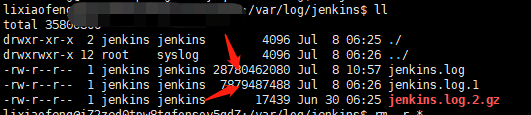
21.修改admin和flower返回平台路径
admin:/home/lixiaofeng/.virtualenvs/env/lib/python3.5/site-packages/simpleui/templates/admin/index.html
flower:/home/lixiaofeng/.virtualenvs/env/lib/python3.5/site-packages/flower/templates/navbar.html
22.数据库迁移,提示 django.db.utils.InternalError: (1054, "Unknown column 'base_report.report_path' in 'field list'")
django_migrations 表中会有每次执行的记录,可以通过修改这些记录解决;
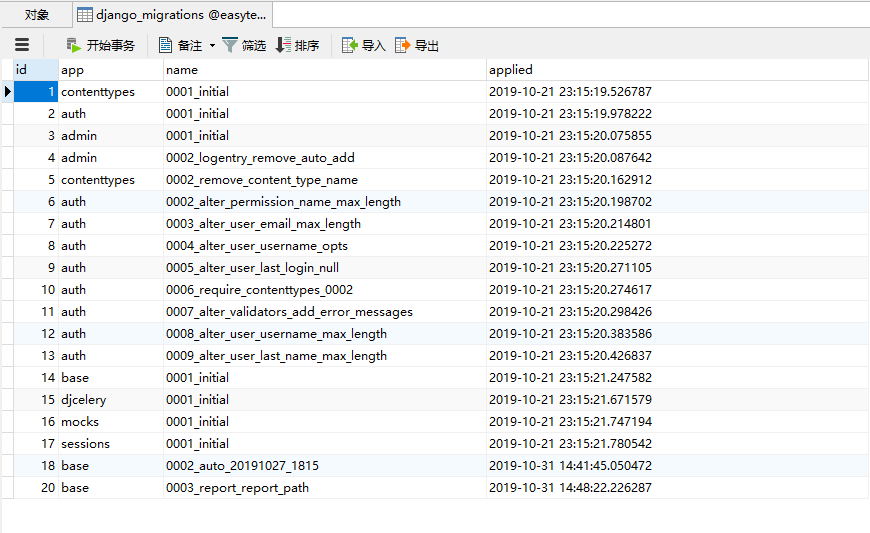
23. 一台服务器实现负载均衡
复制一份代码到别目录,修改 gunicorn-config.py,修改bind 参数 端口为9001;
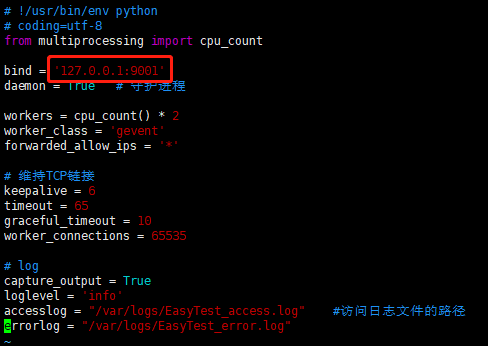
修改nginx.conf;
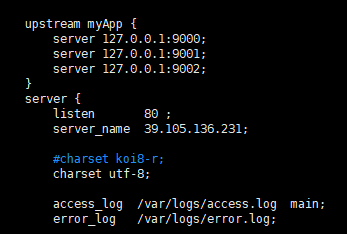
然后重启nginx和gunicorn;
EasyTest-接口自动化测试平台部署上线问题记录的更多相关文章
- 基于HttpRunner的接口自动化测试平台HttpRunnerManager(二)
https://github.com/HttpRunner/HttpRunnerManager HttpRunnerManager Design Philosophy 基于HttpRunner的接口自 ...
- Jmeter+ant+jenkins接口自动化测试 平台搭建(一)
平台简介 一个完整的接口自动化测试平台需要支持接口的自动执行,自动生成测试报告,以及持续集成.Jmeter 支持接口的测试,Ant 支持自动构建,而 Jenkins 支持持续集成,所以三者组合在一起可 ...
- 接口自动化测试平台 http://120.79.232.23
接口自动化测试平台 http://120.79.232.23 T Name Latest commit message Commit time .idea 修改自动化用例修改接口时,其他接口信息被删的 ...
- 接口自动化测试平台-接入持续集成jenkins
开篇提到,自动化测试最终期望还是能接入持续集成系统jenkins,下面记录下Go接口自动化测试平台是如何设计接入jenkins的. 回到Go接口自动化测试平台,在web系统中触发测试任务执行的入口为: ...
- Django 接口自动化测试平台
本项目工程 github 地址:https://github.com/juno3550/InterfaceAutoTestPlatform 0. 引言 1. 登录功能 2. 项目 3. 模块 4. 测 ...
- Linux下搭建接口自动化测试平台
前言 我们今天来学习一下在Linux下如何搭建基于HttpRunner开发的接口自动化测试平台吧! 需要在Linux上提前准备的环境(下面是本人搭建时的环境): 1,Python 3.6.8 (可参考 ...
- Apifox(1)比postman更优秀的接口自动化测试平台
Apifox介绍 Apifox 是 API 文档.API 调试.API Mock.API 自动化测试一体化协作平台,定位 Postman + Swagger + Mock + JMeter.通过一套系 ...
- Jmeter+Ant+Jenkins构建接口自动化测试平台(Windows)
一.首先先介绍下我的环境: 1. win10系统 2. ant版本:apache-ant-1.10.1(作用:执行脚本,便于后期的持续集成,下载地址:http://ant.apache.org/bin ...
- HttpRunner Manager接口自动化测试平台实践(Windows)
1. 源码下载 github: https://github.com/HttpRunner/HttpRunnerManager 下载后放入项目目录,结构如下: 2.依赖环境 根据根目录require ...
随机推荐
- JS框架_(JQuery.js)网页文字评论弹幕
百度云盘 传送门 密码:3azl jQuery网页右下角文字评论弹幕效果 <!DOCTYPE html> <html> <head> <title>jQ ...
- 为什么要使用 Go 语言,Go 语言的优势在哪里?
1.Go有什么优势 可直接编译成机器码,不依赖其他库,glibc的版本有一定要求,部署就是扔一个文件上去就完成了. 静态类型语言,但是有动态语言的感觉,静态类型的语言就是可以在编译的时候检查出来隐藏的 ...
- MySql中根据一列状态值查询状态的个数
最近搞报表的项目,要写数据库sql语句,根据状态值查询状态的个数,这个开始难为到我了,不过已经有解决办法了. 在数据库表中有一个字段是状态(zt),这里面有1-7这7个状态,现在查询每个状态的数量,并 ...
- nginx 与location语法详解
Location语法优先级排列 匹配符 匹配规则 优先级 = 精确匹配 1 ^~ 以某个字符串开头 2 ~ 区分大小写的正则匹配 3 ~* 不区分大小写的正则匹配 4 !~ 区分大小写不匹配的正则 ...
- 查看线程的cpu占用率
1) top -H -p 进程pid 查看线程的线程ID与CPU占用情况.或者使用 ps -eLo pid,lwp,pcpu | grep 进程pid2) pstack ...
- mybatis 中的 update 返回值
摘自:https://www.jianshu.com/p/80270b93082a 如果定义一个如下的update函数,那么这个函数的返回值到底是啥意思呢?是受影响的行数吗? 验证之前我们先看看数据库 ...
- LeetCode 15. 三数之和(3Sum)
题目描述 给定一个包含 n 个整数的数组 nums,判断 nums 中是否存在三个元素 a,b,c ,使得 a + b + c = 0 ?找出所有满足条件且不重复的三元组. 注意:答案中不可以包含重复 ...
- Entity Framework Code First使用者的福音 --- EF Power Tool使用记之一
下次会为大家深入解析这个小工具. 最先看到这个工具是在EF产品组最新的博客文章上,http://blogs.msdn.com/b/adonet/archive/2011/05/18/ef-power ...
- CEF3编译
要使用CEF3首先就要编译 下载网址为http://opensource.spotify.com/cefbuilds/index.html#windows64_builds 如果下载不动 可以用我上传 ...
- java多线程系列3:悲观锁和乐观锁
1.悲观锁和乐观锁的基本概念 悲观锁: 总是认为当前想要获取的资源存在竞争(很悲观的想法),因此获取资源后会立刻加锁,于是其他线程想要获取该资源的时候就会一直阻塞直到能够获取到锁: 在传统的关系型数据 ...