
JS框架_(JQuery.js)网页文字评论弹幕
百度云盘 传送门 密码:3azl
jQuery网页右下角文字评论弹幕效果
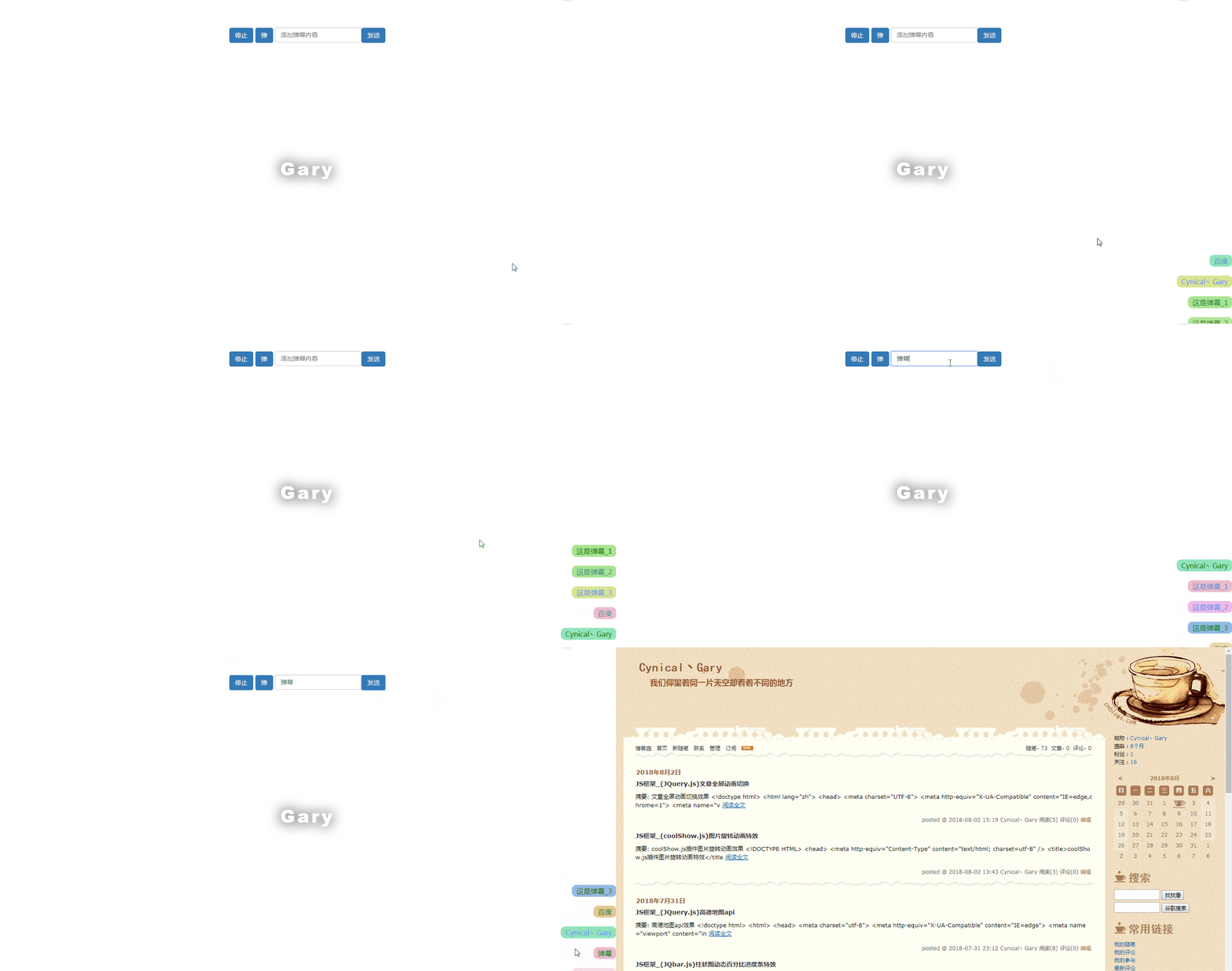
<!DOCTYPE html>

<html>

<head>

<title>jQuery网页右下角文字评论弹幕代码</title>

<meta charset="utf-8">

<meta id="scale" content="initial-scale=1, maximum-scale=1, user-scalable=0" name="viewport">

<script src="js/jquery.min.js"></script>

<script type="text/javascript" src="js/data.js"></script>

<script type="text/javascript" src="js/index.js"></script>

<style type="text/css">

    *{

        padding:0;

        margin:0;

    }

    a{

        text-decoration: none;

    }

    p {

      position: fixed;

      top: 50%;

      left: 0;

      right: 0;

      text-align: center;

      transform: translateY(-50%);

      font-size: 40px;

      font-weight: 900;

      color: white;

      text-shadow: 0 0 50px black;

      text-transform: capitalize;

      font-family: 'Roboto','Helvetica','Arial',sans-serif;

      letter-spacing: 5px;

    }

    .form-control{

        display: inline-block;

        width: auto;

        padding: 6px 12px;

        font-size: 14px;

        line-height: 1.42857143;

        color: #555;

        background-color: #fff;

        background-image: none;

        border: 1px solid #ccc;

        border-radius: 4px;

        -webkit-box-shadow: inset 0 1px 1px rgba(0,0,0,.075);

        box-shadow: inset 0 1px 1px rgba(0,0,0,.075);

        -webkit-transition: border-color ease-in-out .15s,-webkit-box-shadow ease-in-out .15s;

        -o-transition: border-color ease-in-out .15s,box-shadow ease-in-out .15s;

        transition: border-color ease-in-out .15s,box-shadow ease-in-out .15s;

    }

    .btn{

        display: inline-block;

        padding: 6px 12px;

        margin-bottom: 0;

        font-size: 14px;

        font-weight: 400;

        line-height: 1.42857143;

        text-align: center;

        white-space: nowrap;

        vertical-align: middle;

        -ms-touch-action: manipulation;

        touch-action: manipulation;

        cursor: pointer;

        -webkit-user-select: none;

        -moz-user-select: none;

        -ms-user-select: none;

        user-select: none;

        background-image: none;

        border: 1px solid transparent;

        border-radius: 4px;

    }

    .btn-primary {

        color: #fff;

        background-color: #337ab7;

        border-color: #2e6da4;

    }

    /*组件主样式*/

    .overflow-text{

        display: block;

        white-space:nowrap;

        overflow:hidden;

        text-overflow:ellipsis;

        opacity:0;

        clear: both;

        padding:3px 10px;

        border-radius: 10px;

        box-sizing: border-box;

        max-width: 100%;

        color:#fff;

        animation:colorchange 3s infinite alternate;

        -webkit-animation:colorchange 3s infinite alternate; /*Safari and Chrome*/

    }

    @keyframes colorchange{

        0%{

            color:red;

        }

        50%{

            color:green;

        }

        100%{

            color:#6993f9;

        }

    }

</style>

</head>

<body>

<p>Gary</p>

<center><br><br><br>

<button id="stop" class="btn btn-primary">停止</button>

<button id="open" class="btn btn-primary">弹</button>

<input type="text" class="form-control" name="" id="barrage_content" placeholder="添加弹幕内容"><button class="btn btn-primary" id="submit_barraget">发送</button>

</center>

<script type="text/javascript">

// 数据初始化

var Obj = $('body').barrage({

    data : data, //数据列表

    row : 5,   //显示行数

    time : 1000, //间隔时间

    gap : 20,    //每一个的间隙

    position : 'fixed', //绝对定位

    direction : 'bottom right', //方向

    ismoseoverclose : true, //悬浮是否停止

})

Obj.start();

//添加评论

$("#submit_barraget").click(function(){

    var val = $("#barrage_content").val();

    //此格式与dataa.js的数据格式必须一致

    var addVal = {

        href : '',

        text : val

    }

    //添加进数组

    Obj.data.unshift(addVal);

    alert('评论成功');

})

$("#open").click(function(){

    Obj.start();

})

$("#stop").click(function(){

    Obj.close();

})

</script>

</body>

</html>
index.html
    $.fn.barrage = function(opt){

        var _self = $(this);

        var opts = {   //默认参数

            data : [], //数据列表

            row : 5,   //显示行数

            time : 2000, //间隔时间

            gap : 20,    //每一个的间隙

            position : 'fixed', //绝对定位

            direction : 'bottom right', //方向

            ismoseoverclose : true, //悬浮是否停止

        }

        var settings = $.extend({},opts,opt); //合并参数

        var M = {},Obj = {};

        Obj.data = settings.data;

        M.vertical = settings.direction.split(/\s+/)[0]; //纵向

        M.horizontal = settings.direction.split(/\s+/)[1]; //横向

        M.bgColors = ['#edbccc','#edbce7','#c092e4','#9b92e4','#92bae4','#92d9e4','#92e4bc','#a9e492','#d9e492','#e4c892']; //随机背景色数组

        Obj.arrEle = []; //预计存储dom集合数组

        M.barrageBox = $('<div id="barrage" style="z-index:999;max-width:100%;position:'+settings.position+';'+M.vertical+':0;'+M.horizontal+':0;"></div>'); //存所有弹幕的盒子

        M.timer = null;

        var createView = function(){

            var randomIndex = Math.floor(Math.random() * M.bgColors.length);

            var ele = $('<a class="overflow-text" target="_blank" style="opacity:0;text-align:'+settings.direction.split(/\s+/)[1]+';float:'+settings.direction.split(/\s+/)[1]+';background-color:'+M.bgColors[randomIndex]+'"; href="'+(Obj.data[0].href ? Obj.data[0].href : "javascript:;")+'">'+Obj.data[0].text+'</a>');

            var str = Obj.data.shift();

            if(M.vertical  == 'top'){

                ele.animate({

                    'opacity' : 1,

                    'margin-top' : settings.gap,

                },1000)

                M.barrageBox.prepend(ele);

            }else{

                ele.animate({

                    'opacity' : 1,

                    'margin-bottom' : settings.gap,

                },1000)

                M.barrageBox.append(ele);

            }

            Obj.data.push(str);

            if(M.barrageBox.children().length > settings.row){

                M.barrageBox.children().eq(0).animate({

                    'opacity' : 0,

                },300,function(){

                    $(this).css({

                        'margin' : 0,

                    }).remove();

                })

            }

        }

        M.mouseClose = function(){

            settings.ismoseoverclose && (function(){

                M.barrageBox.mouseover(function(){

                    clearInterval(M.timer);

                    M.timer = null;

                }).mouseout(function(){

                    M.timer = setInterval(function(){ //循环

                        createView();

                    },settings.time)

                })

            })()

        }

        Obj.close = function(){

            M.barrageBox.remove();

            clearInterval(M.timer);

            M.timer = null;

        }

        Obj.start = function(){

            if(M.timer) return;

            _self.append(M.barrageBox); //把弹幕盒子放到页面中

            createView(); //创建试图并开始动画

            M.timer = setInterval(function(){ //循环

                createView();

            },settings.time)

            M.mouseClose();

        }

        return Obj;

    }
index.js
var data = [

    {href : 'http://www.baidu.com',text : '百度'},

    {href : 'http://www.cnblogs.com/1138720556Gary/',text : 'Cynical丶Gary'},

    {href : '',text : '这是弹幕_1'},

    {href : '',text : '这是弹幕_2'},

    {href : '',text : '这是弹幕_3'}

]
data.js
作者:冯宇 传送门
实现过程:
CSS
弹幕文字动画效果
    @keyframes colorchange{

        0%{

            color:red;

        }

        50%{

            color:green;

        }

        100%{

            color:#6993f9;

        }

    }
通过 @keyframes 规则,能够创建随着弹幕出现时间改变弹幕颜色动画
0% 是动画的开始时间,100% 动画的结束时间
初始化弹幕
var data = [

    {href : 'http://www.baidu.com',text : '百度'},

    {href : 'http://www.cnblogs.com/1138720556Gary/',text : 'Cynical丶Gary'},

    {href : '',text : '这是弹幕_1'},

    {href : '',text : '这是弹幕_2'},

    {href : '',text : '这是弹幕_3'}

]
href作为参数链接,新建弹幕默认无链接
弹幕属性
        var opts = {   //默认参数

            data : [], //数据列表

            row : 5,   //显示行数

            time : 2000, //间隔时间

            gap : 20,    //每一个的间隙

            position : 'fixed', //绝对定位

            direction : 'bottom right', //方向

            ismoseoverclose : true, //悬浮是否停止

        }
随机背景色数组
M.bgColors = ['#edbccc','#edbce7','#c092e4','#9b92e4','#92bae4','#92d9e4','#92e4bc','#a9e492','#d9e492','#e4c892'];
弹幕展示效果
        var createView = function(){

            var randomIndex = Math.floor(Math.random() * M.bgColors.length);

            var ele = $('<a class="overflow-text" target="_blank" style="opacity:0;text-align:'+settings.direction.split(/\s+/)[1]+';float:'+settings.direction.split(/\s+/)[1]+';background-color:'+M.bgColors[randomIndex]+'"; href="'+(Obj.data[0].href ? Obj.data[0].href : "javascript:;")+'">'+Obj.data[0].text+'</a>');

            var str = Obj.data.shift();

            if(M.vertical  == 'top'){

                ele.animate({

                    'opacity' : 1,

                    'margin-top' : settings.gap,

                },1000)

                M.barrageBox.prepend(ele);

            }else{

                ele.animate({

                    'opacity' : 1,

                    'margin-bottom' : settings.gap,

                },1000)

                M.barrageBox.append(ele);

            }

            Obj.data.push(str);

            if(M.barrageBox.children().length > settings.row){

                M.barrageBox.children().eq(0).animate({

                    'opacity' : 0,

                },300,function(){

                    $(this).css({

                        'margin' : 0,

                    }).remove();

                })

            }

        }
prepend():在被选元素的开头(仍位于内部)插入指定内容
animate() :执行 CSS 属性集的自定义动画
shift() 方法:用于把数组的第一个元素从其中删除,并返回第一个元素的值
当需要暂时的弹幕数量>最大展示数量(这里是5),那么全部展现出来,否则通过opacity()方法,改变弹幕透明度
语法
鼠标放置弹幕上,弹幕停止滚动
        M.mouseClose = function(){

            settings.ismoseoverclose && (function(){

                M.barrageBox.mouseover(function(){

                    clearInterval(M.timer);

                    M.timer = null;

                }).mouseout(function(){

                    M.timer = setInterval(function(){ //循环

                        createView();

                    },settings.time)

                })

            })()

        }
通过.ismoseoverclose判断鼠标是否悬停在弹幕上
M.timer = null使弹幕停止滚动
关闭弹幕
        Obj.close = function(){

            M.barrageBox.remove();

            clearInterval(M.timer);

            M.timer = null;

        }
开启弹幕
        Obj.start = function(){

            if(M.timer) return;

            _self.append(M.barrageBox); //把弹幕盒子放到页面中

            createView(); //创建试图并开始动画

            M.timer = setInterval(function(){ //循环

                createView();

            },settings.time)

            M.mouseClose();

        }
DOM
<script type="text/javascript">

// 数据初始化

var Obj = $('body').barrage({

    data : data, //数据列表

    row : 5,   //显示行数

    time : 1000, //间隔时间

    gap : 20,    //每一个的间隙

    position : 'fixed', //绝对定位

    direction : 'bottom right', //方向

    ismoseoverclose : true, //悬浮是否停止

})

Obj.start();

//添加评论

$("#submit_barraget").click(function(){

    var val = $("#barrage_content").val();

    //此格式与dataa.js的数据格式必须一致

    var addVal = {

        href : '',

        text : val

    }

    //添加进数组

    Obj.data.unshift(addVal);

    alert('评论成功');

})

$("#open").click(function(){

    Obj.start();

})

$("#stop").click(function(){

    Obj.close();

})

</script>
JS框架_(JQuery.js)网页文字评论弹幕的更多相关文章
- JS框架_(JQuery.js)绚丽的3D星空动画
百度云盘: 传送门 密码:8ft8 绚丽的3D星空动画效果(纯CSS) (3D星空动画可以用作网页背景,Gary为文本文字) <!doctype html> <html lang=& ...
- JS框架_(JQuery.js)圆形多选菜单选项
百度云盘 传送门 密码:zb1c 圆形多选菜单选项效果: <!DOCTYPE html> <html lang="en" > <head> &l ...
- JS框架_(JQuery.js)Tooltip弹出式按钮插件
百度云盘 传送门 密码:7eh5 弹出式按钮效果 <!DOCTYPE html> <html > <head> <meta charset="UTF ...
- JS框架_(JQuery.js)夜晚天空满天星星闪烁动画
百度云盘 传送门 密码:xftr 满天星星闪烁动画效果: (可用星空动画来作为页面背景,白色文字改为文章或者其他的O(∩_∩)O) <!doctype html> <html> ...
- JS框架_(JQuery.js)上传进度条
百度云盘 传送门 密码: 1pou 纯CSS上传进度条效果: <!DOCTYPE html PUBLIC "-//W3C//DTD XHTML 1.0 Transitional//EN ...
- JS框架_(JQuery.js)模拟刮奖
百度云盘:传送门 密码:6p5q 纯CSS模拟刮奖效果 <!DOCTYPE html> <html lang="en"> <head> < ...
- JS框架_(JQuery.js)文章全屏动画切换
百度云盘 传送门 密码:anap 文章全屏动画切换效果 <!doctype html> <html lang="zh"> <head> < ...
- JS框架_(JQuery.js)高德地图api
百度云盘 传送门 密码 :ko30 高德地图api效果 <!doctype html> <html> <head> <meta charset="u ...
- JS框架_(JQuery.js)动画效果鼠标跟随
百度云盘 传送门 密码 :4n9u 火狐浏览器上纯CSS_动画效果鼠标跟随效果: (作者:lily_lcj 传送门) <!DOCTYPE html PUBLIC "-//W3C//DT ...
随机推荐
- spark教程(10)-sparkSQL
sparkSQL 的由来 我们知道最初的计算框架叫 mapreduce,他的缺点是计算速度慢,还有一个就是代码比较麻烦,所以有了 hive: hive 是把类 sql 的语句转换成 mapreduce ...
- Linux-1.2关机重启reboot,shutdown
关机重启:reboot,shutdown reboot 重启操作系统 shutdown -r now 重启,shutdown会给其他用户提示
- Zabbix 配置Python邮件告警
1.首先你应该注册一个163邮箱,用于发信,再注册时开启SMTP/POP3功能,使用加密密码认证. 2.在Zabbix主机上新建send.py文件,将以下代码复制编辑,设置发件用户.密码. [root ...
- Docker 添加容器SSH服务
很多时候我们需要登陆到容器内部操作,此时我们就需要开启容器的SSH支持了,下面的小例子将具体介绍三种分配IP地址的方法,分别是pipworl分配,commit分配,Docker分配等. 基于commi ...
- Codeforces 1178C. Tiles
传送门 考虑一块块填,首先 $(1,1)$ 有 $4$ 种方案 然后根据 $(1,1)$ 的右边颜色,$(1,2)$ 有两种方案,$(1,3)$ 根据 $(1,2)$ 也有两种方案... 考虑 $(2 ...
- Java中字符串排序
package com.fs.test; import java.util.ArrayList; import java.util.Collections; import java.util.List ...
- N1考试必备词汇
相次ぐ あいつぐ 淡い あわい 合間 あいま 渋い しぶい 相俟つ あいまつ 慌てよう あわてよう 明るい あかるい 安易過ぎる 明らか あきらか 用心 ようじん 悪事 あくじ 案の定 あんのじょう ...
- Go语言的基本语法(二)
一·if -else (1) package main import "fmt" // if - else //func main(){ // // 先定义 一个变量 // v ...
- ctfd搭建
CTFd 0x00 前言 搭个CTF平台,看能不能带动一下学校的CTF参与度. 一个下午都在搭这个平台:O 抓瞎摸索,最后成功用Apache+mod_wsgi也算是功德圆满了. 进入正题: 系统: C ...
- c# 6.0、c#7.0、c#8.0新特性
官方: https://docs.microsoft.com/zh-cn/dotnet/articles/csharp/whats-new/csharp-6 https://docs.microsof ...