
Repeater的使用
1.页面代码
如果要分页,那么页面开头必须写(<%@ Register Src="~/Controls/Page.ascx" TagName="Page" TagPrefix="uc1" %>)
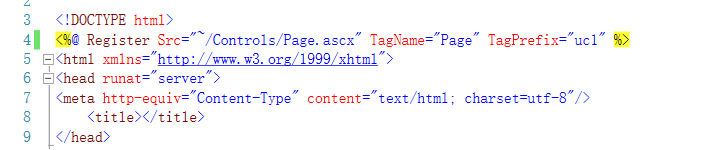
并且分页,页脚<uc1:Page ID="Page2" runat="server" /> 前面的uc1要跟上面的TagPrefix值一样
<table class="table" id="gv">
<%--头标--%>
<thead>
<tr>
<td width="50px" class="auto-style1">
<asp:LinkButton ID="LinkButton1" runat="server" OnClick="DeleteByChk" OnClientClick="javascript:return checkValues('您确定要批量删除数据吗?')">删除</asp:LinkButton>
<input type="checkbox" name="ckb" class="checkall"/>
</td>
<td width="50px" class="auto-style1"><span style="margin-left:20px;">序</span></td>
<td width="100px" class="auto-style1">制单日期</td>
<td width="50px" class="auto-style1">订单状态</td>
<td width="250px" class="auto-style1">任务名称</td>
<td width="50px" class="auto-style1">销售编号</td>
<td width="50px" class="auto-style1">合同编号</td>
<td width="50px" class="auto-style1">客户名称</td>
<td width="50px" class="auto-style1">联系人</td>
<td width="50px" class="auto-style1">联系电话</td>
<td width="50px" class="auto-style1">管理</td>
</tr>
</thead>
<%--数据的绑定--%>
<asp:Repeater runat="server" ID="rpt">
<ItemTemplate>
<tr>
<td><input runat="server" id="chk" type="checkbox" value='<%#Eval("SId")%>' class="checkdelete"/></td>
<td><span style="margin-left:20px;"><%# Container.ItemIndex+1 %></span></td>
<td><span style="margin-left:25px;"><%#Eval("SOperDate")%></span></td>
<td><span style="margin-left:25px;"><%#Eval("SIsLock")%></span></td>
<td><span style="margin-left:25px;"><%#Eval("SName")%></span></td>
<td><span style="margin-left:25px;"><%#Eval("SCode")%></span></td>
<td><span style="margin-left:25px;"><%#Eval("SConNo")%></span></td>
<td><span style="margin-left:25px;"><%#Eval("SComId")%></span></td>
<td><span style="margin-left:25px;"><%#Eval("SLinkMan")%></span></td>
<td><span style="margin-left:25px;"><%#Eval("STell")%></span></td>
<td class="manage">
<a href="TaskInterManage.aspx?SId=<%#Eval("SId") %>" class="show">编辑</a>
<asp:LinkButton runat="server" ID="lb_del" class="delete" title="你确定要删除这一项吗?" OnClick="Delete" >删除</asp:LinkButton>
</td>
</tr>
</ItemTemplate>
</asp:Repeater>
</table>
<%--分页,页脚--%>
<table class="table">
<tr>
<td class="page">
<span style="float:left;" id="num" runat="server"></span>
<uc1:Page ID="Page2" runat="server" /> </td>
</tr>
</table>
2.数据的展示
private void show()

        {

            DataTable dt = System_Project_TasksBLL.GetList("");

            //分页

            int pageNumber = ;//页数

            int pageSize = ;//每一页显示数

            //判断是否需要分页

            if (!string.IsNullOrEmpty(Request.QueryString["page"]))

                pageNumber = Convert.ToInt32(Request.QueryString["page"]);


       //把datatable类型的数据转换为list集合类型的数据

            List<System_Project_Tasks> list = new List<System_Project_Tasks>();

            foreach (DataRow item in dt.Rows)

            {

                System_Project_Tasks data = new System_Project_Tasks();

                data.SId = Convert.ToInt32(item["SId"].ToString());

                data.SOperDate = Convert.ToDateTime(item["SOperDate"].ToString());

                data.SIsLock = int.Parse(item["SIsLock"].ToString());

                data.SName = item["SName"].ToString();

                data.SCode = item["SCode"].ToString();

                data.SConNo = item["SConNo"].ToString();

                data.SComId = item["SComId"].ToString();

                data.SLinkMan = item["SLinkMan"].ToString();

                data.STell = item["STell"].ToString();

                list.Add(data);

            }
       //筛选要显示的数据

            PagedDataSource pageDataSource = new PagedDataSource()

            {

                DataSource = list,//数据源

                AllowPaging = true,//是否开启分页

                PageSize = pageSize,//每一页显示数

                CurrentPageIndex = pageNumber,//开始页的位置

            };

        //下脚的分页菜单的制作,pageNumber:当前页面的页数    pageDataSource.PageCount:获取数据一共有多少页

            this.Page2.sty("meneame", pageNumber, pageDataSource.PageCount, "?page=");

            //赋值

            this.num.InnerHtml = string.Concat("当前总计 - <span style='color:#ff0000; font-weight:bold;'>",dt.Rows.Count , "</span>条-数据");

            this.rpt.DataSource = pageDataSource;

            this.rpt.DataBind();

        }
3.对控件的一些基本操作
protected void Delete(object sender, EventArgs e)

        {

            //查找此控件的上一个层级

            RepeaterItem parent = (sender as LinkButton).Parent as RepeaterItem;

            //在此层级下面查找控件(并不是找此层级的子集)

            HtmlInputCheckBox htmlInputCheckBox = parent.FindControl("chk") as HtmlInputCheckBox;

            //获取chekbox的value值(id)

            int num = Convert.ToInt32(htmlInputCheckBox.Value);

            //删除

            if (bll.Delete(num))

            {

                string str = HttpContext.Current.Server.HtmlEncode("您好!工程测试单删除成功!");

                Response.Redirect(string.Concat("/InfoTip/Operate_Success.aspx?returnpage=", base.Request.Url.AbsoluteUri, "&tip=", str));

            }

        }

        protected void DeleteByChk(object sender, EventArgs e)

        {

            //遍历Repeater每一行数据

            foreach (RepeaterItem item in this.rpt.Items)

            {

                //获取每一行数据中的id叫chk的控件

                HtmlInputCheckBox htmlInputCheckBox = item.FindControl("chk") as HtmlInputCheckBox;

                //判断此行数据的checkbox有没有勾选上

                if (!htmlInputCheckBox.Checked)

                {

                    //如果没有,那么跳过此次循环

                    continue;

                }

                //获取id

                int num = Convert.ToInt32(htmlInputCheckBox.Value);

                //调用bll层方法删除

                bll.Delete(num);

            }

            string str = HttpContext.Current.Server.HtmlEncode("您好!邮件已彻底删除!");

            base.Response.Redirect(string.Concat("/InfoTip/Operate_Success.aspx?returnpage=", base.Request.Url.AbsoluteUri, "&tip=", str));

        }
4.页面的展示

Repeater的使用的更多相关文章
- C# 在Repeater 的ItemDataBound 如何转换e.Item.DataItem 的类型
1.使用DataSet和DataTable绑定数据源时,用 DataRowView view = (DataRowView)e.Item.DataItem; 2.DataReader绑定数据源时,用 ...
- Webform(七)——内置对象(Session、Application)和Repeater的Command操作
内置对象:用于页面之间的数据交互 为什么要使用这么内置对象?因为HTTP的无状态性. 一.内置对象 (一)Session 跟Cookies一样用来存储用户数据 1.Session.Cookies对比 ...
- Webform(五)——内置对象(Response、Request)和Repeater中的数据增删改
一.内置对象 (一)Response对象 1.简介:response 对象在ASP中负责将信息传递给用户.Response对象用于动态响应客户端请求,并将动态生成的响应结果返回到客户端浏览器中,使用R ...
- webform Repeater重复器、地址栏传值、Response
Repeater: 重复器 <HeaderTemplate></HeaderTemplate> - 头模板:在循环开始时,其内容只会打印一遍 <ItemTemplate& ...
- Repeater、地址栏传值、Response--2016年12月30日
Repeater Repeater支持以下5种模板 ● ItemTemplate : 对每一个数据项进行格式设置 [Formats each item from the data sou ...
- C#中用radio单选Repeater循环数据,js实现
<asp:Repeater ID="rpt" runat="server"> <ItemTemplate> <tr data-id ...
- asp:Repeater实例备忘
1.前置部分 <asp:Repeater ID="rptPlanNo" runat="server" OnItemDataBound="rptP ...
- webform Repeater、地址栏传值、Response
Repeater: 重复器 Repeater中有五个模板,这里需要注意的是4个 <HeaderTemplate> - 开头,只执行一次的内容 <ItemTemplate> - ...
- ASP.NET中获取Repeater模板列中LinkButton按钮事件中获取ID等
前台页面中: <asp:Repeater ID="repComment" runat="server"> <ItemTe ...
- Repeater的分页
Repeater控件是个好东西.轻量级.又好用.完全的自定义.但是,正是因为这些优点它没有自动分页的功能.这个需要研究一下.我看了一下起点等小说网站,那些什么推荐排名榜用Repeater控件那是很 ...
随机推荐
- logback为单独的包或者类配置输出文件
最近接一个这样的需求,为某个类的日志输出到指定的文件.一般都是按日志级别输出到对应的文件中.查阅相关资料和logback教程,写出下面的demo供参考. 1.添加一个appender <!-- ...
- 【leetcode】668. Kth Smallest Number in Multiplication Table
题目如下: 解题思路:几乎和[leetcode]719. Find K-th Smallest Pair Distance 的方法一样.只不过一个是减法一个是乘法,还有一点区别是[leetcode]7 ...
- Halo(八)
安全模块 用户描述类 /** * 基本 Entity */ @Data @MappedSuperclass public class BaseEntity { /** Create time */ @ ...
- SpringMVC的 ModelAndView
使用ModelAndView类用来存储处理完后的结果数据,以及显示该数据的视图. public class ModelAndView { /** View instance or view name ...
- SEERC 2018 I - Inversion (Gym - 101964I) DP
Gym - 101964I 题意 有一个数组\(p\),如果满足\(i<j,p_i>p_j\),则\(i,j\)之间就有一条边相连,问存在多少个集合满足集合内的元素互不相连,且集合外的元素 ...
- 【CF1100F】Ivan and Burgers(线性基,分治)
题意:给定n个数,每个数为c[i],有q个询问,每次询问从第l个到第r个数字的最大xor和 n,q<=5e5,c[i]<=1e6,时限3s 思路:直接线段树维护区间线性基是3个log,会T ...
- A Bug's Life - poj2492
Time Limit:5000MS Memory Limit:32768KB 64bit IO Format:%I64d & %I64u Submit Status Descr ...
- CSS基础知识复习
1. CSS优先级 标签内部属性 style定义的CSS > 文档内定义的css > 引用外部CSS文件 2. CSS选择器类型 . 标签选择器 . 类选择器(使用.做标识) . ID选择 ...
- 戴尔DELL P2419H显示器连接笔记本之后,笔记本的耳机不工作了
去control panel,找到sound 在playback的tab上,重新设置default
- PHP运行出现Notice
问题: Notice:Notice是PHP 的提示而非报错,PHP本身不需要事先声明变量即可直接使用,但是对未声明变量会有提示.在网站正式开始运行时,会把提示关了的. 关闭PHP提示的方法: 搜索ph ...