
vue 设置 input 为不可以编辑
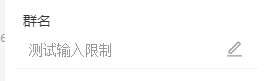
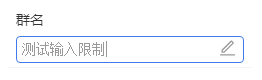
我用最笨的方法,先实现功能先,用两个input,一个可以编辑,一个不可以编辑,失去焦点后隐藏可以点击的那个,点“编辑”时,显示可以编辑的那个input
          <div class="edit-item">

            <input type="text" id="group-name" v-model="groupName" class="edit-input" disabled v-show="!isEditGroupName" >

            <input type="text" id="group-name2" v-model="groupName" class="edit-input" ref="groupName"

            @input="changeValue"

            @change="editGroupNameSave(groupInfo.name)" v-show="isEditGroupName" @blur="isEditGroupName = false">

            <span  @click="editGroupName"><icon-svg name="icon-kaka-compile" icon-style="edit-ico"></icon-svg></span>

          </div>
  export default {

    name: 'RightSideBar',

    props: {

    },

    data () {

      return {

        isEditGroupName: false, // 修改群名称

      }

    },

    computed: {

      // 群名称

      groupName: {

        get () {

          return this.$store.getters.groupSetInfo.name

        },

        set (val) {

          // 使用vuex中的mutations中定义好的方法来改变

          let groupSetInfo = this.$store.getters.groupSetInfo

          let copyMyinfo = Object.assign({}, groupSetInfo)

          copyMyinfo.name = val

          this.$store.dispatch('groupSetInfo', copyMyinfo)

        }

      },

    },

    methods: {

      changeValue () {

        let leng = this.validateTextLength(this.groupName)

        if (leng >= 15) {

          this.$refs.groupName.maxLength = leng

        } else {

          this.$refs.groupName.maxLength = 30

        }

      },

      validateTextLength (value) {

        // 中文、中文标点、全角字符按1长度,英文、英文符号、数字按0.5长度计算

        let cnReg = /([\u4e00-\u9fa5]|[\u3000-\u303F]|[\uFF00-\uFF60])/g

        let mat = value.match(cnReg)

        let length

        if (mat) {

          length = (mat.length + (value.length - mat.length) * 0.5)

          return length

        } else {

          return value.length * 0.5

        }

      },

      // 打开编辑

      editGroupName () {

        this.isEditGroupName = true

        let nickNameInput = document.querySelector('#group-name2')

        setTimeout(() => {

          nickNameInput.focus()

        }, 0)

      },

      // 保存群名修改

      editGroupNameSave (data) {

      },

    },

    created () {

  }
编辑
vue 设置 input 为不可以编辑的更多相关文章
- vue设置input不可编辑切换
html: <Input name="a" v-model="formValidate.coName" placeholder="请输入姓名&q ...
- [oldboy-django][2深入django]学生管理(Form)-- 编辑(设置input标签属性,设置input标签默认显示值,设置input的类型)
1 django 后台实现设置input标签属性,设置input标签默认显示值,设置input输入框类型 # Form生成html标签 a. 通过Form生成Input输入框,Form标签,以及sub ...
- 设置input框文字垂直居中和宽度
input { solid #999;height:22px; background:#ffffff; line-height:22px; margin:0px; padding:0px;/*表单输入 ...
- 使input文本框不可编辑的3种方法
一:disabled disabled 属性规定应该禁用 input 元素,被禁用的 input 元素,不可编辑,不可复制,不可选择,不能接收焦点,后台也不会接收到传值.设置后文字的颜色会变成灰色.d ...
- css设置input中placeholder字体
设置input中placeholder字体颜色 input::-webkit-input-placeholder {color:@a;} input:-moz-placeholder {color:@ ...
- 设置DataGridView 显示自己添加编辑的列名,不动态显示数据库本身
设置DataGridView 显示自己添加编辑的列名,不动态显示数据库本身. 方法: (1)界面操作,把DataGridView控件拖放在窗体中,就看到DataGridView控件的右上角有个小三角, ...
- JQuery设置input属性(disabled、enabled)
document.getElementById("removeButton").disabled = false; //普通Js写法 $("#removeButton&q ...
- Vue 限制input输入 限数字 或 小数点后两位number
Vue 限制input输入 小数点后两位number <input type="number" @keydown="handleInput2" place ...
- 设置input标签的placeholder的样式
设置input样式代码: input::-webkit-input-placeholder{ /*WebKit browsers*/ color: red; } input::-moz-input-p ...
随机推荐
- IIS部署网站 HTTP 错误 500.21 - Internal Server Error
HTTP 错误 500.21 - Internal Server Error处理程序“PageHandlerFactory-Integrated”在其模块列表中有一个错误模块“ManagedPipel ...
- vtkTestHull将多个平面围成一个凸面体
1.vtkHull produce an n-sided convex hull vtkHull is a filter which will produce an n-sided convex hu ...
- js处理表情字符且让数据库支持emoji表情符存储
数据库处理 更换字符集utf8-->utf8mb4 JS处理 将表情转为字符: function utf16toEntities(str) { var patt=/[\ud800-\udbff] ...
- 关于FPS游戏的设计问题
第一个想到的问题: 首先以unity的FPSCharactorController为例,这里规定,相机的方向中心一定是瞄准的方向中心.设置身体的扭曲朝向相机方向,这样身体可以弯腰.你们看图中,我让玩家 ...
- 关于c++对拍的办法
众所周知,在\(oi\)学习以及考试中,对拍是一件非常重要的事. 有了对拍后,我们可以利用它发现代码上的一些非常难看出来的错误. 编写对拍程序一般有两个办法. 方案一 编写一个对拍的\(cpp\),并 ...
- ps -ef 和ps -aux的区别
在 linux 显示进程的命令是ps ,常用的是 ps -ef,今天看到了还有一个ps -aux,查询了资料,这里总结一下 那么ps -ef 和ps -aux 有什么区别呢? 其实区别不是很大,这就要 ...
- spark日志+hivesql
windows本地读取hive,需要在resource里面将集群中的hive-site.xml下载下来. <?xml version="1.0" encoding=" ...
- 服务器配置好但Idea/Datagrip无法连接远程数据库的解决方案
服务器没有开放端口3306,在云服务控制台配置安全组即可.
- java使用Callable创建又返回值的线程
并发编程使我们可以将程序分为很多个分离的,相互之间独立的任务,通过使用多线程的机制,将每个任务都会有一个执行线程来单独的驱动,一个线程是 进程中一个单一顺序控制流,一个进程可以拥有多个线程,也就相当于 ...
- ActiveMQ利用ajax收发消息
准备工作: 后台需要导包: activemq-all.jar activemq-web.jar jetty-all.jar 如果是maven项目: pom.xml <dependency> ...