
批量下载文件web
最近需要这个所以写了一个例子
一般批量下载由以下步骤组成:
1、确定下载的源文件位置
2、对文件进行打包成临时文件,这里会用到递归调用,需要的嵌套的文件夹进行处理,并返回文件保存位置
3、将打包好的文件下载
4、下载完成将打包的临时文件删除
下面的代码中鉴于简单方便,作为例子使用,使用纯的jsp实现下载,没有配置成servlet,
下载时使用JS事件模拟功能直接请求JSP文件方式,如果需要使用servlet方式,
可把jsp中的java代码搬到servlet中
文件打包 zip 代码:
package com.downloadZip;
import java.io.BufferedInputStream;
import java.io.BufferedOutputStream;
import java.io.DataInputStream;
import java.io.File;
import java.io.FileInputStream;
import java.io.FileNotFoundException;
import java.io.FileOutputStream;
import java.io.IOException;
import java.util.zip.ZipEntry;
import java.util.zip.ZipOutputStream;
public class DownloadZip {
private static int BUF_SIZE = 1024*10;
public static void main(String[] args) {
try {
File f = new DownloadZip().createZip("D:/img","D:/imgs","img");
System.out.println(f.getPath());
} catch (IOException e) {
e.printStackTrace();
}
}
/**
* 创建压缩文件
* @param sourcePath 要压缩的文件
* @param zipFilePath 文件存放路徑
* @param zipfileName 压缩文件名称
* @return File
* @throws IOException
*/
public File createZip(String sourcePath ,String zipFilePath,String zipfileName) throws IOException{
//打包文件名称
zipfileName = zipfileName+".zip";
/**在服务器端创建打包下载的临时文件夹*/
File zipFiletmp = new File(zipFilePath+"/tmp"+System.currentTimeMillis());
if(!zipFiletmp.exists() && !(zipFiletmp.isDirectory())){
zipFiletmp.mkdirs();
}
File fileName = new File(zipFiletmp,zipfileName);
//打包文件
createZip(sourcePath,fileName);
return fileName;
}
/**
* 创建ZIP文件
* @param sourcePath 文件或文件夹路径
* @param zipPath 生成的zip文件存在路径(包括文件名)
*/
public void createZip(String sourcePath, File zipFile) {
ZipOutputStream zos = null;
try {
zos = new ZipOutputStream(new BufferedOutputStream(new FileOutputStream(zipFile),BUF_SIZE));
writeZip(new File(sourcePath), "", zos);
} catch (FileNotFoundException e) {
throw new RuntimeException(e);
} finally {
try {
if (zos != null) {
zos.close();
}
} catch (IOException e) {
throw new RuntimeException(e);
}
}
}
/**
* 创建ZIP文件
* @param sourcePath 文件或文件夹路径
* @param zipPath 生成的zip文件存在路径(包括文件名)
*/
public void createZip(String sourcePath, String zipPath) {
ZipOutputStream zos = null;
try {
zos = new ZipOutputStream(new BufferedOutputStream(new FileOutputStream(zipPath),BUF_SIZE));
writeZip(new File(sourcePath), "", zos);
} catch (FileNotFoundException e) {
throw new RuntimeException(e);
} finally {
try {
if (zos != null) {
zos.close();
}
} catch (IOException e) {
throw new RuntimeException(e);
}
}
}
/**
*
* @param file
* @param parentPath
* @param zos
*/
private void writeZip(File file, String parentPath, ZipOutputStream zos) {
if(file.exists()){
if(file.isDirectory()){//处理文件夹
parentPath+=file.getName()+File.separator;
File [] files=file.listFiles();
for(File f:files){
writeZip(f, parentPath, zos);
}
}else{
DataInputStream dis=null;
try {
dis=new DataInputStream(new BufferedInputStream(new FileInputStream(file)));
ZipEntry ze = new ZipEntry(parentPath + file.getName());
zos.putNextEntry(ze);
byte [] content=new byte[BUF_SIZE];
int len;
while((len=dis.read(content))!=-1){
zos.write(content,0,len);
zos.flush();
}
zos.closeEntry();
} catch (FileNotFoundException e) {
throw new RuntimeException(e);
} catch (IOException e) {
throw new RuntimeException(e);
}finally{
try {
if(dis!=null){
dis.close();
}
}catch(IOException e){
throw new RuntimeException(e);
}
}
}
}
}
/**
* 刪除文件
* @param file
* @return
* @throws Exception
*/
public boolean delFile(File file) throws Exception {
boolean result = false;
if(file.exists()&&file.isFile())
{
file.delete();
file.getParentFile().delete();
result = true;
}
return result;
}
}
JSP 下载逻辑代码:
<%@ page language="java" contentType="text/html; charset=GBK"
pageEncoding="GBK"%>
<%@ page import="java.net.*"%>
<%@ page import="java.io.*"%>
<%@ page import="com.downloadZip.*"%>
<!DOCTYPE html PUBLIC "-//W3C//DTD HTML 4.01 Transitional//EN" "http://www.w3.org/TR/html4/loose.dtd">
<html>
<head>
<meta http-equiv="Content-Type" content="text/html; charset=GBK">
<title>Insert title here</title>
</head>
<body>
<%
// 创建压缩包并返回压缩包位置
DownloadZip downloadZip = new DownloadZip();
File zipfile = downloadZip.createZip("D:/img","D:/imgs","img");
String path=zipfile.getPath();
// 获取文件名
String fileName=path.substring(path.lastIndexOf("\\")+1);
System.out.println(fileName);
//制定浏览器头
//如果图片名称是中文需要设置转码
response.setCharacterEncoding("GBK");
response.setContentType("application/x-download");//设置为下载application/x-download
response.setHeader("content-disposition", "attachment;fileName="+URLEncoder.encode(fileName, "GBK"));
InputStream reader = null;
OutputStream outp = null;
byte[] bytes = new byte[1024];
int len = 0;
try {
// 读取文件
reader = new FileInputStream(path);
// 写入浏览器的输出流
outp = response.getOutputStream();
while ((len = reader.read(bytes)) > 0) {
outp.write(bytes, 0, len);
outp.flush();
}
out.clear();
out = pageContext.pushBody();
} catch (Exception e) {
e.printStackTrace();
} finally {
if (reader != null) {
reader.close();
}
//这里貌似不能关闭,如果关闭在同一个页面多次点击下载,会报错
//if (outp != null)
// outp.close();
downloadZip.delFile(zipfile);
}
%>
</body>
</html>
最终效果:
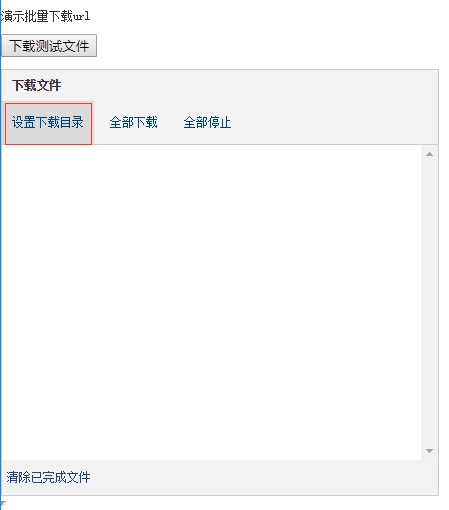
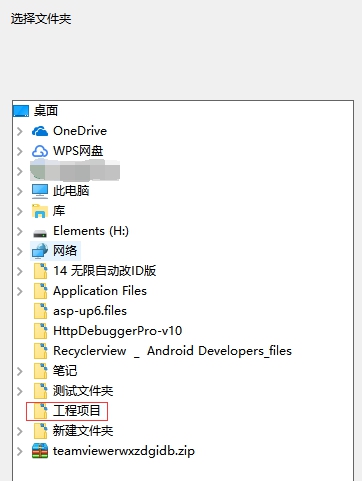
设置下载目录,让文件下载至规定的目录:C:\Users\liu\Desktop\工程项目
开始批量下载文件:
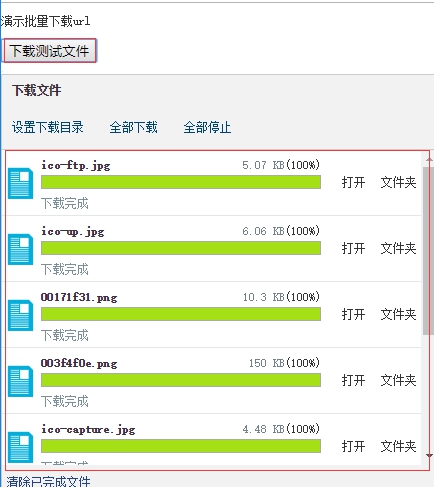
文件已完成批量下载,去文件目录中看看:
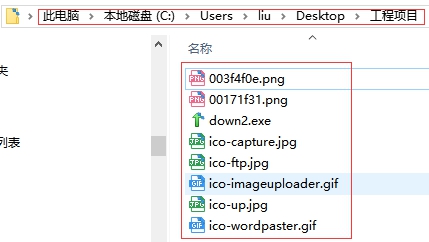
文件已在目录中了,很方便。
详细配置信息可以参考我写的这篇文章:http://blog.ncmem.com/wordpress/2019/08/28/net%e6%96%87%e4%bb%b6%e6%89%b9%e9%87%8f%e4%b8%8b%e8%bd%bd/
批量下载文件web的更多相关文章
- C#异步批量下载文件
C#异步批量下载文件 实现原理:采用WebClient进行批量下载任务,简单的模拟迅雷下载效果! 废话不多说,先看掩饰效果: 具体实现步骤如下: 1.新建项目:WinBatchDownload 2.先 ...
- Java批量下载文件并zip打包
客户需求:列表勾选需要的信息,点击批量下载文件的功能.这里分享下我们系统的解决方案:先生成要下载的文件,然后将其进行压缩,生成zip压缩文件,然后使用浏览器的下载功能即可完成批量下载的需求.以下是zi ...
- java批量下载文件为zip包
批量下载文件为zip包的工具类 package com.meeno.trainsys.util; import javax.servlet.http.HttpServletRequest; impor ...
- web批量下载文件到本地
JavaWeb 文件下载功能 文件下载的实质就是文件拷贝,将文件从服务器端拷贝到浏览器端,所以文件下载需要IO技术将服务器端的文件读取到,然后写到response缓冲区中,然后再下载到个人客户端. 1 ...
- java+web+批量下载文件
JavaWeb 文件下载功能 文件下载的实质就是文件拷贝,将文件从服务器端拷贝到浏览器端,所以文件下载需要IO技术将服务器端的文件读取到,然后写到response缓冲区中,然后再下载到个人客户端. 1 ...
- php批量下载文件
最近用codeigniter开发一个图片网站,发现单文件下载很容易实现,批量下载的话,就有点麻烦. 普通php下载比较简单,比如我封装的一个函数: function shao_download($fi ...
- linux FTP 批量下载文件
wget是一个从网络上自动下载文件的自由工具,支持通过HTTP.HTTPS.FTP三个最常见的TCP/IP协议下载,并可以使用HTTP代理.wget名称的由来是“World Wide Web”与“ge ...
- python_crawler,批量下载文件
这个第一个python3网络爬虫,参考书籍是<python网络数据采集>.该爬虫的主要功能是爬取某个网站,并将.rar,.doc,.docx,.zip文件批量下载. 后期将要改进的是,用后 ...
- PowerShell 实现批量下载文件
简介 批量文件下载器 PowerShell 版,类似于迅雷批量下载功能,且可以破解 Referer 防盗链 源代码 [int]$script:completed = 0 # 下载完成数量 [int]$ ...
随机推荐
- 【SD系列】SAP SD凭证处理被批次处理冻结
公众号:SAP Technical 本文作者:matinal 原文出处:http://www.cnblogs.com/SAPmatinal/ 原文链接:[SD系列]SAP SD凭证处理被批次处理冻结 ...
- Android - Unable to add window android.view.ViewRootImpl$W@6518342 -- permission denied for window type 2133
因为跟博主碰到了一样的问题,所以记录一下分析原理 原文链接:https://www.jianshu.com/p/b0364074288a 首先,先介绍下背景环境,第一,是Android7.0,其次,要 ...
- linux 获取目录中详细信息 -rw-r--r--详解
-rw-r–r– 1 root root 1313 Sep 3 14:59 test.log详解 查询目录中的内容命令 ls [选项] [文件或目录] 选项: -a 显示所有文件.包括隐藏文件 -l ...
- MyBatis插入并返回id技巧
1, 使用返回插入id的值,这个值即是当前插入的id
- 数据库与前端与Django目录
数据库 [怀心抱素]初步认识数据库 [怀心抱素]mysql的表操作 [怀心抱素]mysql记录操作 [怀心抱素]mysql索引与补充 [怀心抱素]python操作mysql 前端 [怀心抱素]HTML ...
- sping data jpa 共享主键 OneTonOne 延时加载
当我们使用spring boot创建项目时,系统默认使用的是如下parent. <parent> <groupId>org.springframework.boot</g ...
- htpwdScan — 一个简单的HTTP暴力破解、撞库攻击脚本
李姐姐之前跟我们分享了子域名枚举工具subDomainBrute<subDomainsBrute — 改进渗透测试时暴力枚举子域名的python脚本>,这回带给我们htpwdScan ht ...
- Kibana 基本操作
es中的索引对应mysql的数据库.类型对应mysql的表.文档对应mysql的记录.映射对应mysql的索引索引:index类型:type映射:mappings 1.创建索引在kibana的Dev ...
- Python性能分析工具Profile
Python性能分析工具Profile 代码优化的前提是需要了解性能瓶颈在什么地方,程序运行的主要时间是消耗在哪里,对于比较复杂的代码可以借助一些工具来定位,python 内置了丰富的性能分析工具,如 ...
- IDEA tomcat热部署方法
项目开发过程中,我们一般希望在修改完代码之后不重启项目即可提现出修改的结果,那么热部署项目就显得十分必要了.在idea中将项目热部署至tomcat中的方法如下: 首先打开tomcat配置界面,在ser ...