
第四篇-以ConstraintLayout进行Android界面设计
此文章基于第三篇。
一、新建一个layout.xml文件,创建方法不再赘述,在Design界面右击LinearLayout,点击Convert LinearLayout to ConstraintLayout,选择ok。
二、将main.java中setContentView(R.layout.layout);删掉,换成setContentView(R.layout.layout2);即用新建的cpntrainlayout xml文件。
三、切换到layout2.xml,拖动Button到手机预览界面的右下角,会发现上面有个红色的感叹号,点击可以看到说没有设置位置。将鼠标放在Button上,可以看见上下左右有四个小圆圈,可以通过这四个小圆圈用鼠标将其连在对应的墙壁,控制Button的位置,如果想将其放在右下角,那么就将右边的小圆圈按住鼠标左键拉到右边的墙壁,Button右侧就和墙壁贴在一起,同理,将下面的小圆圈和界面底部连接,Buttonjiu 固定在右下角了。如果想取消之前的连接,将鼠标放在已经连接的小圆圈上,会发现小圆圈填充了红色,并显示Delete Connection,点一下就可以取消连接了。如果全都不设置连接,默认是从上到下,从左到右。将四个圆圈全部连接,Button就会出现在正中间。选择layout_width为match_constraint,button就会占一整行。写入text为Button #1。取消下方的连接,Button#1就会跑到最上面。
拖动另一个Button到预览界面,连接左右两面,将text变为Button #2。并将Button #2上方的小圆圈连接Button #1下方的小圆圈,并改变layout_width为match_constraint,那么Button #2就会出现在Button #1的下方了。拖动第三个Button按钮,连接左右下方向,将text变为Button #3,改变layout_width为match_constraint,此时Button #3出现在底部。
效果图:
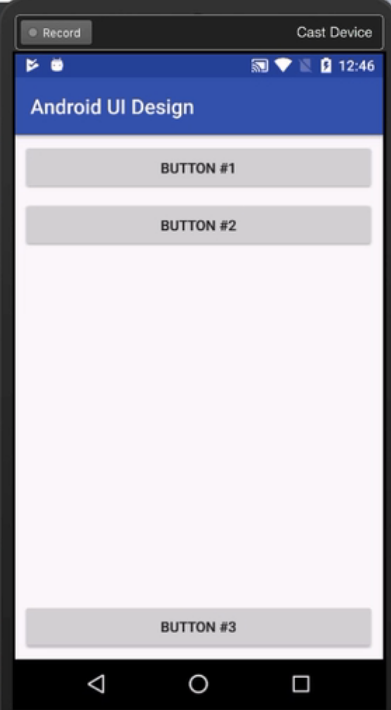
layout2.xml代码如下:
<?xml version="1.0" encoding="utf-8"?>

<android.support.constraint.ConstraintLayout xmlns:android="http://schemas.android.com/apk/res/android"

    xmlns:app="http://schemas.android.com/apk/res-auto"

    xmlns:tools="http://schemas.android.com/tools"

    android:id="@+id/linearLayout"

    android:layout_width="match_parent"

    android:layout_height="match_parent">

    <Button

        android:id="@+id/button5"

        android:layout_width="0dp"

        android:layout_height="wrap_content"

        android:layout_marginStart="8dp"

        android:layout_marginTop="8dp"

        android:layout_marginEnd="8dp"

        android:text="Button #1"

        app:layout_constraintEnd_toEndOf="parent"

        app:layout_constraintStart_toStartOf="parent"

        app:layout_constraintTop_toTopOf="parent" />

    <Button

        android:id="@+id/button6"

        android:layout_width="0dp"

        android:layout_height="wrap_content"

        android:layout_marginStart="8dp"

        android:layout_marginTop="8dp"

        android:layout_marginEnd="8dp"

        android:text="Button #2"

        app:layout_constraintEnd_toEndOf="parent"

        app:layout_constraintStart_toStartOf="parent"

        app:layout_constraintTop_toBottomOf="@+id/button5" />

    <Button

        android:id="@+id/button7"

        android:layout_width="0dp"

        android:layout_height="wrap_content"

        android:layout_marginStart="8dp"

        android:layout_marginEnd="8dp"

        android:layout_marginBottom="8dp"

        android:text="Button"

        app:layout_constraintBottom_toBottomOf="parent"

        app:layout_constraintEnd_toEndOf="parent"

        app:layout_constraintStart_toStartOf="parent" />

</android.support.constraint.ConstraintLayout>
至此,ConstraintLayout部分完成了。可以运行。
第四篇-以ConstraintLayout进行Android界面设计的更多相关文章
- 第三篇-以LinearLayout进行Android界面设计
一.新建一个项目 选择empty activity,此时项目里面没有main.java的文件. 二.手动创建java文件 Project那儿选择android模式,在app/java/com....一 ...
- android 界面设计基本知识Ⅲ
本章继续讲述在android界面设计中相关的知识点.介绍内容包括BroadcastReceiver(广播),Service(服务),Widget(小部件),WebView(网页加载控件). 1.Bro ...
- android界面设计之布局管理
谈到android界面设计,各种布局样式不得不提!传统的布局方式有6种,我们会一一介绍. 在android studio2.2版本之后出现了一款超棒的布局方式,真正意义上的所见即所得,后面我们也会讲到 ...
- Android界面设计适配不同屏幕的尺寸和密度解读
Android是运行在各种提供不同的屏幕尺寸和密度的设备.Android系统提供跨设备的统一开发环境和处理大部分的工作,以调整每个应用程序的用户界面,以在其上显示的画面. 同时,该系统提供了API,允 ...
- 让你大开眼界的10款Android界面设计
根据调查显示, iOS与Android的市场份额差距正越来越大.Android设备正在成为手机应用市场的主力军.如何从设计层面创造一个优美的app界面来吸引用户已然成为广大App开发者们必做的功课之一 ...
- android 界面设计基本知识Ⅱ
上一章讲述了Android界面设计时,一些基本控件的使用,本章主要讲述自定义控件,Fragment和Headler线程机制. 1.自定义控件 (1)基本知识 dp.sp和dx px:像素点 ...
- android 界面设计基本知识
一个好的APP不仅有美观,好看的界面,更需要良好的性能和稳定性.作为一名开发人员,需要理解界面设计原则并写出优秀的界面设计代码. 本章主要讲述基本控件的使用,界面布局及一些常用的界面设计属性. 1.常 ...
- Android界面设计之对话框——定制Toast、AlertDialog
一.概述 在界面设计中需要根据用户操作显示提示信息.出错信息等,就要用到对话框.Android实现提示信息显示常用有两种方式 1.Toast 2.AlertDialog 二.Toast Android ...
- android 界面设计
wm = (WindowManager) getSystemService(Context.WINDOW_SERVICE); DisplayMetrics dm = new DisplayMetric ...
随机推荐
- git基本操作1
1.创建版本库 在文件夹下,打开Git Bash Here ,然后执行git init,文件夹中会多出.git文件夹.(.git可能是隐藏的) 2.创建a.txt vim a.txt ,并添加到版本 ...
- saltstack二
配置管理 haproxy的安装部署 haproxy各版本安装包下载路径https://www.haproxy.org/download/1.6/src/,跳转地址为http,改为https即可 创建相 ...
- 跨站请求伪造和cookie伪造
CSRF(Cross-site request forgery跨站请求伪造,也被称成为“one click attack”或者session riding,通常缩写为CSRF或者XSRF,是一种对网站 ...
- npm安裝、卸載、刪除、撤銷發佈包、更新版本信息
利用npm安裝包: 全局安裝:npm install -g 模塊安裝 局部安裝(可以使用repuire(‘模塊名’)引用):npm install 模塊名稱 如果權限不夠,就是用管理員方式安裝. 本地 ...
- Python——Flask框架——程序的基本结构
一.安装 pip install flask 二.初始化 from flask import Flask app = Flash(__name__) 三.路由:处理URL和函数之间的关系的程序称为路由 ...
- Ibatis中的<trim>标签应用
<trim>的主要属性如下显示: <trim prefix="" prefixOverrides="" suffix="" ...
- NPOI 上传Excel功能(三)
4.验证Excel并上传 using DC.BE.Business.SAS; using DC.BE.Business.SYS; using DC.BE.Entity.SAS; using DC.BE ...
- 手写事务管理器 也是spring实现事务管理的原理
- JAVA-Web 百度编辑器,修改默认大小
百度UEditor富文本编辑器-设置默认字体.字号.行间距及添加字体种类 如果这个还不能改变大小了,找一下在文件夹UEditor--css--中default.css文件,搜索出红色部分: grid_ ...
- C# Timer 的区别
首先,我们看一下 3种Timer 1.System.Threading.Timer 2.System.Timers.Timer 3.System.Windows.Forms.Timer 主要区别,其实 ...