
Masonry练习详解
equalTo <=======> NSLayoutRelationEqual 等于
lessThanOrEqualTo <======> NSLayoutRelationLessThanOrEqual 小于或等于
greaterThanOrEqualTo <=======> NSLayoutRelationGreaterThanOrEqual 大于或等于
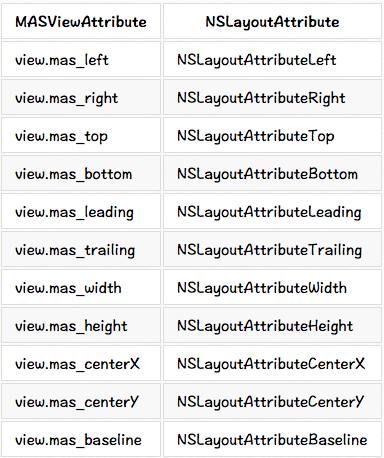
MASViewAttribute:视图约束属性
make.width.greaterThanOrEqualTo(@200);

make.width.lessThanOrEqualTo(@400)
<2>//creates view.left = view.superview.left + 10
make.left.lessThanOrEqualTo(@10)
代替NSNumber,使用原始的数据或者结构体设置约束数据
make.top.mas_equalTo(42);

make.height.mas_equalTo(20);

make.size.mas_equalTo(CGSizeMake(50, 100));

make.edges.mas_equalTo(UIEdgeInsetsMake(10, 0, 10, 0));

make.left.mas_equalTo(view).mas_offset(UIEdgeInsetsMake(10, 0, 10, 0));
使用数组NSArray设置约束
make.height.equalTo(@[view1.mas_height, view2.mas_height]);

make.height.equalTo(@[view1, view2]);

make.left.equalTo(@[view1, @100, view3.right]);
.priorityHigh <======> UILayoutPriorityDefaultHigh 高优先级
.priorityMedium <========> between high and low 介于高/低之间
.priorityLow <=========> UILayoutPriorityDefaultLow 低优先级
make.left.greaterThanOrEqualTo(label.mas_left).with.priorityLow();

make.top.equalTo(label.mas_top).with.priority(600);
// make top, left, bottom, right equal view2

    make.edges.equalTo(view2);

// make top = superview.top + 5, left = superview.left + 10,

// bottom = superview.bottom - 15, right = superview.right - 20

    make.edges.equalTo(superview).insets(UIEdgeInsetsMake(5, 10, 15, 20))
// All edges but the top should equal those of the superview

make.left.right.and.bottom.equalTo(superview);

make.top.equalTo(otherView);
// make width and height greater than or equal to titleLabel

    make.size.greaterThanOrEqualTo(titleLabel)

// make width = superview.width + 100, height = superview.height - 50

    make.size.equalTo(superview).sizeOffset(CGSizeMake(100, -50))
// make centerX and centerY = button1

    make.center.equalTo(button1)

// make centerX = superview.centerX - 5, centerY = superview.centerY + 10

    make.center.equalTo(superview).centerOffset(CGPointMake(-5, 10))
// in public/private interface

@property (nonatomic, strong) MASConstraint *topConstraint;

...

// when making constraints

[view1 mas_makeConstraints:^(MASConstraintMaker *make) {

    self.topConstraint = make.top.equalTo(superview.mas_top).with.offset(padding.top);

    make.left.equalTo(superview.mas_left).with.offset(padding.left);

}];

...

// then later you can call

[self.topConstraint uninstall];
2.更新约束 mas_updateConstraints
- (void)updateConstraints {

    [self.growingButton mas_updateConstraints:^(MASConstraintMaker *make) {

        make.center.equalTo(self);

        make.width.equalTo(@(self.buttonSize.width)).priorityLow();

        make.height.equalTo(@(self.buttonSize.height)).priorityLow();

        make.width.lessThanOrEqualTo(self);

        make.height.lessThanOrEqualTo(self);

    }];

    //according to apple super should be called at end of method

    [super updateConstraints];

}
3.重新设置mas_remakeConstraints
- (void)changeButtonPosition {
    [self.button mas_remakeConstraints:^(MASConstraintMaker *make) {

        make.size.equalTo(self.buttonSize);

        if (topLeft) {

            make.top.and.left.offset(10);

        } else {

            make.bottom.and.right.offset(-10);

        }

    }];

}
具体的实例如下:设置view1举例父视图的四周距离均为50

/**

方式一:使用NSLayoutConstraint实现手动布局

 ----------------------------

 设置UIEdgeInsets

 ----------------------------

 @interface UIView (UIConstraintBasedLayoutInstallingConstraints)

 - (NSArray *)constraints NS_AVAILABLE_IOS(6_0);

 - (void)addConstraint:(NSLayoutConstraint *)constraint NS_AVAILABLE_IOS(6_0);

 - (void)addConstraints:(NSArray *)constraints NS_AVAILABLE_IOS(6_0);

 - (void)removeConstraint:(NSLayoutConstraint *)constraint

 - (void)removeConstraints:(NSArray *)constraints NS_AVAILABLE_IOS(6_0);

*/

-(void)LayoutConstraint

{

    UIView *superView = self.view;

    UIView *view1 = [[UIView alloc]init];

    view1 .translatesAutoresizingMaskIntoConstraints = NO;

    view1.backgroundColor = [UIColor redColor];

    [superView addSubview:view1];

    //设置距离父视图边界距离

    UIEdgeInsets pading = UIEdgeInsetsMake(50, 50, 50, 50);

    //添加给view1约束

    [superView addConstraints:@[

        [NSLayoutConstraint constraintWithItem:view1 attribute:NSLayoutAttributeTop relatedBy:NSLayoutRelationEqual toItem:superView attribute:NSLayoutAttributeTop multiplier:1.0 constant:pading.top],

        [NSLayoutConstraint constraintWithItem:view1 attribute:NSLayoutAttributeLeft relatedBy:NSLayoutRelationEqual toItem:superView attribute:NSLayoutAttributeLeft multiplier:1.0 constant:pading.left],

        [NSLayoutConstraint constraintWithItem:view1 attribute:NSLayoutAttributeBottom relatedBy:NSLayoutRelationEqual toItem:superView attribute:NSLayoutAttributeBottom multiplier:1.0 constant:-pading.bottom],

        [NSLayoutConstraint constraintWithItem:view1 attribute:NSLayoutAttributeRight relatedBy:NSLayoutRelationEqual toItem:superView attribute:NSLayoutAttributeRight multiplier:1.0 constant:-pading.right],

    ]];

}
/**

方法二:使用block  @implementation MAS_VIEW (MASAdditions)

----------------------------

 设置offset偏移 或者 边缘edges

----------------------------

- (NSArray *)mas_makeConstraints:(void(^)(MASConstraintMaker *))block

- (NSArray *)mas_updateConstraints:(void(^)(MASConstraintMaker *))block

- (NSArray *)mas_remakeConstraints:(void(^)(MASConstraintMaker *make))block

*/

-(void)LayoutForMASConstraintMaker

{

    UIView *superView = self.view;

    UIView *view1 = [[UIView alloc]init];

    view1.backgroundColor = [UIColor redColor];

    [superView addSubview:view1];

    //设置距离父视图边界距离

    UIEdgeInsets pading = UIEdgeInsetsMake(50, 50, 50, 50);

    //添加给view1约束

    [view1 mas_makeConstraints:^(MASConstraintMaker *make) {

        make.top.equalTo(superView.mas_top).with.offset(pading.top);

        make.left.equalTo(superView.mas_left).with.offset(pading.left);

        make.bottom.equalTo(superView.mas_bottom).with.offset(-pading.bottom);

        make.right.equalTo(superView.mas_right).with.offset(-pading.right);

        //设置代码可以更简单(效果与上面的是一样的)

        //make.edges.equalTo(superView).with.insets(pading);

    }];

}
/**

方式三:使用block  @implementation MAS_VIEW (MASAdditions)

 ----------------------------

 设置margin距离

 ----------------------------

 - (NSArray *)mas_makeConstraints:(void(^)(MASConstraintMaker *))block

 - (NSArray *)mas_updateConstraints:(void(^)(MASConstraintMaker *))block

 - (NSArray *)mas_remakeConstraints:(void(^)(MASConstraintMaker *make))block

*/

-(void)LayoutForMASConstraintMakerWithMargin

{

    UIView *superView = self.view;

    UIView *view1 = [[UIView alloc]init];

    view1.backgroundColor = [UIColor redColor];

    [superView addSubview:view1];

    //添加给view1约束

    [view1 mas_makeConstraints:^(MASConstraintMaker *make) {

        make.topMargin.equalTo(superView.mas_top).with.offset(50);

        make.leftMargin.equalTo(superView.mas_left).with.offset(50);

        make.bottomMargin.equalTo(superView.mas_bottom).with.offset(-50);

        make.rightMargin.equalTo(superView.mas_right).with.offset(-50);

    }];

}
/**

 方式四:使用block  @implementation MAS_VIEW (MASAdditions)

 ----------------------------

 设置center和size

 ----------------------------

 - (NSArray *)mas_makeConstraints:(void(^)(MASConstraintMaker *))block

 - (NSArray *)mas_updateConstraints:(void(^)(MASConstraintMaker *))block

 - (NSArray *)mas_remakeConstraints:(void(^)(MASConstraintMaker *make))block

 */

-(void)LayoutForMASConstraintMakerWithCenterWidthHeight

{

    UIView *superView = self.view;

    UIView *view1 = [[UIView alloc]init];

    view1.backgroundColor = [UIColor redColor];

    [superView addSubview:view1];

    //添加给view1约束

    [view1 mas_makeConstraints:^(MASConstraintMaker *make) {

        make.centerX.equalTo(superView);

        make.centerY.equalTo(superView);

        make.size.equalTo(superView).sizeOffset(CGSizeMake(-100,-100));

    }];

}
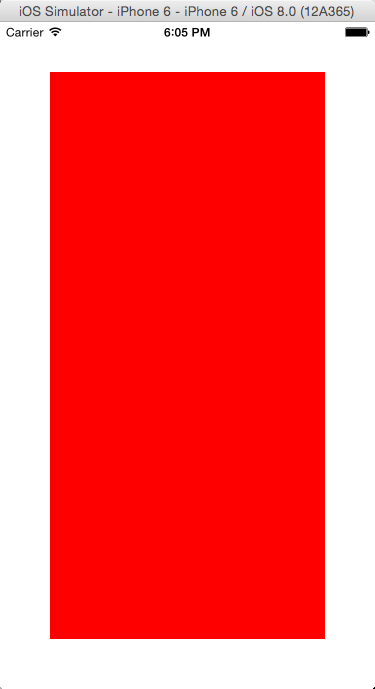
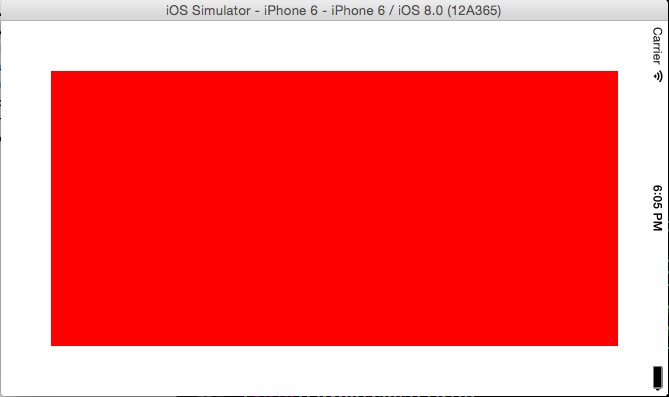
Masonry练习详解的更多相关文章
- iOS:Masonry练习详解
Masonry练习详解 添加约束的方式: 1.通过使用NSLayoutConstraints添加约束到约束数组中,之前必须设置translatesAutoresizingMaskIntoConst ...
- Masonry使用详解
mas_makeConstraints 只负责新增约束 Autolayout不能同时存在两条针对于同一对象的约束 否则会报错 mas_updateConstraints 针对上面的情况 会更新在blo ...
- iOS开发——屏幕适配篇&Masonry详解
Masonry详解 前言 MagicNumber -> autoresizingMask -> autolayout 以上是纯手写代码所经历的关于页面布局的三个时期 在iphone1-ip ...
- AutoLayout详解+手把手实战(转载)
首先说一下这篇博客虽然是标记为原创,但是事实并非本人亲自写出来的,知识点和例子本人花了一天各处查 找和整理最终决定写一个汇总的详解,解去各位朋友到处盲目查找的必要,因为不是转载某一个人的内容,故此不标 ...
- Linq之旅:Linq入门详解(Linq to Objects)
示例代码下载:Linq之旅:Linq入门详解(Linq to Objects) 本博文详细介绍 .NET 3.5 中引入的重要功能:Language Integrated Query(LINQ,语言集 ...
- 架构设计:远程调用服务架构设计及zookeeper技术详解(下篇)
一.下篇开头的废话 终于开写下篇了,这也是我写远程调用框架的第三篇文章,前两篇都被博客园作为[编辑推荐]的文章,很兴奋哦,嘿嘿~~~~,本人是个很臭美的人,一定得要截图为证: 今天是2014年的第一天 ...
- EntityFramework Core 1.1 Add、Attach、Update、Remove方法如何高效使用详解
前言 我比较喜欢安静,大概和我喜欢研究和琢磨技术原因相关吧,刚好到了元旦节,这几天可以好好学习下EF Core,同时在项目当中用到EF Core,借此机会给予比较深入的理解,这里我们只讲解和EF 6. ...
- Java 字符串格式化详解
Java 字符串格式化详解 版权声明:本文为博主原创文章,未经博主允许不得转载. 微博:厉圣杰 文中如有纰漏,欢迎大家留言指出. 在 Java 的 String 类中,可以使用 format() 方法 ...
- Android Notification 详解(一)——基本操作
Android Notification 详解(一)--基本操作 版权声明:本文为博主原创文章,未经博主允许不得转载. 微博:厉圣杰 源码:AndroidDemo/Notification 文中如有纰 ...
随机推荐
- Echars鼠标点击事件多次触发
gChart.on('click', function (params) { if (params.componentSubType == "bar" && par ...
- c/c++ 智能指针 shared_ptr 使用
智能指针 shared_ptr 使用 上一篇智能指针是啥玩意,介绍了什么是智能指针. 这一篇简单说说如何使用智能指针. 一,智能指针分3类:今天只唠唠shared_ptr shared_ptr uni ...
- Hibernate 5 入门指南-基于映射文件
由于Hibernate 4版本混乱,Hibernate 3有些过时,Hibernate 5的开发文档尚不完善,所以构建一份简单的Hibernate 5的入门指南 注:案例参考Hibernate 官方参 ...
- PHP使用Apache中的ab(ApacheBench)测试网站的并发量
AB(ApacheBench) 是 Apache 自带的超文本传输协议 (HTTP) 性能测试工具. 其设计意图是描绘当前所安装的 Apache 的执行性能, 主要是显示 Apache 每秒可以处理多 ...
- Unity 琐碎5 : 利用反射设置编辑器参数
问题 最近处理unity资源打包问题时候经常遇到的一个问题就是平台切换和Bundle编译.一般情况下,平台转换我需要依赖Cache Serbver加快转换速度,但是在Build Bundle的时候我又 ...
- wrk 压力测试 http benchmark POST接口
简单的 http 性能测试工具 wrk.git 一个简单的 http benchmark 工具, 能做很多基本的 http 性能测试. wrk 的一个很好的特性就是能用很少的线程压出很大的并发量. 原 ...
- python的各种推导式
python的各种推导式(列表推导式.字典推导式.集合推导式) 推导式comprehensions(又称解析式),是Python的一种独有特性.推导式是可以从一个数据序列构建另一个新的数据序列的结构体 ...
- 给定一个正整数n,返回从1到n构成的所有的BST
public class C3 { public static void main(String[] args) { ArrayList<TreeNode> res = generateT ...
- [Algorithm] 如何正确撸<算法导论>CLRS
其实算法本身不难,第一遍可以只看伪代码和算法思路.如果想进一步理解的话,第三章那些标记法是非常重要的,就算要花费大量时间才能理解,也不要马马虎虎略过.因为以后的每一章,讲完算法就是这样的分析,精通的话 ...
- Home Assistant-自动化设备
触发器(trigger) 条件(condition) 动作(action) 自动化中的模板(template) 触发器(trigger) 时间(time)触发器时间触发器在指定的时间触发规则,可以是某 ...